
Search Results for 'Wysiwyg'
reply
-
In reply to ACF 5.1.1 not showing some flexible fields
- November 1, 2014 at 12:07 am
Same here!
I use image, text and WYSIWYG fields – only text fields seem to be affected. Funnily enough text fields within my nested repeater are shown.EDIT:
Tried to change the field type from text to WYSIWYG but values still won’t show. Still it’s weird that i can see all none text fields (except for the first one).EDIT2:
Seems like all fields – no matter what type – created after 5.1.1 won’t be shown. -
In reply to Update 5.1.1 select fields not showing
- October 31, 2014 at 5:03 am
Same here, I had some wysiwyg fields named ‘content’ that were not displaying. They were within a flexible content field, I had others that were named ‘content’ as well, and they were showing, in the same flexible content group. Rolled back to 5.1.0 and all is well again.
-
In reply to Update 5.1.1 select fields not showing
- October 31, 2014 at 1:24 am
I’m am noticing this also within a Flexible content field. It looks like select WYSIWYG fields’ content are not displaying when I try to output them to the page:
<?php echo get_sub_field('section_content'); ?> -

In reply to Incompatibility with Page Builder (SiteOrigin). Editor disappears
- October 29, 2014 at 10:52 am
Hi @paulwarren
Thanks for the bug report.
I have a strong feeling that this issue is resolved in ACF PRO (ACF v5) because the implementation of the WYSIWYG field is much much smarter (and the above highlighted code no longer exists).Are you able to give ACF PRO a go? If you have purchased an add-on in the past, you will see a free version in your store account
-
In reply to HTML-Attributes are removed (wysiwyg)
- October 28, 2014 at 1:39 am
Hi, I’m seeing this problem too. It’s confusing behaviour if you go back to re-edit & save a WYSIWYG field, as the stripped-tags version of the content over-rides the intended content. Is there a temporary way to fix it using
acf_the_contentfilter for now? -

In reply to Removing Paragraph Tags from WYSIWYG Fields?
- October 27, 2014 at 10:51 pm
Looking at a solution to this with ACFPRO as well.
Would like to choose which WYSIWYG editors to remove P tags from.
Thanks
-
In reply to Markdown issue with ACF 5.0.1 update
- October 26, 2014 at 3:46 pm
I had the same problem, to solved I added the plugin: Markdown Extra
And add-on: ACF WordPress Wysiwyg Field
In functions.php I added:
// style editor
remove_filter( 'the_content', 'wpautop' );
remove_filter( 'the_content', 'wptexturize' );
remove_filter( 'the_excerpt', 'wpautop' );
remove_filter( 'the_excerpt', 'wptexturize' );
remove_filter( 'acf_the_content', 'wpautop' );
remove_filter( 'acf_the_content', 'wptexturize' );

// markdown support
add_filter( 'the_content', 'Markdown' );
add_filter( 'the_excerpt', 'Markdown' );
add_filter( 'acf_the_content', 'Markdown' );
The plugin Typewrite also work for me only offline.
-
In reply to Add Markdown support in Custom Fields
- October 26, 2014 at 3:44 pm
Now I added the plugin: Markdown Extra
And add-on: ACF WordPress Wysiwyg Field
In functions.php I added:
// style editor remove_filter( 'the_content', 'wpautop' ); remove_filter( 'the_content', 'wptexturize' ); remove_filter( 'the_excerpt', 'wpautop' ); remove_filter( 'the_excerpt', 'wptexturize' ); remove_filter( 'acf_the_content', 'wpautop' ); remove_filter( 'acf_the_content', 'wptexturize' ); // markdown support add_filter( 'the_content', 'Markdown' ); add_filter( 'the_excerpt', 'Markdown' ); add_filter( 'acf_the_content', 'Markdown' ); -
In reply to TinyMce and ACF PRO 5.0.4
- October 17, 2014 at 11:26 am
Hi @imarkimage
Thanks for the login.
I just added a WYSIWYG field to the posts post_type and the WYSIWYG renders correctly for both the standard the_content and AF fields.
Have I misunderstood the issue, or has it resolved itself?
Please also update to the latest version of ACF PRO when possible.Thanks
E -
In reply to TinyMce and ACF PRO 5.0.4
- October 5, 2014 at 5:34 pm
The problem was partially solved, I’ll explain.
Before the fix you sent, the problem occurred as soon as ACF was activated, meaning, even when no WYSIWYG field was present, the editor’s advanced controls were missing.Now, the problem only occurs when I add the WYSIWYG field and leave the default editor as well:
This is the ACF WYSIWYG field:

And this is the default editor:

As soon as I’ll remove the WYSIWYG field – the advanced controls are back.
Cheers
-
In reply to TinyMce and ACF PRO 5.0.4
- October 2, 2014 at 3:34 pm
Elliot,
Seems to have fixed the problem.
Still, when having ACF WYSIWYG field together with the default editor, disables it’s advanced controls.Thank you!
– Ido
-
In reply to TinyMce and ACF PRO 5.0.4
- October 2, 2014 at 1:35 pm
Hi @imarkimage
I have just found and fixed a bug with the WYSIWYG field which I have a feeling may also fix this issue too.
Can you please download the attached file and override the
forms/post.phpfile?Thanks
E post.php_.zi....zip
-
In reply to Error reading Shortcodes in wysiwyg editor
- September 30, 2014 at 2:06 am
Ok 3 days no answer. But I found a solution that seems to have fixed it: https://wordpress.org/support/topic/how-do-i-filter-the-content-for-wysiwyg-editor
-
In reply to WYSIWYG – No JS errors but No toolbars
- September 23, 2014 at 6:19 pm
I’ve just set up a new installation of WP 3.8 with exactly the same theme and plugin setup and the WYSIWYG is working fine.
I’ll stick with this 3.8 installation for now, but there is obviously an issue to be resolved for v4.
-
In reply to WYSIWYG Error
- September 17, 2014 at 9:54 am
Any updates on this?
I am also getting the same results of ‘Add Media’ and ‘Add Form’ (from Formidable plugin), but not the WYSIWYG toolbar?
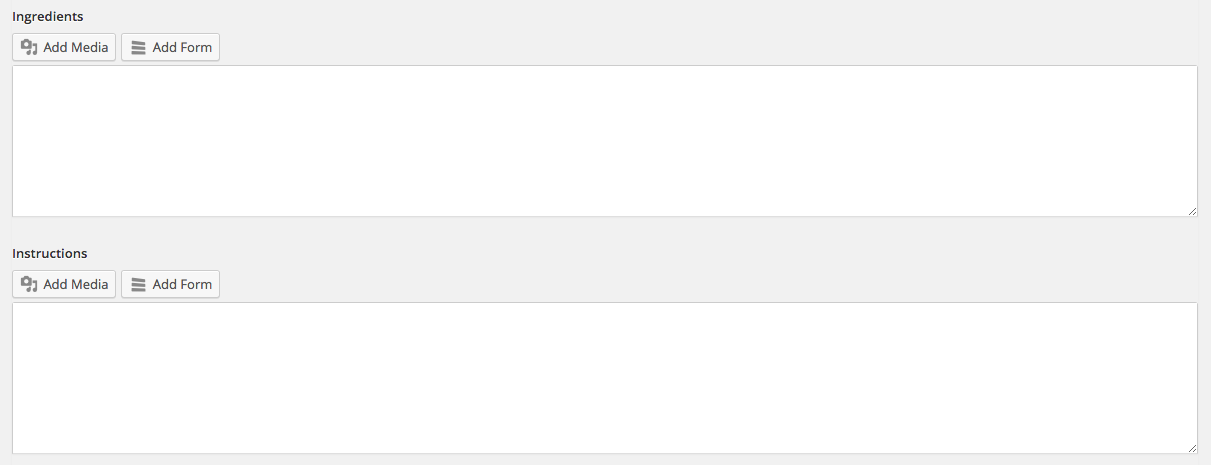 Screen-Shot-....png
-
In reply to How to print email link so it's active
- September 16, 2014 at 12:35 pm
I use it to create fields for the easy adding/editing of content all over a website.
I have really only used a few of the field types (text, image, url, text area, wysiwyg and the repeater field)
I used to make a lot of widget based themes before I found ACF. 😛
-
In reply to Post-Object field too wide with long post titles
- September 9, 2014 at 12:45 am
Just a suggestion, with a large field type like a WYSIWYG editor as one of your repeater sub fields I’d probably set the repeater layout as row instead of table.
-
In reply to Removing Paragraph Tags
- September 3, 2014 at 7:50 pm
If anyone else is looking for a solution to removing <p> tags from around images, in the ACF WYSIWYG editor, just use the following code in your functions:
function filter_ptags_on_acf_images($acfcontent){ return preg_replace('/<p>\s*(<a .*>)?\s*(<img .* \/>)\s*(\/a>)?\s*<\/p>/iU', '\1\2\3', $acfcontent); } add_filter('acf_the_content', 'filter_ptags_on_images'); -
In reply to Use textarea instead of TinyMCE for post_content
- September 2, 2014 at 5:35 pm
Thanks Krendel for the answer.
For current version (I use 5.0.7), you need to use _post_content.add_filter('acf/get_valid_field/type=wysiwyg', 'my_get_valid_field_post_content'); function my_get_valid_field_post_content( $field ) { if ( $field['name'] == '_post_content' ) $field['type'] = 'textarea'; return $field; } -
In reply to Issue with /js/input.min.js in 5.0.5?
- August 25, 2014 at 7:06 pm
ok i’ve deactivated the plugin and then replaced it with the new one and then reactivated. Now my described WYSIWYG problem is fixed. The one specific field is working again. Coolio!
p.s. @Elliot Condon you can drop and forget my mail i’ve sent to your support mail address one or two day ago about the WYSIWYG issue, your hint here already fixed it 🙂 thanks a lot!
-
In reply to ACF conflict with Visual Composer plugin
- August 25, 2014 at 6:36 pm
I also have problems with the combination of ACF and VC. When I try to embed media in the WYSIWYG editor, the media doesn’t get inserted into the editor unless I click inside the editor quickly after clicking the blue insert media button in the media library.
I can deal with it, but my customers can’t.
It would be helpful if you could fix it.
-
In reply to Tabs not visible after update to 5.0.5
- August 22, 2014 at 1:45 am
I too am having this problem. When I updated to 5.05 my tabs disappeared and the wysiwyg editor lost its icons.
Is there a temporary fix? Where can I download 5.04 in the meantime?
-
In reply to How to hide "Text Tab"
- August 18, 2014 at 12:58 pm
Hi @Jan
Just wanted ot let you know I have added a new setting to the WYSIWYG field which will allow you to enable / disable the html tab!
New version should be out soon.
Cheers
E -
In reply to Need repeater data on publishing (save_post only works only updating,not create)
- August 5, 2014 at 12:05 am
In case it helps, here is the code:
Few explanations on what is trying to be achieved:
• The user has a library of images that he uses to build comics. There are 2 repeater fields within one “comic” custom post type: “comic slides” (images within a comic) and “comic_bildkomposition” (layers of images within a slide that will be put into a final image)
• current_timestamp is being used as an ID for each comic that is being built.
• there are 2 repeater fields: “comic_slides” and nested in it there are the fields “comic_text” (wysiwyg field) and “comic_bildkomposition” (repeater field for the image layers within a slide)CODE:
function lextoons_comic_builder( $ID ) {
$comic_slides = get_field(‘comic_slides’);
// $comic_excerpt = substr(get_field(‘comic_excerpt’), 0, 120);
[Author comment: this was a test in order to see if the function receives acf custom field data at all, which it does, “comic_excerpt” is a custom description field that is being put into the variable and printed just fine$comic_timestamp = get_field (‘timestamp’);
$current_timestamp = time();
$timestamp_field_key = “field_53da164db054e”;
$comic_title = get_the_title();//check if comic timestamp has been set yet for this post, set an ID based on timestamp if not
if ($comic_timestamp < 1 ) {
update_field( $timestamp_field_key, $current_timestamp, $ID );
$comic_timestamp = $current_timestamp;
$pathname = “”.$_SERVER[‘DOCUMENT_ROOT’].”wp-content/uploads/comics/”.$comic_timestamp.””;
//print $pathname;
mkdir($pathname);
}//If an ID has been set before, delete all files in the folder of this comic for recreation afterwards
if ($comic_timestamp > 1 ) {
//echo “<br/>Files: <br/>”;
foreach (glob(“”.$_SERVER[‘DOCUMENT_ROOT’].”wp-content/uploads/comics/”.$comic_timestamp.”/*.*”) as $filename) {
// echo “$filename size ” . filesize($filename) . “<br/>”;
unlink($filename);
}
}//Now, Loop through all Comic Slides and Generate a single Image out of each slides’ Layer
$slide_nr = 0;
foreach ($comic_slides as $comic_slide) {
$slide_nr++;
$slide_text = $comic_slide[‘comic_text’];
$slide_text = substr($slide_text, 3, -5);
$comic_layers =$comic_slide[‘comic_bildkomposition’];$width = get_field (‘image_input_width’, ‘options’);
$height = get_field (‘image_input_height’, ‘options’);
$newwidth = get_field (‘image_output_width’, ‘options’);
$newheight = get_field (‘image_output_height’, ‘options’);$image = imagecreatetruecolor($width, $height);
foreach ($comic_layers as $layer) {
unset ($layer_data);
// to make background transparent
imagealphablending($image, false);
$transparency = imagecolorallocatealpha($image, 0, 0, 0, 127);
imagefill($image, 0, 0, $transparency);
imagesavealpha($image, true);
imagealphablending($image, true);
$layer_url = $layer[‘comic_layer’][‘url’];
print $layer_url;
$layer_data = imagecreatefrompng($layer_url);
imagecopy($image, $layer_data, 0, 0, 0, 0, $width, $height);
imagealphablending($image, false);
imagesavealpha($image, true);
}$image2 = imagecreatetruecolor($width, $height);
$white = imagecolorallocate($image, 255, 255, 255);
imagefill($image2, 0, 0, $white);
imagecopy($image2, $image, 0, 0, 0, 0, $width, $height);//create a thumb file img for resizing
$thumb = imagecreatetruecolor($newwidth, $newheight);
imagecopyresized($thumb, $image2, 0, 0, 0, 0, $newwidth, $newheight, $width, $height);
imagepng($thumb, “”.$_SERVER[‘DOCUMENT_ROOT’].”wp-content/uploads/comics/”.$comic_timestamp.”/”.$comic_title.”_”.$slide_nr.”.png”);
unset ($image);
unset ($image2);
unset ($thumb);
}
}add_action( ‘acf/save_post’, ‘lextoons_comic_builder’, 20 );
[/CODE]
-
In reply to WYSIWYG Error
- August 3, 2014 at 7:19 pm
I do have 3.9 installed, this seemed to coincide with when there was a conflict. I also tried to install the Advanced Custom Fields: WP WYSIWYG from Elliot to see if that would help, but unfortunately it did not.


Welcome
Welcome to the Advanced Custom Fields community forum.
Browse through ideas, snippets of code, questions and answers between fellow ACF users
Forums
Helping Others
Helping others is a great way to earn karma, gain badges and help ACF development!
