
Search Results for 'q'
reply
-

In reply to Euro option in number type field, like 1.345,98
- July 12, 2013 at 5:54 pm
Hi @lutealit
Thanks for the feedback.
Whilst this field does not exist, you could use a text field and apply a JS mask to the input!
This would require you to write some custom JS in your WP admin
-
In reply to Custom Options Page
- July 12, 2013 at 5:32 pm
Hi @davidlapham
You will need to provide a bit more of an explanation to this request for me to understand it. Thanks
-
In reply to Taxonomy Field fails to update post categories
- July 12, 2013 at 1:09 pm
I had this exact same issue!
Not sure if this helps, but I was using the Taxonomy Field add-on by Brian Zoetewey previously, and disabled this when ACF gained this functionality. However the bug still remained. Today I removed the Taxonomy Field Add-On completely, and upgraded ACF to the latest version, and this functionality started working perfectly!! Such a winning feature.
One question though – it would be awesome if you could present the option to hide a CPT meta box from a edit screen? As it is, you can only hide default cateogies or tags. However, if we are using this feature, there is a good chance we are using a custom taxonomy that we want to hide – as we are replacing the default taxonomy meta box with our shiny new ACF meta box.
I know you can ‘hide’ this from the options panel up top, but a sneaky client might find this, and then have the ability to choose multiple tickboxes again 🙂 Be good to hide it permanetly if possible.
-

In reply to Array WP_Error trying to get ACF taxonomy value
- July 12, 2013 at 9:05 am
The first issue is not ACF related (its throwing an error before getting to the ACF function). If your taxonomy slug is ‘product_brand’, your get_the_terms() function should be
$terms = get_the_terms($post->ID, "product_brand");In addition to checking if the term array is empty, you should check for a WP error like:
if ( $terms && ! $terms->is_wp_error() ) { ... }Since WP_Error is an object, it can’t be used as an array like in $term[0].
The second code posted should work on a fresh install, provided you have a field called “field_name” (with a value) for taxonomy “Category” for the term with ID 7.
-
In reply to Filter or searchbox with acf fields
- July 12, 2013 at 6:34 am
Hmmm… sorry but we are wrong…
There are not weak points in WP, most of cases WE are our own waekness…
I pass these days searching in tons of sites… and WP surprise me, again.
This above function is the most impressive piece of art that I have ever read. This allow you to crawl all over the site content, and find averything you want… also allow filtering by tazonomies, tags and custom fields.
Now I have a full working searchbox, with crazy customizations.
If someone is interested I’ll try to explain the basics…
Thanks WP for the tools, thanks ACF for keep all in order
PS: Now… trying to make it by Ajax… coffee!!! 😀
-
In reply to Handling Arrays with other normal fields…
- July 12, 2013 at 5:47 am
This seems to be working for me now….
<?php $fields = get_field_objects(); if( $fields ) { echo '<div class="item-info-custom">'; echo '<dl class="item-custom">'; echo '<dt class="title"><h4>Custom Information</h4></dt>'; foreach( $fields as $field_name => $field ) { echo '<dt class="custom-label">' . $field['label'] . ': </dt>'; echo '<dd class="custom-data">'; if (is_array($field['value'])) { echo implode(', ', $field['value']); } else { echo $field['value']; } echo '</dd>'; } echo '</dl>'; echo '</div>'; } ?> -
In reply to Field not displaying on front end (complicated setup).
- July 12, 2013 at 4:25 am
Haven’t checked the error logs, but will look into that – thats a good suggestion.
– Yeah the rest of the info is displaying just fine…
The slides are being called (shortened):
<?php
$slider = get_field('slider');

foreach($slider as $slide) :
	$slide_button_text = $slide['slide_button_text'];
?>
etc etc….
Same set of code for both links as well, it’s just masking the sub folder…
This site is using the WPMU plugin as well.
The only other thing I can think of is that we had added this “slide button text” field much later in development. Don’t know if that would be the cause..Here are some links where it’s WORKING – so for some reason it’s just effecting that one post…
http://inspiration.travelalerts.ca/discover-st-vincent/
http://www.travelalerts.ca/inspiration/discover-st-vincent/http://inspiration.travelalerts.ca/fr/sepaq-camping/
http://www.travelalerts.ca/inspiration/fr/sepaq-camping/http://inspiration.travelalerts.ca/fr/sepaq-chalets/
http://www.travelalerts.ca/inspiration/fr/sepaq-chalets/http://inspiration.travelalerts.ca/fr/sepaq-parcs/
http://www/travelalerts.ca/inspiration/fr/sepaq-parcs/http://inspiration.travelalerts.ca/fr/sepaq-peche/
http://www.travelalerts.ca/inspiration/fr/sepaq-peche/ -

In reply to Field not displaying on front end (complicated setup).
- July 12, 2013 at 4:17 am
Out of curiosity, have you checked your error logs recently? Sometimes there’s treasure in there.
That’s a pretty strange bug! The first thing that pops to mind is that the post loop is using a global
$postvariable that you’re not expecting, but that is obviously not the case – the rest of the slide info seems to be showing!Can we assume that
$slide = get_field('slider', $post->ID);or something similar? And are you using two different sets of code, or is the PHP/MySQL just being served to 2 different URLs? -
In reply to Need a better way to organize fields!
- July 12, 2013 at 3:52 am
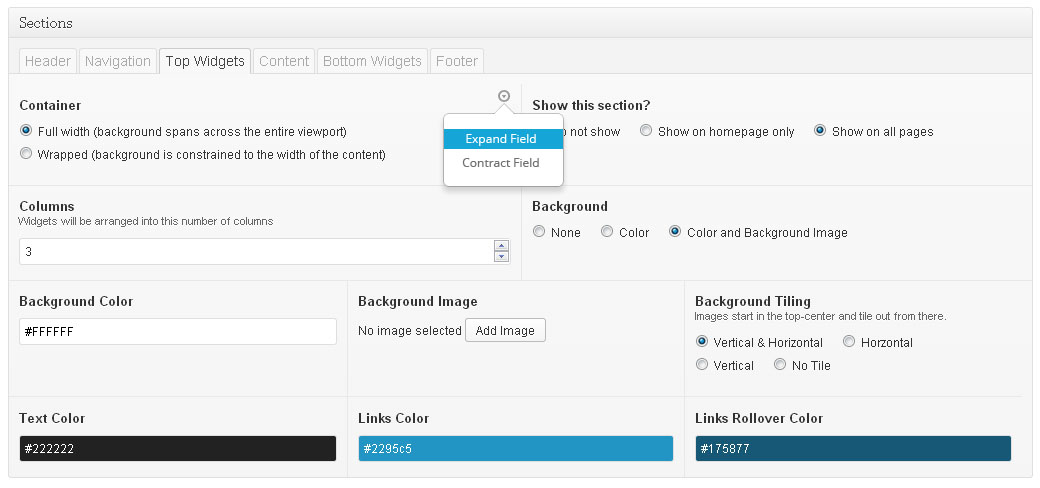
The image here uses a random glyph icon set, AmandaB’s field layout and a Bootstrap popover. This is by no means the best solution, it’s just an idea!
Visualization suggestion: when fields are hovered on, a small arrow icon might appear in the corner. On clicking this icon, a menu could be displayed with field-specific layout options.
After the “Expand Field” or “Contract Field” link is clicked, the field wrapper could have its column width class adjusted to the next closest division – if we were using a 12-col class-based grid system, a field with
class="field six columns"might instead becomeclass="field seven columns"on click. This might be a bit easier on the Javascript/English translation if a more custom integer-based system was used, for example:class="field col6 columns"… this would allow for JS string split and integer manipulation, which is a bit less tedious 🙂Clearly this is only display-side, I imagine that admins would like the ability to specify layout options like this from the field edit page at
/wp-admin/edit.php?post_type=acfas well.Data submission could either be AJAX on popover link click, or it could be submitted on post update like normal – the latter may be better in case users change layout and decide to refresh the page in order to revert changes.
I suppose this means adding more data for each field – ACF will need to keep track of each field’s layout settings behind the scenes. I’m not sure where exactly this data should be placed however… it’s not particularly useful in the theme-side
get_field()calls, so in the interest of efficiency it might be better to only have this info available in the administration pages.The downside of the display-side layout adjustment is that it will need to be role-restricted. We won’t want everybody to be changing field layouts on a whim! I’m not sure what capability level is required to add/edit ACF fields, but I would assume that it’s
manage_options– the same capability level could be used to determine whether a user has the ability to adjust field layout on the fly.Thoughts?
 acf_fieldlay....jpg
-
In reply to How do we get from "Replies Created" to their post threads?
- July 12, 2013 at 3:17 am
Looks awesome! Nice work 😉
-
In reply to Form Submitted to Custom Field??
- July 12, 2013 at 2:17 am
Hi @elliot, thanks very much for your help on this and for the excellent work on this plugin.
Your answer does make sense, but I’m afraid it may be “above my paygrade” when it comes to development (I’m better w/ design than development). If you think you or someone else would be able to resolve this issue and could give me a quote, I’d be happy to check to see if we could pay you to put this solution into play.
We’re using Formidable right now for the form plugin, but could use anything, I suppose. Please let me know if you are interested, and if so, what a potential price range might be?
Thanks!
-
In reply to Displaying a category ID
- July 12, 2013 at 1:52 am
That threw up an error:
Warning: array_pop() expects parameter 1 to be array, boolean given in D:\Dropbox\NooMedia Upload\Burma Campaign\burmacampaign.dev\wp-content\themes\roots\templates\sidebar-right-section.php on line 33On line 33 is:
$term = array_pop( $terms );The full code I’m using is
<?php
  $terms = get_the_terms( $post->ID, 'category' );
  $term = array_pop( $terms );
  query_posts( array
    (
    'posts_per_page' => 5,
    'order'=> 'DESC',
    'orderby' => 'date',
    'category__in' => $term->term_id
    )
  );
?>
Below the error was a list of the latest five news stories from all categories.
-
In reply to Displaying Fields from Post Category or Subcategory
- July 11, 2013 at 10:20 pm
My real-world application needed repeater fields, so here are repeater fields from a category page:
$current_category = single_cat_title("", false); $term_id = get_queried_object_id($current_category); if(get_field('state_links', 'category_' . $term_id)) { echo '<h2><span>'; echo single_cat_title() . ' FFA Links'; echo '</span></h2>'; echo '<ul id="double" class="state">'; while(has_sub_field('state_links', 'category_' . $term_id)) { echo '<li class="state"><a href="' . get_sub_field('state_link', 'category_' . $term_id) . '" target="_blank">' . get_sub_field('state_link_title', 'category_' . $term_id) . '</a></li>'; } echo '</ul>'; } -
In reply to Default post content is replaced with visual editor field
- July 11, 2013 at 7:03 pm
Yest, the problem is qtranslate, but… i fixed that (almost).
This is the solution:
Go into wp-content/plugins/qtranslate/qtranslate_javascript.php
Go to line 288 (or line between 280-320 when you use other version qtranslate).Search and Delete:
qtrans_save(switchEditors.pre_wpautop(o.content));Insert:
if (ed.editorId.match(/^qtrans_/)) {
   qtrans_save(switchEditors.pre_wpautop(o.content));
  }
It almost fixed problem, but sometimes default post content is replaced with visual editor field, sometimes not. I edit visual editor field 20 times, and 2-3 times post content was replaced with content from visual editor field. It’s strange. Have any idea?
-
In reply to Displaying Fields from Post Category or Subcategory
- July 11, 2013 at 6:02 pm
Ah, that did it! THANK YOU!
Here was my final code that actually got the current category ID for me:
$current_category = single_cat_title("", false);
$term_id = get_queried_object_id($current_category);
the_field('test_field', 'category_' . $term_id);
I’m sure there’s a more efficient way.
Thank you again!
-
In reply to Frontend WYSIWYG Problems
- July 11, 2013 at 5:24 pm
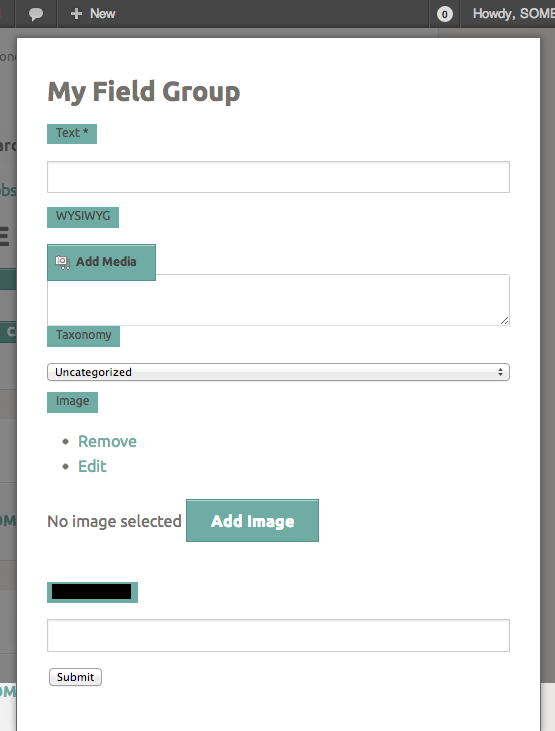
Perhaps a screen shot to display the problem… This is after the button has been pushed and the AJAX request has filled the now-visible popup container ( please excuse the poor CSS ).
 wysiwyg_prob....png
-
In reply to Displaying a category ID
- July 11, 2013 at 5:14 pm
If you want to get the category of your Promo Box, just use this code:
$terms = get_the_terms( $post->ID, 'category' );
$term = array_pop( $terms );
query_posts( array ('posts_per_page' => 5, 'order'=> 'DESC', 'orderby' => 'date', 'category__in' => $term->term_id ) -
In reply to Field to write into the_content & the_excerpt
- July 11, 2013 at 5:10 pm
Hi @sireneweb
Yes. This is quite easy and all you need to do is add a WYSIWYG field, then in your functions.php file, use the acf/update_value filter to hook into the save.
In the filter, you can get the value and use it to update the post’s the_content value. Have a look at the wp_update_post function on the WP codex site.
Good luck!
-
In reply to qTranslate
- July 11, 2013 at 5:08 pm
Unfortunately, ACF has not yet been tested with qTranslate. It does however work well with WPML
-
In reply to 'Daily Features' Posts by Date
- July 11, 2013 at 5:06 pm
Hi @adammm
This task can be spit up into a few tasks:
1. Find today’s date. This can be done with the date function is PHP. Please research this first, but it will look something like this:
$today = date('Ymd');2. Next step is to add the date field to the ‘feature’ post type. It seems like you have already done this. Make sure the save_format is ‘yymmdd’ This JS format will match the PHP format of Ymd
3. Lastly, just add in a meta query into the query_posts parameters. Please research this, but it will look something like this:
<?php query_posts( 'post_type=feature&posts_per_page=1&meta_key=date_field_name&meta_value=' . $today); ?>Hope that helps
-
In reply to Default post content is replaced with visual editor field
- July 11, 2013 at 4:55 pm
Hi @pawelpoz
I think the conflict here is due to qTranslate.
If you disable that plugin, do the WYSIWYG field’s behave correctly?
-
In reply to Select Field – Label cut off at ':'
- July 11, 2013 at 4:49 pm
Hi @elliot,
thanks a lot for the quick answer.
I just looked into the source code and made the following change in line 335 of the file select.php
$choice = explode(':', $choice, 2);This seems to work for my case as it limits the split to the first ‘:’ ;
In any case thanks for your reconsideration of the change you made and your awesome plugin.
Best and beyond
martin
-
In reply to get_field() can't retrieve new post saved with update_field in ACF 4.1.8
- July 11, 2013 at 3:08 pm
Hi @acffan
I don’t belive the issue is caused from update 4.1.7 to 4.1.8 as there has been no code change which would effect this function.
However, it is possible that after the update, your code was run on a different post object, and in doing so, you spotted a bug caused by not having a ‘reference’ field.
Please read up on the update_field function in the documentation to learn more about this hidden value which is required for ACF to work
-
In reply to New Support Forum Questions
- July 11, 2013 at 2:44 pm
Hi @devinwalker
Thanks for the kind words, I’m happy to head the support forum is being well received.
The status and karma points plugins are custom and specific to this forum.
My advise is to copy over the bbPress default theme into your WP theme and then read through it to understand how to hook in and modify the tempaltes!
Good luck
-
In reply to Delete Gallery Images when Deleting Post
- July 11, 2013 at 2:41 pm
The only way to do this is to hook into the save function of the gallery field (before ACF saves the new value) and compare the previous and new values.
From there you can delete the attachment post records you need to.
Use the above search to find more info on the acf/update_value filter which you can use to hook into the gallery field save function.
The rest should be straight forward but will require time and debugging skills.
Good luck


Welcome
Welcome to the Advanced Custom Fields community forum.
Browse through ideas, snippets of code, questions and answers between fellow ACF users
Forums
Helping Others
Helping others is a great way to earn karma, gain badges and help ACF development!
