
Search Results for 'q'
reply
-
In reply to Flexible Field within Flexible Field ?
- July 15, 2013 at 6:53 pm
Thanks Elliot! Works like charm! 🙂EDIT
BTW. I managed to create flexible field inside flexible in dashboard. Now when I’m trying to return value of this fields in front end.But its not returning value of sub flexible fields.
I’m using following is code.
<?php while (has_sub_field("main_field")): ?>; <?php if (get_row_layout() == "layout_1"): ?> <div> <php the_sub_field("textarea"); ?> </div> <?php endif; ?> <?php if (get_row_layout() == "layout_2"): ?> <?php if (get_sub_field("main_2")): ?> <?php if (get_row_layout() == "layout_2a"): ?> <div> <?php the_sub_field("text_field"); ?> </div> <?php elseif (get_row_layout() == "layout_2b"): ?> <img src="<?php the_sub_field('image_field'); ?>" class="alignnone size-full" /> <?php endif; endif; endif; ?> <?php endwhile; ?> -
In reply to error message field type
- July 15, 2013 at 9:55 am
thanks- okay another naive question – how do I roll back to V3?
-

In reply to Frontend WYSIWYG Problems
- July 14, 2013 at 5:31 pm
Hi @tatemz
Seems like you may need to do some in depth debugging and perhaps hire a freelance dev to help you out on this one.
I would love to, but I have my hands full at the moment tending to the support forum and working on the ACF plugin.
I hope you find the issue and can fix it quickly
Cheers
Elliot -
In reply to The easiest feature request in the world – emoticon CSS
- July 14, 2013 at 4:45 pm
Hi @emcniece
Nice, will do
-
In reply to Displaying a category ID
- July 14, 2013 at 4:27 pm
Hi @Debatewise
You mentioned in your previous comment that the ‘full’ code you are using is:
<?php
  $terms = get_the_terms( $post->ID, 'category' );
  $term = array_pop( $terms );
  query_posts( array
    (
    'posts_per_page' => 5,
    'order'=> 'DESC',
    'orderby' => 'date',
    'category__in' => $term->term_id
    )
  );
?>
The code I suggested was to test the variables you were using.
I don’t know what this code is:
<?php if(get_field('latest_news_or_reports', $post_object->ID) == "news"): ?>
  <?php query_posts( array ('posts_per_page' => 5, 'order'=> 'DESC', 'orderby' => 'date', 'category__in' => '' ) ); ?>
  <?php if(have_posts()) : while(have_posts()) : the_post(); ?>
is that what you are using?
Please explain clearly
-

In reply to Hide subfield if it has no text
- July 14, 2013 at 7:55 am
Just check if the field is populated with PHP:
<div class="pricelist"><?php $rows = get_field('price_list'); if($rows) { echo '<ul class="leaders">'; foreach($rows as $row) { echo '<li><span class="service">' . $row['product_or_service'] . '</span> <span class="price"> ' . $row['price'] .'</span></li>'; if( $row['description']) echo '<p class="description"> ' . $row['description'] .'</p>'; } echo '</ul>'; } ?> </div> -
In reply to Frontend WYSIWYG Problems
- July 13, 2013 at 11:15 pm
Thank you, Elliot for your previous help. I have come up with some more information. I understand that I am using some third party code, however I have tested this functionality with basic jQuery
.post()methods. Each variant has the same result.Here is the status of the situation:
acf_form_head()is at the top of my file.- WordPress
ajaxurlhas been defined. - WordPress AJAX callback hooks are defined and working.
- A button triggers the AJAX callback and appends the result to a DOM element.
- On a successful WP nonce verification and AJAX callback, the HTML for an
acf_form()is populated but the ACF WYSIWYGs are not correctly initialized. - It seems that the
acf/setup_fieldstrigger performs successfully as the media uploaders and location fields initialize their scripts successfully.
I edited your
wysiwyg.jsfile to deliver some debugging information:// validate tinymce if( ! _wysiwyg.has_tinymce() ) { console.log( "FAILED TO VALIDATE TINYMCE" ); return; }This indeed returns a failure on the initial page load (as there are no ACF forms or WYSIWYGs). However, even after the AJAX callback has successfully completed, a failure is returned for the number of WYSIWYGs in the form. I am dumb when it comes to anything about tinyMCE. I tried an attempt to solve this within the AJAX success callback (before the `acf/setup_fields’ trigger):
$('.acf_wysiwyg textarea').each(function() {
    tinymce.execCommand('mceAddControl', false, $(this).attr('id'));
});
Suggestions or thoughts? I absolutely love ACF and use it for many of my client’s projects (love the repeater fields). I would love to help you solve this issue for future users, so in the meantime, I will be diving into your source and seeing if I can come up with a solution. Feel free to offer your suggestions and move on. I will simply keep posting my findings here for other users (and hopefully we can get some community support on this issue).
-
In reply to Relationship Field Conflict with The Events Calendar 3.0
- July 13, 2013 at 11:08 am
Running a
var_dumpon the$valuebefore and after theforeachloop inupdate_valueshows that the value is the same before and after. Trying to save one relationship field with one post selected gives me this:array(1) { [0]=> string(1) "8" }As I mentioned earlier, the value can be set without The Events Calendar activated and, when activated it hides the values and doesn’t allow updating but also doesn’t delete the values. When you deactivate it again, the values selected before activating are back and visible.
In addition, this also effects
the_field()/get_field()which similarly cannot access the value stored in the DB when TEC is activated even though the data is still there.I’ll dig some more…
-
In reply to Repository of Complex Fieldsets and Output Functions
- July 13, 2013 at 11:01 am
Glad you like it, @admin 🙂 It seems like the big initial decision in building something would be whether to house the code or just serve as an index. Theoretically, it could even just be a forum thread, though that could get unwieldy pretty quickly.
Hopefully some others chime in here and throw out other ideas!
-
In reply to Querying values by the URL
- July 13, 2013 at 9:33 am
Oh, and it might be a good idea to
orderby => meta_value_numif you’re using integer values like in a Unix timestamp. -
In reply to Create a post with custom fields with php
- July 13, 2013 at 9:27 am
Are you creating the custom fields from scratch and adding them to a field group, ie. outside of the post itself? If so, set up a sample custom field group and choose PHP export – you’ll get a PHP file that you can include in your script that you can tweak to add new custom fields to the field group.
On the other hand, if you’re just adding content to a post during post creation, I think you can save the custom field content as meta data: http://codex.wordpress.org/Function_Reference/update_post_meta.
But don’t quote me on that! There’s probably an ACF method to add data to posts on creation. 😀
-
In reply to Querying values by the URL
- July 13, 2013 at 9:23 am
You’re looking at doing some custom wp_query filtering! Check out the Custom Field Parameters, this will give you a rundown on how to implement.
I don’t have quite enough time to look into pulling in GET parameters, but here’s a sample of custom field filtering that I have open in front of me. The first one does actually look at the URL for variables, but probably not the proper WP way.
Use an action hook, make sure that you have your URL variable and the right post type, then apply your field filters:
add_action('pre_get_posts', 'wpse71814_filter_search');
function wpse71814_filter_search( $query ){

     if( isset($_REQUEST['search']) && ($query->query_vars['post_type'] == 'properties') ){

         //Collect user input from $_GET for example
        // Protect yourself!
        foreach($_REQUEST as &$get){ $get = mysql_real_escape_string($get); }
        $meta_query = $query->get('meta_query');

        $meta_query[] = array(
            'key'       => 'price',
            'value'     => array($_REQUEST['price_min'], $_REQUEST['price_max']),
            'type'      => 'NUMERIC',
            'compare'   => 'BETWEEN'
        );

        if($_REQUEST['location'] != 'any'){
            $meta_query[] = array(
                'key'       => 'district-rel',
                'value'     => serialize(array(0=>$_REQUEST['location'])),
                'compare'   => 'LIKE'
            );
        }
        $query->set('meta_query',$meta_query);

    } // if isset

    return $query;
}
For this example, I’m filtering post type “properties” and doing 2 meta queries: firstly inside a price range (
price_minandprice_max), and secondly if a location variable has been provided I am filtering on adistrict_relcustom post relation field.Let me know if you want a hand adapting this for your date field 😉
-
In reply to Add Image field getting URL and array data
- July 13, 2013 at 9:10 am
Duuuuude!
Ok I didn’t realise there were image options, and it was set to “Object”. Changing it to Image URL fixed it.
Total oversight on my part. Thank you kindly for the quick reply!
-
In reply to You have returned a logo id, not the url?
- July 13, 2013 at 9:10 am
I think that you’re looking at the attachment ID for the logo. Try querying the database like so:
SELECT * from wp_posts WHERE ID = '2361';Is that the image you’re looking for?
-
In reply to Array WP_Error trying to get ACF taxonomy value
- July 13, 2013 at 7:50 am
No matter I fixed it. The problem was with “get_field” I replaced it with “the_field”
<?php global $post; // load all 'category' terms for the post $terms = get_the_terms($post->ID, "product_brand"); // we will use the first term to load ACF data from if( !empty($terms) ) { $term = array_pop($terms); $custom_field = the_field('contact_info', 'product_brand_' . $term->term_id); // do something with $custom_field } ?> -
In reply to acf/update_value filter issues
- July 13, 2013 at 7:10 am
So I guess it would be nice to know if the function is being executed at all – I usually do this by dropping something fairly identifiable into the first line of the function, like
echo "ilovetroubleshooting";, then I watch for that to appear on the page load when the filter should have executed.Do you think that the
add_filter()definition is ok inpage.php? I wonder if it should go infunctions.phpinstead… -
In reply to general slowness
- July 13, 2013 at 6:48 am
there could be a variety of things slowing your site down. I usually start troubleshooting with the theme:
- Change to a default theme (TwentyEleven, TwentyTwelve) and see if it gets faster
- Try running Google PageSpeed tools
- In Firefox or Chrome, open the developer tools (F12) and change to the Network tab (Chrome) or Net tab (Firefox)… watch for slow-loading javascripts or images. Also check for errors while you’re here.
- Install a caching plugin like BWP Minify
- Check out the WP Debug Bar for some query information
I have never had ACF slow my site down on its own, and I have made sites with dozens of custom fields. Let us know what you find!
-
In reply to Comma-separated array values
- July 13, 2013 at 4:06 am
Can you provide a sample of the
get_field('fieldname');data? Here’s a quick debug snippet to see what the field holds:echo '<pre>'.print_r(get_field('fieldname'), true).'</pre>';If you already have a comma-separated value and want to convert it to an array, try this little snippet out:
$values = explode(',', get_field('fieldname'));
if( count($values)){
    foreach($values as $value){
        echo trim($value);
    }
}
This snippet should work with a text string that looks something like
one,two, three four, five-, sixand should output this:onetwothreefourfivesix.However, I have a feeling that you already have an array as provided by
get_field('fieldname'), so if that’s the case then you don’t need to explode at all, just loop with aforeach()and output with something likeecho $value.', ';. A snippet like this might look like:$values = get_field('fieldname'); if( count($values)){ foreach($values as $k=>$value){ if($k) echo ', '; echo $value; } }In this example,
$kis a counter that lets us know what item number we are currently working with. During the first loop,$kwill be0so no comma will be printed. -
In reply to The easiest feature request in the world – emoticon CSS
- July 13, 2013 at 4:01 am
😀 😀 😀 😀
-
In reply to Field not displaying on front end (complicated setup).
- July 13, 2013 at 3:59 am
Hi again @flashpunk! I dug into my local MU setup and confirmed how ACF operates across MU sites.
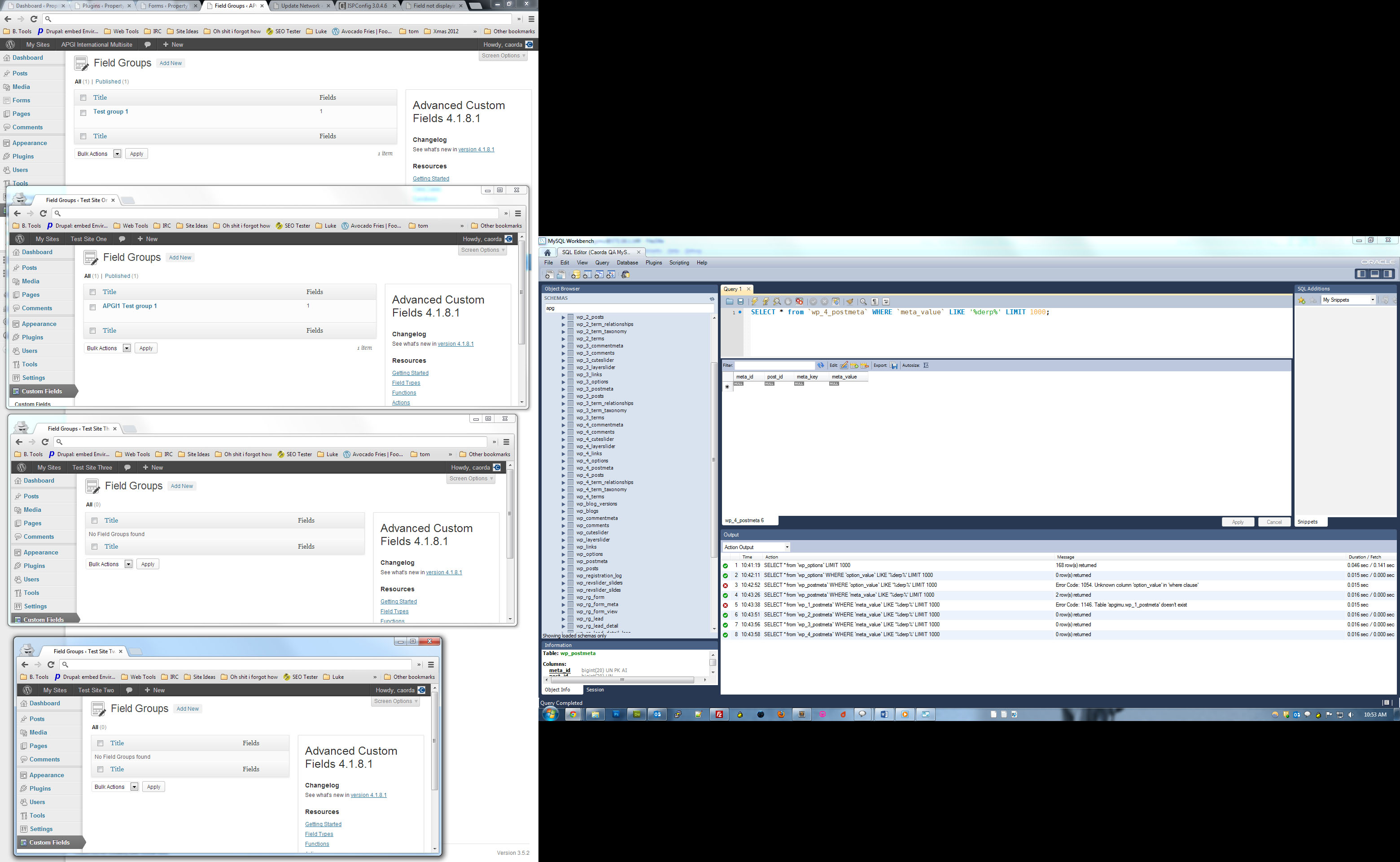
The attached screenshot details a 4-site MU setup, and the primary site has a single post with a single text ACF with the contents “derp” in it. As we can see from the database queries on the right, the string was only found in the primary MU install site and not the others… so I guess this confirms the idea that ACF data is independent across MU sites.
You’ve undoubtedly already checked this out, but can we confirm that the missing slider button text actually exists from the admin? Have you tried deleting that particular ACF field and re-creating it and adding the text again?
Debugging without code/db access is indeed a bit harder 🙂
 flashpunk_ac....jpg
-
In reply to Repeater does not automatically add rows
- July 12, 2013 at 9:33 pm
-
In reply to Displaying a category ID
- July 12, 2013 at 8:00 pm
I’m not exactly sure where this is supposed to go, so forgive the ignorance but if placed above or between any of the following nothing is returned:
<?php if(get_field('latest_news_or_reports', $post_object->ID) == "news"): ?>
  <?php query_posts( array ('posts_per_page' => 5, 'order'=> 'DESC', 'orderby' => 'date', 'category__in' => '' ) ); ?>
  <?php if(have_posts()) : while(have_posts()) : the_post(); ?>
If placed below I get:
Array
  (
  	[36] => stdClass Object
  (
    [term_id] => 36
    [name] => Events
    [slug] => events
    [term_group] => 0
    [term_taxonomy_id] => 36
    [taxonomy] => category
    [description] =>
    [parent] => 0
    [count] => 3
    [object_id] => 2470
  )

)
Which seems to indicate its grabbing the details from the most recent post (which is something in the Events category with an ID of 2470).
-
In reply to Array WP_Error trying to get ACF taxonomy value
- July 12, 2013 at 7:15 pm
@wells5609 @elliot
Ok, so I managed to get this code to work to get a specific taxonomy ID (so I know the system is working)<p><?php // the_field('contact_info', 'product_brand_14'); ?></p>But trying to get the same terms of the current Term ID being displayed, doesn't work however. (In my “archive-brands” template.) Even with array_pop.
<?php

global $post;

// load all 'category' terms for the post
 $terms = get_the_terms($post->ID, "product_brand");

// we will use the first term to load ACF data from
if( !empty($terms) )
{
	$term = array_pop($terms);

	$custom_field = get_field('contact_info', 'category_' . $term->term_id );

	// do something with $custom_field
}

?>
Thanks guys
-
In reply to Frontend WYSIWYG Problems
- July 12, 2013 at 6:17 pm
Hi @tatemz
I am unable to debug this issue for you at the moment as it would require me to search through 3rd party code.
Lets break down the solution into steps.
1. Being able to alert something after the form has posted and the new HTML is appended to the DOM
2. console.log the new DOM html container after it is updated
3. Use the code I posted above to trigger the acf/setup_fields action on the new DOM element
-
In reply to Default post content is replaced with visual editor field
- July 12, 2013 at 5:56 pm
Hi @pawelpoz
I wish I knew, but I am unable to advise you on the cause of the issue.
i wish you good luck in your debugging and hope you can find out why qTranslate is causing this random issue.


Welcome
Welcome to the Advanced Custom Fields community forum.
Browse through ideas, snippets of code, questions and answers between fellow ACF users
Forums
Helping Others
Helping others is a great way to earn karma, gain badges and help ACF development!
