
Search Results for 'q'
reply
-

In reply to Field data not appearing in page
- July 17, 2013 at 8:03 pm
Ah! We’ll it seems your wp_query that comes after the regular loop overwrites the post object with this: $wp_query->the_post();
You can try putting wp_reset_postdata(); right after the endwhile for that loop.. If that does not work try putting the value in a variable inside the regular loop that comes before the new wp_query and then access the variable where you need it 🙂
-
In reply to Field data not appearing in page
- July 17, 2013 at 7:16 pm
hi Jonathan
Thanks for the quick response!
I tried your solution but it still doesnt work.
I put the code in the sidebar section of the template
you can see the page code here:
https://www.dropbox.com/s/2hw4f6g1guvotfh/page-portfolio-col3-sidebar.phpThanks again
Ronen -
In reply to How do you set default values on a set of posts in bulk?
- July 17, 2013 at 3:03 pm
Hi @nc
Thanks for the q,
The default value is only loaded on the edit screen. It is not saved automatically when you import data.
Sorry, but this is outside the scope of the ACF plugin.
You will need to write some custom code to hook into each post imported and then update the postmeta manually
Thanks
Elliot -
In reply to How to relate the WP_User_Query custom fields created in a particular group?
- July 17, 2013 at 2:58 pm
Hi @bigrecreio
Thanks for the code and screenshots, but I don’t understand how your code is possible to work.
You have created a post type, and a custom field which has tags. Is this correct?
This has no relation to a user, so I don’t think your args and the WP_User_Query object would work.
Perhaps you could re explain what you are trying to do.
-
In reply to Front End Form Validation Error
- July 17, 2013 at 2:53 pm
I can’t recall the function to ‘remove the wp-jquery-ui-dialog’. Can you elaborate on this?
-
In reply to Required Validation Bug
- July 17, 2013 at 2:42 pm
Hi @aaroun@tg
Just to clarify, the issue is if you have a post object field which is marked as required, the post will not save, even if you have selected a post?
Have you checked your console log for any JS errors?
-
In reply to Issue displaying on page with multiple items
- July 17, 2013 at 12:51 pm
Looks like your loop is a query template. Is this correct?
-
In reply to Removing Paragraph Tags
- July 17, 2013 at 12:49 pm
Hi @BelindaJ
I think you need to re-read my previous advice. I have specified the exact line which needs to be changed. I don’t understand why you have renamed a parameter. this would do nothing.
I am not intending to be rude, but ACF is a developer tool and as a per-requisute you must understand how to use WP actions, filters and an understanding of function paramters, etc.
There’s not much else I can do from my end. I have already given the solution in a previous comment
-
In reply to Can you update a row in a repeater?
- July 17, 2013 at 12:46 pm
$value holds an array of rows. It is this array that you save.
All you need to do is loop through the array and modify the row you want, then save the array like normal.
It is the line
$value[] = array("sub_field_1" => "Foo", "sub_field_2" => "Bar");That ‘adds’ to the array, by removing this, there will be no rows added
-
In reply to Repeater rows don't save new files
- July 17, 2013 at 12:43 pm
Can you please perform some debugging to find the issue?
First save a file (I am to assume this works correctly for the first row)
Now edit your code to print the variable before saving like so:
$field_key = "documents";

$value = get_field($field_key, $post_ID);

echo '<pre>';
	print_r(value);
echo '</pre>';
die;
What is the $value?
I think the issue may be fixed by changing $field_key to actually use the field key, not the field name
-
In reply to How to relate the WP_User_Query custom fields created in a particular group?
- July 17, 2013 at 8:36 am
I am sending screens to assist in troubleshooting.
thank you!


-
In reply to Gallery images not displaying on SOME pages
- July 17, 2013 at 12:59 am
Yes, I have tested that as well, and it is correct. I also used this code to display the values of all the fields:
$fields = get_fields( $post->ID );?>
		<pre> <?php var_dump($fields) ?> </pre>
I then compared the output on both the archive page and category pages. Everything is the same except on the archive page, the “photos” field shows an array filled with different photos and sizes, whereas the output on the category pages has a completely empty array.
["photos"]=> array(0) { } -
In reply to Relationship Field Conflict with The Events Calendar 3.0
- July 17, 2013 at 12:53 am
Yup, I’m with @shauny. This always felt like a TEC problem and it seems to be more and more clear that it is. However, let’s not quite resolve this thread yet until we’ve got a resolution. Just in case… 🙂
-
In reply to Lost many fields after import.
- July 16, 2013 at 9:22 pm
-
In reply to How to get values from a CUSTOM taxonomy?
- July 16, 2013 at 6:47 pm
From documentation:
All the API functions can be used with a taxonomy term, however, a second parameter is required to target the term ID. This is similar to passing through a post_id to target a specific post object.
The $post_id needed is a string containing the taxonomy name + the term ID in this format: “$TaxonomyName_$TermID”
Examples
Display a field<p><?php the_field('field_name', 'thetaxonomyname_7'); ?></p> -
In reply to ACF conflicting with link saving in HTML mode
- July 16, 2013 at 6:45 pm
Hi Elliot – thanks for getting back to me.
Yes, I’ve seen a couple of error in Firebug Console when trying to save a link from a Post in the HTML editor, but here’s the one that relates to ACF:
NS_ERROR_FAILURE: Failure
http://thepooka.org/wp-content/plugins/advanced-custom-fields/js/input.php?ver=4.1.8.1
Line 461This seems to happen on first attempt to save a link in HTML mode, then I get the following error repeated for each subsequent time I try to save the link:
NS_ERROR_FAILURE: Failure
http://thepooka.org/wp-includes/js/wplink.min.js?ver=3.5.2
Line 1This is in WP3.5.2 with latest ACF running, but I’ve also experienced the error on WP3.3.1 and on older versions of ACF version 3.
Behaviour when trying to save a link in a post in HTML varies from browser to browser, but can often crash the browser tab altogether.
Any help in resolving this would be appreciated. We use ACF to great effect on a number of sites, but see this issue repeatedly.
Cheers
Marcus -
In reply to General Questions about ACF
- July 16, 2013 at 12:28 pm
Hi @Needlemouse
Thanks mate.
1. Yes. All field group data will be exported. You can test this yourself
2. Yes. If you remove A field and then update the field group, it will be deleted
-

In reply to error message field type
- July 16, 2013 at 9:53 am
Yessss!! Nice work, great to see that patched up.
The best way to proceed with updates in the future is to upgrade to ACF v4 and purchase the Repeater Field plugin – the upgrade doesn’t require any work, just update as normal and install/enable the repeater field.
However, for now you may wish to stick with v3 until the rest of the site is stable. If that’s the case, you’ll want to avoid updating ACF, so to make sure that nobody hits that button by accident you can drop this code into the main ACF plugin file:
add_filter('site_transient_update_plugins', 'c15465_remove_update_nag');
function c15465_remove_update_nag($value) {
 unset($value->response[ plugin_basename(__FILE__) ]);
 return $value;
}
This is certainly not a good permanent solution, but it might spare you some grief in the near future.
Oh, and here… http://www.advancedcustomfields.com/add-ons/repeater-field/. It’s a tiny one-time purchase and you can use it on as many sites as you want! Plugins like this and their devoted developers (@elliot) are well worth supporting (in my opinion).
Good luck out there 🙂
-
In reply to error message field type
- July 16, 2013 at 7:26 am
Phew, that’s quite a dump… for future use, check out http://pastebin.com/, it’s a bit more dump-friendly and it will format a bit easier 🙂
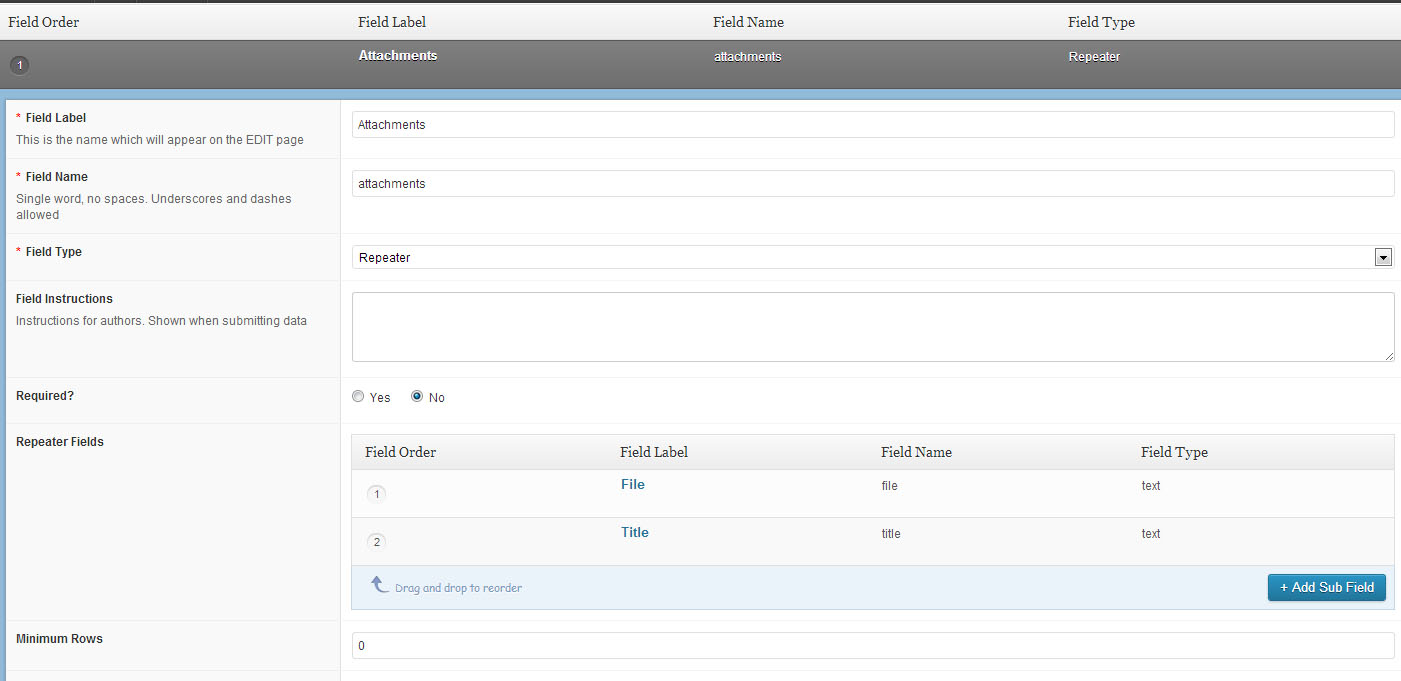
Good news – we know that the field name you are looking for is called attachments, and it’s looking for two items inside called “file” and “title”. I can emulate this setup using a repeater with 2 sub-fields inside named “File” and “Title”!
Why don’t you try setting up two text fields inside a repeater and see what happens? I’ve attached a screenshot of what this might look like, though I’m working with v4 so it may differ a bit from your view.
 repeater-2te....jpg
-
In reply to error message field type
- July 16, 2013 at 7:13 am
Hi again- thanks for your patience. I am not whether I saved or updated but this is what I found-
archive-reports.php<?php /** * The template for displaying Archive pages. * * Used to display archive-type pages if nothing more specific matches a query. * For example, puts together date-based pages if no date.php file exists. * * Learn more: http://codex.wordpress.org/Template_Hierarchy * */ get_header(); ?> <div id="main_container"> <!-- IE7 float fix --><!--[if lt IE 7]><span class="iefix">.</span><![endif]--> <div class="main"> <div class="entries_full"> <div class="entry_full"> <div class="box_twothirds mt30 pr60"> <?php if (have_posts()) : while ( have_posts() ) : the_post(); ?> <?php $country = get_the_term_list( $post->ID, 'report_country','', ', ', '' ); $year = get_the_term_list( $post->ID, 'report_year','', ', ', '' ); $topics = get_the_term_list( $post->ID, 'report_topic','', ', ', '' ); ?> <?php $count++; if($count > 3) { $count = 1; } ?> <h4 class="<?php if($count > 1) echo "mt25 "; ?>mb12"><?php the_title(); ?></h4> <?php the_content(); ?> <ul class="files"> <?php $rows = get_field('attachments'); if($rows) { foreach($rows as $row) { ?> <li> <a href="<?php echo $row['file']; ?>"> <?php echo $row['title']; ?> </a> </li> <?php } } ?> </ul> <p class="meta"> <?php if($country) echo 'Country: ' . $country . '<br>'; ?> <?php if($year) echo 'Year: ' . $year . '<br>'; ?> <?php if($topics) echo 'Topics: ' . $topics . '<br>'; ?> </p> <div class="bar mt25 mb30"></div> <?php endwhile; if(function_exists('wp_pagenavi')) { wp_pagenavi(); } else { if ( $wp_query->max_num_pages > 1 ) : next_posts_link( __( '← Older posts', 'amplify' ) ); previous_posts_link( __( 'Newer posts →', 'amplify' ) ); endif; } else : ?> <h1><?php _e( 'Not Found', 'amplify' ); ?></h1> <p><?php _e( 'Apologies, but no results were found for that search.', 'amplify' ); ?></p> <?php endif; ?> </div> <!-- Begin Sidebar --> <?php include('sidebar-reports.php'); ?> <!-- end sidebar --> <div class="clear"></div> </div><!-- end div.entry --> </div><!-- end div.entries --> <div class="clear"></div> </div><!-- end div#main --> <div class="clear"></div> </div><!-- end div#main_container--> <?php get_footer(); ?>I also found single-reports.php
<?php /** * The Template for displaying all single posts. * */ get_header(); ?> <div id="main_container"> <!-- IE7 float fix --><!--[if lt IE 7]><span class="iefix">.</span><![endif]--> <div class="main"> <div class="entries_full"> <div class="entry_full"> <?php $portfolio_cat = get_option('bb_portfolio_cat'); if($portfolio_cat == 'Choose a category') {$portfolio_cat = 'portfolio';} if ( in_category($portfolio_cat) ) { include ('portfolio_single.php'); } else { ?> <div class="box_twothirds mt30 pr60"> <?php if ( have_posts() ) while ( have_posts() ) : the_post(); ?> <?php $country = get_the_term_list( $post->ID, 'report_country','', ', ', '' ); $year = get_the_term_list( $post->ID, 'report_year','', ', ', '' ); $topics = get_the_term_list( $post->ID, 'report_topic','', ', ', '' ); ?> <?php $count++; if($count > 3) { $count = 1; } ?> <h4 class="<?php if($count > 1) echo "mt25 "; ?>mb12"><?php the_title(); ?></h4> <?php the_content(); ?> <ul class="files"> <?php $rows = get_field('attachments'); if($rows) { foreach($rows as $row) { ?> <li> <a>"> <?php echo $row['title']; ?> </a> </li> <?php } } ?> </ul> <p class="meta"> <?php if($country) echo 'Country: ' . $country . '<br>'; ?> <?php if($year) echo 'Year: ' . $year . '<br>'; ?> <?php if($topics) echo 'Topics: ' . $topics . '<br>'; ?> </p> <div class="bar mt25 mb30"></div> <?php endwhile; // end of the loop. ?> </div> <!-- Begin Sidebar --> <?php include('sidebar-reports.php'); ?> <!-- end sidebar --> <div class="clear"></div> <?php } ?> <!-- end single post content --> </div><!-- end div.entry --> </div><!-- end div.entries --> <div class="clear"></div> </div><!-- end div#main --> <div class="clear"></div> </div><!-- end div#main_container--> <?php get_footer(); ?> -
In reply to Output Select label, based on page parent ID
- July 16, 2013 at 4:30 am
This combination output the label correctly, thanks for the pointers.
<?php
/*
*  Displaying a single value's Label
*/
$field = get_field_object('color');
$value = get_field('color');
$label = $field['choices'][ $value ];
?>
Another question on the same issue has raised though. I have a page, with a colorscheme set as described above, also within the page, I have a Repeater Field, which has a sub-field to set a colorscheme.
I’d like to use the same set of color options I’ve set in Options. This works fine if the sub field is named “color”, as this will pick up the choices for a select list. But when these are output, things get confused between the pages colorcheme, and the repeater field box colorscheme – both of which come from a field called “color”.
Is it possible to have a page and a repeater field using the same Options data source for a select list?
Thanks.
-
In reply to The easiest feature request in the world – emoticon CSS
- July 16, 2013 at 3:02 am
You rock 🙂
-
In reply to error message field type
- July 16, 2013 at 3:01 am
Well, we just have to find the right field type. So long as you haven’t updated or saved the posts since the update (fingers crossed!) the field data should still be available if you switch the field back to its old type.
There may be a hint in the template code. By looking at http://hiaconnect.edu.au/reports/, we can see that the site is reading the
post-type-archiveorpost-type-archive-reportstemplate. Checking out the Template Hierarchy, we can guess that the site is reading a file under thearchive.phptree, possiblyarchive-reports.php. If you open up your theme editor (/wp-admin/theme-editor.php), see if you can find a file named something along those lines… pop that file open and see if you can locate the output for these missing fields.If you can’t find the field output in here, keep an eye out for
<?php the_excerpt(); ?>or<?php the_content(); ?>, as the missing output may be printed inside a different file such assingle.php.Looking at the source code of your link, the missing information appears inside a list:
<ul class="files">
    <li>
        <a href>
        </a>
    </li>
</ul>
<p class="meta">...
So look around for that
<ul class="files">and check out the PHP inside the list that prints your missing field data. Depending on the PHP output, we may be able to figure out what field type it is! Post the code you find if it doesn’t make any sense! -
In reply to Hide subfield if it has no text
- July 16, 2013 at 2:43 am
You’ll need to do a check for
$row['description']before actually echoing the<p>tag – that’s why I placedif( $row['description'])beforeecho '<p class="description">.... This check will simply make sure that$row['description']is not empty.If this doesn’t work for you, PHP can also check for empty values in a number of different ways:
http://php.net/manual/en/function.empty.php
http://php.net/manual/en/function.is-null.phpAnd there’s a discussion of some implementations over at http://techtalk.virendrachandak.com/php-isset-vs-empty-vs-is_null/ !
Ah, and just for ease of reading: http://diffchecker.com/7za0xnhq 🙂
-
In reply to Repeater field split in 2 columns
- July 15, 2013 at 11:59 pm
I figured it out
Code is wrong on 2nd part.
if (($i++ % 2) == 0 )should beif (($i++ % 2) != 0 )And one line was missing in the middle
$i = 0; rewind_posts();So in the end, general code is :
<?php
$i = 0;
$rows = get_field('articles_de_presse');
	echo '<div class="odd-column">' ;
		foreach($rows as $row) {
			if (($i++ % 2) == 0 ) {
 				echo '<div class="actupost"><h3>' . $row['auteur_de_larticle']  . '</h3><div class="actuexeprt">'. $row['contenu_de_larticle'] .' </div></div>';
			}
		}
	echo '</div>' ;
$i = 0; rewind_posts();
$rows = get_field('articles_de_presse');
	echo '<div class="even-column">' ;
		foreach($rows as $row) {
			if (($i++ % 2) != 0 ) {
				echo '<div class="actupost"><h3>' . $row['auteur_de_larticle']  . '</h3><div class="actuexeprt">'. $row['contenu_de_larticle'] .' </div></div>';
			}
		}
 	echo '</div>' ;?>


Welcome
Welcome to the Advanced Custom Fields community forum.
Browse through ideas, snippets of code, questions and answers between fellow ACF users
Forums
Helping Others
Helping others is a great way to earn karma, gain badges and help ACF development!
