
Search Results for 'Wysiwyg'
reply
-

In reply to Delete media when clicking on remove button of file field
- February 18, 2022 at 8:58 am
There are a couple of options.
One way to do this is to create an acf/save_post action with a priority of < 10. In this action you can compare the old value in the field
get_field('file_field')with the new value submitted$_POST['acf']['field_KEY']and if they are different then usewp_delete_attachment()to delete the old file. This will only work after a post has been saved. So if someone adds a file and then changes their mind before saving then the file will not be deleted.A variation of the above (still using an acf/save_post action) would be get all of the attachments for the post being saved https://stackoverflow.com/questions/42917812/how-to-get-all-attachments-for-a-wordpress-post. All files uploaded in an ACF field should be attached to the post. Then look in every field that is for an attachment (file, image, gallery) and get a list of the ones actually being used and delete the ones that are not. The flaw in this method is that you will not be able to detect files or images that are added in the WP editor or a WYSIWYG field and you’d end up deleting these.
Another way that this could be done is to add custom JavaScript to ACF and add an action to the remove button that fires an AJAX request to delete the file. This would be the best solution, but also the hardest to accomplish.
There is another flaw with every method, you will not know if the same file has been used on another post. Deleting the file if it is used somewhere else will cause issues with wherever else it is used.
-
In reply to WYSIWYG editor is broken within repeater field, wont save values ( tabs,toolbar,
- February 15, 2022 at 3:18 pm
I am not having any issues with WYSIWYG fields, either in repeaters or out.
Have you tried a different theme?
Are you seeing any JS errors on the page?
-
-
In reply to Wysiwyg Bug
- February 11, 2022 at 8:19 am
The ACF WYSIWYG field works the same as the WP Classic Editor always worked. autop is applied to the content.
You cannot define your
<p>tags in the template when using a WYSIWYG field. If you want to do this then I would suggest you use a textarea field. -
In reply to get first image in Wysiwyg Editor
- February 9, 2022 at 9:10 am
You cannot do what you are attempting to do. Images added to a WYSIWYG field are not added to an image field.
-
In reply to Wysiwyg and wpforms
- January 27, 2022 at 10:04 am
All of my sites use ACF and WPForms and I am not seeing any issues with WPForms shortcodes in ACF WYSIWYG fields. I would suspect there is another plugin or something in the theme that’s interfering with WPForms operation. Have you tried deactivating other plugins or trying with a different theme?
-

In reply to External Links
- January 25, 2022 at 10:07 am
You could use the Text Editor/WYSIWYG field
OR
You could use 3 fields
Textarea – to create the text
Textfield – to create the link text
URL – to handle the linkThe latter would need more coding to combine the fields
-
In reply to ACF block output breaks due to wp_kses() on woocommerce checkout page
- January 18, 2022 at 4:04 pm
I’m having the same issue. In my case, in addition to links in the WYSIWYG fields, ACF Gutenberg blocks are also getting mangled. My guess is that there’s a WC hook that would allow us to change the function from wp_kses to apply_filters( ‘the_content’… Just need to figure out where it lives.
-
In reply to Lists not showing bullets
- January 6, 2022 at 4:15 am
Hmm, nothing wrong with the code.
What is the field type? I assume a WYSIWYG field?
Do you have any CSS overriding the styling?
If you inspect the list with the browser tools, does it output as HTML UL and LI? -
In reply to How to edit the ACF WYSIWYG block format options?
- December 20, 2021 at 8:14 am
You can use JS for this.
Here is how you can add JS:
https://www.advancedcustomfields.com/resources/adding-custom-javascript-fields/And there is a JS filter for changing settings of tinymce (wysiwyg editor) before it’s initialized.
https://www.advancedcustomfields.com/resources/javascript-api/#filters-wysiwyg_tinymce_settingsAnd here is the final code. Just change ‘field_abcd123456’ to whatever is the key of your field.
add_action('acf/input/admin_footer', function(){ ?> <script> acf.addFilter('wysiwyg_tinymce_settings', function( mceInit, id, field ){ if(field.get('key') !== 'field_abcd123456'){ return mceInit; } mceInit.block_formats = 'Paragraph=p;Heading 4=h4'; return mceInit; }); </script> <?php }); -
In reply to If a field is empty (doesn\'t have any value), do something with plain Javascript
- December 8, 2021 at 11:29 am
Let’s say it’s a video field. Or an image field. Or a Wysiwyg editor. I actually have all of them, but my main concern is how to implement in code that the field might be empty. PHP or JS. I don’t mind.
The screenshot will help.
Thanks for your time.
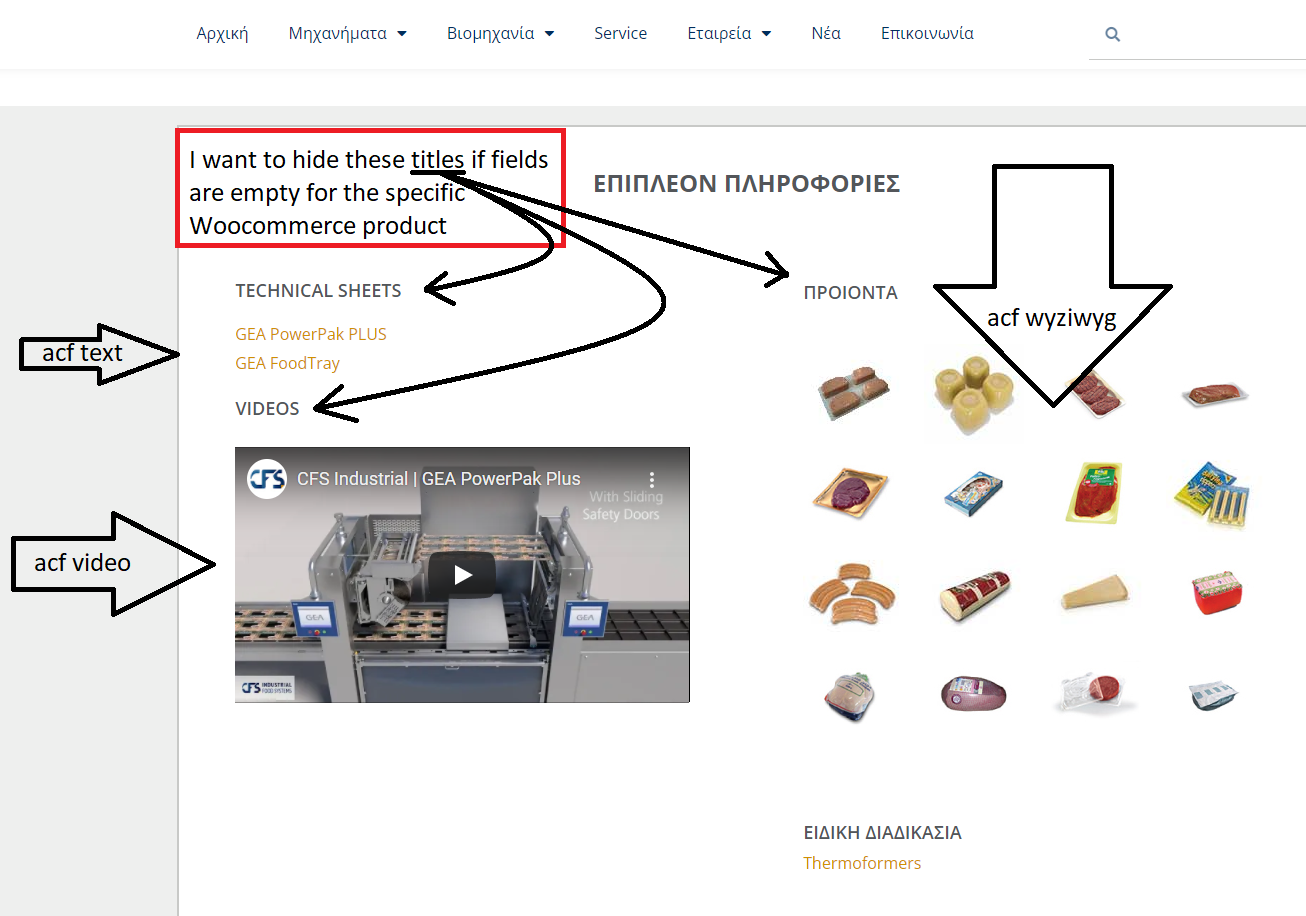 Untitled.png.png
-
In reply to How to assign random ID to headings (h1,h2,h3,h4 exc) in AFC WYSIWYG field?
- November 24, 2021 at 5:44 am
Up!
I’ve managed to apply IDs to all WYSIWYG fields, but how could intercept a specific field with its key?
this is the code applied:
function my_heading_ids($content) {
$content = preg_replace_callback(“/\<h([4])/”, function ($matches) {
static $num = 1;
$hTag = $matches[4];
return ‘<h4′. $hTag .’ id=”my’ . $num++ . ‘”‘;
}, $content);
return $content;
}
add_filter(‘acf_the_content’, ‘my_heading_ids’);Thanks
-
In reply to How to make a custom media button work with ACF?
- November 15, 2021 at 12:58 pm
Just out of curiosity, does the shortcode get inserted into the standard WP editor (classic editor) instead of the ACF WYSIWYG?
I don’t really have an answer and this is only guessing. A lot of tools used for inserting content do not work correctly when there are multiple tinyMCE editors on the page and they assume that only that only the default editor exists.
I have run into this issue in the past with some plugins.
-
In reply to Custom fields
- October 21, 2021 at 4:12 pm
see this https://www.advancedcustomfields.com/resources/customize-the-wysiwyg-toolbars/
-
In reply to Injecting class in content
- October 8, 2021 at 9:00 am
If you want to use the_content filter you need to use that acf_the_content filter for WYSIWYG fields
add_filter('the_content', 'ja_ul_class'); add_filter('acf_the_content', 'ja_ul_class'); -
In reply to Wysiwyg-info field for Editors.
- September 24, 2021 at 11:18 am
You can enter html into a message field. It’s not a wysiwyg editor but it works. You can compost the content in a wysisyg editor and then paste it in.
-

In reply to Remove Media button from WYSIWYG (acf form)
- September 22, 2021 at 7:35 am
This snippet worked for me.
add_filter( 'acf/get_valid_field', 'change_post_content_type'); function change_post_content_type( $field ) { if($field['type'] == 'wysiwyg') { $field['tabs'] = 'visual'; $field['toolbar'] = 'basic'; $field['media_upload'] = 0; } return $field; } -
In reply to ACF Blocks with a repeater field empty in Admin
- September 20, 2021 at 9:08 am
Has there been any progress on this? I have a repeater field with a minimum of 2 items and in the repeater a WYSIWYG block, which have default (some Lorem ipsum text) and when I add a block to the Gutenberg editor a completely empty block is shown. If I click the editor and edit the content the preview becomes visible.
The code above does nothing for me (or do I need to change some values to my field names?)
I made a screencast to better illustrate the issue. As you can se when you edit the block it becomes visible
https://www.youtube.com/watch?v=IzM-OMoHbWQ
-
In reply to wysiwyg visual editor not working on WP 5.6
- September 3, 2021 at 2:49 pm
I am having the same issue. If WYSIWYG field is used in Gutenberg with position set to ‘Side’, WYSIWYG field is editable at first, but if you select any blocks in the page changing the Gutenberg sidebar tab to ‘Block’ instead of ‘Page’ (taking the WYSIWYG field out of view), and then go back to the ‘Page’ sidebar tab, the WYSIWYG Visual tab is not editable and any content in the Visual tab is gone. However the ‘Text’ WYSIWYG tab does contain its content.
I verified not a plugin or theme conflict by using Twenty Twenty One theme with all plugins deactivated except ACF Pro.
-
In reply to Add own UL/OL styles to ACF WYIWYG
- September 2, 2021 at 11:08 am
Anything you do to tinyMCE should be reflected in the ACf WYSIWYG fields
https://www.hostpapa.com/knowledgebase/how-to-add-custom-styles-to-wordpress-visual-editor/
-
In reply to All ACF Post fields suddenly in sidebar
- August 31, 2021 at 5:34 am
Hi Guys,
This may be of use to anyone in the thread so thought I would post it up as a solution.
This plugin just allows you to resize the Gutenberg sidebar which makes working with ACF repeater fields, WYSIWYG’s or any other large field a lot easier.
See here: https://wordpress.org/plugins/resizable-editor-sidebar/.
-
In reply to Flexible Content Type w/ Columns Shortcode is not expanding parent
- August 29, 2021 at 9:35 pm
From your description it appears that the shortcodes plugin that you have installed is not returning anything to be shown. This is what happens when you add a shortcode that does not exist. It seems that the plugin you are using is no longer supported, unless I found the wrong one. ACF WYSIWYG fields run shortcodes.
-
In reply to No p tags with wysiwyg field
- August 27, 2021 at 3:08 pm
Solution!!! The Advanced Editor Tools (previously TinyMCE Advanced) plugin worked for me. I couldn’t get the p tags to render using ACF wysiwyg. I would save, view page and no p breaks. Read a ton of threads, didn’t want to touch functions.php or anything of that nature, then got lucky and stumbled upon a forum post where some dude mentioned the aforementioned plugin.
Held my breath, installed the plugin (search for “TinyMCE Advanced”), went to the “classic editor” settings tab, scrolled down to advanced options and toggled “Keep paragraph tags in the Classic block and the Classic Editor” and it worked! Literally jumped out of my seat after spending 4 hours digging for a solution.
I hope this helps someone else in the same spot 🙂
-
In reply to Prepopulate ACF WYSIWYG field
- August 23, 2021 at 6:56 pm
I’m trying to do something similar and just got a reply from ACF. Right now there doesn’t seem to be a way to load anything into a Wsyiwyg field using a filter. I’m trying to load an HTML/PHP template I created into one for emails into the Wysiwyg field in WP-admin. If anyone can help us that would be great!
-
In reply to Problems with acf_form()
- August 13, 2021 at 11:36 am
I’m seeing a wysiwyg for the content field.
What are the settings you’re using for acf_form();
I suspect that you have conflict somewhere.


Welcome
Welcome to the Advanced Custom Fields community forum.
Browse through ideas, snippets of code, questions and answers between fellow ACF users
Forums
Helping Others
Helping others is a great way to earn karma, gain badges and help ACF development!
