
Search Results for 'q'
reply
-
In reply to Update to ACF Pro makes themed fields disappear
- June 5, 2015 at 8:03 am
I don’t think they worked. I had to start over the migration due to a Mysql error and saw again at the 4.4.2 point the renderings are blank (although the data remains visible on the edit side).
-

In reply to Order by subfield values
- June 5, 2015 at 6:07 am
WordPress 4.2 introduced new order by clauses for meta_query.
https://make.wordpress.org/core/2015/03/30/query-improvements-in-wp-4-2-orderby-and-meta_query/
Which would probably let you do what you looking for.
By the way, very good solution for altering ‘meta_key =’ to ‘meta_key LIKE’. I know I”l be using that in the future.
-
In reply to Using a front-end CPT creation form on a CPT page
- June 5, 2015 at 5:48 am
I’m assuming that this question is related to the other question and if we answer that one we’ll also answer this one.
-
In reply to Create a table of field values of all posts of a custom post type?
- June 4, 2015 at 9:27 pm
The only way I know of to do a query for the posts, create a table and then loop through the posts and create the table. You’ll probably need to create a custom page template if you want to do this, or alternately on a custom post type archive page.
The get_fields() function can get all the fields at once rather than getting them one at a time, may help if you have lots of fields to retrieve. http://www.advancedcustomfields.com/resources/get_fields/
-
In reply to 'source code' button on wysiwyg editor field
- June 4, 2015 at 5:46 am
Hi, I don’t think the tinymce editor is created by another plugin. I’m just using ACF’s own Wysiwyg Editor fields. I’ve attached two screenshots to illustrate the problem:
Its hard to edit code with no formatting like that. I’d like the line breaks and indentation of the code.
-
In reply to duplicat fields after upgrading to PRO
- June 4, 2015 at 4:21 am
We just had the same problem with a transition from ACF+Repeater, etc., to Pro. All our field groups but one were duplicated. The one that was not duplicated had only a single text field; each of the others had repeater, WYSIWYG and/or related post link fields.
The bad news is that in at least one case, there are two fields missing from one of the repeater fields in the older version of the field group. The portal_box field in field_group #5209 has only three fields; the one in field_group #5255 contains all five of the fields that should be there. (See attachments.) As a result, part of the portal box is not displaying.
We have no multi-language support. Here’s a list of our active plugins:
ManageWP – Worker (v4.1.6) by ManageWP
Gravity Forms (v1.9.9) by rocketgenius
Admin Quick Jump (v1.4) by James Kemp
Advanced Custom Fields Pro (v5.2.6) by elliot condon
Advanced Post Types Order (v3.6.2) by Nsp Code
BackWPup (v3.1.4) by Inpsyde GmbH
Categories Images (v2.5) by Muhammad Said El Zahlan
Cookies for Comments (v0.5.5) by Donncha O Caoimh
Duplicate Post (v2.6) by Enrico Battocchi
WordPress Editorial Calendar (v3.5) by Colin Vernon, Justin Evans, Joachim Kudish, Mary Vogt, and Zack Grossbart
Enable Media Replace (v3.0.3) by Måns Jonasson
Google Analytics by Yoast (v5.4.2) by Team Yoast
Google Calendar Events (v0.7.2) by Ross Hanney
Gravity Forms – Placeholders add-on (v1.2.1) by Joan Piedra
Gravity Forms MailChimp Add-On (v3.6) by rocketgenius
Image Watermark (v1.5.0) by dFactory
McWebby Magnific Popup (v00.01.00) by Donna McMaster
McWebby Custom Post Types (v00.02.01) by Donna McMaster (declares post types)
Media Tags (v3.2.0.2) by Paul Menard
Members (v0.2.4) by Justin Tadlock
Simple Sitemap (v1.65) by David Gwyer
Sucuri Security – Auditing, Malware Scanner and Hardening (v1.7.9) by Sucuri, INC
Category Order and Taxonomy Terms Order (v1.4.2) by Nsp-Code
ThreeWP Activity Monitor (v2.12) by edward mindreantre
WooCommerce Bulk Discount (v2.3.1) by Rene Puchinger
WooCommerce Dynamic Pricing (v2.9.6) by Lucas Stark
WooCommerce (v2.3.10) by WooThemes
WooThemes Helper (v1.5.5) by WooThemes
WordPress SEO (v2.1.1) by Team Yoast
WP Migrate DB Pro (v1.4.7) by Delicious Brains
WP SEO Humility (v0.1) by Donna McMasterMust-use Plugins:
ManageWP – Worker Loader (v) by ManageWP
McWebby Debug Log (v0.1.0) by Donna McMaster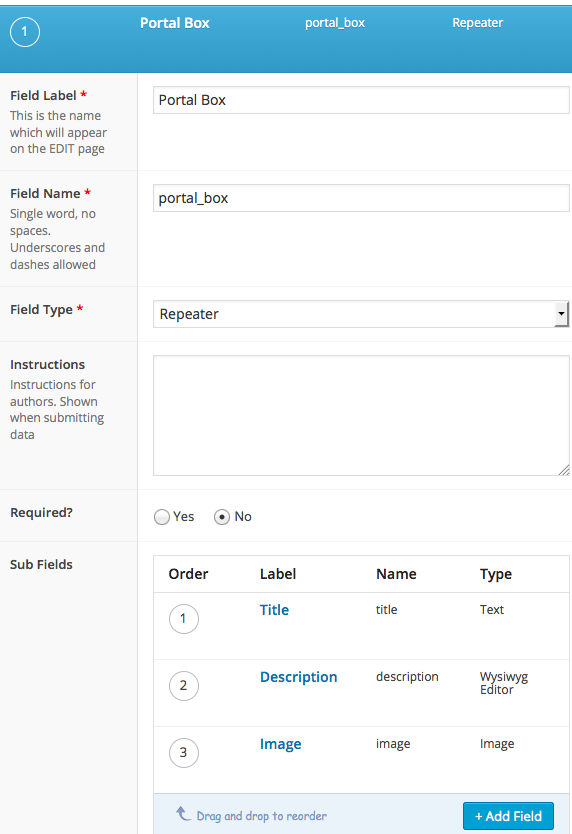 field-group-....png
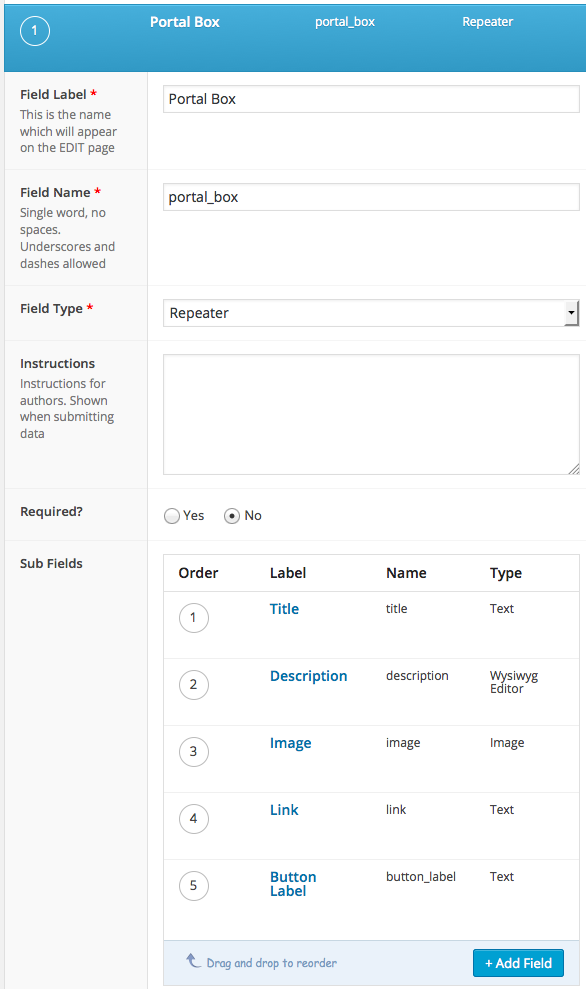 field-group-....png
-
In reply to Order query based on relationship
- June 4, 2015 at 2:20 am
Well i’ve skipped using ACF for now until I get a response but FYI, I done it using the following:
function sytycdv2_posts_clauses($pieces) {
  global $wp_query, $wpdb;
  if (preg_match("/post_type = '([^']+)'/", $pieces['where'], $matches) && !is_admin() && in_array($matches[1], get_campaign_post_types())) {
    $pieces['fields'] .= ", COALESCE((SELECT CASE WHEN COUNT(p99.ID) = 2 THEN 1 ELSE 0 END FROM {$wpdb->posts} p99 INNER JOIN {$wpdb->postmeta} pm99 ON (p99.ID = pm99.post_id) WHERE p99.post_type = 'campaign' AND (pm99.meta_key = '_start_date' AND (CAST(pm99.meta_value AS DATETIME) IS NULL OR CAST(pm99.meta_value AS DATETIME) <= NOW())) OR (pm99.meta_key = '_end_date' AND (CAST(pm99.meta_value AS DATETIME) IS NULL OR CAST(pm99.meta_value AS DATETIME) > NOW())) GROUP BY p99.ID HAVING COUNT(p99.ID) = 2 AND FIND_IN_SET(p99.ID, pm98.meta_value) LIMIT 0, 1),0) AS s";
    $pieces['join'] .= " LEFT JOIN {$wpdb->postmeta} pm98 ON (wp_posts.ID = pm98.post_id AND pm98.meta_key = '_campaigns')";
    $pieces['orderby'] = 's DESC, ' . $pieces['orderby'];
  }
  return $pieces;
}
add_action( 'posts_clauses', 'sytycdv2_posts_clauses' );
As dirty as it looks, the above basically uses a subquery to return all campaigns that are valid and then checks to see if that campaign ID exists in the current posts custom field.
If the value exists, the subquery will return 1 otherwise 0.
Then you can see I’m sorting by the subquery result followed by the original sort, allowing it to promote the ones I want at the top, followed by the original posts 🙂
DIIIIIIIIRTY yes, but it works for now.
-
In reply to Field to display Posts and filter then by the value of a Field?
- June 3, 2015 at 9:00 am
Elliot has created a tutorial about querying relationship field here: http://www.advancedcustomfields.com/resources/querying-relationship-fields/
This would be a bit different. A Post Object field holds a single value rather than an array, so this makes it easier. Basically you just need to query the tasks post type with a meta_query to look for the ID of the project.
-
In reply to Request – help with up/downvote feature on relationship field
- June 3, 2015 at 2:35 am
So, this is not a 100% ACF solution, I don’t think that’s possible, and this is just an outline.
To store the vote value use a custom field, you would create a custom field for each collection that an item is in. I would make these hidden meta fields by adding an underscore at the beginning. For example if $collection holds my collection post my meta key would be
'_'.$collection. Then you simply store the current value in this field.I personally would only store the total from the up votes and down votes, for example each item in the collection would start off with a value of 0. up votes would increase it and down votes would decrease it. I would also use the second option because it will allow me to order the posts easier.
The next step is to create these custom meta fields in the first place. Create a acf/save_post filter as outlined here: http://www.advancedcustomfields.com/resources/acfsave_post/
This filter would run on your collection post type when the collection was saved.
1) Get the posts of the second post type from the relationship field
2) Test to see if the post in the collection has a value set for the custom field for this collection
3) If there is not an existing value then initialize it by created the field and setting it to 0.Now, when someone votes one way or another you can update this value. I’m assuming you might be using some type of AJAX to do this.
WordPress has recently added functionality that will let you order by these values in a more complex way when doing a query. The following are the meta queries and orderby that you could use.
$meta_key = '_the_collection_field_key';
$clause = $meta_key_clause.'_clause';

$meta_query = array(
    'relation' => 'AND',
    $clause => array(
        'key' => $meta_key,
        'compare' => 'EXISTS',
        'type' => 'NUMERIC'
    )
);

$orderby = array(
    $clause => 'ASC'
);
The above meta and orderby values uses the new meta clause feature added in WP v4.2. You can read more about it here: https://make.wordpress.org/core/2015/03/30/query-improvements-in-wp-4-2-orderby-and-meta_query/
I hope this helps. Like I said it’s only an outline and except for the save post filter, really does not involve ACF. This is definitely a situation where some custom coding is going to need to be done and not really a small project.
-
In reply to Frontend Form Tutorial
- June 3, 2015 at 1:23 am
Hi @iphoenix ,
Thanks for the request.I will let the developer know if this and probably might come up with a tutorial for the same.
-
In reply to Can't display data on post
- June 3, 2015 at 12:40 am
Hi @brian-w
Here is some sample code that may help in displaying custom post types in your page<?php $args = array( 'post_type' => 'products', 'post_status' => 'publish', 'posts_per_page' => '10' ); $products_loop = new WP_Query( $args ); if ( $products_loop->have_posts() ) : while ( $products_loop->have_posts() ) : $products_loop->the_post(); // Set variables $title = get_the_title(); $description = get_the_content(); $download = get_field(‘download’); $featured_image = wp_get_attachment_image_src( get_post_thumbnail_id(), 'full' ); $product_image1 = $featured_image[0]; $product_image2 = get_field(‘product_image’); // Output ?> <div class=”product”> <img src=”<?php echo $product_image1; ?>” alt=”<?php echo $title; ?>”> <h2><?php echo $title; ?></h2> <img src=”<?php echo $product_image1; ?>” alt=”product-detail” class=”product-detail align-right”> <?php echo $description; ?> <p><a href=”<?php echo $download; ?>” target=”_blank” name=”Spec Sheet”>Download Spec Sheet</a></p> </div> <?php endwhile; wp_reset_postdata(); endif; -

In reply to get_field('galery') return false
- June 2, 2015 at 11:42 pm
what code do you use to display the gallery? and what is your gallery-fieldname?
gallery is an array, that means you need a foreach loop like this to show the images inside that array:<?php $images = get_field('gallery'); if( $images ): ?> <ul> <?php foreach( $images as $image ): ?> <li> <a href="<?php echo $image['url']; ?>"> <img src="<?php echo $image['sizes']['thumbnail']; ?>" alt="<?php echo $image['alt']; ?>" /> </a> <p><?php echo $image['caption']; ?></p> </li> <?php endforeach; ?> </ul> <?php endif; ?> -
In reply to Conditional logic should work with 'post object' relational fields
- June 2, 2015 at 10:03 pm
Hi @nathanshubert,
Thank you for the feature request. This will be forwarded to the developer for consideration.
-
In reply to Query Posts using meta data from a Post Object field
- June 2, 2015 at 9:15 pm
Hi @quirksmode
This is achievable through the use of the acf/fields/post_object/query filter. You can modify the $args array as follows:
function my_post_object_query( $args, $field, $post ) {
$args[‘author’]=$user_id
return $args;
}add_filter(‘acf/fields/post_object/query/name=my_post_object’, ‘my_post_object_query’, 10, 3);
For more info you can refer to this article: acf/fields/post_object/query
-
In reply to ACF and Polylang
- June 2, 2015 at 6:27 pm
-
In reply to Flexible content field suddenly gone after edit
- June 2, 2015 at 5:52 pm
-
In reply to Paginating results?
- June 2, 2015 at 5:49 pm
As referenced
HereYou have to use You have to use WP_Query class http://codex.wordpress.org/Class_Reference/WP_Query
Here is the code for the pagination
<?php while ( have_posts() ) : the_post(); ?> <?php $paged = (get_query_var('paged')) ? get_query_var('paged') : 1; $args = array( 'posts_per_page' => 5, 'meta_key' => 'course_date', 'order'=> 'ASC', 'orderby' => 'meta_value', 'cat' => 2 ,'paged'=>$paged); $catpost_ = new WP_Query( $args ); if ($catpost_->have_posts() ) : while ($catpost_->have_posts() ) : $catpost_->the_post(); ?> <!--- CONTENT ---> <?php endwhile; endif; wp_reset_query();?> <?php $big=76; $args = array( 'base' => str_replace( $big, '%#%', esc_url( get_pagenum_link( $big ) ) ), 'format' => '?paged=%#%', 'total' => $catpost_->max_num_pages, 'current' => $paged, 'prev_next' => True, 'prev_text' => __('Previous'), 'next_text' => __('Next'), 'type' => 'list'); // ECHO THE PAGENATION echo paginate_links( $args ); endwhile; ?> -
In reply to Update broke our site
- June 2, 2015 at 5:44 pm
Hi,
ACF Version came with quite a number of changes.Kindly check out the following link in he documentation on how to correctly update from version 3 to 4
-
In reply to Repeater writes content into different field
- June 2, 2015 at 5:28 pm
Hi,
That is quite unexpected.Kindly check your location rules to ensure that everything is correctly configured and that each template only shows its respective repeater field.
-
In reply to ACF and Polylang
- June 2, 2015 at 5:23 pm
Hi James
I am glad to hear that it is possible.
My question is how to get the Translate field groups option in admin.
Do you know of an (code) example somewhere?
Or someone that I could contact who has achieved a merge?thx Inigo
-
In reply to easy way to change default ACF TinyMCE settings
- June 2, 2015 at 4:47 pm
Thanks @elliot this lead me to the solution.
i can share now this code:
function my_acf_input_admin_footer() {
?>
<script type="text/javascript">
acf.add_filter('wysiwyg_tinymce_settings', function( mceInit, id ){

	// do something to mceInit
	mceInit.setup = function( ed ){
	ed.on('init', function () {
         // Note these lists may not be complete & that other tinymce plugins can add their own shortcuts anyway.
                var ctrls = [ 'u', '1', '2', '3', '4', '5', '6', '7', '8', '9', 's', 'k', 'Alt+F', 'P' ];
                var modKeys = [ 'c', 'r', 'l', 'j', 'q', 'u', 'o', 'n', 's', 'm', 'z', 't', 'd', 'h', 'o', 'x', 'a', 'w', '1', '2', '3', '4', '5', '6', '7', '8', '9' ];
                // Overwrite shortcuts with no-op function. Key sequences will still be captured.
                for (var i = 0; i < ctrls.length; i++ ) {
                    //this.addShortcut('ctrl+' + ctrls[i], '', function () {}); //use if tinyMCE <=4.1.7
                    this.addShortcut('Meta+' + ctrls[i], '', function () {});
                }
                for (var i = 0; i < modKeys.length; i++ ) {
                    //this.addShortcut('alt+shift+' + modKeys[i], '', function () {});//use if tinyMCE <=4.1.7
                    this.addShortcut('access+' + modKeys[i], '', function () {});
                }
    });
	};
	// return
	return mceInit;

});
</script>
<?php
}

add_action('acf/input/admin_footer', 'my_acf_input_admin_footer');
can be inserted into function.php or a own plugin and should work. and provide the disable of tinymce shortcuts. (at my example it removes: headings, underline, and more. bold and italic shortcuts would still work)
I will update this post with the other options that wish to use. as soon i tested it
EDIT:
TinyMCE <= 4.1.7, and >= 4.1.8 use different code -
In reply to Conditionally Show Content
- June 2, 2015 at 4:34 pm
-

In reply to Custom Fields on Attachments
- June 2, 2015 at 8:09 am
I have added some custom fields to all attachments that are uploaded to the Media Library.
Text fields such as Location, Date, and some custom Tags.
I then have a custom post type of Photo Archive in which the admin can create a new post, upload as many images as they wish, which will then display on the single post page. The images are uploaded using the ACF Gallery field.
Each image will have a tag or tags, as well as Location and Date information attached to it.What I now require is to get that information.
So far I have created this staging site: http://website-test-lab.com/sites/zuludawn/photographic-archive/
If you see where it says Filter by tags; this is where I need to get all the tags used from each image, from within the single post.
I did take a look at the code here but not sure where to put it or how to use it: http://www.advancedcustomfields.com/resources/how-to-get-values-from-a-media-attachment/
Any advice would be much appreciated.
-
In reply to Request – help with up/downvote feature on relationship field
- June 2, 2015 at 6:02 am
Couple of questions, when you say “collection” of posts, how are you creating this collection? As part of a taxonomy of is just in the relationship field? Do you have multiple post types that you’re using? So basically more information on what you have so far.
I have a couple ideas on how you could go about this and could outline them, but that really depends what you have set up so far.
-
In reply to An comment to relation
- June 2, 2015 at 5:41 am
I’m assuming that you’ll have multiple actors per movie. It’s just a suggestions but if I wanted to add additional information about a relationship I would probably use a repeater field and then use a Post Object field instead of a Relationship filed.
The drawback of doing this is that it would be far more complicated to do a reverse relationship query if you want to show what movies each actor is in on the single actor page.
If you want to use reverse a reverse relationship query the problem could be remedied by adding a acf/save_post filter that takes the actors in the repeater field and puts them into a standard wp meta field with the WP update_post_meta() function.


Welcome
Welcome to the Advanced Custom Fields community forum.
Browse through ideas, snippets of code, questions and answers between fellow ACF users
Forums
Helping Others
Helping others is a great way to earn karma, gain badges and help ACF development!
