

Forum Replies Created
-

Hi @mhowellsmead , thank you for your reply. I had considered going the cpt route, the image I shared was just one simple example. My client is going to want to create many charts, each type of chart comparing different products and features. So as of now, even my client can’t provide me with a complete list of possible features a product can have. More products with different features are going to be made available and my client is not going to want me to have to go in and add new features as they become available.
So sadly, creating the features as choices in a field group is not going to viable option. And I’m having a tough time thinking of a way to let the client enter custom features that will be simple and intuitive for them to use for all the different products and features they will comparing.
I was wondering if there is a way to create 2 sets of repeaters. The first repeater for the features. The second repeater would be for products. Then inside the products repeater I would have a nested repeater where they could enter a value for a given feature, like a check, text or leave blank. The part I’m wondering if there is a way to dynamically create as many rows in the nested repeater as there are in the features repeater, and then maybe display the value of each row of the features repeater in each row of the nested repeater.
So for example, if I created 5 features (in the first repeater): feature 1, feature 2, feature 3, feature 4 and feature 5. Then when I create a new row in the products repeater, there will be a nested repeater for whether this product has this feature. So in this nested repeater, there would already be 5 rows created, and value entered for its corresponding row in the features repeater displays as a label or something.
I hope I didn’t confuse anyone further. Just trying to think of a creative solution. I’m just not sure how to pull it off.
-
KiwiCreative
- in reply to: Ordering posts by number field treated like a string
- December 8, 2018 at 7:23 am
Oops, I figured out that I had made a mistake.
In my pre_get_post function I had
$query->set('orderby', 'meta_value');when it should have been$query->set('orderby', 'meta_value_num'); -
KiwiCreative
- in reply to: Fields no longer updating or appearing on front end
- November 30, 2018 at 6:45 am
@leahahglobalnetwork-com I’ve had this same thing happen before. It ended up being a conflict with a plugin, can’t remember off the top of my head which plugin it was. I want to say it was a plugin called ACF Content Analysis for Yoast SEO, but can’t say for sure. If I were a betting man, I would put my money on either a plugin conflict or maybe even with some custom functionality in your theme.
Have you tried deactivating all plugins except ACF and see if works then? If the fields begin to save, then reactivate each plugin one at a time until the issue presents itself again, then you will know what plugin is the culprit. \
If it still doesn’t work after deactivating all plugins, then you will probably want to switch to a default theme like Twenty Seventeen. That should be a starting point to determine whether it’s a plugin or theme conflict.
If the issue still persists after deactivating all other plugins and switching the theme, then problem is most likely in your database.
-
KiwiCreative
- in reply to: ACF Checkbox Choices
- November 30, 2018 at 5:50 am
@julianmarcorpsa-com Have you tried dropping the underscore from the meta_key value…so just
= 'mychoices'. I ask because when I use a plugin called Search & Filter Pro, I have to select the meta key to pick which which field I want to filter by. In the list of available fields, each field shows up twice, one with a preceding underscore and one without. I have to use the one without in order for it to work correctly.But if that’s not the case, you should be able to do something like:
<?php
$values = get_field('mychoices');
$field = get_field_object('mychoices');
$choices = $field['choices'];
?>

<ul>
	<?php foreach( $choices as $choice => $label ) : ?>
	<li>Value: <?php echo $choice; ?>, Label: <?php echo $label; ?></li>
	<?php endforeach; ?>
</ul>
Let me know if that doesn’t work for you. I didn’t get a chance to test out, but I just did something similar the other day.
-
KiwiCreative
- in reply to: Convert field group into Flexible Content layout area
- November 30, 2018 at 5:27 am
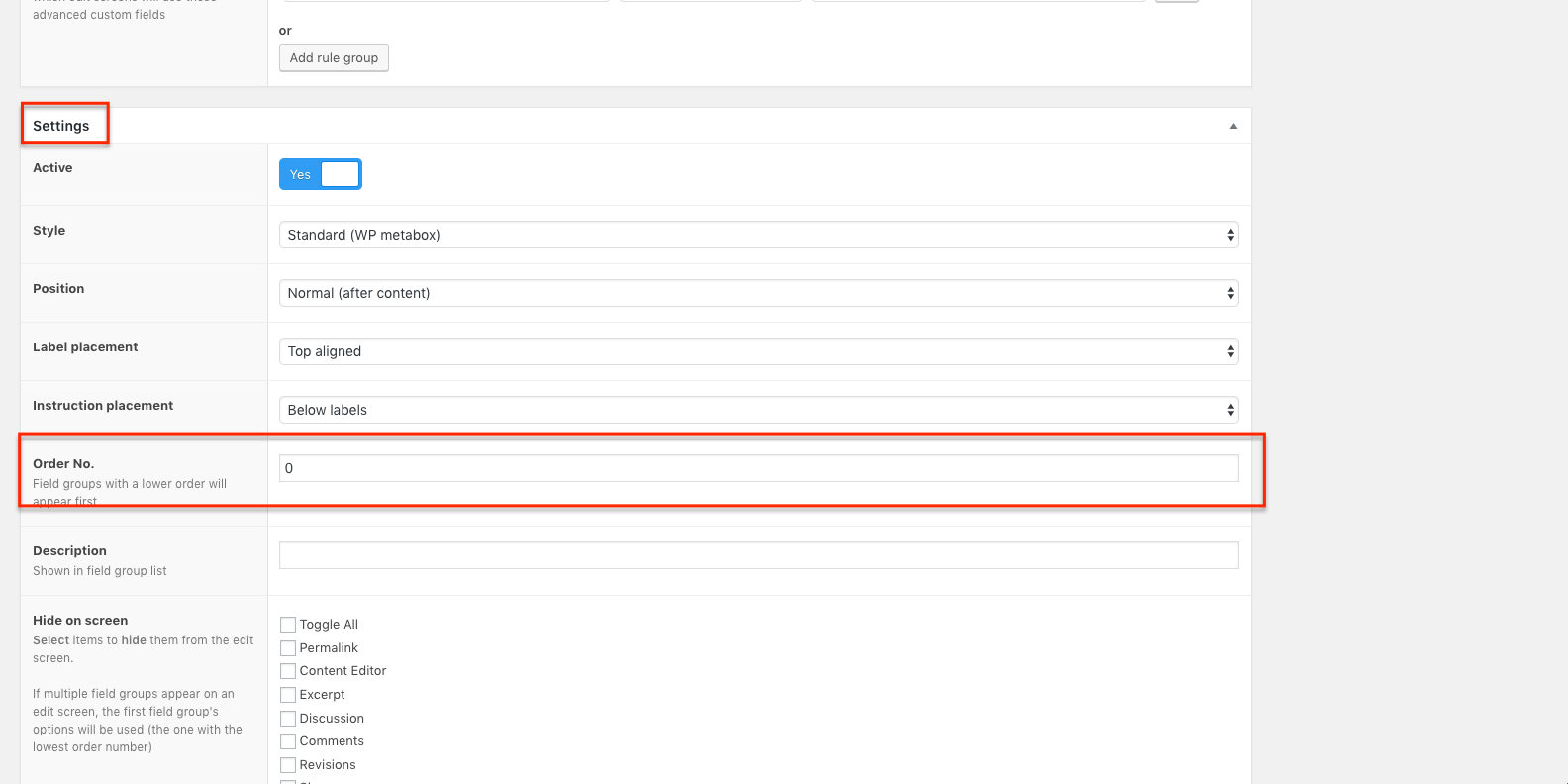
@raison When you create a field group, if you scroll down to the Settings metabox, you will see a field labeled Order No. This is how you can set the order in which the field groups appear on your post edit screen. The order starts at 0. So whatever field group you want to show up first, give it a value of 0. Then the next field group would be 1 and so on.
 acf.png.png
-
@alexi I’m not sure if I know exactly what you mean. I’ve personally never seen a select’s option be a link. And I’m talking about <select> form control.
You could create a traditional dropdown, but would require css and js to work. If this is what you are wanting, you would want to create a repeater with a Link field type sub field with an array return type. Then you’re code would look something like the following. I’m using an example of a dropdown from W3Schools https://www.w3schools.com/howto/howto_js_dropdown.asp
PHP/HTML
<?php if( have_rows('repeater_field_name') ) : ?>
<div class="dropdown">
	<button class="dropdown-button">Dropdown</button>
	<div id="myDropdown" class="dropdown-options">
		<?php
		while( have_rows('repeater_field_name') ) : the_row();
			$link = get_sub_field('option_link');
		?>
		<a href="<?php echo $link['url']; ?>" target="<?php echo $link['target']; ?>"><?php echo $link['title']; ?></a>
		<?php endwhile; ?>
	</div>
</div>
<?php endif; ?>
JS
/* When the user clicks on the button,
toggle between hiding and showing the dropdown content */
function myFunction() {
    document.getElementById("myDropdown").classList.toggle("show");
}

// Close the dropdown menu if the user clicks outside of it
window.onclick = function(event) {
  if (!event.target.matches('.dropdown-button')) {

    var dropdowns = document.getElementsByClassName("dropdown-content");
    var i;
    for (i = 0; i < dropdowns.length; i++) {
      var openDropdown = dropdowns[i];
      if (openDropdown.classList.contains('show')) {
        openDropdown.classList.remove('show');
      }
    }
  }
}
Then here are some styles. Some are necessary, but others can be changed to fit your needs.
CSS
/* The container <div> - needed to position the dropdown options */
.dropdown {
    position: relative;
    display: inline-block;
}

/* Dropdown Content (Hidden by Default) */
.dropdown-options {
    display: none;
    position: absolute;
    background-color: #f1f1f1;
    min-width: 160px;
    box-shadow: 0px 8px 16px 0px rgba(0,0,0,0.2);
    z-index: 1;
}

/* Links inside the dropdown */
.dropdown-options a {
    color: black;
    padding: 12px 16px;
    text-decoration: none;
    display: block;
}

/* Change color of dropdown links on hover */
.dropdown-options a:hover {background-color: #ddd}

/* Show the dropdown menu (use JS to add this class to the .dropdown-options container when the user clicks on the dropdown button) */
.show {display:block;}
I apologize if I’m not understanding you correctly.
-
KiwiCreative
- in reply to: Display all checkbox options but add class to selected
- November 30, 2018 at 3:46 am
Sorry @lynx_gd , I accidentally clicked on my last reply as the solved answer. It should be your answer, but can’t figure out how to undo.
-
KiwiCreative
- in reply to: Display all checkbox options but add class to selected
- November 30, 2018 at 3:44 am
@lynx_gd You rock!!! That did it, and completely makes sense now that I think about.
Thank you very much!
-
KiwiCreative
- in reply to: [Checkbox] How to display all item as check uncheck
- November 29, 2018 at 8:07 am
@solomax Did you ever find a solution? I tried using @hube2 code and added a simple else like you were looking for, but it will only echo “checked” on the last selected option. So if I have 4 options, checked options 1,2 and 4. It only adds “checked” to option 4.
-
KiwiCreative
- in reply to: Display all checkbox options but add class to selected
- November 29, 2018 at 7:55 am
Alight, still having a conversation with myself lol.
I’m getting closer. I hadn’t seen the second code snippet John Huebner provided. This is the code I have now.
<?php
$values = get_field('service_options');
$field = get_field_object('service_options');
$choices = $field['choices'];
?>
<ul>
	<?php

	foreach($choices as $choice_value => $choice_label) :
		foreach ( $values as $value ) :
			if( $value['value'] == $choice_value ) :
				$class = ' class="checked"';
			else :
				$class = '';
			endif;
		endforeach;
		echo '<li' . $class . '>' . $choice_label . '</li>';
	endforeach;

	?>

</ul>
But it’s only working on one of the options. So if I check 3 options, it will only assign the ‘checked’ class to last checked option. So if I checked option 1, 2 and 4. The outputted html will only add the checked class to the option 4.
So close!
-
KiwiCreative
- in reply to: showing the Field Type upload image on the vendor page
- November 29, 2018 at 7:14 am
@shahbazi It may be a language barrier thing, but your question is kind of difficult to understand what you are asking. When you say you want to show part of the image on the vendor page so that the seller can upload the image there. That doesn’t make any sense to me. What is part of the image? And how would displaying an image allow a user to upload an image?
Are you asking if you can use ACF to place an image upload button on the front end? I personally have never seen that done before, but can’t say for sure whether it’s possible or not. From what I understand, ACF itself won’t display an image upload field on the front end, only on a post edit screen, from which you can then display the image in your page template using something like:
<?php
// get image field return value from post edit screen
$image = get_field('vendor_image');
?>
<!-- If return type is array -->
<img src="<?php echo $image['url']; ?>" alt="<?php echo $image['alt']; ?>" />

<!-- If return type is URL -->
<img src="<?php echo $image; ?>" alt="hardcoded alt text description" />
If you’re wanting to give users the ability to upload images on the front end, you will most likely need to code this manually, using <input type=”file”> form control and then handling the storing/access of the image with php or js. Or perhaps you can find another plugin to do this for you, but I’ve never heard of ACF being used for something like that. Then again, I could be totally misunderstanding what you are asking.
-
@swennet So I’m not sure if it’s a typo, but when retrieving a value from an options page, you use ‘option’ (singular), not ‘options’ (plural).
Also, the if statement will only return true or false. You need to loop through them and load the row’s data (the_row();) per loop iteration.
So your code would look something similar to:
<?php if ( have_rows('my_repeater', 'option') ) : ?> <ul> <?php //Use while loop to loop through rows, the_row() will load the row's data while( have_rows('my_repeater', 'option') ) : the_row(); // create variables for sub field values $sub_field = get_sub_field('sub_field'); ?> <li><?php echo $sub_field; ?></li> <?php endwhile; ?> </ul> <?php endif; ?> -
KiwiCreative
- in reply to: Display all checkbox options but add class to selected
- November 29, 2018 at 3:04 am
Sorry for constant messages, I’m trying to work on this while I wait on a reply.
Ok, realized I had a typo on the $value variable, needed to be plural like I used in the foreach loop
$value = get_field('service_options');Should have been
$values = get_field('service_options');That took care of the warning, but is still not assigning the checked class to the ones that are checked.
Getting closer!
-
KiwiCreative
- in reply to: Display all checkbox options but add class to selected
- November 29, 2018 at 2:54 am
Sorry forgot to show you what I have tried so far. I found someone asking a similar question in forum https://support.advancedcustomfields.com/forums/topic/checkbox-how-to-display-all-item-as-check-uncheck/
I used the code in the reply marked as solved, but are getting errors.
Here’s my PHP code:
<?php
$value = get_field('service_options');
$field = get_field_object('service_options');
$choices = $field['choices'];

if( $field ) :
?>
<ul>
   <?php

   foreach($choices as $value => $label) :
      if( in_array($value, $values) ) :
         $class = ' class="selected"';
      else :
	 $class = '';
      endif;
      echo '<li' . $class . '>' . $label . '</li>';
   endforeach;

   ?>

</ul>
<?php endif; ?>
But I’m getting the following warning for each option:
Warning
: in_array() expects parameter 2 to be array, null given in …In addition to the warning on each item, , the class selected isn’t being added to the options that were selected.
-
KiwiCreative
- in reply to: Options page field values not showing on page load
- August 28, 2018 at 1:00 am
Functopus,
When retrieving values from an option page, you have to put ‘option’ as the second parameter in the get_field() and/or the_field() functions.
So for your first field, you would use:
the_field('get_in_touch', 'option');You can learn more about this in the documentation:
https://www.advancedcustomfields.com/resources/options-page/
Look at the template usage section
-
KiwiCreative
- in reply to: True/False – Only allow one post to have true value
- August 1, 2018 at 11:59 pm
That did it! You da man, John!
I really appreciate your help. Thanks again.
-
KiwiCreative
- in reply to: True/False – Only allow one post to have true value
- July 31, 2018 at 12:40 am
Hi John,
Do you have any other thoughts or recommendations?
Thanks
-
KiwiCreative
- in reply to: True/False – Only allow one post to have true value
- July 24, 2018 at 12:02 am
Hi John,
Thank you for your reply. I’m using ACF PRO, so ACF5. I switched out
$_POST['fields']with$_POST['acf']but unfortunately my code is still not working. Saving an post as featured, doesn’t unset the featured option on a different post.So my code now looks like:
function my_acf_save_post( $post_id ){ $fields = false; if ( isset( $_POST['acf'] ) ) { $fieldId = 'field_5b51ec43f331a'; $fields = $_POST['acf']; $featuredArticle = $fields[$fieldId]; if ( $featuredArticle ) { $args = array( 'post_type' => array('post'), 'meta_query' => array( array( 'key' => 'featured', 'value' => '1', 'compare' => '==' ) ) ); $post_query = new WP_Query( $args ); if ( $post_query->have_posts() ) { while ( $post_query->have_posts() ) { $post_query->the_post(); acf_update_field( $fieldId, false, get_the_ID() ); } } } } } // end my_acf_save_post add_action('acf/save_post', 'my_acf_save_post', 1); -
KiwiCreative
- in reply to: ACF and WP Search
- July 12, 2017 at 11:33 pm
John,
Just wanted to let you know that your code did end up working. It wasn’t working when I was building the site locally on MAMP, but once I moved to a remote web server, it started working. I have no idea why it works now and not locally, but I’m just happy it’s working so not going to question it.
Thanks again for all your help, man!
-
KiwiCreative
- in reply to: ACF and WP Search
- July 8, 2017 at 12:04 am
Hi John,
Unfortunately, I’m still not able to get that to work. Probably just going to have to create a people single template file and allow the people cpt to be searchable.
I appreciate your help, and I do really like the concept you provided. I’ll just have to figure out how to make it happen.
Thanks again,
Ryan
-
KiwiCreative
- in reply to: ACF and WP Search
- July 7, 2017 at 6:44 am
Hi John,
Thank you for your speedy reply. I do have to apologize, I just realized I was thinking of another post type when explaining my issue.
On the People page template, instead of a repeater with a post object sub field. I have just a post object field that allows multiple selections. Then in my template file I was using a foreach loop to display each person selected.
I tried to edit your code snippet for my correct situation, but think I’m doing something wrong as it’s still not returning any results. And yes, for the people cpt, the title is what contains the person’s name.
add_action('acf/save_post', 'copy_persons_to_people', 20); // priority 20 runs after acf has saved content
function copy_persons_to_people($post_id) {
  // we need to create a new meta key to hold the list of people
  // this is the meta key you'll use to set up the search of this field
  $meta_key = 'related_peoples';
  // clear this field if it exists for this post
  // need to start fresh each time
  delete_post_meta($post_id, $meta_key);
  // see if there are any related people
  $persons = get_field('team_members', $post_id);

  foreach ( $persons as $person ) {
	  add_post_meta($post_id, $meta_key, $person->post_title, false);
  }
}
On the page template, the acf field for the post object is called ‘team_members’.
Thanks again for your help, I really appreciate it.
-
KiwiCreative
- in reply to: Getting Select Field Values From Post Object Inside Repeater
- December 9, 2016 at 1:45 am
That did it!
Thanks so much for your help, James.
-
KiwiCreative
- in reply to: Getting Select Field Values From Post Object Inside Repeater
- December 8, 2016 at 2:16 am

Welcome
Welcome to the Advanced Custom Fields community forum.
Browse through ideas, snippets of code, questions and answers between fellow ACF users
Forums
Helping Others
Helping others is a great way to earn karma, gain badges and help ACF development!
