
Search Results for 'taxonomy'
reply
-

In reply to Sorting the results of taxonomy field
- February 26, 2021 at 6:04 am
The only way that you can alter the order of the terms in an ACF taxonomy field would be to use acf/fields/taxonomy/query and the sorting would need to be something you could apply to a term query using the order/orderby arguments.
-
In reply to HELP: Filtering by ACF field in Archive
- February 23, 2021 at 8:25 pm
UPDATE:
Sorted it.
Needed a
tax_queryEnd result that allowed me to filter archive based on the taxonomy:
// Filter by Taxonomy when needed. if ($_GET['discipline']) : $term = get_query_var('discipline'); $args = array( 'post_type' => 'case_study', 'tax_query' => array( array( 'taxonomy' => 'discipline', 'field' => 'slug', 'terms' => $term, ) ) ); else : // show everything $args = array( 'numberposts' => -1, 'post_type' => 'case_study', ); endif; -

In reply to Creating a chained question and answers form
- February 20, 2021 at 3:07 am
I’m not sure if I fully grasp what you’re trying to accomplish, so I could be way off here… but, if it’s a matter of drilling down deeper and deeper, I could envision using a custom hierarchical taxonomy to do something like this. You select the parent term and it displays the possible child options, over and over.
Something like this:
Car Trouble
– Engine
— Possible Engine Issue 1
— Possible Engine Issue 2
– Gear Box…and so on.
Again, maybe that’s a stupid idea for your use case. Regardless, by using ACF fields on the actual terms themselves, you could specify a “question” field that is associated with each term and displayed to the user.
So for example, if the user chose “the engine”, on the next screen they would see the question associated with that term. Like “Which of the following symptoms is your engine experiencing?”, then the child terms of “Engine” are displayed.
In any case, good luck with your project!
-
In reply to How to auto select ACF relationship field based on taxonomy selection
- February 17, 2021 at 3:07 am
I Just need little help/direction on how to select the ACF relationship field selections automatically based on the existing taxonomy selections. Any existing example maybe I could follow??
Thank you
Karen -
In reply to Problem with WP_Query with Custom Taxonomy Types
- February 13, 2021 at 3:55 am
The taxonomy is ‘category’
-
In reply to Problem with WP_Query with Custom Taxonomy Types
- February 13, 2021 at 3:47 am
The field name is “div2” that is not the taxonomy.
What is the taoxnomy?
-
In reply to Problem with WP_Query with Custom Taxonomy Types
- February 13, 2021 at 3:17 am
I’m attaching an image of the custom field configuration.
There are posts with that taxonomy, that’s my concern about it.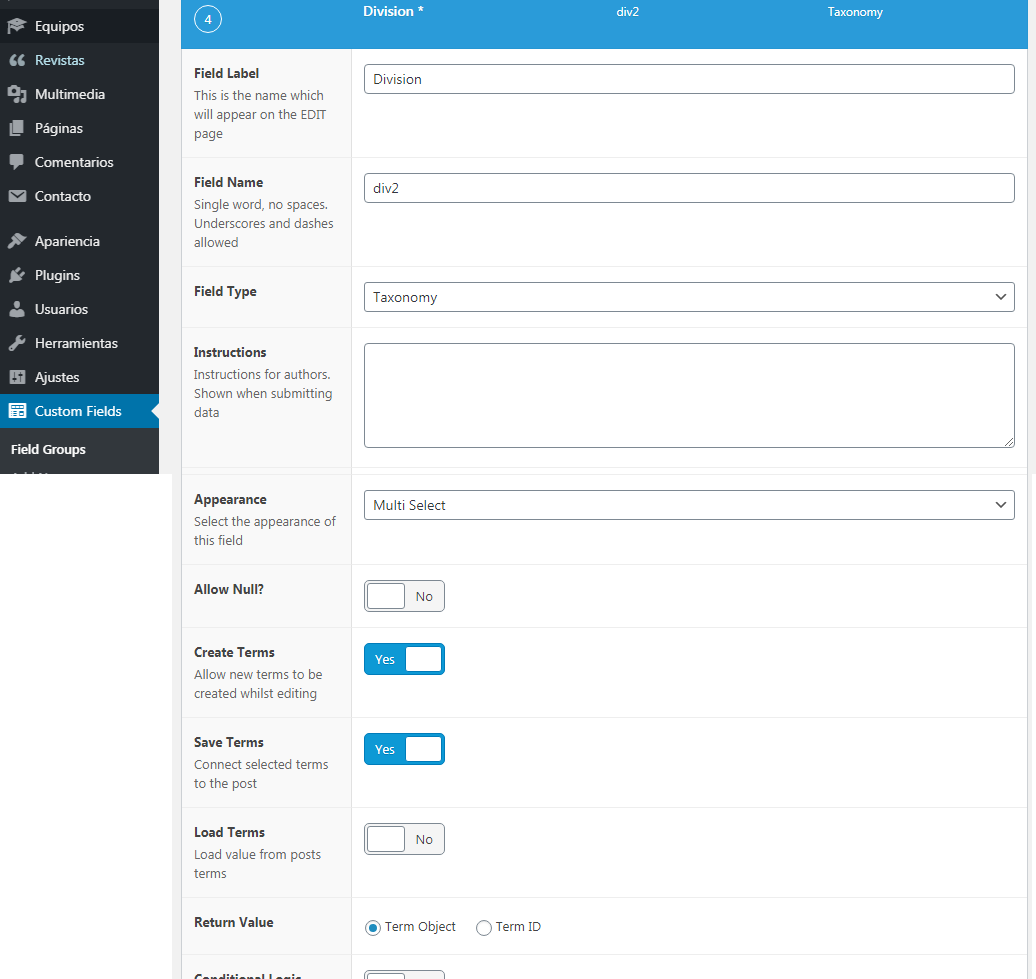 custom_taxon....png
-
In reply to Problem with WP_Query with Custom Taxonomy Types
- February 13, 2021 at 2:54 am
Well, if you’ve created a custom taxonomy then that value must be the value of your custom taxonomy. Other than this I see no reason it should not be working unless there are no posts of that post type that are in that term of the taxonomy.
-
In reply to Problem with WP_Query with Custom Taxonomy Types
- February 13, 2021 at 2:34 am
'taxonomy' => 'div2', -
In reply to Setting Parent Posts from Frontend
- February 9, 2021 at 12:07 am
To set the parent post from the front end you need a relationship field that is only available on the front end. Set this up to start. Add a post object field that only allows one selection.
Create the following filters for your field in functions.php
// only show field on front of site
// https://www.advancedcustomfields.com/resources/acf-prepare_field/
add_filter('acf/prepare_field/name=YOUR FIELD NAME HERE', 'field_only_on_front');
function field_only_on_front($field) {
  if (is_admin()) {
    return false;
  }
  return $field;
}

// alter the acf query of the post object field to only show top level posts
https://www.advancedcustomfields.com/resources/acf-fields-post_object-query/
add_filter('acf/fields/post_object/query/name=YOUR FIELD NAME HERE', 'only_top_level_posts', 20, 3);
function only_top_level_posts($args, $field, $post_id) {
  $args['post_parent'] = 0;
  return $args;
}
After you do this set up your taxonomy field to return term objects
Once all that is done then then create an acf/save_post filter in functions.php
add_action('acf/save_post', 'update_and_save_journal_post');
function update_and_save_journal_post($post_id) {
  // make sure to only do this on the right post type
  $post_type = get_post_type($post_id);
  if ($post_type != 'YOUR POST TYPE HERE') {
    return;
  }
  // get the post
  $post = get_post($post_id);
  // get the parent, unformatted, ID only
  $parent = get_field('YOUR POST OBJECT FIELD', $post_id, false);
  if ($parent ) {
    $post->post_parent = $parent;
  }

  // get the taxonomy field
  $terms = get_field('YOUR TAXONOMY FIELD;, $post_id);
  if (!empty($terms) && !is_wp_error($terms)) {
    $term = terms[0];
    $post->post_title = $term->name.$post->post_title;
  }
  // remove this action so that an infinite loop is not created
  remove_filter('acf/save_post', 'update_and_save_journal_post');
  // update the post
  wp_update_post($post);
  // re-add this filter
  add_action('acf/save_post', 'update_and_save_journal_post');
}
Please note that none of the above code has been tested for syntax errors.
-
In reply to Display ACF from specific Taxonomy
- February 8, 2021 at 1:39 am
Oh I see. I set it using the WO taxonomy checkboxes which appear in the right column. I am not using the ACF taxonomy selector.
Thanks -
In reply to Display ACF from specific Taxonomy
- February 8, 2021 at 1:35 am
The price field is on the taxonomy term. Before you can get that field you need to get the term to get it from.
I am asking how you set this term when you edit a “Repair” post.
-
In reply to Display ACF from specific Taxonomy
- February 8, 2021 at 1:23 am
Hi,
I don´t really understand. I set up the taxonomy using CPT UI and then added a ACF field to it for the price field. Everything else is standard. I am not using the ACF taxonomy type field.
-
In reply to Setting Parent Posts from Frontend
- February 8, 2021 at 1:18 am
Before I answer the entire question. What is the return value of the taxonomy field set to? Term ID or Object?
-
In reply to Display ACF from specific Taxonomy
- February 8, 2021 at 1:09 am
Do you have a field where you set the term in each of these taxonomies or do they use the standard WP metaboxes?
You need to get the term in the taxonomy related to the post, what you need to do that depends on if you have an ACF taxonomy field for each taxonomy on the post edit page or not.
-
In reply to Default value for the taxonomy field type
- February 7, 2021 at 11:58 am
Just adding this here in case someone else needs this. This piece of code will add the first taxonomy term as default for all taxonomy fields *on the frontend*. I needed this for frontend forms, but feel free to remove the “is_admin” check if that’s what you need.
Beware of potential overhead if you have many terms or fields that would be triggered by this.
function set_tax_default($field) { if(!is_admin()){ $terms = get_terms($field['taxonomy'], ['number' => 1]); if($terms) { $single_term = reset($terms); $field['default_value'] = $single_term->term_id; } } return $field; } add_filter('acf/load_field/type=taxonomy', 'set_tax_default'); -
In reply to Get Custom Taxonomy Field Value
- February 5, 2021 at 6:10 am
This worked for me to get the taxonomy terms for the current post with an ACF icon field attached:
<?php $terms = get_the_terms( get_the_ID(), 'project_services' ); $cat_icon = get_field('icon', $queried_object); ?> <?php if( $terms ): ?> <ul class="menu"> <?php foreach( $terms as $term ): ?> <li> <a href="<?php echo get_term_link( $term ); ?>"> <?php $icon = get_field('icon', $term->taxonomy . '_' . $term->term_id);?> <img src="<?php echo $icon ?>"> <?php echo $term->name; ?> </a> </li> <?php endforeach; ?> </ul> <?php endif; ?> -
In reply to Disable ajax-validation
- February 1, 2021 at 6:19 pm
Hello, thanks for the answer, but I had something else in mind.
There is a function in acf-form-functions.phpfunction acf_form_data( $data = array() ) { // Apply defaults. $data = wp_parse_args($data, array( /** @type string The current screen (post, user, taxonomy, etc). */ 'screen' => 'post', /** @type int|string The ID of current post being edited. */ 'post_id' => 0, /** @type bool Enables AJAX validation. */ 'validation' => true, ));In which the value “validation” is always = true.
Is it possible to change this value to “false” when creating one form, and leave it “true” when creating another?
Thankyou.
-
In reply to Set 'Post Title' from Field Group (Toggle)
- January 30, 2021 at 11:39 pm
Hi guys, firstly thank you for providing your solution to this – I’m trying to do the same thing but I need to use an ACF field’s related taxonomy in the Post Title…
When I implement your code @andycheeseman I can pull in the ID of the field I want, but not the Object. I have tried setting the Return Value in the field’s settings to Term Object rather than Term ID but I still get the ID.
For reference this is the code I am using:
function my_post_title_updater( $post_id ) {

	if ( get_post_type() == 'match' ) {

		$my_post = array();
		$my_post['ID'] = $post_id;
		$my_post['post_title'] = get_field( 'home_team', $post_id );

		// Update the post into the database
		wp_update_post( $my_post );

	}

}

// run after ACF saves the $_POST['fields'] data
add_action('acf/save_post', 'my_post_title_updater', 20);
`
Any help on how to get the taxonomy values from an ACF field would be much appreciated!!
Thanks 🙂
-
In reply to create new taxonomy with acf form not new post
- January 28, 2021 at 5:24 pm
Under Locations, select the Taxonomy Term rule and choose the corresponding value to show this field group.
-
In reply to Many to many relationship with extra fields.
- January 28, 2021 at 2:17 am
What type of fields? Relationship? Post Object? Taxonomy?
What are Wines? Grapes? Posts? Terms? -
In reply to Extract the images of a custom post for each category
- January 22, 2021 at 8:28 pm
For those interested in the feature, here’s how it worked for me.
function.php
// Loop Gallery Cat1

function my_custom_gallery_cat1() {
    query_posts(array(
        'post_type' => 'gd_project',
        'orderby' => 'rand',
        'posts_per_page' => 10,
        'tax_query' => array(
            array (
                'taxonomy' => 'gd_projectcategory',
                'field' => 'slug',
                'terms' => 'example-terms',
            )
        ),
    ));
    ?> <div class="masonry">
    <?php
    while (have_posts()) : the_post();
        $image_field = get_field('image');
        $image_url = $image_field['url'];
        $image_alt = $image_field['alt']; ?>
        <div class="grid-item">
        <a href="<?php echo get_permalink( $post->ID ); ?>" target="_blank">
        <img src="<?php echo esc_url($image_url); ?>" alt="<?php echo esc_attr($image_alt); ?>" />
        <h4><?php the_field( 'title' ); ?></h4>
        </a>
        </div>
    <?php endwhile; ?>
    </div> <?php
}
add_shortcode('example-terms', 'my_custom_gallery_cat1');
single-example.php
<div class="container-fluid"> <div class="row"> <?php echo do_shortcode('[categoria]');?> </div> </div> -
In reply to Customising Taxonomy Field (Checkbox)
- January 22, 2021 at 2:28 pm
Each taxonomy option is documented in detail in the WordPress Codex. After adding this to your theme’s functions.
-
In reply to Flexible field is appearing twice on admin page
- January 20, 2021 at 10:51 pm
How to get fields set in the Taxonomy List location?
-


Welcome
Welcome to the Advanced Custom Fields community forum.
Browse through ideas, snippets of code, questions and answers between fellow ACF users
Forums
Helping Others
Helping others is a great way to earn karma, gain badges and help ACF development!
