
Search Results for 'q'
reply
-
In reply to Import Custom Posts via CSV
- November 13, 2013 at 10:47 am
Hi guys
Just thought I would report back.
I found a plugin called TurboCSV ($50) which (with the help of the Chris Richardson the developer) I managed to get to work with ACF.
I had to do quite a lot of testing but I found that if you name the csv column the same name as your ACF custom field, it should map itself automatically when it uploads.
Other than that, the plugin works a dream and is incredibly reliable.
Hope this post is useful to others
-

In reply to Repeater UI gets wonky after last update
- November 13, 2013 at 10:46 am
Elliot,
I had a similar issue with the recent update as well. Client’s site has repeaters within repeaters and they complained that the fields would extend beyond as well as beneath the containing borders causing the wysiwyg fields to be unusable.
My initial thought was “your screen is just too small”. Looked into it a little more in-depth and compared it to a cloned site on the version 1.0.1 repeater plugin. It turns out that there was a change in the 1.1.0 css that was causing the issue.
On line 5 of the input.css file you have
table-layout: fixed;If I comment out this line, the editor displays as expected (expected by the client).
For my client I’m overriding this style attribute with a custom filter in my functions.php.
function admin_css() { ?>
	<style type="text/css">
		.repeater > table{
			table-layout:auto!important;
		}
	</style>
<? }
add_action('admin_head', 'admin_css');
That should hold them over and even help with future updates, but could you explain the reason for this simple style change? Is my modification going to come back and bite me?
Thanks,
-
In reply to Sort Order for Custom Fields not working?
- November 13, 2013 at 2:59 am
Hi Elliot!
Yes, I am referring to field group sort order.
I don’t recall using the drag/drop, especially since this field was appearing at the top (I never would have dragged it there), but a couple question about that:
1) Is the drag/drop sort order stored in the user or a cookie? I had a client log in using the same username on a different PC and she was seeing the same thing.
2) If the drag/drop was used, is there a way to restore control to the sort order of ACF?
-
In reply to Get image loaded
- November 13, 2013 at 1:46 am
Thanks, i think im on the way, still not there, but almost.
The code looks like this for the moment:
foreach ( $posts as $post ) {
    $post_back_id = the_field('back_image', $udt_project->ID);
    $back_image_src=wp_get_attachment_image_src($post_back_id,'back-thumb');
    $homepage_secs.='<div class="back-thumb-container"><div class="back-thumb"><img class="image" src="'.$back_image_src[0].'" /></div></div>';
}
but, in the website source code, it looks like this:
http://localhost/test/wp-content/uploads/2013/09/test.jpg
<div class="back-thumb-container">
<div class="back-thumb">
<img class="image" alt="123456789" src="">
</div>
</div>
I have found the path to the second image, but its not in between the src-tag.
Any ideas?
Thanks. -
In reply to get image from category custom field
- November 13, 2013 at 1:03 am
Thanks so much for drumming this into me. I’ve finally figured it out. You were correct on both accounts i.e. needed to be inside the loop and also needed to use
$category->term_idSo the final code I have is
<?php $cat = get_query_var('cat'); $args = array( 'child_of' => $cat, 'orderby' => 'name', 'order' => 'ASC' ); $categories = get_categories($args); foreach($categories as $category) { $attachment_id = get_field('cat_half_image', 'category_'. $category->term_id .''); $size = "half-img"; echo '<div class="cat-block g_6">'; echo '<a href="' . get_category_link( $category->term_id ) . '" title="' . sprintf( __( "View all posts in %s" ), $category->name ) . '" ' . '>' . wp_get_attachment_image( $attachment_id, $size ); echo '<h2>'. $category->name . '</h2>'; echo '</a>'; echo '<p>'. $category->description . '</p>'; echo '</div>'; } ?> -
In reply to read more
- November 13, 2013 at 12:27 am
Thank you for your suggestions. I ´m afraid it is not very clear for me
This is what I pasted in functions.php
function custom_field_excerpt() {
	global $post;
	$text = the_sub_field('two-col');
	if ( '' != $text ) {
		$text = strip_shortcodes( $text );
		$text = apply_filters('the_content', $text);
		$text = str_replace(']]>', ']]>', $text);
		$excerpt_length = 10; // 20 words
		$excerpt_more = apply_filters('excerpt_more', ' ' . '...');
		$text = wp_trim_words( $text, $excerpt_length, $excerpt_more );
	}
	return apply_filters('the_excerpt', $text);
}
function custom_field_excerpt_longer() {
	global $post;
	$text = the_sub_field('two-col');
	if ( '' != $text ) {
		$text = strip_shortcodes( $text );
		$text = apply_filters('the_content', $text);
		$text = str_replace(']]>', ']]>', $text);
		$excerpt_length = 25; // 20 words
		$excerpt_more = apply_filters('excerpt_more', ' ' . '...');
		$text = wp_trim_words( $text, $excerpt_length, $excerpt_more );
	}
	return apply_filters('the_excerpt', $text);
}
and this is my repeater set
	<div class="entry-content">
		<?php the_content(); ?>
		<?php wp_link_pages( array( 'before' => '<div class="page-link"><span>' . __( 'Pages:', 'twentyeleven' ) . '</span>', 'after' => '</div>' ) ); ?>
                    <!-- Spalten -->
    <?php if(get_field('set')): ?>
    <div>
      <?php while(has_sub_field('set')): ?>
      <div class="paragraph">
           <div class="two-col">
          <?php the_sub_field('two-col'); ?>
        </div>
        <div class="left-col">
          <?php the_sub_field('left-col'); ?>
        </div>
        <div class="right-col">
          <?php the_sub_field('right-col'); ?>
        </div>
      </div>
      <?php endwhile; ?>
    </div>
    <?php endif; ?>
	</div><!-- .entry-content -->
I ´m not sure how to call the function here
-
In reply to Get image loaded
- November 13, 2013 at 12:10 am
<?php

$postMeta = get_post_meta($post->id);
print_r($postMeta);

?>
That should give you a print of all the custom fields attached to the post in a
'field_name' => 'field_value'array. This is just temporary code to find out the name of the field that holds the image information.Once you have identified the ‘field_name’ that is matched with your image ‘field_value’, do this:
<?php

foreach ( $posts as $post ) {
   if (has_post_thumbnail($post->ID)) {
    $post_thumbnail_id = get_post_thumbnail_id( $post->ID );
    $image_src=wp_get_attachment_image_src($post_thumbnail_id,'post-thumb');
    $homepage_secs.='<div class="thumb-container"><div class="thumb"><img class="image" src="'.$image_src[0].'" /></div></div>';
   }
  $second_image = get_field('field_name', $post->ID);
  // do whatever you need to with the second image

?>
The difference between
get_field()andthe_field()is just thatthe_field()prints the field value to the screen immediately, whereasget_field()allows you to assign the result to a variable. -
In reply to get_category_link from taxonomy addon
- November 12, 2013 at 11:53 pm
Apologies for the confusion and thanks for helping out on this. I’ve removed the code that’s actually working from the example below and included the dump of what’s getting produced. It is getting the category ID from the ACF custom field.
Custom fields in Use (to get category ID):
site_cat_link = taxonomy field type (Taxonomy Add-on)
cat_id = Text field type (I’ve just manually added the categories I want to pass, just to see if this works).Code:
<?php if( get_field('site_cats') ): ?>
	<?php while( has_sub_field('site_cats') ): ?>
<?php
    $variable = get_sub_field('site_cat_link');
    var_dump($variable);
    $category_link = get_category_link( $variable );
    var_dump($category_link);
?>

<p><?php echo the_sub_field('site_cat_link'); ?></p>
<p><?php echo the_sub_field('cat_id'); ?></p>
<a href="<?php echo esc_url( $category_link ); ?>" >Category</a>

	<?php endwhile; ?>
<?php endif; ?>
Output when using cat_id (text field):
Category string(3) “249” string(57) “http://www.mysite.com/inspiration-ideas/”
249
249
Category string(3) “346” string(50) “http://www.mysite.com/tips-advice/”
346
346Output when using site_cat_link (taxonomy field):
Category array(1) { [0]=> string(3) “249” } string(43) “http://www.mysite.com/news/”
249
249
Category array(1) { [0]=> string(3) “346” } string(43) “http://www.mysite.com/news/”
346
346What I can’t understand is that even though both are outputting the correct category id’s. The taxonomy addon then doesn’t seem to be able to pass that to the link.
-
In reply to Possibility to choose different order form Drag&Drop
- November 12, 2013 at 11:42 pm
Maybe it could be easier to add an “order” field to the repeater that easily make possible to reorder drag-and-drop items by name ASC or DESC for example. (leaving drag and drop working, so if after reorder I want to drag an Item this impact on the query)
Something like this for example (see attachment).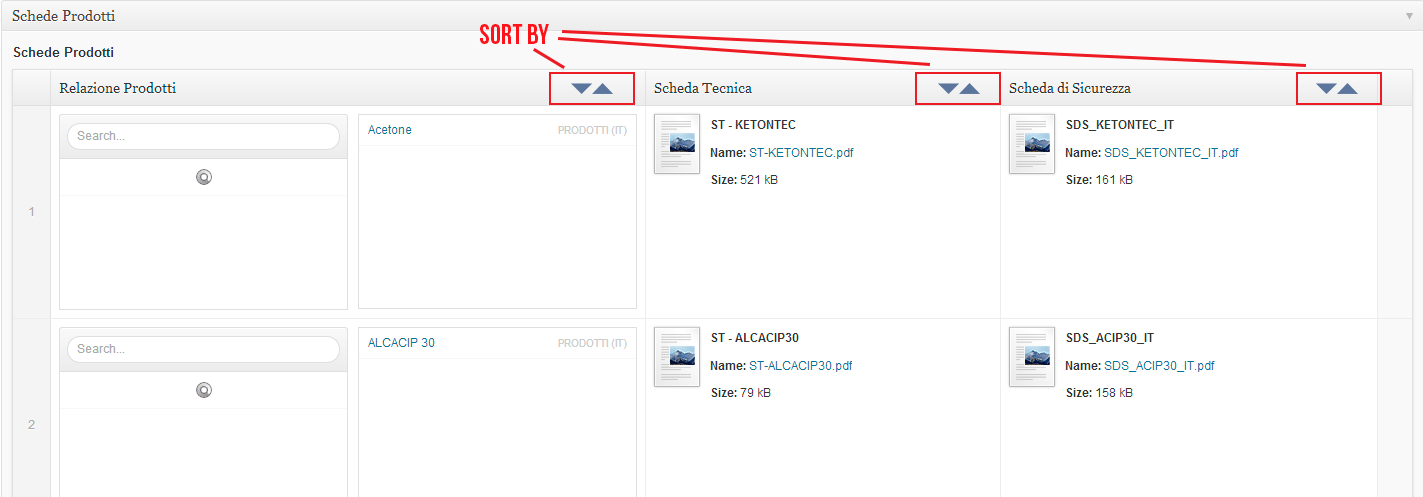 Senza-titolo....png
-
In reply to Frontend form – required fields
- November 12, 2013 at 10:00 pm
Hi @elliot,
OK that is perfect. I will try to make some JS verification right now and I’m waiting for the 5 then 🙂
Thanks for your amazing plugin, I really love it and I’m so glad that not only it is free (thought I bought the repeater add-on which is awesome as well) but you’re also doing support … That’s really kind of you 🙂
-
In reply to "Add row" button label missing
- November 12, 2013 at 9:46 pm
Hi Elliot,
Same problem here. My client is really confused hehe.
Unfortunately the temp fix didn’t work for me.
I downloaded the new version with the fix already implemented, but no luck.
There is currently no way to delete the Flexible field (except if I remove the whole repeater field and add the data again)
I hope there is another solution/hotfix!Thanks for your help,
Daan Smit
-
In reply to Nesting relationship querys
- November 12, 2013 at 9:08 pm
Got the code working in the end this is the finished piece
http://hastebin.com/dufucamaja.xml
-
In reply to Putting jQuery in footer
- November 12, 2013 at 7:11 pm
Hi @elliot,
Well that explains why I couldn’t find it but it seems to go away when I remove the add-ons folder. Any idea why the above bit of code doesn’t work to put jquery in the footer?Here is what I’m basing my findings on:
-
In reply to Undefined Variable 'value' in api.php
- November 12, 2013 at 7:06 pm
Yeah, it looks like some are still hanging about there, but several have disappeared entirely from the ACF editor and are not in the “add repeater” section:
Yet, those broken fields still appear in the front end, as blank boxes:
[http://www.]ellaberthoud.com/2013/ – and in the postmeta in the database, as outlined above.Is there any way of retrieving this field data? Can you see it in the mysql database? Should I just give up and start again?
Thanks
James -

In reply to The new supportforums ranking-funktion
- November 12, 2013 at 6:10 pm
Hi @elliot
Ah okay. Sounds simple enough 🙂 What about the topic-marking (solved, solving etc.)? Is that a custom piece of code too? Seeing as You’d need to get the status of the post as well as the “solved my question” post saved into the database and retrieved on page load.
-
In reply to DB query for field via URL
- November 12, 2013 at 5:44 pm
Thanks for the reply Elliot.
Have a look at this page:
http://slashcomment.com/movie-review-compendium/
While on the page, note the sidebar on the right called, “Latest Review Roundup”. It’s a small subset of the full list above.
If there was a simple way to get the post_ID in the editing phase I could easily use that.
Later I plan to automate — fully — the creation of both of the above areas but, for now, I’m nowhere near that level of coding expertise to make that happen.
My genesis for this idea was a plugin called Xavin’s Review Ratings. You use a shortcode to just make graphical stars appear wherever you want. For a site like ours, that’s useful. However, as the first page above grew in size we ran into an issue. Their shortcode created the images one star at a time so every line created five calls to draw those stars. The page took 30-50 seconds to render. I then created a much more efficient shortcode that links to images that are already pre-built with five stars (thus a 3-star review would call a single image that has 5 stars with 3 gold and two blank). The difference is the page now loads in a few seconds.
However, I then compared notes with our Editor and we realized between us that we were finding mistakes between instances of the references to each movie. The entry for a movie is this:
[stars rating=5 set=tiny] <a href="http://slashcomment.com/entertainment/12-years-a-slave/" title="by Rich Heimlich 10/25/13">12 Years a Slave</a>We just paste that into a text widget for the sidebar and the Page for the Compendium page.
Is there a better way? I’m new to WP (switched from Blogger less than a year ago) and PHP coding so I won’t be insulted that I’m doing this all wrong. hehe
-
In reply to Select in repeater – Prevent user from selecting the same option twice
- November 12, 2013 at 5:01 pm
Hi @sirjonathan
I would use a simple jQuery approach to loop through all the select fields, and then apply a disabled attribute to it’s options where the option value has already been selected.
You can use the acf/setup_fields JS hook to fire your code:
http://www.advancedcustomfields.com/resources/tutorials/adding-custom-javascript-jquery-for-fields/Thanks
E -
In reply to read more
- November 12, 2013 at 4:51 pm
Hi @lexxlevi
Yes, it is possible and is explain in this thread:
http://wordpress.stackexchange.com/questions/50331/advanced-custom-fields-wysiwyg-more-tagI’m not sure how this would work with using 3 more tags at once, but this will be up to you to test.
Thanks
E -
In reply to DB query for field via URL
- November 12, 2013 at 4:42 pm
Hi @Agrajag
May I ask why you need to wrap all this within a shortcode?
The ACF plugin is best used by editing your theme and using PHP code to render data.
Perhaps you could provide some screenshots to show why the shortcode is needed?
I don’t think WP has a function to find a post via a url (I may be wrong). So I would be more inclined to use a post_id instead.
Thanks
E -
In reply to Add updated_message to front end form options
- November 12, 2013 at 4:36 pm
Hi @nciske
Thanks for the feature request. I’ll definitely build this into v5.
Thanks
E -
In reply to Nesting relationship querys
- November 12, 2013 at 4:31 pm
Looking over your code, you have written your meta malue like this:
'$speaker->ID'This is not correct. It shoudld be:
'"' . '$speaker->ID' . '"'There is a big difference and you can see it from the documentation on querying relationship fields.
Hope that helps.
Thanks
E -
In reply to Putting jQuery in footer
- November 12, 2013 at 4:28 pm
ACF does not include any jQuery migrate. It has a dependency for jQuery. Perhaps it is the WP core which is including the jQuery migrate? Or another plugin / theme?
-
In reply to Frontend form – required fields
- November 12, 2013 at 4:23 pm
Hi @charlotte83
Currently, there is no way to prevent the saving of a post. ACF is not yet setup for front end functionality, however, this is something I make sure is built into v5
Thanks
E -
In reply to Filter pages by custom field
- November 12, 2013 at 4:22 pm
Hi @robinw
Querying posts based on custom field values:
http://www.advancedcustomfields.com/resources/how-to/how-to-query-posts-filtered-by-custom-field-values/Hoe to allow a user to select the filter?
Simple, just use a $_GET parameter in the URL to set the custom field value!Thanks
E -
In reply to Relationship field for multisite
- November 12, 2013 at 4:14 pm
Hi @rsrc1147
What line did you try placing the switch_to_blog(1) function?
I would try placing it at the very start of query_posts on line 133.


Welcome
Welcome to the Advanced Custom Fields community forum.
Browse through ideas, snippets of code, questions and answers between fellow ACF users
Forums
Helping Others
Helping others is a great way to earn karma, gain badges and help ACF development!
