
Search Results for 'q'
reply
-
In reply to Vantage theme , implementing
- March 4, 2014 at 10:45 pm
Now i’m feeling kinda ripped off after paying for that theme. The answer i got in their support forum is that they don’t provide assistance for ‘untrusted’ plugins and for this type of customization i should contact their ‘authorized’ developers/partners.
Found this ‘answer’ on stackoverflow , but that tutorial link is not valid anymore .I can provide theme files/wp admin acces if anyone want’s to help me out .
-
In reply to JS performance issues
- March 4, 2014 at 9:07 pm
Hi Elliot,
The suggested fix from raldenhoven didn’t work for me. Sorry, but I’ve noticed no difference whatsoever.
I can confirm the issue as mentioned above. Conditional logic in repeater field slows down the editing significantly.
If additionally you have nested repeater field with its own conditional logic then it can simply kill the editing experience.EDIT:
Hi,
I’ve installed latest version from the github. I can confirm that editing experience is now greatly improved!
There is still a lag when adding new repeater field or changing select field with conditional logic but this lag does not grow exponentially like before. It seems constant.
Also before it was nearly impossible to add more than few images but now it works quite fast.
I’ll keep adding content and let you know if it goes downhill. -
In reply to Select first row in flexible content
- March 4, 2014 at 8:28 pm
Hi,
I’ve gotten close thanks to stumbling onto this post from the old support site http://goo.gl/flryRN
I’ve had to amended it a little for my needs & it isn’t perfect at all, but maybe we can get to a better solution together?
You will need to use Relevanssi, with this code added to your functions.php file…
// Get Relevanssi to display excerpts from your custom fields
add_filter('relevanssi_excerpt_content', 'excerpt_function', 10, 3); function excerpt_function($content, $post, $query) {

global $wpdb; $fields = $wpdb->get_col("SELECT DISTINCT(meta_key) FROM $wpdb->postmeta");

foreach($fields as $key => $field){ $field_value = get_post_meta($post->ID, $field, TRUE); $content .= ' ' . ( is_array($field_value) ? implode(' ', $field_value) : $field_value ); }

$content = preg_replace($wordlist, '', $content);

return $content; }
This works, but (and there is a but) it seems to display post revisions, so if you’re like me and use Latin as place holders for dummy content during the build process, it shows up in the results. Also, it seems to show the custom field IDs at times too, depending where your search term shows up in the order of the ACF field content.
I’ve not figured out a solution to the revisions yet, but to remove the IDs I’ve tweaked the code for this…
// Get Relevanssi to display excerpts from your custom fields
add_filter('relevanssi_excerpt_content', 'excerpt_function', 10, 3); function excerpt_function($content, $post, $query) {

global $wpdb; $fields = $wpdb->get_col("SELECT DISTINCT(meta_key) FROM $wpdb->postmeta");

foreach($fields as $key => $field){ $field_value = get_post_meta($post->ID, $field, TRUE); $content .= ' ' . ( is_array($field_value) ? implode(' ', $field_value) : $field_value ); }

// Remove random terms from showing in the search. These are related to the names of the ACF field names
$wordlist = array('acf_id_1', 'acf_id_2', 'acf_id_3', 'acf_id_4');
foreach ($wordlist as &$word) {
    $word = '/\b' . preg_quote($word, '/') . '\b/';
}

$content = preg_replace($wordlist, '', $content);

// The excerpt ready with bits removed from it
return $content; }
Again, not ideal, but works of sorts.
-
In reply to Making customfields searchable?
- March 4, 2014 at 8:23 pm
Hi,
I’ve been having a similar issue for a while now. I use the flexible content field to allow my clients to create columns within WordPress and other elements they may need.
I’ve been working on a solution for a while (I’m no PHP developer, so forgive me here), I’ve gotten close thanks to stumbling onto this post from the old support site http://goo.gl/flryRN
I’ve had to amended it a little for my needs & it isn’t perfect at all, but maybe we can get to a better solution together?
You will need to use Relevanssi, with this code added to your functions.php file…
// Get Relevanssi to display excerpts from your custom fields
add_filter('relevanssi_excerpt_content', 'excerpt_function', 10, 3); function excerpt_function($content, $post, $query) {

global $wpdb; $fields = $wpdb->get_col("SELECT DISTINCT(meta_key) FROM $wpdb->postmeta");

foreach($fields as $key => $field){ $field_value = get_post_meta($post->ID, $field, TRUE); $content .= ' ' . ( is_array($field_value) ? implode(' ', $field_value) : $field_value ); }

$content = preg_replace($wordlist, '', $content);

return $content; }
This works, but (and there is a but) it seems to display post revisions, so if you’re like me and use Latin as place holders for dummy content during the build process, it shows up in the results. Also, it seems to show the custom field IDs at times too, depending where your search term shows up in the order of the ACF field content.
I’ve not figured out a solution to the revisions yet, but to remove the IDs I’ve tweaked the code for this…
// Get Relevanssi to display excerpts from your custom fields
add_filter('relevanssi_excerpt_content', 'excerpt_function', 10, 3); function excerpt_function($content, $post, $query) {

global $wpdb; $fields = $wpdb->get_col("SELECT DISTINCT(meta_key) FROM $wpdb->postmeta");

foreach($fields as $key => $field){ $field_value = get_post_meta($post->ID, $field, TRUE); $content .= ' ' . ( is_array($field_value) ? implode(' ', $field_value) : $field_value ); }

// Remove random terms from showing in the search. These are related to the names of the ACF field names
$wordlist = array('acf_id_1', 'acf_id_2', 'acf_id_3', 'acf_id_4');
foreach ($wordlist as &$word) {
    $word = '/\b' . preg_quote($word, '/') . '\b/';
}

$content = preg_replace($wordlist, '', $content);

// The excerpt ready with bits removed from it
return $content; }
Again, not ideal, but works of sorts.
-
In reply to Recreating fancybox effect with image ID
- March 4, 2014 at 12:53 pm
Hi,
Thanks for the reply, but no the issue is still unresolved..
Perhaps I didn’t make myself clear, let me try again 🙂
Please visit: http://www.justrunlah.com/blog/race/safari-zoo-run-2014/
Then click on the Race logo (the brown square on the top left of the page, right above the star rating). This takes you to a new page showing the image file.
Now, try clicking on a “Route Map” (further down in the same page). It pops up the fancybox, displaying the image.
What I want to do, is make it for the Logo to behave the same way (fancybox pop-up instead of redirecting to the image url). For the maps I return the “object”, while for the logo, I return the “ID”.
I have pasted the codes for both cases on my original post. So, is it possible to recreate effect of code no.1 with ID (code no.2)?
thanks a lot
-

In reply to gmap field
- March 4, 2014 at 9:41 am
Hi @kaiser
You can either write some jQuery to copy / paste the ACF val into the ‘lat/lng’ text box, or hook into the
acf/update_valuefilter and run some custom PHP to save the data into the DB manually.It probably easier to use jQuery. You can use the
$(document).ready()function to add some functionality to look at the ‘lat/lng’ value, and copy / paste across the ACF value.You can also listen to a change on the ‘ACF field’ and copy across the new val.
So, jump on google and look into the
document readyand ‘.on(‘change’)’ eventsThanks
E -
In reply to Bots scanning for vulnerability in export.php
- March 4, 2014 at 9:32 am
Hi @sydatbliz
Thanks for the info.
The file in question contains the code:// Exit if accessed directly if ( !defined( 'ABSPATH' ) ) exit;So this would shut down any unauthorized usage of the file.
Please note that ACF5 does not contain a PHP export function, so perhaps this will not be an issue in the near future.
Thanks again, but I wouldn’t worry too much about the sniffing.
Thanks
E -
In reply to True / False question
- March 4, 2014 at 9:02 am
I am close to a solution, I have the true/false working but need the else piece of the puzzle to post to page id 235. any idea?
<?php if( have_rows('active_studies', 14) ): ?> <?php while ( have_rows('active_studies', 14) ) : the_row(); ?> <?php // check if box is ticked if( get_sub_field('complete_study') ) { echo '<h1>'.the_sub_field('title').'</h1>', '<h2>'.the_sub_field('investigator_name').'</h2>', '<h2><i>'.the_sub_field('organization(s)').'</i></h2>', '<p>'.the_sub_field('summary').'</p>', '<h3>'.the_sub_field('related_content_title').'</h3>', '<p style="color: #666666;">'.the_sub_field('related_content').'</p>'; } else { echo "do something else"; } ?> <?php endwhile; else : // no rows found endif; ?> -
In reply to Ajax autocomplete
- March 4, 2014 at 4:30 am
In case somebody else is looking to implement auto-complete for ACF and stumbles upon this thread – as I did -, there is a topic on this on WPSX:
How to implement jquery-ui autocomplete into custom fields?Basically you just would need to print out all available values inside the admin head. There is another topic that covers how to do that:
getting all values for a custom field key (cross-post) -
In reply to True / False question
- March 4, 2014 at 3:43 am
I understand getting page A data and the $post_id parameter. I think now I am confused on how page B will actually display that data on the page. All of my other custom field content uses the Location and Rules to display. So what PHP would I add to my template file that says:
on page B post the following:
<?php if( have_rows('active_studies', 14) ): ?> <?php while ( have_rows('active_studies') ) : the_row(); ?> <h1><?php the_sub_field('title'); ?></h1> <h2><?php the_sub_field('investigator_name'); ?></h2> <h2><i><?php the_sub_field('organization(s)'); ?></i></h2> <p><?php the_sub_field('summary'); ?></p> <h3><?php the_sub_field('related_content_title'); ?></h3> <p style="color: #666666;"><?php the_sub_field('related_content'); ?></p> <?php endwhile; else : // no rows found endif; ?> -
In reply to Front End Edit – Image upload not working
- March 3, 2014 at 10:10 pm
-
In reply to Displaying metabox dynamically on choosing a taxonomy term
- March 3, 2014 at 5:40 pm
hi, @elliot
I’m was writing new forum thread, but when start selecting “tags”, found this post 🙂
@dashaluna, means “displaying it as bullet list” – taxonomy field with radio button type..so, i have same problem..
I have three ACF field groups.
First – field group “general”:
-some fields,
-taxonomy field, field type – radio button, “Load & Save Terms to Post” checked.And two more – field groups “child1” and “child2”:
-some fields,
-and group options, “Show this field group if” : post taxonomy -> equal -> specified taxonomy element.According to my configuration, this must work thus:
When editing/creating post, and selecting taxonomy field value by radio button, ACF, according on my group options for “child1” and “child2” field groups, it must show me the field group on, which approaches under the condition..
But this does not work since must..
It seems to me that the problem in Load & Save Terms to Post with radio button taxonomy fieldIf i go to “general” field group options & change taxonomy field type from radio button to checkbox – it’s all will be work fine.
so that it is possible with this to do?)
-
In reply to ACF+Gravity Forms
- March 3, 2014 at 10:41 am
Hi @rdell
What is the value that GF saves for the file field?
Does GF save an ID, or a string url?ACF only saves / loads an ID. So if you are seeing a url value saved, this is why ACF does not recognize the value when as a file field type.
I don’t understand your second question, sorry.
Thanks
E -
In reply to Show latest custom posts with acf values A, B or C
- March 3, 2014 at 10:35 am
Hi @phil.owen
You only need the one ‘relation’, this is explained in the WP_Query docs.
I’m not sure why your query is not working, perhaps the mystery post which is appearing does contain a blank value in the DB containing the custom field.
Maybe your compare needs to check if the value is not “”, this will allow the custom field to exist in the db, but not be found if it is blank
-
In reply to Use WP Post/Page Title in TextBox or Wysiwyg
- March 3, 2014 at 10:25 am
Hi @QandnotU
What do you mean by ” use the WordPress post/page title ‘the_title()’ in any of the text field types”. Please be very descriptive.
Thanks
E -
In reply to Custom Fieldgroup Not Showing on User Profile
- March 2, 2014 at 8:24 am
Hi @elliot:
I’ve encountered a similar problem and have done some digging to try and get to the bottom of it. I tried the fix you mentioned above (got the new code from github: https://github.com/elliotcondon/acf/commit/df4386fa71f8392aaa6b1ac4aff3e3974b68a782) and it didn’t work.When the user type “subscriber” is logged in, they can see the custom fields that are assigned to “User = All”.
However, both a “contributor” and an “author” cannot see these fields. The next step up, “Editor” and, of course, “Admin” can.
I messed around with the capabilities assigned to the various roles. And when I add “edit_posts” as a capability to “subscriber” it breaks. I haven’t figured out what other capabilities “counter balance” the issue to where an Editor is able to see the custom fields in their profile.
I even edited “everything_fields.php” to try and see if moving the placement of the custom fields helps. I changed line 424 to
echo "$('#createuser > table.form-table:first > tbody').append( html );";. The same issue manifested.Thought that this may help to further address the issue. Of course I’m trying to achieve every user type to see the custom fields assigned to the post type = user.
Deep thanks for the hard work on this family of plugins. I use almost all of them now on a daily basis. They rock!
-Nic
-
In reply to get_field not getting value of code
- March 1, 2014 at 4:07 am
I used get_post_meta to pull the info. Below are the results for social_media_script2 …..
[social_media_script2] => Array ( [0] => <div class="fb-activity" data-site="http://ridgewood.tipsfromtown.com" data-action="likes, recommends" data-width="100%" data-height="400px" data-colorscheme="light" data-header="true"></div> ) [_social_media_script2] => Array ( [0] => field_530b8d2cb5ff9 ) -
In reply to Show latest custom posts with acf values A, B or C
- March 1, 2014 at 3:36 am
Thanks Elliot, I tried incorporating this but while it pulls the post in with those values, I also get post name from this:
At <a href="<?php echo get_permalink(); ?>"><?php the_title(); ?></a>
…coming through from another post which doesn’t have any of the values I’m checking for.Does this look right or do I need a
'relation' => 'OR',before each array?<?php $posts = get_posts(array( 'post_type' => 'spot', 'posts_per_page' => -1, 'meta_query' => array( 'relation' => 'OR', array( 'key' => 'offer_title_1', 'compare' => 'EXISTS' ), array( 'key' => 'offer_title_2', 'compare' => 'EXISTS' ), array( 'key' => 'offer_title_3', 'compare' => 'EXISTS' ) ) )); if($posts) { foreach($posts as $post) { ?> <div class="one-third"> <?php if(get_field('offer_title_1')) { ?> <a href="<?php echo get_permalink(); ?>"><h3><?php the_field('offer_title_1') ?></h3></a> <?php } ?> <?php if(get_field('offer_title_2')) { ?> <a href="<?php echo get_permalink(); ?>"><h3><?php the_field('offer_title_2') ?></h3></a> <?php } ?> <?php if(get_field('offer_title_3')) { ?> <a href="<?php echo get_permalink(); ?>"><h3><?php the_field('offer_title_3') ?></h3></a> <?php } ?> At <a href="<?php echo get_permalink(); ?>"><?php the_title(); ?></a> </div> <?php } } ?>Thanks for your help with this Elliot. Your plugin rocks!
-
In reply to Date-sorted agenda with forthcoming/past sorting
- February 28, 2014 at 1:15 pm
hello,
will do and ask more specific questions here if needed…thanks
-
In reply to Galley displays 'Array, Array' instead of images
- February 28, 2014 at 10:28 am
I greatly appreciate free help. However, I don’t appreciate snarky replies to a simple question about a PAID add on. And yes, I do indeed expect customer support for something I paid for.
It wasn’t clear to me if I should be using code from http://www.advancedcustomfields.com/resources/getting-started/displaying-custom-field-values-in-your-theme/, http://www.advancedcustomfields.com/resources/getting-started/code-examples/ or http://www.advancedcustomfields.com/resources/field-types/gallery/, hence me asking what I was missing.
To you, as the plugin developer, it is obvious. To plugin users, especially those new to the plugin, it is not always obvious. I wasn’t looking to be spoon fed an answer, otherwise I wouldn’t be modifying the code myself to work with the Genesis framework. I was simply asking for clarification about which code I should be using.
It’s ironic that you mention patience and appreciation. Being patient with paying customers and appreciative that they’ve put some extra money in your pocket are the basics of good customer service.
Ta, Elliot. Hope the plugin continues to go well for you.
-
In reply to Repeater Field not playing well using update_field()
- February 28, 2014 at 10:01 am
Hi @gregattack
You will need to be more descriptive with your questions. What CSS are you referring to?
Perhaps you could open a support ticket:
http://support.advancedcustomfields.com/Thanks
E -
In reply to sort custom posts by time from repeater
- February 28, 2014 at 9:57 am
Hi @Speedy-one
Your last code shows incorrect syntax for the ‘meta_query’. Please read over the WP_Query docs and make sure you are using the correct terms.
Perhaps you can look at using the ‘DATE’ compare?
Maybe your answer would be best found from the developer of the time picker field?Thanks
E -
In reply to Repeater Field not playing well using update_field()
- February 28, 2014 at 8:11 am
-
In reply to Prepend and Append Do Not Appear after update
- February 28, 2014 at 6:56 am
Thanks @elliot.
I went with something similar to this to hard code the file.
I know this isn’t the most efficient but the load time is almost identical and updating will be far easier for co-workers if they need to make edits in the future.. '[/toggle_item][toggle_item title="Textbook" active="false"]' . $value = get_field( "textbookTitleH1", 23690 ) . $value = get_field( "textbookTitleUserInput" )The script is built within a toggle shortcode
Thank you again so much for all of your hard work. -
In reply to sort custom posts by time from repeater
- February 28, 2014 at 6:00 am
thanks for fast reply… is it possible to sort my custom post type with the date-time-picker?
for example… to get all Courses from monday i use the following… but it is not sorted by time…
<?php // args $args = array( 'post_type' => 'kurse', 'posts_per_page' => -1, 'meta_query' => array( array( 'meta_key' => 'von', 'orderby' => 'meta_value_num', 'order' => 'ASC' ) ) ); // query $wp_query = new WP_Query( $args ); // loop while( $wp_query->have_posts() ) { $wp_query->the_post(); ?> <?php $tag_wahl = get_field('tag'); if($tag_wahl == 'Montag'): ?> <?php the_title(); ?><br> <?php if(get_field('zeit')): ?> <?php while(the_repeater_field('zeit')): ?><?php the_field('tag'); ?>´s von <?php the_sub_field('von'); ?> Uhr bis <?php the_sub_field('bis'); ?> Uhr. <?php endwhile; ?><br><br> <?php endif; ?> <?php endif; ?> <?php } ?>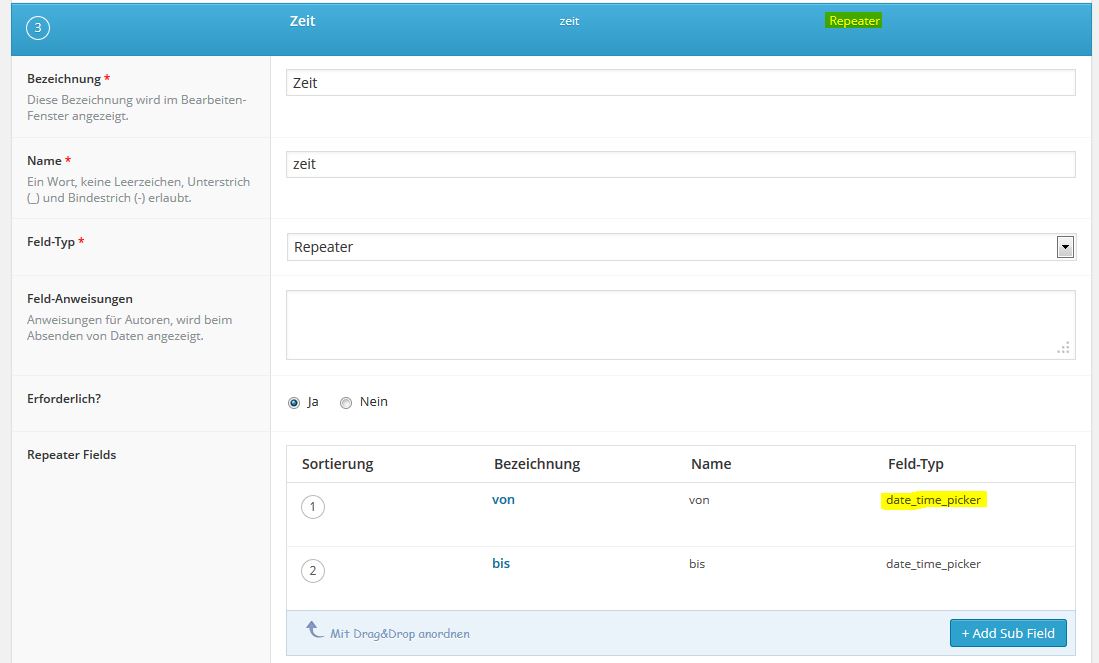 acf1.jpg.jpg


Welcome
Welcome to the Advanced Custom Fields community forum.
Browse through ideas, snippets of code, questions and answers between fellow ACF users
Forums
Helping Others
Helping others is a great way to earn karma, gain badges and help ACF development!
