
Search Results for 'q'
reply
-
In reply to Rows/blocks difference and more?
- July 5, 2021 at 12:57 am
While I have a good example:
Table, Block, and Row are options for how the fields are displayed in the admin panel. They are not unique to the ‘flexible content’ type of fields.
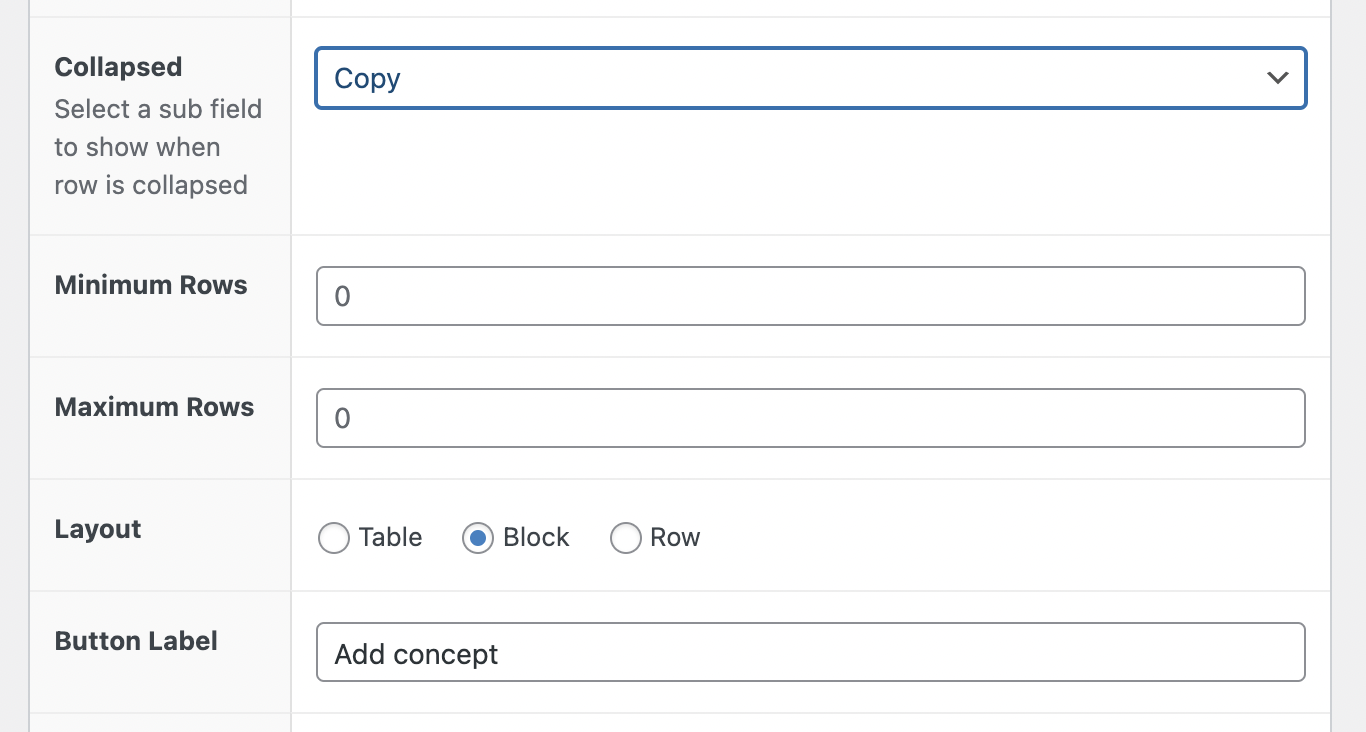
A comparison of these options would be great in the docs. I can find one. I usually just try all three and see which one works best for my specific set of fields. It’s a real challenge to set up the fields in the most compact way – so that my admin page isn’t 10 feet long.
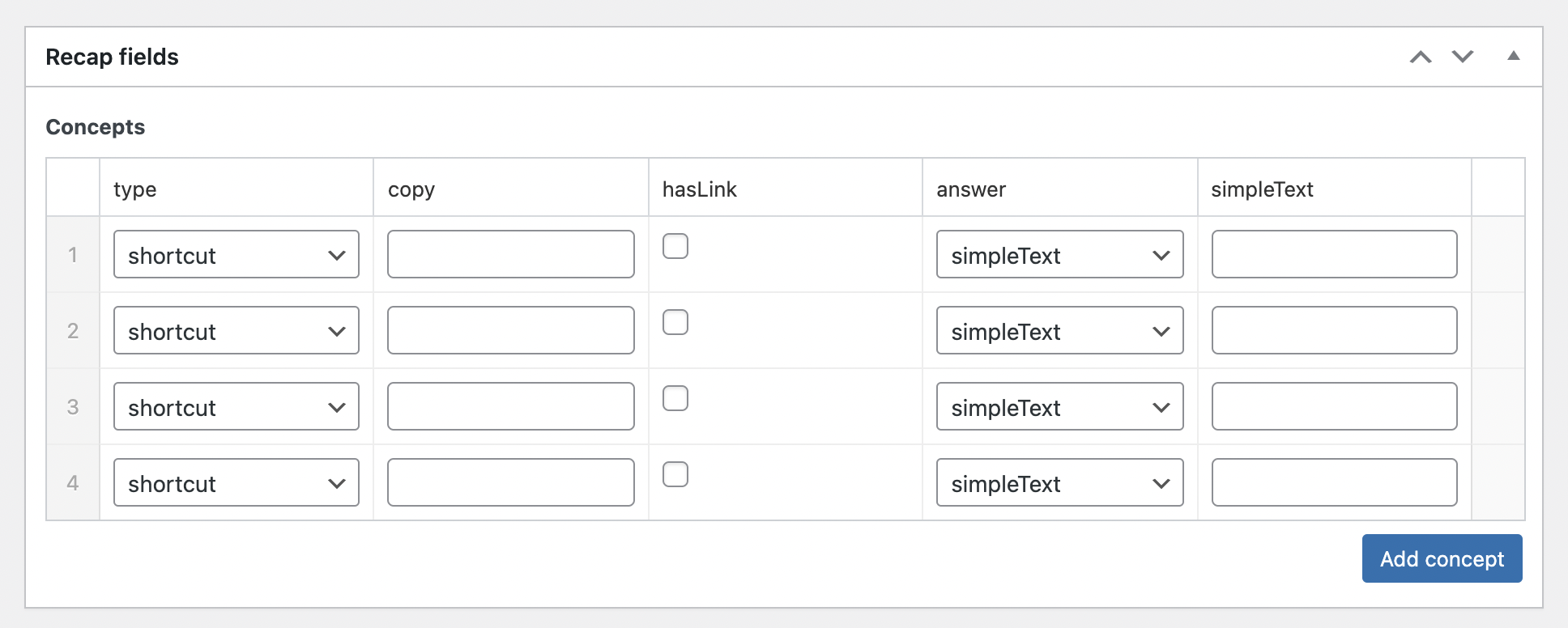
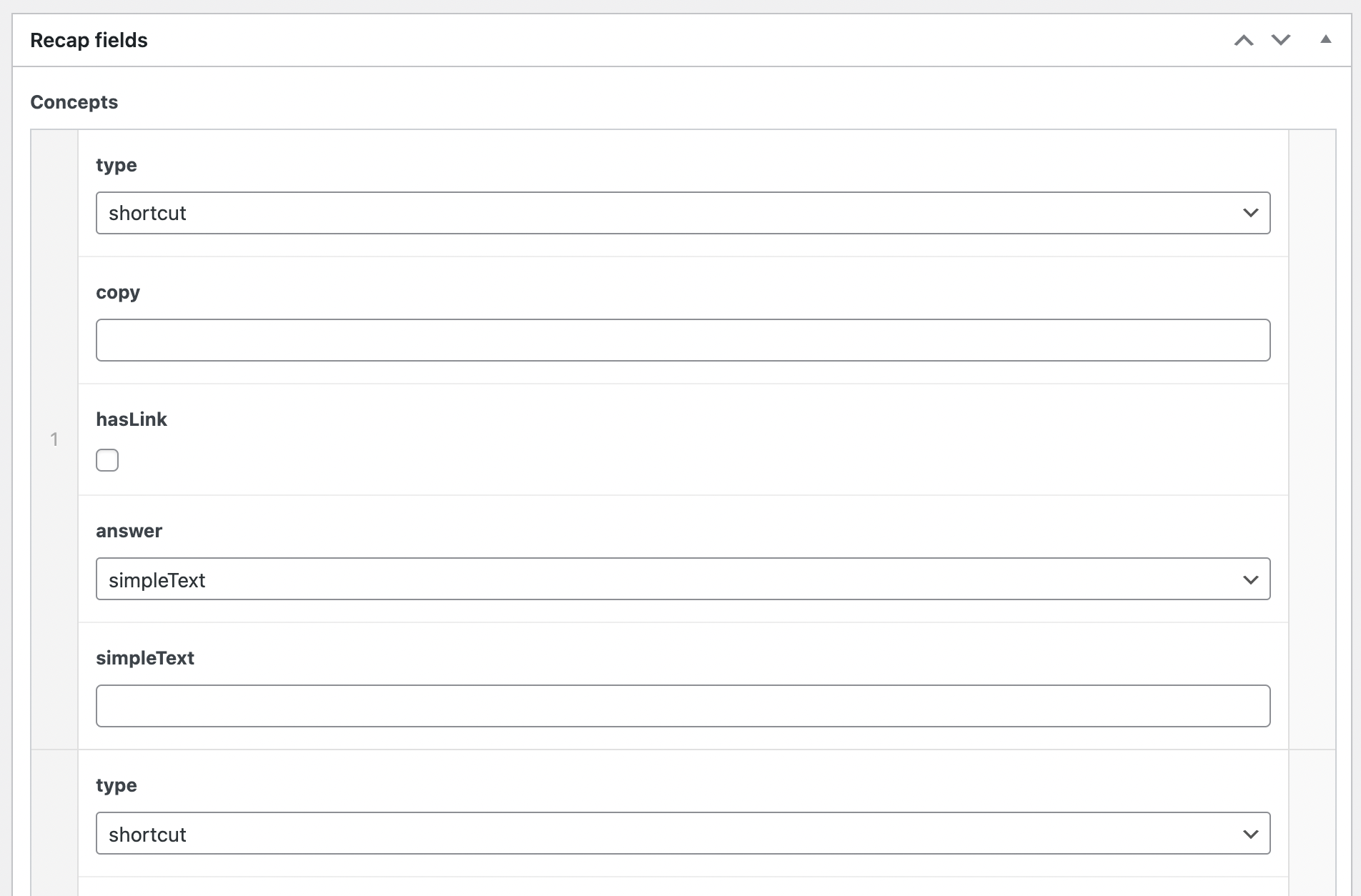
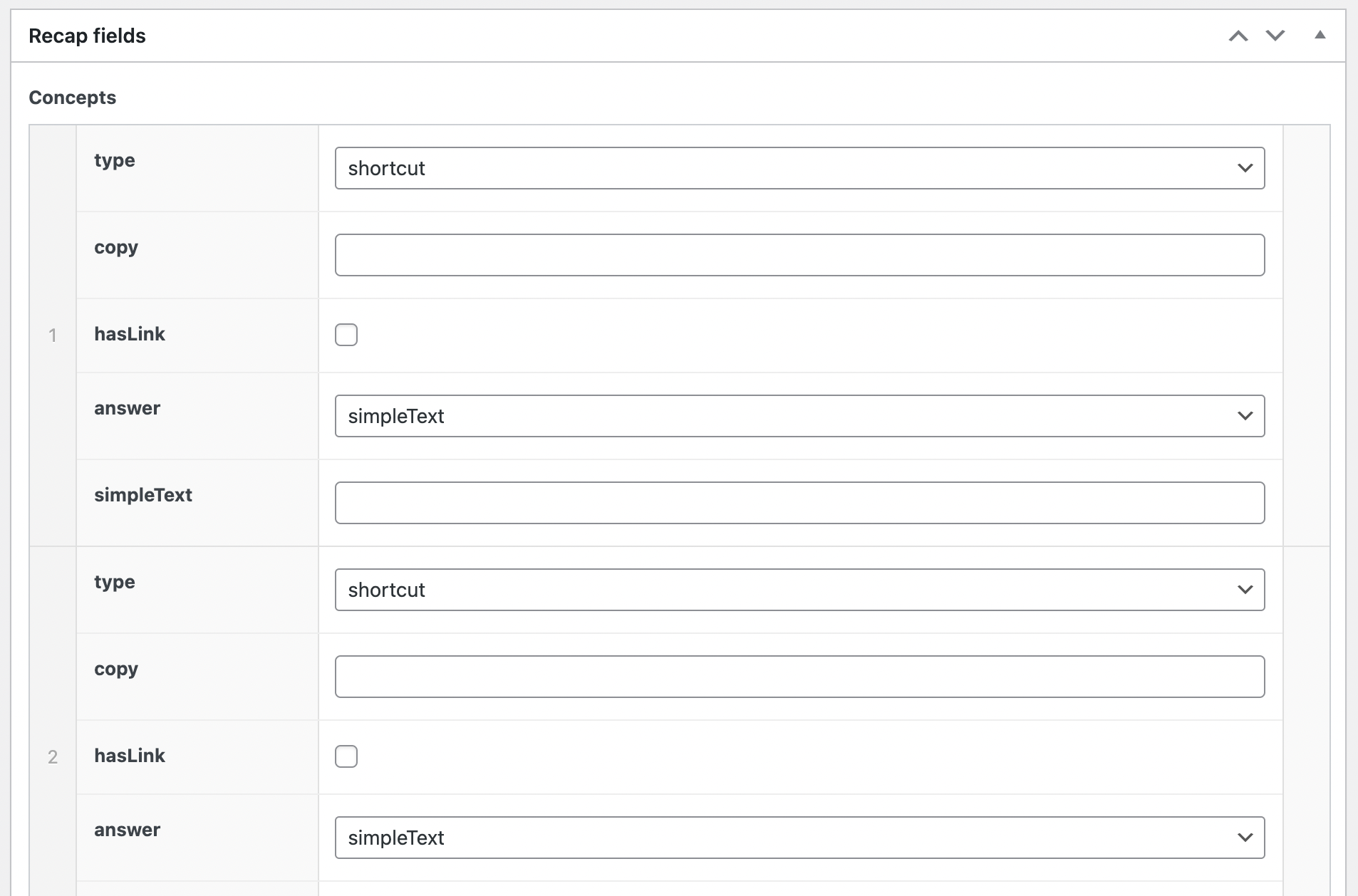
Here’s a shot of each. In this case, it’s a “repeater” field with 4 or so fields in it (and some conditional logic to hide possibly unused fields)TABLE
BLOCK
ROW
-
In reply to Initializing page builder in acf wysiwyg field
- July 1, 2021 at 11:11 pm
There is a feature request for this at https://support.advancedcustomfields.com/forums/topic/acf-field-for-add-elementor-button/.
-
In reply to Gutenberg field type
- July 1, 2021 at 7:51 am
I’m finally delving into Gutenberg, and this is a major issue for me as well. As there is no “Gutenberg-style” WYSIWG-type option, it means that if you need to add a WYSIWIG field, you have to repeat all custom theme style programming for compatibility with both Gutenberg and TinyMCE — more than twice the code (since TinyMCE requires more). Are there any solutions in the works for this yet?
-

In reply to Automatically creating sub_fields of repeater/flexible content depending on name
- July 1, 2021 at 3:09 am
There are probably a lot of ways to do it. The only thing that matters it that it is never changed.
I would probably just do something like
'key' => 'field_videorepeatertitle'You just need to use something unique.
-
In reply to Meta_Query Not Working Properly?
- July 1, 2021 at 12:57 am
Still guessing here.
It could be that the fact that you are using
'compare' => 'EXISTS'that'type' => 'NUMERIC'is being ignored. But I really do not know.Honestly I would expect your query to work. However, take a look at this https://stackoverflow.com/questions/43624283/orderby-and-order-not-working-for-numeric-meta-query
Note that the numeric values that this person wants to order by uses nested meta queries using both ‘>=’ and ‘<=’ comparison with no values so that it will return anything that has any value except an empty string or is non-existing.
-
In reply to Meta_Query Not Working Properly?
- June 30, 2021 at 10:24 pm
This is only a guess, but what I think you are running into is a conflict with an existing WP_Query parameter. “year” is an argument that already has a special meaning to WP_Query. Are the posts being ordered by the post date “Year”? Try changing your clause name to something else. It is generally a good idea to use things like “year_clause” and “num_clause” to make sure you don’t end up with conflicts in naming.
-
In reply to Automatically creating sub_fields of repeater/flexible content depending on name
- June 30, 2021 at 10:09 pm
The reason that this is happening is that every time you run the code the sub fields get assigned a different field key
key' => 'field_' . uniqid(),When ACF tries to get the value of the new field by the key there is no field value in the DB that using that’s field key. The field key must be the same every time the field is added.
-
In reply to Is there a way to retrieve the fields from a particular post by postID?
- June 30, 2021 at 9:59 pm
The ACF JS API is really only useful in the admin on the current edit page. There is not functionality in it to query posts of get values from other posts.
You would need to write your own AJAX queries to get values from other posts, or you would need to output those values on the front end to “localize” your script or otherwise include the values you need in javascript output for the page.
-
In reply to Check for a specific select sub-field value
- June 29, 2021 at 8:56 pm
<?php if ( have_rows( 'property_banners' ) ) : ?>
    <?php while ( have_rows( 'property_banners' ) ) : the_row(); ?>
        <?php if (get_sub_field( 'status_1' ) == 'Sold') {
      echo "Hi";
} ?>
    <?php endwhile; ?>
<?php endif; ?>
Works. sold needed to be Sold
-
In reply to Displaying correct postID content on blog page (home.php)
- June 29, 2021 at 2:09 am
I just did a quick look and I found this at the beginning of the ACF code that determines the current post ID
$preload = apply_filters( "acf/pre_load_post_id", null, $post_id );This can be used to determine the post ID, if you return any value it will override ACF looking for the post ID.
I do not know the specifics of what you need to do off the top of my head… and it could get complicated and there are a number of factors to consider.
Just as a for instance, you would want to return the value for
get_option( 'page_for_posts' );only if you were not inside the main loop and you actually want to show a field for the current post. I’m not exactly sure without doing a lot of testing how to determine this.this might work, but it is only a guess
add_filter('acf/pre_load_post_id', 'your_filter_name_here', 10, 2);
function your_filter_name_here($value, $post_id) {
  $queried_object = get_queried_object();
  // queried object will be page for posts if it is the blog page
  if (is_a($queried_object, 'WP_Post') && $queried_object->ID == get_option(page_for_posts')) {
    $value = intval(get_option(page_for_posts'));
  }
  return $value;
}
There is also a filter at the end of the ACF code to determine the post ID that can potentially also be used in some way.
$post_id = apply_filters('acf/validate_post_id', $post_id, $_post_id); -
In reply to How to store a repeater row number as a value in another field
- June 29, 2021 at 1:49 am
This is really awesome, @hube2 thank you. This is more elegant than an arbitrary value from
uniqid(). I appreciate you taking the time to document this. I hope it’s useful for others as well.-Alex
-
In reply to How to store a repeater row number as a value in another field
- June 29, 2021 at 1:30 am
I do something similar to the unique id plugin you found, but I do it manually. What I do is that I create a text field in each row, then I create a filter for this field to make it read only. Then I generate a value for this field, I generally do this in JavaScript but it can be done using an acf/save_post filter. The main issue with doing it based on the number of rows but if I had to… assuming that new fields can be added and fields can be moved.
add_action('acf/save_post', 'repeater_unique_row_id_on_count'); function repeater_unique_row_id_on_count($post_id) { if (have_rows('your-repeater-field')) } // first loop over repeater to get existing IDs $existing_ids = array(); while (have_rows('your-repeater-field')) { the_row(); if (get_sub_field('your-id-field')) { // note that this field should be a read only field // you could also hide this field using custom admin CSS $existing_ids[] = intval(get_sub_field('your-id-field'); } } // when while have_rows // you may need to reset rows, I don't know, next line may not be needed reset_rows() // second loop to set any missing IDs $count = 1; while (have_rows('your-repeater-field')) { the_row(); if (!get_sub_field('your-id-field')) { // id field is empty while (in_array($count, $existing_ids)) { // inc count until it does not already exist // this will cause count to skip anything that exists $count++; } // end while // record ID and update sub fiele $existing_ids[] = $count; update_sub_field('your-id-field', $count); } // end if empty id } // end while have_rows } // end if have_rows } // end function -
In reply to Mass page creation with acf
- June 29, 2021 at 1:04 am
This was so long ago that I don’t remember and I have not used any plugin to insert dummy data in a long time. Today I use the duplicate post plugin to add test posts quickly and when needed make edits after duplication to create “variations” for testing purposes. With this method I can create many posts quickly and more quickly than farting with creating filters or whatever to get ACF fields populated. Adding dummy content for testing is still one of those things I really hate. I’m actually doing that now on a project.
-
In reply to How to store a repeater row number as a value in another field
- June 29, 2021 at 12:51 am
I will say that I’ve seen a lot of interest in other support posts for an auto-incrementing id feature in ACF. For me, the question is what value to assign to this unique_id field in each repeater row.
Ideally, I’d like to have this unique_id just be an integer equal to the total number of rows in the repeater at the moment the post is saved. So if there’s only 1 row, the unique_id value of that row is 1. If there’s one and a second is added, the unique_id value of that second row is 2, and so on. If the row order is changed, who cares. The unique_id integers don’t change and can’t be edited. This integer value is already automatically auto-incremented and stored in the database in the field with the name of repeater itself – this is the number of current rows in the repeater. It’d be great to use this same auto-incrementing feature as a kind of unique_id field for each repeater row. I’ve seen numerous other requests for this feature while searching for a solution to my issue.
Instead, I’m using this https://github.com/KLicheR/wp-acf-unique_id which works fine but adds a 13 digit unique id using PHP’s
uniqid()which seems like overkill to me.It’d be really cool to see ACF integrate both an optional uneditable unique id field to repeater rows and add a way in the standard backend stack of options to select this row elsewhere in ACF. It seems from searching the documentation and support that I’m not the only one looking to achieve this.
Thanks again for reading!
-
In reply to How to store a repeater row number as a value in another field
- June 29, 2021 at 12:44 am
Yes I understand that repeater row order can change and that rows can be deleted. This is why I’m asking what the best solution is to add a unique value for a repeater row and then to store this value in another post that references the repeater row.
I’m not sure what you’re referring to with “permanent_email_address”. We are storing mailing addresses, not email addresses. And nothing is permanent as anything in the universe can change, which is what this whole process is meant to achieve – letting users add new mailing addresses while always keeping intact previous posts that reference previous addresses.
What I’m doing now is adding a “unique_id” field to the repeater row so that there’s something unique / unchanging about each repeater row to store elsewhere. Then I can add this unique_id value to any other post when I want to reference a specific row of a repeater.
I’m just not sure if this is the most efficient way to achieve this goal.
Thanks!
-
In reply to Youtube embed deffer loading
- June 26, 2021 at 11:21 pm
Commenting to remind others like myself: don’t forget to set ‘jquery’ as the dependency when enqueueing John’s script. Otherwise, you might receive “Uncaught TypeError: url.indexOf is not a function”.
add_action( 'wp_enqueue_scripts', function() {
    wp_enqueue_script('load-deferred-videos-js', get_template_directory_uri() . '/static/js/load-deferred-videos.js', ['jquery']);
});
Notice
['jquery']as the third argument towp_enqueue_script.P.S.
If you only want to load this script on a custom post type, such as “car”, then wrap thewp_enqueue_scriptfunction inside an if-clause.if (is_singular('car')) { wp_enqueue_script('load-deferred-videos-js', get_template_directory_uri() . '/static/js/load-deferred-videos.js', ['jquery']); } -
In reply to Sending user to Tab on validation errors
- June 26, 2021 at 5:29 pm
@marcelo2605 thanks for your solution.
This one also works for repeater fields:jQuery(document).ready(function ($) { acf.add_filter('validation_complete', function (json) { if (json.errors) { $.each(json.errors, function (index) { var field = $('[name="' + json.errors[index].input + '"]').parents('.acf-field'); var repeater = field[1]; var previous_tabs = $(repeater).prevAll('[data-type="tab"]'); var tab_data_key = $(previous_tabs[0]).attr('data-key'); $('.acf-tab-wrap a[data-key=' + tab_data_key + ']').click(); }); } return json; }); }); -
In reply to Display parent\'s relationship on child post
- June 25, 2021 at 9:53 pm
I have a feeling that I am not completely understanding how the relationships between your post types and posts work.
But I think I’ve worked out what you want to do
function my_post_object_query($args, $field, $post_id) { $parent = wp_get_post_parent_id($post_id); $meta_query = array( array( 'key' => 'pro_to_con', 'value' => $parent, 'compare' => 'LIKE' ) ); $args['meta_query'] = $meta_query; return $args; } -
In reply to group field in frontend page
- June 25, 2021 at 12:01 pm
Is the the only post that is created with with the post_author set to the user ID?
In the “customers” custom post type , yes.
-
In reply to Display parent\'s relationship on child post
- June 25, 2021 at 12:01 pm
John,
Your answers to other ACF user’s questions have helped me tremendously in learning ACF. I’m a fan of yours and I appreciate your reply.
I tried your suggestion of
$value = get_field('field_name', $post->post_parent);and it’s still displaying all of the posts – including those without a relationship to the parent. I apologize, I’m still a bit lost, so I wonder if I explained my question properly.
The post object field on the form on the child post should filter posts that share a relationship with the child post’s parent.
I’m still missing something…
-
In reply to group field in frontend page
- June 25, 2021 at 11:18 am
How is the post created?
/*
 * Agregar entrada personalizada "clientes" cuando se registra un nuevo usuario
 */

add_action( 'user_register', 'agregar_cp_clientes_usuario', 10, 1 );

function agregar_cp_clientes_usuario( $user_id ) {
   // Get user info
    $user_info = get_userdata( $user_id );
    $user_roles = $user_info->roles;

    // New code added
    $this_user_role = implode(', ', $user_roles );

    if ($this_user_role == 'cliente') {

        // Create a new post
        $user_post = array(
            'post_title'   => $user_info->user_nicename,
            'post_author'   => $user_info->ID,
            'post_status'  => 'publish', // <- here is to publish
            'post_type'    => 'clientes', // <- change to your cpt
        );
        // Insert the post into the database
        $post_id = wp_insert_post( $user_post );
    }
}
What is it that causes the user and the post that is automatically created related to each other?
They are related by the author of the post.
That is, the post is added automatically, when a new user registers. -
In reply to group field in frontend page
- June 25, 2021 at 11:07 am
How can I do that?
You also need to use the post id of the post that the user can edit, so you’ll need to get the post related to the user and set “post_id” in acf_form or ACF will save the values to whatever page is currently being displayed.
-
In reply to ACF get image from product term
- June 25, 2021 at 4:02 am
if get_the_terms() is working then it will return an array of terms rather than one term
$terms = get_the_terms( get_the_ID(), 'brand' ); if (!empty($terms)) { $term = $terms[0]; ?><img src="<?php the_field('brand_logo', $term); ?>" /><?php } -
In reply to ACF get image from product term
- June 25, 2021 at 2:41 am
I had a bit of that feeling. Before I got to the code I was laying out the thread with, I had also tried with get_the_terms()
I have again made the code below, but here too I can not make it work
<?php
function prefix_add_brand_before_variations_form() {

	$term = get_the_terms( get_the_ID(), 'brand' );

       if( ! empty( $term ) ) { ?>

  		<img src="<?php the_field('brand_logo', $term); ?>" />


 		<?php }

}

add_action('woocommerce_before_variations_form', 'prefix_add_brand_before_variations_form', 10, 0);
I have tried both
get_the_terms()andget_post_terms(). If I useget_post_terms()my product pages shows a critical error. -
In reply to ACF get image from product term
- June 25, 2021 at 2:03 am
Your issue is that
$queried_object = get_queried_object();is returning the post object for the current product.What you need to do is to use get_post_terms() or the function in WC that returns the “brand” taxonomy term that is associated with the product. Then use what is returned from that to get the image from the term.


Welcome
Welcome to the Advanced Custom Fields community forum.
Browse through ideas, snippets of code, questions and answers between fellow ACF users
Forums
Helping Others
Helping others is a great way to earn karma, gain badges and help ACF development!
