
Search Results for 'Wysiwyg'
reply
-
In reply to WYSIWYG broken – No console errors
- December 13, 2013 at 12:22 am
Yes, has always been happening with WYSIWYG. Thank you for the suggestion Elliot, I will try setting up a testing environment today.
Thanks again for the amazing plugin.
-
In reply to WYSIWYG field html view
- December 12, 2013 at 1:28 pm
@elliot, thanks so much for looking into this. I just started working with ACF and it is freakin awesome. I just happened to notice today that the HTML in the WYSIWYG seemed to be minified and then came across this post. I would be very happy if it can be made to emulate the native WordPress editor, but I also understand if it is an issue with tinyMCE object.
-

In reply to How do I automatically wrap images with div in WP WYSIWYG?
- December 12, 2013 at 1:07 pm
Hi @ericadecker
Can you please update the WP WYSIWYG add-on from github. I just released a fix so that now it uses the acf_the_content filter correctly, and your code should then work.
Thanks
E -
In reply to WYSIWYG broken – No console errors
- December 12, 2013 at 12:43 pm
Hi @tomfordweb
Is the same issue happening with the normal ACF WYSIWYG field?
If so, there is definitely a conflict between ACF and either a plugin or theme code.
Perhaps you could install a fresh WP + ACF, create a WYSIWYG field and slowly add in all the plugins / theme until the issue occurs.
That way, you can target exactly what code is causing the issue
Thanks
E -
In reply to WYSIWYG broken – No console errors
- December 11, 2013 at 10:35 am
Hi @tomfordweb
It is possible that the WP WYSIWYG add-on has a bug with the current version of WP and ACF. I’ll do some testing and let you know what I find.
Just to clarify, no console errors on a refreshed page with the console already open?
Thanks
E -
In reply to Lock position in flexible content
- December 10, 2013 at 11:39 pm
Hi @Excelmans Graphics
If you always want a text block before any other flex content could you not just create a separate textarea/WYSIWYG and place it before your flex content (on the front end – you could always place it before the flex field in admin too to ensure it makes more sense to your client)? That way you always know it’s going to appear before any content your client adds.
Not sure I can see the benefit to be able to lock content position for this use case – I guess it might be useful in cases where a certain content type needs to appear at a particular point in a loop e.g. every fifth item) but I think that’s possibly too edge to be worth baking in. Elliot might have other ideas!
-
In reply to Taxonomy Relationship
- December 10, 2013 at 4:46 pm
Thanks Elliot, your code gave me a good head start, my end code is a bit different but does what i want!
In the end i changed Years to a Country taxonomy. Basic setup was as follows:
Custom Post Type: Speakers
Taxonomy: Country (attached to Speakers)
ACF Speakers Field Group with 2 fields:
– speaker_title
– speaker_photo
ACF Page Field Group with 1 Flexible Content field with 2 layouts:
– basic_wysiwyg (1 wysiwyg field)
– speakers_country_list (1 taxonomy field to choose multiple countries, set to return as Term Object)The following code outputs it all with Countries as headings before each list of Speakers within that country:
<?php /* * Loop through a Flexible Content field and display it's content with different views for different layouts */ while(has_sub_field("flexible_content")): ?> <?php if(get_row_layout() == "basic_wysiwyg"): // layout: Basic Wysiwyg ?> <div style="border: 1px solid red; margin: 20px; padding: 20px;"> <?php the_sub_field("wysiywg"); ?> </div> <?php elseif(get_row_layout() == "speakers_country_list"): // layout: Speaker Country List ?> <div style="border: 1px solid green; margin: 20px; padding: 20px;"> <?php $taxterms = get_sub_field("country"); ?> <?php foreach ($taxterms as $taxterm) : ?> <?php $args = array( 'post_type' => 'speakers', 'tax_query' => array( array( 'taxonomy' => 'speakers_country', 'field' => 'id', 'terms' => $taxterm->term_id ) ) ); $myquery = new WP_Query( $args ); if($myquery->have_posts()) : ?> <h2>People in <?php echo $taxterm->name; ?></h2> <ul> <?php while ( $myquery->have_posts() ) : $myquery->the_post(); ?> <li style="margin-bottom: 15px;"> <?php if (get_field('speaker_photo')) { $attachment_id = get_field('speaker_photo'); $size = "thumbnail"; echo wp_get_attachment_image( $attachment_id, $size ); echo "<br />"; } ?> <strong><?php the_title(); ?></strong><br /> <?php the_field("speaker_title"); ?></li> <?php endwhile; ?> </ul> <?php endif; ?> <?php wp_reset_query(); ?> <?php endforeach; ?> </div> <?php endif; ?> <?php endwhile; ?> -
In reply to WYSIWYG fields & full screen mode conflict
- December 10, 2013 at 4:08 pm
Thanks for the bug report. I’ll try to reproduce the issue myself.
In the mean time, can you record any pattern or similarity that you see when this issue occurs. Hopefully, we can spot the pattern and figure out where it stems from.
Such as: Issue occurs when page is still loading images,
or: Issue occurs when the edit screen contains multiple WYSIWYG editorsThanks
E -
In reply to Wysiwyg Editor and jQuery Colorbox
- December 7, 2013 at 10:34 am
Thanks for the reply. I’m not sure how to demonstrate that. The only way to really see it is in the page source. If you view this page and view the source, you will see an image named lemons-avacados-01-80×80.jpg. In that image tag is a class called “colorbox-001”. This was automatically inserted when I inserted that image into the WYSIWYG editor for that page.
By contrast, view this page and view source, you’ll see an image named meadow-lakes-01.jpg but there is no class for colorbox even though it was inserted through the WYSIWYG custom field. Does that help?
-
In reply to Disable ACF in Backend
- December 4, 2013 at 11:41 pm
Hey Elliot, thanks for your fast reply.
Dequeue-ing the .js files works, but now i get the error
“Uncaught ReferenceError: acf is not defined”the Admin-Page still loads some .js stuff:
<script type="text/javascript"> (function($) { // vars acf.post_id = 3590; acf.nonce = "341a2fa2dd"; acf.admin_url = "http://beta.qm-leinerstift.de/wp-admin/"; acf.ajaxurl = "http://beta.qm-leinerstift.de/wp-admin/admin-ajax.php"; acf.wp_version = "3.7.1"; // new vars acf.o = {"post_id":3590,"nonce":"341a2fa2dd","admin_url":"http:\/\/beta.qm-leinerstift.de\/wp-admin\/","ajaxurl":"http:\/\/beta.qm-leinerstift.de\/wp-admin\/admin-ajax.php","wp_version":"3.7.1"}; acf.l10n = {"core":{"expand_details":"Details anzeigen","collapse_details":"Details ausblenden"},"validation":{"error":"Fehler bei \u00dcberpr\u00fcfung: Ein oder mehrere Felder werden ben\u00f6tigt."},"image":{"select":"Bild ausw\u00e4hlen","edit":"Bild bearbeiten","update":"Bild aktualisieren","uploadedTo":"zu diesem Artikel hochgeladen"},"file":{"select":"Datei ausw\u00e4hlen","edit":"Datei bearbeiten","update":"Datei aktualisieren","uploadedTo":"zu diesem Artikel hochgeladen"},"relationship":{"max":"Max. Werte erreicht ( {max} Werte )","tmpl_li":"\n\t\t\t\t\t\t\t<li>\n\t\t\t\t\t\t\t\t<a href=\"#\" data-post_id=\"<%= post_id %>\"><%= title %><span class=\"acf-button-remove\"><\/span><\/a>\n\t\t\t\t\t\t\t\t<input type=\"hidden\" name=\"<%= name %>[]\" value=\"<%= post_id %>\" \/>\n\t\t\t\t\t\t\t<\/li>\n\t\t\t\t\t\t\t"},"google_map":{"locating":"Locating","browser_support":"Sorry, this browser does not support geolocation"},"date_picker":{"closeText":"Fertig","currentText":"Heute","monthNames":["Januar","Februar","M\u00e4rz","April","Mai","Juni","Juli","August","September","Oktober","November","Dezember"],"monthNamesShort":["Jan","Feb","Mrz","Apr","Mai","Jun","Jul","Aug","Sep","Okt","Nov","Dez"],"monthStatus":"Zeige einen anderen Monat","dayNames":["Sonntag","Montag","Dienstag","Mittwoch","Donnerstag","Freitag","Samstag"],"dayNamesShort":["So","Mo","Di","Mi","Do","Fr","Sa"],"dayNamesMin":["S","M","D","M","D","F","S"],"isRTL":false}}; acf.fields.wysiwyg.toolbars = {"full":{"theme_advanced_buttons1":"bold,italic,strikethrough,bullist,numlist,blockquote,justifyleft,justifycenter,justifyright,link,unlink,wp_more,spellchecker,fullscreen,wp_adv,separator,wpUserAvatar,avia_builder_button","theme_advanced_buttons2":"formatselect,underline,justifyfull,forecolor,pastetext,pasteword,removeformat,charmap,outdent,indent,undo,redo,wp_help,code","theme_advanced_buttons3":"","theme_advanced_buttons4":""},"basic":{"theme_advanced_buttons1":"bold,italic,underline,blockquote,strikethrough,bullist,numlist,justifyleft,justifycenter,justifyright,undo,redo,link,unlink,fullscreen"}}; })(jQuery); </script> -
In reply to Image field vs WYSIWYG or a better way?
- December 4, 2013 at 11:18 am
Hi Elliot,
Thanks for the advise, I thought it was probably a more robust solution to use but just wanted to confirm I was on the right track.
I will brush on my PHP and re-read the documentation on the image field to implement.
On the repeater field I’ll definately make a purchase on that soon, I was just wanting to get to grips with a slightly simpler (if more repetitive) version dealing with one field at a time as a starting point.
Out of interest is there a donate option somewhere as I didn’t notice an obvious one. I’ll be buying the repeater add-on and possibly the gallery one but a general donation option might also be good for such a great and useful plugin coupled with great support! 🙂
Kind Regards
Andrew
-
In reply to Remove/filter WSIWYG output – remove HTML tags
- December 4, 2013 at 11:10 am
Hi Elliot,
I’ve just copied the code from you example as below – but the strange thing is that there isn’t any code on line 35 – the file ends on line 33 … I created the functions.php file just for this so it’s the only thing in it?
Is it because I’ve closed the php tag at the end – I’m sure I read somewhere it can cause problems?
Entire code of functions.php
<?php add_filter( 'acf/fields/wysiwyg/toolbars' , 'my_toolbars' ); function my_toolbars( $toolbars ) { // Uncomment to view format of $toolbars /* echo '< pre >'; print_r($toolbars); echo '< /pre >'; die; */ // Add a new toolbar called "Very Simple" // - this toolbar has only 1 row of buttons $toolbars['Very Simple' ] = array(); $toolbars['Very Simple' ][1] = array('bold' , 'italic' , 'underline' ); // Edit the "Full" toolbar and remove 'code' // - delet from array code from http://stackoverflow.com/questions/7225070/php-array-delete-by-value-not-key if( ($key = array_search('code' , $toolbars['Full' ][2])) !== false ) { unset( $toolbars['Full' ][2][$key] ); } // remove the 'Basic' toolbar completely //unset( $toolbars['Basic' ] ); // return $toolbars - IMPORTANT! return $toolbars; } ?> -
In reply to Image field vs WYSIWYG or a better way?
- December 4, 2013 at 10:25 am
Hi @Andrew C
100% I would use an image field over the WYSIWYG field, simply for the fact that if your user selects the incorrect image size, then the website will break.
The less a client can edit, the better your website will remain intact!
Please refer to the image field documentation to see how you can load any size you wish for an image.
The best option is to set the image field’s ‘return type’ to ‘image array’. This will give you an array containing all the image data including a ‘sizes’ array which holds all the different size urls and the width / height info.
If PHP is not your strong point, I would set aside na hour to read over some basic array tutorials and play around with some debug code like so:
<?php

$image = get_field('image_field');

echo '<pre>';
	print_r( $image );
echo '</pre>';
die;

 ?>
As for the repeater field, yes, this is a much smarter way to organise your fields and will simplify your template code!
Check out the have_rows function to loop through repeater field data!
Hope that helps.
Thanks
E -
In reply to Wysiwyg Editor not appearing in edit page
- December 3, 2013 at 10:28 am
Hi @Sreejesh
Thanks for the info and solution.
I’ll add this to the to-do and hope to find some better compatibilityCheers
E -
In reply to Wysiwyg Editor not appearing in edit page
- December 2, 2013 at 10:21 pm
I found the issue, it was because I installed ckeditor wordpress plugin. Due to javascript conflict native Wysiwyg editor of ACF disabled. After disabling ckeditor plugin. ACF Wysiyg editor working properly.
-
In reply to Wysiwyg Editor not appearing in edit page
- December 2, 2013 at 6:54 pm
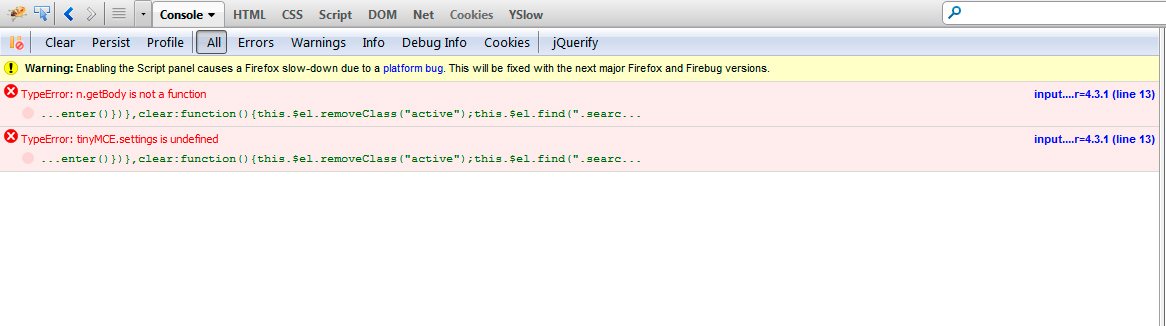
Firebug shows a different erro message:
TypeError: n.getBody is not a function
TypeError: tinyMCE.settings is undefined
Attached screenshot
 firebugerror....jpg
-
In reply to theme shortcodes in wysiwyg field
- December 2, 2013 at 10:22 am
Hi @dynamyc
Thanks for the foolow up. This confirms that the shortcode is indded working correctly, but either the script is missing or there is a JS error on the page preventing it from working.
Can you please open your console log and report any JS errors on the page?
Next, can you search the source code on the page for the javascript file. Is it included at all?
Lastly, search through the 3rd party plugin to find out how the script is included. Perhaps it is using the ‘the_content’ filter to add the script? If this is the case, then you will need to run your ACF value through this filter like so:
echo apply_filters('the_content', get_field('field_name'));Thanks
E -
In reply to Google Maps Field doesn’t work in Tabs
- December 2, 2013 at 3:42 am
I have a weird issue here – whenever the google map field is not inside a tab, it shows fine, but once I put it inside a tab it disables the WYSIWYG editor (basically the editor renders as a standard textarea field).
EDIT: It’s working now, but I’m having the same issue as Aurelien Denis.
-
In reply to WYSIWYG Styling
- December 1, 2013 at 8:01 am
I know it’s been a while for the rest of the commenters on this thread, but I found a way (maybe a little hacky) to do this. In my theme
functions.phpfile I added:add_filter( 'tiny_mce_before_init', 'override_mp6_tinymce_styles' ); function override_mp6_tinymce_styles( $mce_init ) { // make sure we don't override other custom <code>content_css</code> files $content_css = get_stylesheet_directory_uri() . '/bd-editor.css'; if ( isset( $mce_init[ 'content_css' ] ) ) $content_css .= ',' . $mce_init[ 'content_css' ]; $mce_init[ 'content_css' ] = $content_css; return $mce_init; }mp6 styling was getting in the way, so I hooked into the
tiny_mce_before_initfilter to force my editor styles to load anyway. Hope this helps someone. -
In reply to WYSIWYG Styling
- December 1, 2013 at 7:26 am
Would also love to see this — clients often ask for editor styles to match their display styles.
-
In reply to theme shortcodes in wysiwyg field
- November 29, 2013 at 11:16 pm
The DOM markup is produced by the shortcode, but the scripts which should be pushed are missing and that’s why the div is empty.
-
In reply to theme shortcodes in wysiwyg field
- November 29, 2013 at 10:22 am
Hi @dynamyc
ACF does not include any 3rd party scripts or styles. This is not possible for ACF to do.
Can you please read over my previous comment and answer the first question?
It is important for us to clarify what is and isn’t working? Is the DOM markup being produced by your shortcode?
Thanks
E -
In reply to WYSIWYG anchor not working
- November 29, 2013 at 9:51 am
Hi @floq-design
Thanks for the clarification. I’ll do some testing on the options page.
Thanks
E -
In reply to Remove/filter WSIWYG output – remove HTML tags
- November 29, 2013 at 9:43 am
Hi @Andrew C
Thanks for the question.
= Custom WYSIWYG toolbar buttons =
Yes, please read this article to create a custom set of buttons (only link)
http://www.advancedcustomfields.com/resources/tutorials/customize-the-wysiwyg-toolbars/= filter / remove markup =
ACF does not contain a function for this, but I’m sure WP or PHP (please search on google) has a function!= private posts =
Yes, ACF works with private posts just fineThanks
E -
In reply to theme shortcodes in wysiwyg field
- November 29, 2013 at 5:24 am
I’ve asked the plugin developer and he said that his plugin it pushes also custom styles and scripts to the header and I have to make sure that the ACF plugin pushes them.
Do you have any idea how can I check or make the necessary scripts and plugins to be pushed inside the ACF plugin ?


Welcome
Welcome to the Advanced Custom Fields community forum.
Browse through ideas, snippets of code, questions and answers between fellow ACF users
Forums
Helping Others
Helping others is a great way to earn karma, gain badges and help ACF development!
