
Search Results for 'woocommerce'
reply
-

In reply to Woocommerce+ACF return field value via functions.php
- August 14, 2017 at 3:35 am
Hi @avegas
Please change your code to:
add_filter( 'woocommerce_page_title', 'custom_title' ); function custom_title( $title ) { $title = get_field("h1_title", "product_cat_" . $product_cat_object->term_id); return $title; } -
In reply to Add ACF input to woocommerce admin panel
- August 8, 2017 at 6:10 am
I tried but there seems to be no way to make an ACF field group display inside a WooCommerce product data tab in admin. So I resorted to a jQuery hack. It’s “ugly” but it works. The short answer is:
$("#source").appendTo("#destination");The long answer is, create a new custom product data tab as a placeholder:
// Register New Product Data Tab
add_filter( 'woocommerce_product_data_tabs', 'add_custom_product_data_tab' );
function add_custom_product_data_tab( $tabs ) {
	$tabs['my-custom-tab'] = array(
		'label' => 'Dates & Times',
		'target' => 'my_custom_product_data',
	);
	return $tabs;
}

// Create Product Data Tab Content
add_action( 'woocommerce_product_data_panels', 'add_custom_product_data_fields' );
function add_custom_product_data_fields() {
	echo '<div id="my_custom_product_data" class="panel woocommerce_options_panel"></div>';
}
Then add some JS & CSS to admin:
// Add JS & CSS to move and style ACF fields inside Product Data Tab
function admin_style() {
	wp_enqueue_script('admin-script', get_template_directory_uri() . '/js/admin.js', array( 'jquery' ) );
	wp_enqueue_style('admin-styles', get_template_directory_uri().'/css/style-admin.css');
}
add_action('admin_enqueue_scripts', 'admin_style');
My ‘admin.js’ file script looks like this:
jQuery(document).ready(function($) {
	$("#acf-group_5988b10b578ea").appendTo("#my_custom_product_data");
});
And my ‘admin-style.css’ file looks like this:
#my_custom_product_data {
	padding: 13px;
}
#my_custom_product_data .acf-label {
	margin: 0;
}
#my_custom_product_data .acf-label label {
	font-weight: 400;
	font-size: 12px;
}
All this does is move the ACF field group from one div to another using jQuery and adds some CSS to iron out some ACF and WOO style conflicts (i.e. make the ACF panel look more like the WOO-native panels)
-

In reply to Frontend form without submit
- July 27, 2017 at 5:30 pm
Thanks @john huebner
I did try that but in the end had to leave this option. Once the main WooCommerce form was triggered, it would then come up with a leave this page error, I assume it’s because I had the ACF form as well
Many thanks for your reply though
-
In reply to Can't see custom fields on Woocommerce shop page
- July 21, 2017 at 3:34 am
Thanks for the reply @hube2. I’m getting that value from a field in the backend that is a drop-down selector. This selects from a post type called ‘Sidebars’. The idea is that you can create any number of sidebars, add content into them, then add them onto any page from the drop-down. As I mentioned, this works 100% on any standard page outside of Woocommerce.
In answer to your second question, the example I pasted above is in the generic sidebar.php file which is pulled into all page templates. It’s not wrapped in any kind of post loop.
Thanks
-
In reply to ACF display issues
- June 4, 2017 at 10:48 am
I did experiment:
– fresh install, latest versions of components – WP 4.7.5, Woocommerce 3.0.7 and ACF 5.5.14;
– extremely minimal theme, with empty index.php, empty style.css, and function.php file with content for creating custom product type:// initial actions function custom_init() { // add custom product type term add_custom_product_type_term(); // custom product type class class WC_Product_Test extends WC_Product { public function __construct($product) { $this->product_type = 'test'; parent::__construct($product); } } } add_action('init', 'custom_init'); // add custom product type to product type selector function custom_product_type_selector ($types) { $types['test'] = 'Test'; return $types; } add_filter('product_type_selector', 'custom_product_type_selector'); // add custom product type term function add_custom_product_type_term() { $product_types_existing = get_terms(array( 'taxonomy' => 'product_type' ,'hide_empty' => false )); $exists = false; foreach ($product_types_existing as $pte) if ($pte->slug == 'test') $exists = true; if (!$exists) wp_insert_term('test', 'product_type'); }– two product categories (‘Category 1’ and ‘Category 2’) and two tags (‘Tag 1’ and ‘Tag 2’);
– field group created, for post type ‘product’ with product_type ‘test’;
– field group created, for post type ‘product’ with tag ‘Tag 1’;I run same actions:
1. Creating / editing product: on product type ‘Test’ select / deselect, corresponding acf group doesn’t appears / disappears.
No PHP errors logged. Console shows nothing.2. Creating / editing product: on adding / removing tag ‘Tag1’, corresponding acf group doesn’t appears / disappears.
No PHP errors logged. Console shows nothing.3. Editing product with type ‘test’, acf group is visible. Selecting / deselecting product categories causes acf group disappearing.
Initial state – both categories are selected.
After one category deselected, ajax fires with form data:
post_id:668
post_taxonomy[]:
post_taxonomy[]:15
action:acf/post/get_field_groups
exists[]:group_593352f539930
exists[]:group_58a595ba1534b
nonce:55b5acd041
Response:
{"success":true,"data":[]}After one category selected, ajax fires with form data:
post_id:668
post_taxonomy[]:
post_taxonomy[]:15
post_taxonomy[]:16
action:acf/post/get_field_groups
nonce:55b5acd041
Response:
{"success":true,"data":[]}After other category deselected, ajax fires with form data:
post_id:668
post_taxonomy[]:
post_taxonomy[]:16
action:acf/post/get_field_groups
nonce:55b5acd041
Response:
{"success":true,"data":[]}Disappearing of acf groups, when adding / removing product image, or adding / removing tag – such behavior is not observed yet.
So for the moment the biggest issue still exists, and it seems, that ajax call with action ‘acf/post/get_field_groups’ causes the problem. Am I right?
-
In reply to How do I add WooCommerce Attributes?
- May 18, 2017 at 1:24 am
Does anyone know why this would no longer work in Woocommerce 3.0.x?
All tabs in wp-admin no longer show & ‘visual’ tab for text editor no longer works! Does anyone from support ever read these forums?
-
In reply to How do I add WooCommerce Attributes?
- May 17, 2017 at 10:03 am
Hmm, it seems that this doesn’t work properly with Woocommerce 3.0.x – the fields still show on the front-end, but the admin GUI is all messed up! 🙁
-
In reply to Select2 in repeater broken after update to 5.5.13
- May 16, 2017 at 11:35 am
Hey Elliot, nice to see you jumping in on this. I was in the process of editing my ACF version as you mentioned, but upon checking for updates I see you posted a new version, 5.5.14, maybe in an effort to force other installs to update. Anyway, just to be sure I changed my version and then updated ACF.
Bad news though, it did NOT work for me. Bummer. John’s original simple filter how did work, so I’m going back to that for now, as it continues to work and so far not cause issues with my WooCommerce install.
-
In reply to Cannot Query By Custom Field
- May 16, 2017 at 9:17 am
woocommerce. I’ve also bought/downloaded ACF for woocommerce to integrate. But i cant seem to figure it out.
-
In reply to Add row to repeater for each product purchased and predefine post object value
- May 13, 2017 at 1:17 am
For anyone looking to use this, I’ve amended my code:
/* ACF - add repeater with purchases to user profile after order complete */ function mm_add_repeater_rows_on_order_complete( $order_id ) { // set order object $order = wc_get_order( $order_id ); // add rows for each product foreach( $order->get_items() as $item_id => $item ) { // get repeater field key $field_key = 'field_58b69a624605c'; // get user id $user = wp_get_current_user(); $user_id = 'user_' . $user->id; // set field value as product name $value = get_field( $field_key, $user_id ); $value[] = array( 'mm_user_challenge' => $item['product_id'] ); // update the field update_field( $field_key, $value, $user_id ); } // add order note to confirm $order->add_order_note( __( 'Challenges successfully added to user profile.', 'woocommerce' ) ); } add_action( 'woocommerce_order_status_completed', 'mm_add_repeater_rows_on_order_complete', 10, 1 ); -
In reply to Select2 in repeater broken after update to 5.5.13
- May 12, 2017 at 11:16 pm
Just to add some more data for what works and doesn’t:
– the acf/settings/select2_version filter doesn’t help
– I also triedacf_update_setting('select2_version', 4 );which didn’t work either
– I am using WooCommerce, and it’s WC’s select2 which gets enqueued
– when attempting to add a new repeating field set in a form in admin I get the same js error as reported by others
– reverting to ACF 5.5.11 resolves the issue -
In reply to Select2 in repeater broken after update to 5.5.13
- May 12, 2017 at 8:22 pm
I am not sure, but it seems like that is the case. The error references the select2 file from the WordPress SEO folder, when disabling that plugin, the same error references the select2 file from the Woocommerce folder. When disabling Woocommerce there are no errors.
-
In reply to Select2 in repeater broken after update to 5.5.13
- May 11, 2017 at 10:13 pm
yes, you’re right. thanks for the hint. In my case it was woocommerce that was in conflict.
-
In reply to Select2 in repeater broken after update to 5.5.13
- May 11, 2017 at 9:39 pm
Yeah, this has caused some pretty major errors on one my sites (in production).
I dug into the console a little and saw that the select2.min.js file was actually being called from the Yoast SEO plugin folder. I then deactivated Yoast and found Woocommerce causing the exact same issue. Once I deactivated Woocommerce ACF started working as expected.
-
In reply to Woocommerce 3 and Order's CF
- April 28, 2017 at 10:58 pm
Same here using Woocommerce 3.0.4, no custom fields are updating, both my own outside of ACF. Anyone found a solution? I don’t see any difference with rollback to 3.0.1 or latest.
-
In reply to get_field() doesn't return a value when fields are created with update_field()
- April 28, 2017 at 4:30 pm
Hi,
I’m not sure if it’s valid for this conversation, but…. I just wanted to update You. I found a solution, to what was my problem.
The context
I got at WordPress site with WooCommerce. Since adding and updating products one by one get tiresom if you got a few hundred products, I make changes and import new products via plugin ‘WP AllImport’.There’s where my problem emerges. ACF wont show labels and values for advanced custom fields that have been “filled”/imported via a service like WP AllImport (is that what is called a programmatic import?). Unless, I open every product and re-save it. Just re-save, nothing more, for the labels and values to show. But I can’t (more won’t) oper an re-save hundreds (in some cases thousands) of products and re-save them every time I make an product update.
All I wanted to do was to dynamically show the values from a fieldgroup, in order, in a tab on my productpages.
The possible solution
After a few days searching in ACF documentation (i’m not a developer, so I takes me more time), and contact with ACFsupport, I found an article on this supportforum. In other words’https://support.advancedcustomfields.com/forums/topic/show-an-entire-specific-field-group-in-frontend/’.My solution
With that article, I was able to do what I wanted. See attached image. That specific code adds an tab to the single product page created by WooCommerce, and it places the values from my hardcoded fieldgroup (row with $group_ID = 3438).add_filter( 'woocommerce_product_tabs', 'woo_new_product_tab' ); function woo_new_product_tab( $tabs ) { // Adds the new tab $tabs['test_tab'] = array( 'title' => __( 'Teknisk data', 'woocommerce' ), 'priority' => 50, 'callback' => 'woo_new_product_tab_content' ); return $tabs; } function woo_new_product_tab_content() { echo '<table class="shop_attributes">'; echo ' <tbody>'; $class = ''; $group_ID = 3438; $fields = array(); $fields = apply_filters('acf/field_group/get_fields', $fields, $group_ID); if ( $fields ){ foreach ($fields as $field){ $value = get_field( $field['name'] ); if (strlen($value) > 0){ echo ' <tr class="' . $class . '">'; echo ' <th>' . $field['label'] . '</th>'; echo ' <td><p>' . $value . '</p></td>'; echo ' </tr>'; $class = $class === '' ? 'alt' : ''; } } } echo ' </tbody>'; echo '</table>'; }The snippet also skippes rows without values, so You can have 10 rows in one product and just 5 on another.
The snippet also uses the themes alternative color on every other row(made to work with Enfoldin this case)
The snippet is placed in file ‘functions.php’, in my child theme.
Best regards
Christian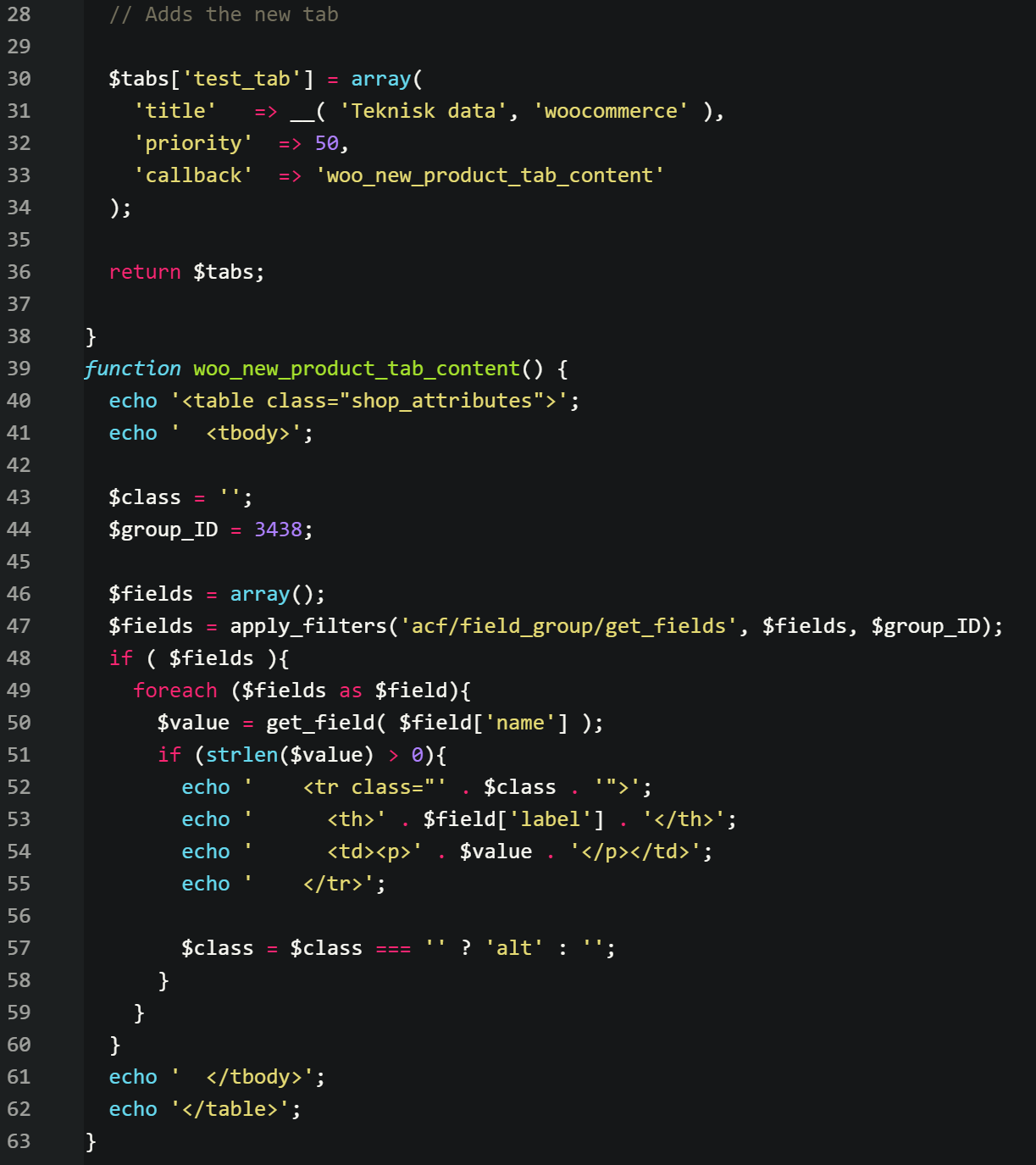 CaptureSolut....png
-
In reply to select2 v4
- April 27, 2017 at 6:33 pm
Just bringing this up because it seems Woo Commerce is using Select2 library v4
https://github.com/woocommerce/woocommerce/wiki/Select2-fields-not-working-in-3.0.x
From what I understand the only solution is to remove the plugin. So any site using Woo Commerce cant use ACF.
Or is there a solution so I can use both?
-
In reply to ACF Post Object / WooCommerce conflict
- April 27, 2017 at 10:20 am
There have been other reports of conflicts with the new version of WC. for example
https://support.advancedcustomfields.com/forums/topic/woocommerce-3-and-orders-cf/You can submit a ticket here and the developer may look at it
https://support.advancedcustomfields.com/new-ticket/
You should probably also submit this issue to the folks over at WC.
-
In reply to How do I add WooCommerce Attributes?
- April 26, 2017 at 11:58 pm
I have done this very thing for a client (but for different reasons)…
Here’s the code I used to display a WYSIWYG custom field in the attributes list:
add_filter( 'woocommerce_get_product_attributes', 'ariel_display_recordings_attribute', 20 );
function ariel_display_recordings_attribute( $attributes ) {
	$ariel_recording_details = get_field('ariel_recording_details');
	if (!empty(get_field('ariel_recording_details'))) {

	$attribute = array(
		'name'         => 'Recording',
		'value'        => $ariel_recording_details,
		'is_visible'   => '1',
		'is_taxonomy'  => '0',
		'is_variation' => '0',
		'position'     => '0',
	);

	$attributes['ariel_recording_details'] = $attribute;
	}

	return $attributes;
}
You can also add additional code to attributes.php to specify what order you’d like attributes to appear in…
-
In reply to [WPGeoDirectory + ACF] Field calls fail on plugin pages. Ideas?
- April 25, 2017 at 1:16 am
Figured it out. WPGEODIR is really stupidly coded.
Add this to functions to fix it
function override_the_stupid_plugin_filters($query) { global $wp_query, $wpdb, $geodir_post_type, $table, $dist, $mylat, $mylon, $s, $snear, $s, $s_A, $s_SA; // fix woocommerce shop products filtered by language for GD + WPML + Woocommerce if (!geodir_is_geodir_page()) { return; } //----------------------_START_CUSTOMIZED CODE--------------------------- $removeFilterNicely = function($filter) { if( empty($GLOBALS['wp_filter'][$filter]) || empty($GLOBALS['wp_filter'][$filter]['callbacks']) ) { return; } foreach($GLOBALS['wp_filter'][$filter]['callbacks'] as $priority => $callbacks) { foreach($callbacks as $reference => $callback) { if( stripos($callback['function'],'ACF') !== FALSE || stripos(get_class($callback['function']), 'ACF') !== FALSE ) { unset($GLOBALS['wp_filter'][$filter]['callbacks'][$priority][$reference]); } } } }; $removeFilterNicely('query'); $removeFilterNicely('posts_search'); $removeFilterNicely('posts_fields'); $removeFilterNicely('posts_join'); $removeFilterNicely('posts_orderby'); $removeFilterNicely('posts_where'); /** remove all pre filters remove_all_filters('query'); remove_all_filters('posts_search'); remove_all_filters('posts_fields'); remove_all_filters('posts_join'); remove_all_filters('posts_orderby'); remove_all_filters('posts_where'); **/ //----------------------_END_CUSTOMIZED CODE--------------------------- if ((is_search() && isset($_REQUEST['geodir_search']) && $_REQUEST['geodir_search'] != '')): if (isset($_REQUEST['scat']) && $_REQUEST['scat'] == 'all') $_REQUEST['scat'] = ''; //if(isset($_REQUEST['s']) && $_REQUEST['s'] == '+') $_REQUEST['s'] = ''; if (isset($_REQUEST['sdist'])) { ($_REQUEST['sdist'] != '0' && $_REQUEST['sdist'] != '') ? $dist = esc_attr($_REQUEST['sdist']) : $dist = 25000; } elseif (get_option('geodir_search_dist') != '') { $dist = get_option('geodir_search_dist'); } else { $dist = 25000; } // Distance if (isset($_REQUEST['sgeo_lat'])) { $mylat = (float) esc_attr($_REQUEST['sgeo_lat']); } else { $mylat = (float) geodir_get_current_city_lat(); } // Latitude if (isset($_REQUEST['sgeo_lon'])) { $mylon = (float) esc_attr($_REQUEST['sgeo_lon']); } else { $mylon = (float) geodir_get_current_city_lng(); } // Distance if (isset($_REQUEST['snear'])) { $snear = trim(esc_attr($_REQUEST['snear'])); } if (isset($_REQUEST['s'])) { $s = trim(esc_attr(wp_strip_all_tags($_REQUEST['s']))); } if ($snear == 'NEAR ME') { $ip = $_SERVER['REMOTE_ADDR']; $addr_details = unserialize(file_get_contents('http://www.geoplugin.net/php.gp?ip=' . $ip)); $mylat = stripslashes(geodir_utf8_ucfirst($addr_details[geoplugin_latitude])); $mylon = stripslashes(geodir_utf8_ucfirst($addr_details[geoplugin_longitude])); } if (strstr($s, ',')) { $s_AA = str_replace(" ", "", $s); $s_A = explode(",", $s_AA); $s_A = implode('","', $s_A); $s_A = '"' . $s_A . '"'; } else { $s_A = '"' . $s . '"'; } if (strstr($s, ' ')) { $s_SA = explode(" ", $s); } else { $s_SA = ''; } endif; } -
In reply to Relationship (User) field can't see Administrator users
- April 21, 2017 at 3:47 am
FYI, we just upgraded to WooCommerce 3.0 and it did NOT resolve this issue.
Should I report this issue to them as a “bug/conflict”?Update: Sorry just saw that you said in your last post that I should talk to WC.
I can also verify that adding the filter on theI’ve filed a bug with Woo Commerce here: https://github.com/woocommerce/woocommerce/issues/14580wc_modify_editable_rolesdid not fix the issue for me so it must be some other filter.Update 2: The above filter code DID work
-
In reply to WooCommerce Help
- April 15, 2017 at 11:58 pm
Hi @culpdesign ,
Thanks a lot for reaching out to us.
The ACF documentation would a great place to start.
advancedcustomfields.com/resources/
You may also check third party plugins such as
https://wordpress.org/plugins/acf-for-woocommerce/
-
In reply to ACF Hangs when assigning to a post
- April 13, 2017 at 3:03 am
The AJAX request appears to be timing out. We have over 500 products in WooCommerce and only 17 posts for a custom post type.
Is there any easy way to exclude WooCommerce products from the posts in ACF?
-
In reply to Relationship (User) field can't see Administrator users
- April 11, 2017 at 7:35 am
Sorry it took me longer to get back to you on this than expected. After doing extensive testing there does seem to be a plug-in conflict with WooCommerce 2.6.14. WooCommerce 3.0 came out last week, but it will be a while before I’ll be able to upgrade and test. Being a major upgrade to Woo we need to vet our theme and other plug-ins. We’re working on other stuff at the moment, so it might be a week or two before we do that.
I have also not dug into the code to see why 2.6.14 is causing this problem with ACF either. If you have any ideas I’d appreciate your thoughts.
-
In reply to WooCommerce accessories
- April 9, 2017 at 9:35 pm
HI @elenacabo85
Yes this can easily be achieved with ACF.
You will only need to create some custom fields via the ACF admin UI and then call the values within the Woocommerce filter responsible for displaying content on the product page. For info on this filter, you will need to consult the Woocommerce docs.
Here is a beginner’s guide on displaying ACF values on your theme: http://www.advancedcustomfields.com/resources/displaying-custom-field-values-in-your-theme/


Welcome
Welcome to the Advanced Custom Fields community forum.
Browse through ideas, snippets of code, questions and answers between fellow ACF users
Forums
Helping Others
Helping others is a great way to earn karma, gain badges and help ACF development!
