
Search Results for 'woocommerce'
reply
-

In reply to Display Custom Fields At Thank You WOOComerce Page
- September 21, 2021 at 5:38 am
Hi @vicmar
If you’ve added custom fields to the billing form, this information is store against the order ID.
So on the thank you page, you need to access the order ID, then you should be able to access your custom field data.
For example:
$variable2 = get_field(‘billing_wooccm11’,$order_id);I also believe this line is wrong:
add_action(‘woocommerce_thankyou’, ‘action_woocommerce_before_checkout_form’);You’re trying to use a hook for the thank you page but mixed with an action on the checkout page (I may be wrong here!)
I think this is the correct hook:
function action_woocommerce_thankyou( $order_get_id ) {
// your code goes here
};
add_action( 'woocommerce_thankyou', 'action_woocommerce_thankyou', 10, 1 );
Or you could copy the thank-you.php file to your theme and add the code directly – obviously you need to still
-
In reply to Get product category (Woocommerce) with a taxonomy field to filter the loop
- August 31, 2021 at 10:40 am
In your first example you are using the category__in argument which can only be used with the category taxonomy.
In WooCommerce the product category taxonomy is a custom taxonomy. Since it is a custom taxonomy instead of using category__in in your second example you should use a tax_query. Take a look at the tax_query documentation for wp_query, it is pretty intuitive to set up if you are not familiar with it.
Hope this is helpful!
-
In reply to ACF & Yoast Seo Conflict Issue
- August 28, 2021 at 11:24 am
Hey @lgladdy,
Yes, the WooCommerce already installed on all of them and the problem came up when these 3 plugins were activated.
-

In reply to ACF & Yoast Seo Conflict Issue
- August 28, 2021 at 8:55 am
Hey everyone,
Do you also have WooCommerce installed with Yoast on these installs?
In 5.10.1, we had to work around a bug in WooCommerce where they’re loading a non-select2 compatible version of SelectWoo by mistake, but calling it select2. They’ve got a patch already merged to core for their 5.7 release – but until then, I think it’s possible that Yoast + WooCommerce leaves us a case where this could happen.
-
In reply to Post Object showing as [object Object] in select
- August 26, 2021 at 9:55 am
Hey @matthias-wagnerfalkemedia-at,
You are right that this is a WooCommerce conflict. They install a different version of select2 called selectWoo, and it has an issue with rendering templates: https://github.com/woocommerce/selectWoo/issues/39
We’ve got a workaround in testing right now though, and we should have a patch out for this shortly! I’ll let you know once it’s available.
-
In reply to Post Object showing as [object Object] in select
- August 26, 2021 at 8:47 am
hy,
thank you for your quick reply! i cleared browser cache one more and accessed the site via a fresh browser as well, but that does not make any changes :/
i am not sure if it may have something to do with woocommerce installed and enabled in this site. because i find this line:
<link rel='stylesheet' id='select2-css' href='https://www.rinnhofer.info/wp2018/wp-content/plugins/advanced-custom-fields-pro/assets/inc/select2/4/select2.min.css?falkeTS=61277bd691e4f2021' media='all' />
which seems fine.but i can not find a line with select2-js pointing to a js-file inside acf.
but i can find a line:
<script src='https://www.rinnhofer.info/wp2018/wp-content/plugins/woocommerce/assets/js/select2/select2.full.min.js?falkeTS=61277bd691e4f2021' id='select2-js'></script>which may be have the same file-handle and use a different version inside woocommerce?matt
-
In reply to WooCommerce $order woes
- August 16, 2021 at 9:11 am
Did anyone manage to find a solution to this using ACF?
I have tried to change the priority of the order completed email from Woocommerce but it still fires before the ACF field updates.
Here is what I tried:
add_action( 'woocommerce_email', 'unhook_those_pesky_emails' ); function unhook_those_pesky_emails( $email_class ) { remove_action( 'woocommerce_order_status_completed_notification', array( $email_class->emails['WC_Email_Customer_Completed_Order'], 'trigger' ) ); add_action( 'woocommerce_order_status_completed_notification', array( $email_class->emails['WC_Email_Customer_Completed_Order'], 'trigger' ), 90, 2 ); } -
In reply to Display specific blog posts on product pages
- August 6, 2021 at 10:33 am
Here’s a tutorial on adding ACF fields to product pages.
I would use a relationship field.
-
In reply to Can't get repeater field value on WooCommerce search page
- July 19, 2021 at 9:15 am
UPDATE
I got it to work (thanks to ACF support), so it seems only right to let you guys know if you ever run into this problem.The solution for getting the repeater values to appear on the WooCommerce search page was the use of acf-json. This way, the field groups are loaded locally and not from the database. So the field definition lookup query is not affected by any other WP filters.
Worked like a charm!
-
In reply to ACF on product variations: almost works
- July 15, 2021 at 10:12 am
Hi!
Some who know what i’m doing wrong?
Can’t get the custom tab or field to display for each specific variation, when i choose the variants color and size, the unique description appears, not the tab and field.
It’s unique product User manual links foreach.
Variation custom field code is from this forum and works so far!
Problem is to display when specific variation is active or not, and to hide and display the “Downloads” tab window, when there is or not a download file link in the wysiwyg editor field?add_filter('acf/location/rule_values/post_type', 'acf_location_rule_values_Post'); function acf_location_rule_values_Post( $choices ) { $choices['product_variation'] = 'Product Variation'; return $choices; } add_action( 'woocommerce_product_after_variable_attributes', function( $loop, $variation_data, $variation ) { global $abcdefgh_i; $abcdefgh_i = $loop; add_filter( 'acf/prepare_field', 'acf_prepare_field_update_field_name' ); $acf_field_groups = acf_get_field_groups(); foreach( $acf_field_groups as $acf_field_group ) { foreach( $acf_field_group['location'] as $group_locations ) { foreach( $group_locations as $rule ) { if( $rule['param'] == 'post_type' && $rule['operator'] == '==' && $rule['value'] == 'product_variation' ) { acf_render_fields( $variation->ID, acf_get_fields( $acf_field_group ) ); break 2; } } } } remove_filter( 'acf/prepare_field', 'acf_prepare_field_update_field_name' ); }, 10, 3 ); function acf_prepare_field_update_field_name( $field ) { global $abcdefgh_i; $field['name'] = preg_replace( '/^acf\[/', "acf[$abcdefgh_i][", $field['name'] ); return $field; } add_action( 'woocommerce_save_product_variation', function( $variation_id, $i = -1 ) { if ( ! empty( $_POST['acf'] ) && is_array( $_POST['acf'] ) && array_key_exists( $i, $_POST['acf'] ) && is_array( ( $fields = $_POST['acf'][ $i ] ) ) ) { foreach ( $fields as $key => $val ) { update_field( $key, $val, $variation_id ); } } }, 10, 2 ); function xxx_admin_head_post() { global $post_type; if ($post_type === 'product') { wp_register_script( 'xxx-acf-variation', get_template_directory_uri() . '/inc/ss.js', array( 'jquery-core', 'jquery-ui-core' ), '1.1.0', true ); // Custom scripts wp_enqueue_script( 'xxx-acf-variation' ); // Enqueue it! } } /* actions fired when adding/editing posts or pages */ /* admin_head-(hookname) */ add_action( 'admin_head-post.php', 'xxx_admin_head_post' ); add_action( 'admin_head-post-new.php', 'xxx_admin_head_post' );Showing the tab:
/* Create Technical details tab */
//adding new tab//
add_filter( 'woocommerce_product_tabs', 'product_tab' );
function product_tab( $tabs ) {
if ( get_field('downloads', $post_id) ) {
$tabs[] = array(
'title' => 'Downloads',
'priority' => 15,
'callback' => 'show_content'
);
}
return $tabs;
}
function show_content() {
$downloads = get_field('downloads', $post_id);
if( $downloads ):
echo get_field('downloads', $post_id);
endif;
}
The settings in the ACF – admin panel is this as attached images below:
the name “Vare” = “Product”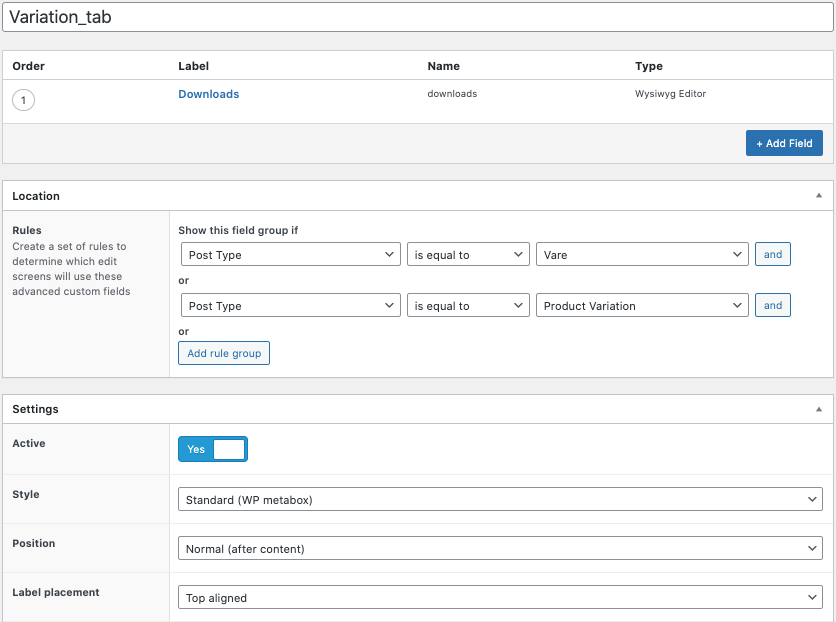 Skaermbilled....png
-
In reply to Show custom field below images Gallery
- July 10, 2021 at 12:34 pm
Take a look at this topic I found on stack
-
In reply to Show custom field below images Gallery
- July 7, 2021 at 6:24 pm
I tried with custom code un functions.php but it didn’t work either.
add_action( 'woocommerce_product_thumbnails', 'my_function', 20 );

function my_function() {
  echo '<b>Video:</b> ' . get_field('video');
};
Any idea ? Thanks !
-
In reply to Show custom field below images Gallery
- July 5, 2021 at 6:43 pm
Thank you @andrewmarker .
What do you mean?
I can’t show the video just below the woocommerce product images gallery ?
The shortcode is an error ?
No solution ? Nothing can be show below the woocommerce product images gallery ? -
In reply to ACF get image from product term
- June 25, 2021 at 5:34 pm
I really appreciate your help, but it still does not work. My website shows critical errors when I run the code.
<?php
function prefix_add_brand_before_variations_form() {

	$terms = get_the_terms( get_the_ID(), 'brand' );

	print_r($terms);

}

add_action('woocommerce_before_variations_form', 'prefix_add_brand_before_variations_form', 10, 0);
I have tried to see what print_r() can show about $terms. At first glance, it does not look right? I get this output:
WP_Error Object ( [errors] => Array ( [invalid_taxonomy] => Array ( [0] => Invalid taxonomy. ) ) [error_data] => Array ( ) [additional_data:protected] => Array ( ) )
-
In reply to ACF get image from product term
- June 25, 2021 at 2:41 am
I had a bit of that feeling. Before I got to the code I was laying out the thread with, I had also tried with get_the_terms()
I have again made the code below, but here too I can not make it work
<?php
function prefix_add_brand_before_variations_form() {

	$term = get_the_terms( get_the_ID(), 'brand' );

       if( ! empty( $term ) ) { ?>

  		<img src="<?php the_field('brand_logo', $term); ?>" />


 		<?php }

}

add_action('woocommerce_before_variations_form', 'prefix_add_brand_before_variations_form', 10, 0);
I have tried both
get_the_terms()andget_post_terms(). If I useget_post_terms()my product pages shows a critical error. -
In reply to Add custom fields to custom product tabs
- June 18, 2021 at 6:45 pm
My apologies – I didn’t include all of the code, just the portion that I thought was relevant.
Yes, I had created a custom tab in my child’s function.php file:
/**
 * Add a custom product data tab
 */
add_filter( 'woocommerce_product_tabs', 'woo_new_product_tab' );
function woo_new_product_tab( $tabs ) {

	// Adds the new tab

	$tabs['test_tab'] = array(
		'title' 	=> __( 'specifications_custom_tab', 'woocommerce' ),
		'priority' 	=> 50,
		'callback' 	=> 'specifications_custom_tab'
	);

	return $tabs;

}
function specifications_custom_tab() {

	// The new tab content

	echo '<h2>New Product Tab</h2>';
	echo '<p>Here\'s your new product tab.</p>';

}
Then I added this code straight after:
add_action('specifications_custom_tab', 'display_product_fields' );
function display_product_fields() {
	$fields = get_field_objects();
	if( $fields ): ?>
		<ul>
			<?php foreach( $fields as $field ): ?>
				<li><?php echo $field['label']; ?>: <?php echo $field['value']; ?></li>
			<?php endforeach; ?>
		</ul>
	<?php endif;
}?>
The code to add custom product fields to my custom tab (or any tab for that matter) didn’t work. Am I doing something wrong?
Thank you again for all your help!
-
In reply to The Word Array Displays
- June 17, 2021 at 12:36 am
Hi, any updates on what made the solution? Having the same problem with, Array, is written in front of the link.
add_filter( ‘woocommerce_product_tabs’, ‘woo_new_tab’ ); function woo_new_tab( $tabs ) { // Hide empty tabs if ( ! empty( $tabs ) ) { foreach ( $tabs as $title => $tab ) { if ( empty( $tab[‘content’] ) && strtolower( $tab[‘title’] ) !== ‘description’ ) { unset( $tabs[ $title ] ); } } } $tabs[‘new2’] = array( ‘title’ => __( ‘Monteringsvejledninger’, ‘woocommerce’ ), ‘priority’ => 40, ‘callback’ => ‘woo_new_tab_content2’ ); return $tabs; } function woo_new_tab_content2() { // The new tab content echo $link = get_field(‘monteringsvejledninger’); if( $link ): $link_url = $link[‘url’]; $link_title = $link[‘title’]; $link_target = $link[‘target’] ? $link[‘target’] : ‘_self’; ?> ” target=”<?php echo esc_attr( $link_target ); ?>”><?php echo esc_html( $link_title ); ?> <?php endif; } -
In reply to Add custom fields to custom product tabs
- June 14, 2021 at 11:02 pm
I found this explanation of adding custom product tabs https://wisdmlabs.com/blog/add-custom-tab-woocommerce-product-page/
What you have appears that is should work but you did not include code to add the custom tab.
-
In reply to woocommerce product page
- June 2, 2021 at 3:16 am
Here is a tutorial for adding custom fields to a WooCommerce product and displaying them on the products template:
https://themeisle.com/blog/custom-fields-woocommerce/
Another option for displaying the values from your ACF fields on the products template outside of using the short codes which the above tutorial does not get into is WooCommerce provides a number of hooks/filters that can be used with the single products template to add information/customize the output. These hooks/filters can be placed in the functions file of your theme to output the additional ACF fields you want to include on the products template.
Hope this is helpful!
-
In reply to Date fields and E-Mails
- May 23, 2021 at 7:44 pm
Hi, i added a date field to a product on woocommerce. Did someone tried to send an email to the customer after purchase based on the date set to the product?
issue got solved!!
-
In reply to Adding WooCommerce tabs
- May 18, 2021 at 5:08 am
Thanks to all, but no worries, I discovered an alternative way to do this which works great… here is the link.
-
In reply to Adding WooCommerce tabs
- May 18, 2021 at 4:14 am
So it turns out that all fields show up if I make sure the “key” is different.
But now I need to show my tabs, and this code, which should display the new tabs, does not (even when I ensure a tab has content in it):
if (class_exists('acf') && class_exists('WooCommerce')) {
	add_filter('woocommerce_product_tabs', function($tabs) {
		global $post, $product;  // Access to the current product or post

		$custom_tab_title = get_field('tab_title', $post->ID);

		if (!empty($custom_tab_title)) {
			$tabs['awp-' . sanitize_title($custom_tab_title)] = [
				'title' => $custom_tab_title,
				'callback' => 'awp_custom_woocommerce_tabs',
				'priority' => 10
			];
		}
		return $tabs;
	});

	function awp_custom_woocommerce_tabs($key, $tab) {
		global $post;

		?><h2><?php echo $tab['title']; ?></h2><?php

		$custom_tab_contents = get_field('tab_contents', $post->ID);
		echo $custom_tab_contents;
	}
}
Any advice is much appreciated!
-
In reply to Calculate a field using price and acf value
- May 1, 2021 at 4:19 pm
Update:
I was able to update the price per tablet by using the following code:function wc_update_price_per_unit($post_id) { $value= get_field('_price')/get_field('number_of_unit');//use _regular_price to get regular woocommerce price $field_name = "price_per_unit"; update_field($field_name,$value,$post_id); } add_action('save_post','wc_update_price_per_unit');The price_per_tablet value gets populated when saving the post. How can I see changes in the price_per_unit field before saving or updating the post.
-
In reply to Replace product image with ACF field in Shop page
- April 27, 2021 at 7:16 pm
Hi, thanks for the tip.
This is how I managed to solve it:
function replacing_template_loop_product_thumbnail() {
remove_action( ‘woocommerce_before_shop_loop_item_title’, ‘woocommerce_template_loop_product_thumbnail’, 10 );
function wc_template_loop_product_replaced_thumb() {
$shop_image = get_field( ‘shop_oldal_kep’ );echo ‘
</img>’;
}
add_action( ‘woocommerce_before_shop_loop_item_title’, ‘wc_template_loop_product_replaced_thumb’, 10 );
}
add_action( ‘woocommerce_init’, ‘replacing_template_loop_product_thumbnail’ ); -
In reply to Dynamically creating field based on select value
- April 23, 2021 at 12:46 am
So i exported the field group with it’s conditional wysywig field based on the choice in the button group to php:
if (function_exists('acf_add_local_field_group')) :
    acf_add_local_field_group(array(
        'key' => 'group_xxxxxxxxxx',
        'title' => 'The product tabs',
        'fields' => array(
            array(
                'key' => 'field_of_the_product_tabs_xxxxx',
                'label' => 'The tabs',
                'name' => 'the_tabs',
                'type' => 'button_group',
                'instructions' => '',
                'required' => 0,
                'conditional_logic' => 0,
                'wrapper' => array(
                    'width' => '',
                    'class' => '',
                    'id' => '',
                ),
                // These choices are generated by the repeater with a text subfield from the option page
                'choices' => array(
                    'choice1' => 'choice1',
                    'choice2' => 'choice2',
                ),
                'allow_null' => 0,
                'default_value' => '',
                'layout' => 'horizontal',
                'return_format' => 'value',
            ),
            // So this wysywig field needs to be created everytime a choice is added from the option page
            // Corresponding to the selected button group choice
            array(
                'key' => 'field_xxxxxxxx',
                'label' => 'product tab content',
                'name' => 'pro_tab_content',
                'type' => 'wysiwyg',
                'instructions' => '',
                'required' => 0,
                // array van conditional logic ie.
                'conditional_logic' => array(
                    array(
                        array(
                            'field' => 'field_of_the_product_tabs_xxxxx',
                            'operator' => '==',
                            'value' => 'choice1', // the selected button group choice ie. choice1, choice2...
                        ),
                    ),
                ),
                'wrapper' => array(
                    'width' => '',
                    'class' => '',
                    'id' => '',
                ),
                'default_value' => '',
                'tabs' => 'all',
                'toolbar' => 'full',
                'media_upload' => 1,
                'delay' => 0,
            ),
        ),
        'location' => array(
            array(
                array(
                    'param' => 'post_type',
                    'operator' => '==',
                    'value' => 'product',
                ),
            ),
        ),
    ));

endif;
I think i’m missing some skills or knowledge because i can’t wrap my head around in how to create a wysiwyg field specific for it’s product tab.
A ‘static’ field and displaying that in the tab content is easy, but then every tab has the same value 😉/* -- WooCommerce Tabs content -- */ function woo_tab_content($slug, $tab) { // the content in this function is display in the WooCommerce tabs }


Welcome
Welcome to the Advanced Custom Fields community forum.
Browse through ideas, snippets of code, questions and answers between fellow ACF users
Forums
Helping Others
Helping others is a great way to earn karma, gain badges and help ACF development!
