
Search Results for 'taxonomy'
reply
-

In reply to Dropdown Taxonomy and post boxes
- July 29, 2015 at 1:08 am
Hi @pipoulito
Thanks for the post.
It is now possible to synchronize the Taxonomy terms to the post using the save terms options in the field edit screen.
 Edit-Field-G....png
-
In reply to Hide Category(s) in a Taxonomy (Back-end)
- July 28, 2015 at 7:07 am
If you’re not using uncategorized at all you can just delete it.. but first you need to set a new default category which you can do in settings > writing I think..
If you still need to hide specific categories you can use this hook:
http://www.advancedcustomfields.com/resources/acffieldstaxonomyquery/ -
In reply to Autoload options
- July 25, 2015 at 3:14 am
E, A related topic about taxonomy fields stored in the options table. http://support.advancedcustomfields.com/forums/topic/cache-acf-fields-stored-in-the-wp_options-table/
-
In reply to Cache ACF fields stored in the wp_options table
- July 25, 2015 at 3:12 am
Recently, the developer has made plans to allow options values to be set to autoload. See this topic http://support.advancedcustomfields.com/forums/topic/autoload-options/. I’m not sure if this would include taxonomy fields.
-
In reply to Cache ACF fields stored in the wp_options table
- July 25, 2015 at 3:05 am
Agreed. I’m using custom fields for taxonomy terms… so if you have a taxonomy with 250 terms and I have to cross check with wp_options for say… 2 custom fields… the number of queries goes from 1 with get_terms() to 500 when I have to loop through every one to get it’s associated custom field in wp_options. Brutal. Adds 5 seconds to page load time. There must be some better way?
-
In reply to If no taxonomy item then add new item
- July 24, 2015 at 12:11 pm
What version of ACF are you using?
ACF 5 has the ability to allow new terms to be added to a taxonomy.
In order to allow the this for your users you’ll also probably need to adjust user permissions on the site to give their user type the ability to add terms. There are several user role editor plugins available on the WP repo.
-
In reply to Front-end new post form – pre-populate fields
- July 24, 2015 at 7:59 am
You need to use the update_field() function. http://www.advancedcustomfields.com/resources/update_field/
There are details on updating a repeater. It is for a taxonomy, but it will work on a post as well, just use the posts ID.
YOu will need to do this in a pre save post filter, this is explained here http://www.advancedcustomfields.com/resources/acf-pre_save_post/
-
In reply to Include Taxonomy dropdown on Options page?
- July 24, 2015 at 7:32 am
If you return set up the taxonomy field to return term object then get_field will return an array of terms
$terms = get_field('my_tax_field');
echo '<pre>'; print_r($terms); echo '</pre>';
The result of the above looks something like this
Array
(
    [0] => stdClass Object
        (
            [term_id] => 2
            [name] => test category 1
            [slug] => test-category-1
            [term_group] => 0
            [term_taxonomy_id] => 2
            [taxonomy] => category
            [description] =>
            [parent] => 0
            [count] => 1
            [object_id] => 1
            [filter] => raw
        )

    [1] => stdClass Object
        (
            [term_id] => 3
            [name] => test category 2
            [slug] => test-category-2
            [term_group] => 0
            [term_taxonomy_id] => 3
            [taxonomy] => category
            [description] =>
            [parent] => 0
            [count] => 1
            [object_id] => 1
            [filter] => raw
        )

)
You then need to loop through the terms to get the term->name and term->slug
foreach ($terms as $term) {
    $name = $term->name;
    $slug = $term->slug;
}
Hope that answers your question.
-
In reply to Include Taxonomy dropdown on Options page?
- July 24, 2015 at 3:10 am
Sorry – that was extremely unclear.
Here is what I need: to be able to select a taxonomy on the options page and pass the name and slug for the taxonomy to other pages.
When I use get_field as discussed on the taxonomy page:
$term = get_field('summer_semester', 'option');It’s not returning
$term->nameor$term->slugSo I’m assuming I need to do something different when the $term is coming from the options page.
-
In reply to Include Taxonomy dropdown on Options page?
- July 23, 2015 at 2:02 pm
I’m not exactly sure what you’re looking for, but you can use a taxonomy field on an options page and then get the value from the option and use it elsewhere.
Slightly more difficult would be to use a dynamically loaded select field. http://www.advancedcustomfields.com/resources/dynamically-populate-a-select-fields-choices/
-
In reply to Font-end search form for a subfield
- July 23, 2015 at 12:47 am
Hello @hube2
Many thanks, I’ve tried this.
I can see how close I am to the solution, but it’s just out of reach with the knowledges I have.
It’s the first time I use the $wpdb method and I’m not sure what i am doing wrong (again !).So I dynamically make the SQL request to have something like this in a var:
SELECT *
FROM wp_posts
INNER JOIN wp_term_relationships ON (wp_posts.ID = wp_term_relationships.object_id)
INNER JOIN wp_postmeta ON (wp_posts.ID = wp_postmeta.post_id)
INNER JOIN wp_postmeta AS mt1 ON (wp_posts.ID = mt1.post_id)
INNER JOIN wp_postmeta AS mt2 ON (wp_posts.ID = mt2.post_id)
INNER JOIN wp_postmeta AS mt3 ON (wp_posts.ID = mt3.post_id)
INNER JOIN wp_postmeta AS mt4 ON (wp_posts.ID = mt4.post_id)
WHERE 1=1
  AND (((mt3.meta_key = 'tous_lots_0_surface_du_lot'
         AND CAST(mt3.meta_value AS SIGNED) BETWEEN '110.5' AND '155.25')
        AND (mt4.meta_key = 'tous_lots_0_etat_de_livraison'
             AND CAST(mt4.meta_value AS CHAR) LIKE '%"1-loc"%'))
       OR ((mt3.meta_key = 'tous_lots_1_surface_du_lot'
            AND CAST(mt3.meta_value AS SIGNED) BETWEEN '110.5' AND '155.25')
           AND (mt4.meta_key = 'tous_lots_1_etat_de_livraison'
                AND CAST(mt4.meta_value AS CHAR) LIKE '%"1-loc"%'))
       OR ((mt3.meta_key = 'tous_lots_2_surface_du_lot'
            AND CAST(mt3.meta_value AS SIGNED) BETWEEN '110.5' AND '155.25')
           AND (mt4.meta_key = 'tous_lots_2_etat_de_livraison'
                AND CAST(mt4.meta_value AS CHAR) LIKE '%"1-loc"%'))
       OR (etc...)
  AND (wp_term_relationships.term_taxonomy_id IN (10))
  AND (wp_postmeta.meta_key = 'dept_nb_for_the_order'
       AND mt1.meta_key = 'city_name_for_the_order'
       AND mt2.meta_key = 'arrondissement')
  AND post_status = 'publish'
  AND wp_posts.post_type = 'post'
GROUP BY wp_posts.ID
ORDER BY CAST(wp_postmeta.meta_value AS CHAR) ASC, CAST(mt1.meta_value AS CHAR) ASC, CAST(mt2.meta_value AS CHAR) ASC LIMIT 0,
                                                                                                                                10
Then I send the query and loop through the results.
It almost works !!!I think I just have a problem with LIKE ‘%”1-loc”%’
Even if this string isn’t in the db, the result shows up.Thanks a lot for your help, I almost reach the end 🙂
-
In reply to Multiple custom post types by custom taxonomy on same page
- July 22, 2015 at 11:36 pm
I’m pretty sure that a taxonomy field stores an array terms IDs, or if you have it set to return term objects then it returns an array of term objects. See the image below. If you want to use the returned value in queries like this those should be the settings of your taxonomy field. Then change your query slightly.
<?php $taxterms = get_field("collectiona"); $args = array( 'post_type' => 'products', 'tax_query' => array( array( 'taxonomy' => 'product-collections', 'field' => 'id', 'terms' => $taxterm, // remove ->term_id ) ) );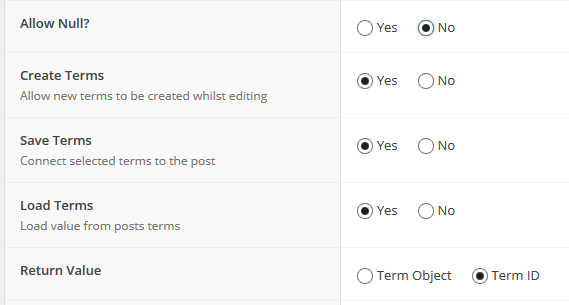 acf1.png.png
-
In reply to Multiple custom post types by custom taxonomy on same page
- July 22, 2015 at 4:03 pm
So, i’ve tried using code like this, and still no luck
<?php $taxterms = get_field("collectiona"); ?> <?php $args = array( 'post_type' => 'products', 'tax_query' => array( array( 'taxonomy' => 'product-collections', 'field' => 'id', 'terms' => $taxterm->term_id ) ) ); $myquery = new WP_Query( $args ); if($myquery->have_posts()) : ?> <h2><?php the_field('prod_subtitle'); ?></h2> <ul> <?php while ( $myquery->have_posts() ) : $myquery->the_post(); ?> <li> <a href="<?php the_permalink(); ?>"><img src="<?php the_field('prod_featured_image'); ?>" onmouseover="this.src='<?php the_field('prod_hover_featured_image'); ?>'" onmouseout="this.src='<?php the_field('prod_featured_image'); ?>'" /></a> <h2><?php the_field('prod_subtitle'); ?></h2> <p>$<?php the_field('prod_price'); ?></p> </li> <?php endwhile; ?> </ul> <?php endif; ?> <?php wp_reset_query(); ?> -
In reply to User taxonomies
- July 15, 2015 at 2:16 am
I’ve successfully registered a custom taxonomy and assigned it to the ‘user’ object. It actually all works fine. The only issue is there is no default UI for managing the taxonomy. I have CMB2 (ACF may work too) to choose the taxonomy term(s) for the user.
A tip on how to manage the taxonomy:
Also attach the custom taxonomy to another post type (like posts), then you can add the terms, descriptions, etc via the Posts/taxonomy UI and they will show up (via ACF/CMB2) in the user profile.
It’s working well for me this way right now.
-
In reply to understanding acf_form
- July 13, 2015 at 5:13 pm
Ok, it’s somehow strange for me. I thought it was ACF taxonomy field because it’s a field, in ACF, named Taxonomy. So what’s an ACF taxonomy field if it’s not that ?
(for the conditional, it can’t be a select2 limitation because it works on backend, using select2)
-
In reply to understanding acf_form
- July 13, 2015 at 8:58 am
When you set
[post taxonomy] [is equal to] [my_choice]
You are using the built in Taxonomy in WP.
[post taxonomy]
is not an ACF Taxonomy field.
The taxonomy field in ACF is not a choice field like a radio, checkbox or select. When you create a choice type field you specify what the values will be.
The values that appear in a taxonomy field are loaded with Select2 which is a JavaScript input field add on. The values that will be displayed in the field are not known until they are displayed on the post to be selected. Well, this is just a theory. This may be a limitation of ACF or the Select2 script.
When I want to create a field where the user can select something and that selection will be used as a condition on another field I use a standard select field, dynamically populated it, as in the code I gave previously, and then when the post is saved I do all the work myself of setting the taxonomy either with a acf/save_post or acf/pre_save_post filter.
-
In reply to understanding acf_form
- July 13, 2015 at 5:04 am
To be clear, I only use ACF taxonomy field, with my own custom taxonomy. I don’t use WP meta box at all. But perhaps I don’t understand something.
And so, I really have ACF Field Group that only appears if a ACF taxonomy field in another ACF Field Group is a certain value. But only in backend. I simply set Show this field group if [post taxonomy] [is equal to] [my_choice].
Sincerely, I don’t understand why conditional logic is not possible with ACF taxonomy field. I don’t see why it’s related to WP core. It’s a select or a radio choice : if I select it, display field, if not, hide it. Why it’s so complicated ?
Anyway, thanks for all your answers.
-
In reply to User taxonomies
- July 12, 2015 at 10:33 am
I’m looking at this same thing now (2 months later) and I’ve found that Advanced Custom Fields isn’t attaching a user to a taxonomy properly.
Instead of properly adding an entry to the
wp_term_relationshipstable they’re just adding an entry to thewp_user_metatable. -
In reply to Multi Generation Pedigree Tutorial
- July 11, 2015 at 5:55 am
Are you having trouble creating the pedigrees taxonomy?
If so, you can create it manually using code in the theme’s functions.php file: http://www.smashingmagazine.com/2012/01/04/create-custom-taxonomies-wordpress/
Or use a plugin like Custom Post Type UI: https://wordpress.org/plugins/custom-post-type-ui/
I use the second method as it allows me to quickly create taxonomies and link them to posts, custom post types or both.
-
In reply to Relationship + Custom Fields
- July 11, 2015 at 5:47 am
Hi Christian,
Just wondering, are you trying to build something like a mega menu?
Seems like the simplest way to achieve this would be to create a CPT for the custom links as well and then using the relationship field in the two places.
And then you can make it easier for people to search+select the links in the relationship field by assigning taxonomy terms to them if that’s possible.
-
In reply to understanding acf_form
- July 11, 2015 at 4:00 am
– First of all, WHY I have to do all this, just because I use taxonomy? Why don’t you better integrate taxonomy in ACF(Pro)?
Because ACF has some limitations, an these limitations are directly related to limitation in WP. ACF does not change the way WP works (even if it looks like it does) it only enhances what WP can already do and what is possible for anyone to do using core WP function if they wanted to do all the work themselves.
– You said
You also mentioned trying to create a field group that was conditional based on a field in another field group, also not possible, either front or back end
but it works for me on backend (not in front).
I seriously doubt that you have a ACF Field Group that only appears if a field in another ACF Field Group is a certain value unless you created the JavaScript to do it. You may have an ACF Field Group that appears if a certain term in the WordPress Taxonomy Meta Box is selected, but this is not the same as an ACF Taxonomy Field. The ACF Taxonomy Field and the WP Taxonomy Meta Box are two entirely different things that work in different ways that produce similar results. I don’t think that I can explain this any better or in any other way.
– …and I still don’t understand why I have to specify ‘field_groups’ for acf_form. What’s the aim of location rules if it doesn’t work ?
The reason that you need to do this is because you want to create new posts. If you wanted to show the current values of the current post or page and allow someone to update those values then yes, the location rules will work. But since your intention is to create a new post in a different post type than the post where the form is shown on the front end, setting the location of the field group to appear on both you template page where you want the form and on the post type where you want to create the new post, is pointless.
you use wp_set_post_terms and it works whereas codex said “For a taxonomy on a custom post type use wp_set_object_terms()
A post is a post is a post, even a post in a custom post type is just another post that has all of the same properties. Anything that works on the ‘post’ post type will work on a post in a custom post type.
-
In reply to understanding acf_form
- July 10, 2015 at 7:25 pm
Thanks for this detailed answer !
Many questions and remarks :
– First of all, WHY I have to do all this, just because I use taxonomy? Why don’t you better integrate taxonomy in ACF(Pro)?
– You said
You also mentioned trying to create a field group that was conditional based on a field in another field group, also not possible, either front or back end
but it works for me on backend (not in front).
– acf/save_post : it’s ok but as my taxo was not hierarchical, it didn’t really work. So, I don’t think it’s necessary to keep term_id : $term->name in field choices.
Strangely, you use wp_set_post_terms and it works whereas codex said “For a taxonomy on a custom post type use wp_set_object_terms()”– acf/pre_save_post : it’s ok. I would like to allow update post but I don’t try to do this for now.
– …and I still don’t understand why I have to specify ‘field_groups’ for acf_form. What’s the aim of location rules if it doesn’t work ?
Thanks.
-
In reply to understanding acf_form
- July 10, 2015 at 6:45 am
My apologies, I guess I misunderstood and was also in error.
I thought you were looking for an field group to be based on a taxonomy (standard WP Taxonomy Meta Box), which is not available on the front end form.
You also mentioned trying to create a field group that was conditional based on a field in another field group, also not possible, either front or back end.
I also incorrectly said that you could make a field conditional on a tax field, and you’re right that I was wrong. I am sometimes wrong, or half asleep.
So you can’t have a conditional field based somehow on a taxonomy/term without changing the type of field you’re using for the condition and adding a couple of filters.
You can accomplish the second field group by using a select field that is dynamically populated from the taxonomy.
add_filter('acf/load_field/name=select_field_name',
             'acf_load_select_field_name);
function acf_load_select_field_name($field) {
    $choices = array();
    $taxonomy = 'my-taxonomy-name';
    $args = array(
        'hide_empty' => false;
    );
    $terms = get_terms($taxonomy, $args);
    if ($terms) {
        foreach ($terms as $term) {
            $choices[$term->term_id] = $term->name;
        }
    }
    $field['choices'] = $choices;
    return $field;
}
You’ll need to set up the above and load your field group to edit it and it should populate the selections for you. Then you can select the value for the conditional field.
You’ll also need to set up a acf/save_post hook to set the term when the post is saved, since you’re using a front end form I will include two actions, one for the back end form and one for the front.
// run after ACF saves the $_POST['acf'] data
add_action('acf/save_post', 'my_acf_save_post', 20);

function my_acf_save_post($post_id) {
    // action for back end form
    // bail early if no ACF data
    if( empty($_POST['acf']) ) {
        return;
    }
    // check to make sure it's the right post type
    // could be combined with the above
    $post_type = get_post_type($post_id);
    if ($post_type != 'my-post_type') {
        return;
    }
    $term_id = get_field('select_field_name', $post_id);
    if ($term_id) {
        wp_set_post_terms($post_id, array($term_id), 'my-taxonomy-name', false);
    }
}
This next one may not be perfect, a lot of it depends on if your creating a new post or allowing updating of existing posts. I’m assuming a new post here. You can get more information on this hook here http://www.advancedcustomfields.com/resources/acf-pre_save_post/
// action for front end form
add_filter('acf/pre_save_post' , 'my_pre_save_post', 10, 1 );

function my_pre_save_post($post_id) {
    // check if this is to be a new post
    if ($post_id != 'new') {
        return $post_id;
    }
    // Create a new post
    $post = array(
        'post_status'  => 'draft',
        'post_title'  => 'A title, maybe a $_POST variable' ,
        'post_type'  => 'my-post-type',
    );
    // insert the post
    $post_id = wp_insert_post( $post );

    // your will need the field key of your select field for this next part
    $term_id = $_POST['acf']['field_558aa7b9f6168'];
    if ($term_id) {
        wp_set_post_terms($post_id, array($term_id), 'my-taxonomy-name', false);
    }

    // return the new ID
    return $post_id;

}
Hopefully some part of this helps you.
-
In reply to understanding acf_form
- July 9, 2015 at 9:53 pm
On my example, I specify field_groups because I have to in order to display it. If I don’t, I only have the submit button.
The reason why the field groups will not appear without specifying them is that your field groups location rule is to display on the “Post” post type and you are displaying the form on a “Page”
No ! My location rule is :
Post type is equal to “document” —> OR <—
Page is equal to “add document”And, of course, “Add document” is a page.
Yes, you could have optional fields based on the taxonomy field
What ?! Since when ? It doesn’t work for me !
First field :
“Type of document”,
taxonomy,
required,
taxonomy : my own,
appearance : radio buttons.Second field (only displayed if a specific taxo term is choosen) :
“Keywords”,
taxonomy,
required : no,
taxonomy : my own 2,
conditional logic : yes -> Show this field if [No toggle fields available]. -
In reply to Some Taxonomy Fields Not Saving
- July 9, 2015 at 12:24 pm
Your field names are too long.
Short answer is to use shorter field names. Your sub fields can be much shorter because sub fields are all prefixed with the repeater field name.
Long answer
Custom fields for taxonomies stored in options table and the option name column has a max length of 64 characters.
Let’s say that the taxonomy is
categoryso the field name is prefixed with “category” and the term IDThen it has a prefix of the repeater field name and the row index, then the field name is added
category_1_ssfm_slider_slides_0_ssfm_slider_statement_background_imagetotal 69 characters. The data is being saved but you option name is getting truncated to
category_1_ssfm_slider_slides_0_ssfm_slider_statement_backgroundso when ACF goes to look for the data it can’t find it.Edit: There is a trac ticket on this and the WP team has been sitting on it for years. We have been pushing to get the lenght of this field increased but they keep putting it off for more important things… well, more important to some.
`


Welcome
Welcome to the Advanced Custom Fields community forum.
Browse through ideas, snippets of code, questions and answers between fellow ACF users
Forums
Helping Others
Helping others is a great way to earn karma, gain badges and help ACF development!
