
Search Results for 'q'
reply
-
In reply to Custom User Photo Field
- October 23, 2015 at 3:33 am
I guess I’m a little rusty at PHP and MySQL? ACF has got me quite spoiled.
Thanks for all the help! I think I’ll have to just figure it out. Any suggestions would be appreciated.
Ben
-

In reply to Custom User Photo Field
- October 23, 2015 at 3:28 am
Using ACF, unfortunately, no. The only way to do it without coding would be to edit all 500+ users and select the right image for each.
How good are you with PHP and MySQL?
-
In reply to Display Image for each entry on Tag Archive
- October 23, 2015 at 2:18 am
Hi John, thanks for your help! So, I noticed I had an inconsistency here with the field name:
<?php
// Get the logo, if it exists.
$image = get_field('sponsor-logo');
if( get_field('sponsor_logo') ): ?>
Having fixed that and changing the image tag to your suggestion now seems to put the image ID in the SRC – for example:
<img class="sponsorlogo" src="266" width="120" height="120" alt="Hillcrest Paving & Excavating">I’ve checked the field setup itself and it is set to output a URL, and does so in other templates. I’m guessing that because this template is for tags of a custom post type, it might require something else?
-
In reply to Repeater Column Headers Floating or On Bottom
- October 22, 2015 at 11:44 pm
I’m going to start a new thread for this question since it is different than my original one.
-
In reply to Taxonomy Issue
- October 22, 2015 at 9:20 pm
I’ve tried the below and also tried the ‘parent’ => 0.
If I do the below, nothing happens. If I do the ‘parent’ => 0 it removes the subcategory and only shows the parent… there must be something i’m doing wrong 🙁
<?php $member_group_terms = get_terms( 'meps_category', array( 'child_of' => 0 ) ); ?> <?php foreach ( $member_group_terms as $member_group_term ) { $member_group_query = new WP_Query( array( 'post_type' => 'mep', 'tax_query' => array( array( 'taxonomy' => 'meps_category', 'field' => 'slug', 'terms' => array( $member_group_term->slug ), 'operator' => 'IN' ) ) ) );?> -
In reply to Taxonomy Issue
- October 22, 2015 at 8:24 pm
that sooooo close!
Its still showing the parent category at the top, which is wrong… but its now showing the child category below, which is right.
<div id="accordion" class="panel-group"> <div class="panel panel-default"> <!-- SUB CATEGORY TITLE AREA --> <?php $member_group_terms = get_terms( 'meps_category' ); ?> <?php foreach ( $member_group_terms as $member_group_term ) { $member_group_query = new WP_Query( array( 'post_type' => 'mep', 'tax_query' => array( array( 'taxonomy' => 'meps_category', 'parent' => $currentCat, 'field' => 'slug', 'terms' => array( $member_group_term->slug ), 'operator' => 'IN', ) ) ) ); ?> <div class="panel-heading"> <!--<div class="col-md-2"><img src="#" /></div>--> <div class="col-md-12"><h3><?php echo $member_group_term->name; ?></h3> <p><?php echo $member_group_term->description; ?></p></div> <div class="clear bottomgap"></div> <div class="col-md-8"></div><div class="col-md-4"><a data-toggle="collapse" data-parent="#accordion" class="button" href="#<?php the_ID(); ?>">View MEPs</a> <a href="#" class="button" target="_blank">Visit Website</a></div> <div class="clear"></div> </div> <div class="clear"></div> <?php if ( $member_group_query->have_posts() ) : ?> <!-- END SUB CATEGORY TITLE AREA --> <div id="<?php the_ID(); ?>" class="panel-collapse collapse col-md-12"> <!-- SUB CATEGORY POSTS AREA --> <?php while ( $member_group_query->have_posts() ) : $member_group_query->the_post(); ?> <div class="panel-body"> <div class="col-md-2 meppic"><?php the_post_thumbnail(); ?></div> <div class="col-md-10"><h3 class="mepname"><?php echo the_title();?></h3> <strong><?php the_field('title_position'); ?></strong> <div class="clear"></div> <?php the_field('location'); ?> <div class="clear"></div> <br/> <?php the_field('description'); ?> <div class="clear"></div> <br/> <div class="col-md-3 first"><strong>Email:</strong> <a href="mailto:<?php the_field('email'); ?>"><?php the_field('email'); ?></a></div><div class="col-md-3"><strong>Website:</strong> <a href="<?php the_field('website'); ?>" target="_blank"><?php the_field('website'); ?></a></div><div class="col-md-3"><strong>Tel:</strong> <?php the_field('tel'); ?></div><div class="col-md-3 last"><a href="http://www.twitter.com/<?php the_field('twitter_id'); ?>" target="_blank"><?php the_field('twitter_id'); ?></a></div> </div> </div> <!-- END SUB CATEGORY POSTS AREA --> </div> <?php endwhile; ?> <?php endif; ?> <?php // Reset things, for good measure $member_group_query = null; wp_reset_postdata(); } ?> </div> </div>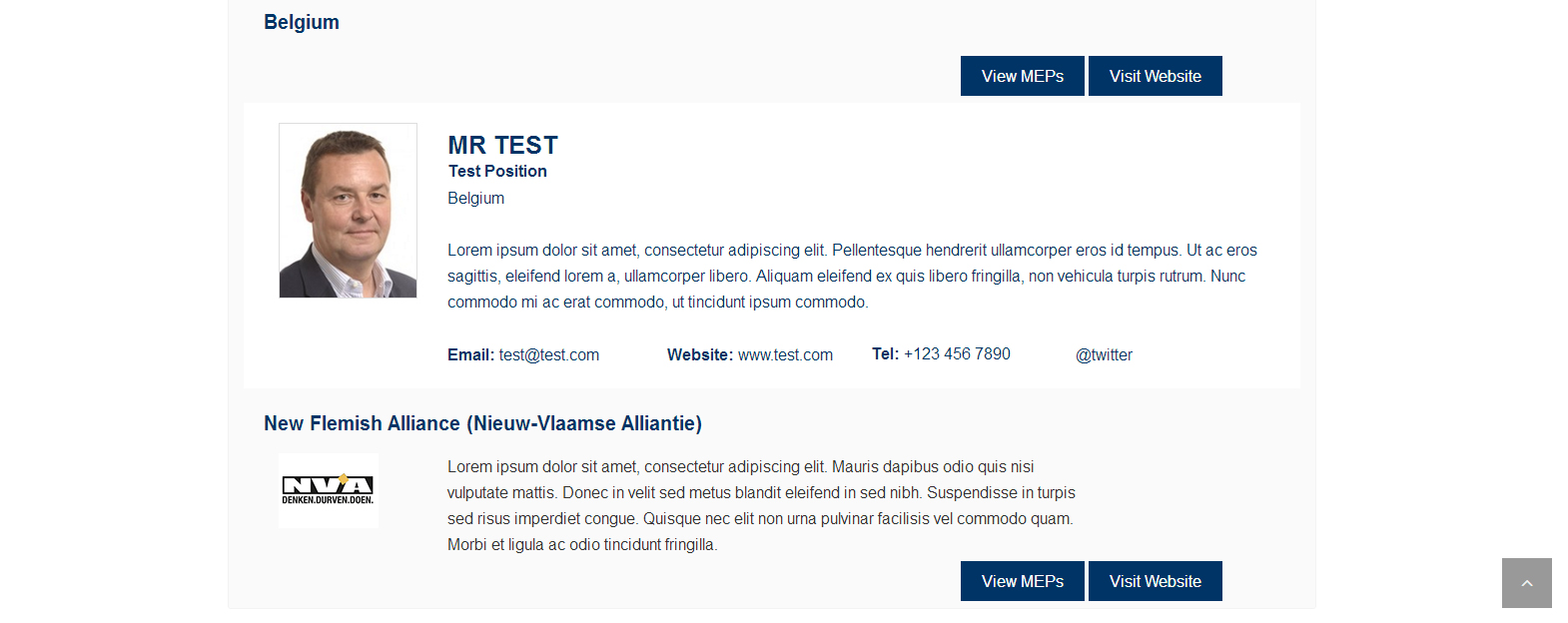 screen2.jpg.jpg
-
In reply to Taxonomy Issue
- October 22, 2015 at 7:41 pm
You have some nesting issues in your code to work out.
Near the bottom of what you posted, I commented were I found one nesting error. there may be others. I caught this by cleaning up the whitespace in your code.
<?php if ($member_group_query->have_posts()) : ?> <!-- END SUB CATEGORY TITLE AREA --> <div id="<?php the_ID(); ?>" class="panel-collapse collapse col-md-12"> <!-- SUB CATEGORY POSTS AREA --> <?php while ($member_group_query->have_posts()) : $member_group_query->the_post(); // removed inner dive to make it easier to read endwhile; //there should be a </div> here before end if endif; -
In reply to Field-Position acf_add_local_field
- October 22, 2015 at 7:10 pm
Too bad that there is no native way to do this. I will proceed as you suggested. I guess my original question is a feature request then 🙂
Thanks for your help!
-
In reply to Taxonomy Issue
- October 22, 2015 at 5:51 pm
tried the below instead.. it displays the category information, but below the post (see the screenshot) which makes no sense, as it should be displaying it where it says Belgium, and then when you press the expander it will display the posts (the MEPs) underneath.
<div id="accordion" class="panel-group">
    <div class="panel panel-default">
<!-- SUB CATEGORY TITLE AREA -->
<?php $member_group_terms = get_terms( 'meps_category' ); ?>
<?php
foreach ( $member_group_terms as $member_group_term ) {
    $member_group_query = new WP_Query( array(
        'post_type' => 'mep',
        'tax_query' => array(
            array(
                'taxonomy' => 'meps_category',
				'parent' => $parentcat,
                'field' => 'slug',
                'terms' => array( $member_group_term->slug ),
                'operator' => 'IN',
            )
        )
    )
	);
    ?>
        <div class="panel-heading">
		<div class="col-md-2"><?php echo $member_group_term->category_image; ?></div>
			<div class="col-md-10"><h3><?php echo $member_group_term->name; ?></h3>
			<p><?php echo $member_group_term->description; ?></p></div>
			<div class="clear bottomgap"></div>
			<div class="col-md-8"></div><div class="col-md-4"><a data-toggle="collapse" data-parent="#accordion" class="button" href="#<?php the_ID(); ?>">View MEPs</a> <a href="#" class="button" target="_blank">Visit Website</a></div>
        <div class="clear"></div>
		</div>
<div class="clear"></div>
<?php  if ( $member_group_query->have_posts() ) : ?>
<!-- END SUB CATEGORY TITLE AREA -->
        <div id="<?php the_ID(); ?>" class="panel-collapse collapse col-md-12">
<!-- SUB CATEGORY POSTS AREA -->
		<?php while ( $member_group_query->have_posts() ) : $member_group_query->the_post(); ?>
            <div class="panel-body">
			<div class="col-md-2 meppic"><?php the_post_thumbnail(); ?></div>
			<div class="col-md-10"><h3 class="mepname"><?php echo the_title();?></h3>
			<strong><?php the_field('title_position'); ?></strong>
			<div class="clear"></div>
			<?php the_field('location'); ?>
			<div class="clear"></div>
			<br/>
            <?php the_field('description'); ?>
			<div class="clear"></div>
			<br/>
			<div class="col-md-3 first"><strong>Email:</strong> <a href="mailto:<?php the_field('email'); ?>"><?php the_field('email'); ?></a></div><div class="col-md-3"><strong>Website:</strong> <a href="<?php the_field('website'); ?>" target="_blank"><?php the_field('website'); ?></a></div><div class="col-md-3"><strong>Tel:</strong> <?php the_field('tel'); ?></div><div class="col-md-3 last"><a href="http://www.twitter.com/<?php the_field('twitter_id'); ?>" target="_blank"><?php the_field('twitter_id'); ?></a></div>
			</div>
			</div>
<?php
endwhile;
endif;
?>
<?php
    // Reset things, for good measure
    $member_group_query = null;
    wp_reset_postdata();
}
?>
<!-- END SUB CATEGORY POSTS AREA -->
        </div>

    </div>
</div>
Any help to fix this would be awesome!
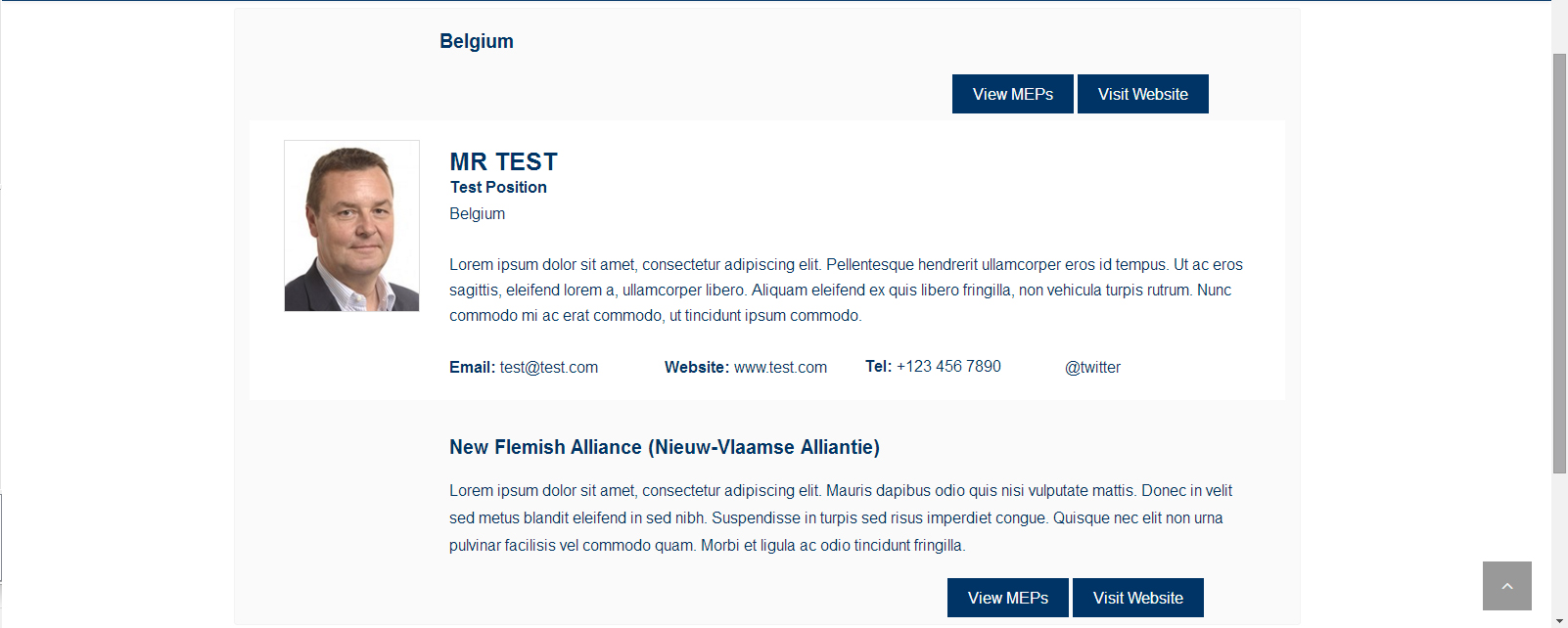 screen.jpg.jpg
-
In reply to How to change basic Gallery code to assign a custom size for the first photo
- October 22, 2015 at 5:06 pm
Add a counter to you loop and if it’s the first image then use a different size
<?php $images = get_field('gallery'); if ($images) { ?> <div class="library"> <?php $first = true; foreach ($images as $image) { $url = $image['sizes']['large']; if ($first) { // I made up a size here, you'll need to use a real size $url = $image['sizes']['extralarge']; $first = false; } ?> <a href="<?php echo $url; ?>" class="item"><img src="<?php echo $url; ?>" alt="<?php echo $image['alt']; ?>" /></a> <?php } // end foreach ?> </div> <?php } // end if ?> -
In reply to Taxonomy Issue
- October 22, 2015 at 12:01 pm
for custom taxonomies you need to use a tax_query. http://codex.wordpress.org/Class_Reference/WP_Query#Taxonomy_Parameters
-
In reply to Give more info on field groups with what rules/posts/pages use the group
- October 22, 2015 at 11:49 am
Well, this does the basics, menu order and and overview of the rules.
https://github.com/Hube2/acf-filters-and-functions/blob/master/acf-extended-admin-columns
To list all the pages, posts and whatever that the field is attached to would be quite complicated without actually examining all of the things that it could possibly be attached to.
You could add custom columns using a similar method to show what template each page uses. There are plenty of tutorials around on adding custom columns to admin pages.
-
In reply to Display Image for each entry on Tag Archive
- October 22, 2015 at 8:42 am
If you have the image field set to return a url, then using you’re above code you should change the image tag to
<img class="sponsorlogo" src="<?php echo $image; ?>" width="120" height="120" alt="<?php the_field('sponsor_company_name'); ?>"> -
In reply to Adding/Removing the gallery side info
- October 22, 2015 at 6:07 am
Do you mean you want to remove the URL, Title, Caption and Alt Text fields?
Yes exactly that. I just mocked up that image in Photoshop. Is there anyway to remove the default fields like I have in that image? This is using all latest WP and ACF PRO
-
In reply to Text custom fields don't work after 'Recent Posts' code
- October 21, 2015 at 12:13 pm
I would like to thank the both of you! I had the same problem and was going bonkers trying to figure it out. And it was so simple. I feel like quite the nooblet! 😉
-
In reply to acf_form() always creates two posts
- October 21, 2015 at 8:26 am
It’s this one but I take all the functions out of the functions.php file. Looking at it now, it is quite an old theme…
https://code.google.com/p/wordpress-naked/
-
In reply to Creating theme fields – generating a key?
- October 21, 2015 at 7:55 am
I ran into this problem too, so I went over to w3schools and used their uniqid generator to generate a unique ID for me. I then just pasted that, along with
field_into my code. Hopefully this hint saves somebody some time. -
In reply to Generate fields solely from PHP
- October 21, 2015 at 7:54 am
I ran into this problem too, so I went over to w3schools and used their uniqid generator to generate a unique ID for me. I then just pasted that, along with
field_into my code. Hopefully this hint saves somebody some time. -
In reply to Delete repeater row programmatically
- October 21, 2015 at 7:21 am
Hello,
+1 for this question, i am looking for the solution too… -
In reply to Custom php redirect field
- October 21, 2015 at 6:14 am
okay, so I overlooked something simple earlier
you are using
$url = the_field()It should be
$url = get_field()<?php $queried_object = get_queried_object(); $post_id = $queried_object->ID; if( get_field('redirect', $post_id) ): ?> <?php $url = get_field('redirect', $post_id); ?> <?php header("Location: $url?". $_SERVER['QUERY_STRING'], true, 301); exit; ?> <?php endif; ?> -
In reply to Custom php redirect field
- October 21, 2015 at 5:42 am
As long as it’s a valid URL is should be working, I’ve used dynamic values in redirects often. Are you sure that the field is returning a valid URL? I think you said it was, but I just want to check. Before the redirect have you tried.
echo $url,'?',$_SERVER['QUERY_STRING']; exit;because the code really does look correct so the only problem would have to be the url being used.
-
In reply to Custom php redirect field
- October 21, 2015 at 5:13 am
You are doing this outside the loop, so you need to supply the post id I think.
<?php $queried_object = get_queried_object(); $post_id = $queried_object->ID; if( get_field('redirect', $post_id) ): ?> <?php $url = the_field('redirect', $post_id); ?> <?php header("Location: $url?". $_SERVER['QUERY_STRING'], true, 301); exit; ?> <?php endif; ?> -
In reply to Options page: post_id for acf_add_options_sub_page
- October 20, 2015 at 11:04 pm
There is quite a bit that’s not documented. I knew for example that the two function add_options_page and add_options_sub_page actually both end up calling the same function in the end because I dig around in the code a bit, and I needed to understand how these work to build my plugin.
What bothers me, like I said, is that I completely missed this option when I was adding the autoload option.
-
In reply to Repeater Field Wrapper, Incrementing Class and IDs
- October 20, 2015 at 10:22 pm
Ok, thanks Jonathan. That explains the purpose of the wrapper attributes. But Eric, does this help with your original questions? #2 – Adding the numbers after the class isn’t addressed yet. Not sure about the others, #1 and #3.
-
In reply to Query taxonomy for fields
- October 20, 2015 at 5:29 pm
Are you sure there is an image field called “icon” on each of your terms?
Yes, there’s.What have you set as the return value of this field? With your current code it should be set to “image object”.
Yes, it’sThere’s attachment of my settings.
Also, you’re currently echoing the image outside of the li tag which I don’t think is what you want.. ?
I know. It should be like:<?php $current_term = get_queried_object(); $args = array( 'parent' => $current_term->term_id, 'orderby' => 'slug', 'hide_empty' => false ); $child_terms = get_terms( $current_term->taxonomy, $args ); ?> <ul> <?php foreach ($child_terms as $term) { ?> <?php $icon = get_field('icon', $term->taxonomy . '_' . $term->term_id); $image_thumb = $icon['sizes']['full']; ?> <li> <h3><a href="<?php echo get_term_link( $term->name, $term->taxonomy ); ?>"><?php echo $term->name; ?></a></h3> <img src="<?php echo $image_thumb; ?>" class="icona" alt="" /> </li> <?php } ?> </ul>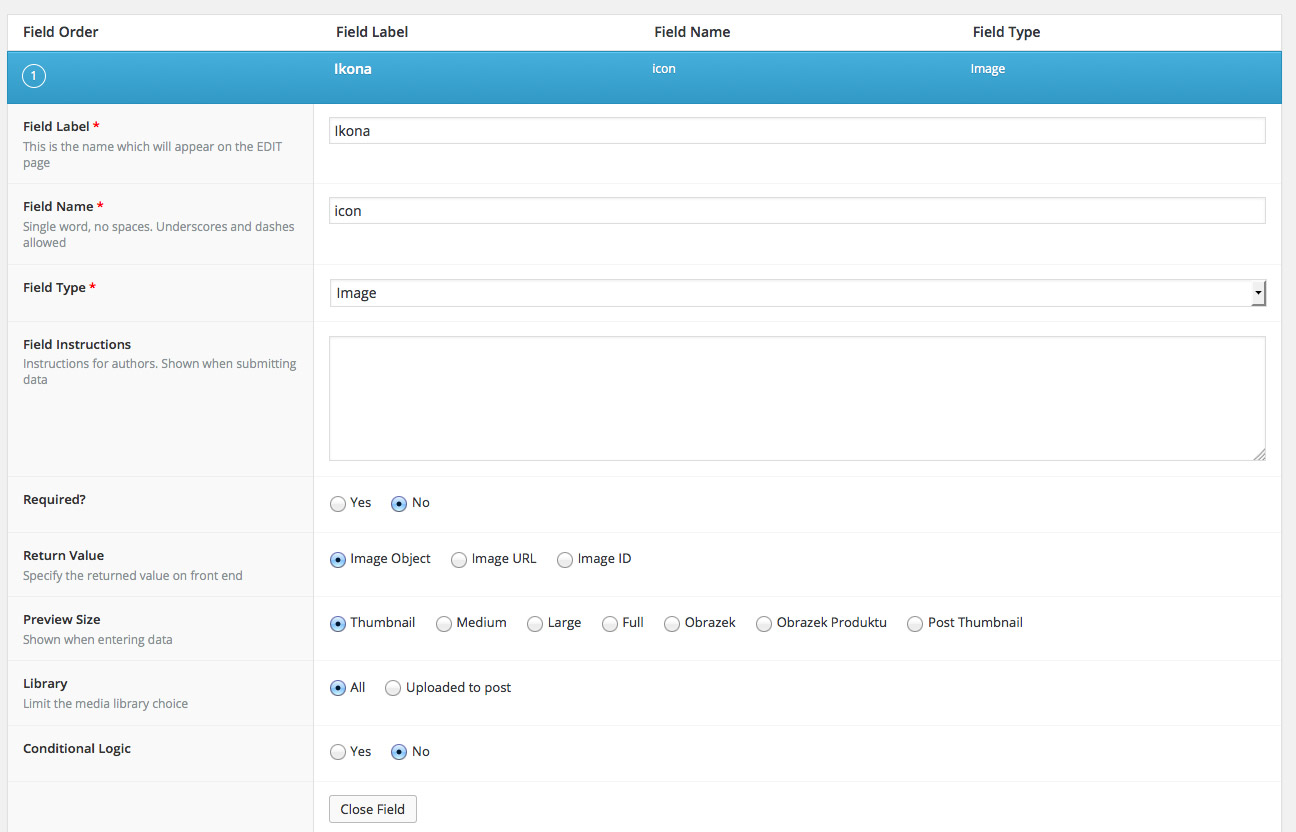 custom-field....jpg


Welcome
Welcome to the Advanced Custom Fields community forum.
Browse through ideas, snippets of code, questions and answers between fellow ACF users
Forums
Helping Others
Helping others is a great way to earn karma, gain badges and help ACF development!
