

Forum Replies Created
-

nicmare
- in reply to: Yoast SEO & ACF
- December 7, 2015 at 10:13 pm
i missed that statement from yoast. but i click thru their discussion and ended with this javascript documentation: https://github.com/Yoast/YoastSEO.js/blob/master/README.md
but at the moment i have no clue how to use this code with our old hook
-
two years later and nothing happened here 🙁
+1 for external page link -
nicmare
- in reply to: Yoast SEO & ACF
- November 17, 2015 at 4:04 am
hey paul. i took a look into the code of yoast. seems it expects < img > strings in $content. so all you need to do is something like this:
add_filter( 'wpseo_pre_analysis_post_content', 'filter_yoasts_wpse_119879', 10, 2 );
function filter_yoasts_wpse_119879( $content, $post ){
	$myimage = get_field("myimage",$post->ID);
	$content .= "<img src='".$myimage["sizes"]["medium"]."' alt='".$myimage["alt"]."'/>";
	return $content;
}
and it would recognize your custom field images.
-
okay. that was easy! here we go. simply adjust it to your needs:
1. create a new entry in wp_options: “is_winner”
2. insert that code to your functions.php:// register the meta box add_action( 'add_meta_boxes', 'my_custom_field_checkboxes' ); function my_custom_field_checkboxes() { add_meta_box( 'winner_box', // this is HTML id of the box on edit screen 'Winner', // title of the box 'my_customfield_box_content', // function to be called to display the checkboxes, see the function below 'product', // on which edit screen the box should appear 'side', // part of page where the box should appear 'default' // priority of the box ); } // display the metabox function my_customfield_box_content( $post_id ) { wp_nonce_field( 'wp_nonce_check', 'myplugin_nonce' ); echo '<label><input type="checkbox" name="is_winner" value="1" /> Winner'; if(get_the_id() == get_option("is_winner")) echo " (currently selected)"; echo "</label>"; } // save data from checkboxes add_action( 'save_post', 'my_custom_field_data' ); function my_custom_field_data() { // check if this isn't an auto save if ( defined( 'DOING_AUTOSAVE' ) && DOING_AUTOSAVE ) return; // security check if ( ! isset( $_POST['myplugin_nonce'] ) || !wp_verify_nonce( $_POST['myplugin_nonce'], 'wp_nonce_check' ) ) return; if ( isset( $_POST['is_winner'] ) ) update_option("is_winner", get_the_id()); else return; }now in every post is a meta box along with ACF fields. when you check that meta box, the id is saved to the field in wp_options. this way, you save a lot of performance because there is no wp_query and you do not need to alter all posts!!
 Screenshot-2....png
-
normally i do this with an option page. but i would prefer to set that post meta directly in the post too. i would do it like you but this makes me worry because of a lot of code for such a tiny thing. hmm. another approach might be to create an option field in the database which saves the post id. and toggle that id inside of each post.
-
-
just to complete the thread. thats easy:
add_action('admin_head', 'admin_styles'); function admin_styles() { if( get_post_type() == "product" ) { ?> <style> .acf-editor-wrap iframe { height: 100px !important; min-height: 100px; } </style> <?php } } -
i think i found it:
$group_NAME = 'Attribute';
$group_query = new WP_Query( array( 'post_type' => 'acf-field-group', 's' => $group_NAME) );
$group_ID = $group_query->post->ID;
$field_query = new WP_Query( array( 'post_type' => 'acf-field', 'post_parent' => $group_ID) );
the second query returns me all available custom fields of the fieldgroup “Attribute”
-
okay. found it!
$group_NAME = 'Attribute'; $group_query = new WP_Query( array( 'post_type' => 'acf-field-group', 's' => $group_NAME) ); $group_ID = $group_query->post->ID; $field_query = new WP_Query( array( 'post_type' => 'acf-field', 'post_parent' => $group_ID) ); -
same here. i try to get all available fields of a fieldgroup assigned to a specific post type:
$group_NAME = 'Attribute';
$the_query = new WP_Query( array( 'post_type' => 'acf-field-group', 's' => $group_NAME) );
$group_ID = $the_query->post->ID; // returns the valid ID !
$fields = array();
$fields = apply_filters('acf/field_group/get_fields', $fields, $group_ID);
but the $fields array is empty!
-
dear jonathan,
i’ve noticed that the function sorts the array by field id. but you have an idea how to sort them like they are arranged in plugin settings (drag an drop order)?
-
nicmare
- in reply to: HowTo: build tables with acf and merged cells (colspan)
- June 17, 2015 at 7:16 pm
updated (better) version with prepend and append elements and support for regular text input fields and without extra function:
function make_cells($field){ global $post, $posts; $i = 1; // variable counter, may reset during foreach $b = 1; // global counter, never resets $end = count($posts); echo "<td"; foreach($posts as $key => $post) { $value = get_field($field); $valueobj = get_field_object($field); $nextvalue = ""; if(isset($posts[$key+1])) $nextvalue = get_field($field,$posts[$key+1]->ID); if($nextvalue != $value){ echo " colspan='".$i."'>"; if(isset($valueobj["prepend"])) echo $valueobj["prepend"]." "; if(isset($valueobj["choices"])){ if(is_array($value)){ $newarray = []; foreach($value as $val){ $newarray[] = $valueobj["choices"][$val]; } echo implode(", ",$newarray); }else{ echo $valueobj["choices"][$value]; } }else{ echo $value; } if(isset($valueobj["append"])) echo " ".$valueobj["append"]; $i=0; if($b != $end) echo "</td><td"; } if($b == $end) echo "</td>"; $i++; $b++; } } -
damn it ^^. then one could use it that way:
<?php
if($fields = get_field_objects()){
unset($fields["bild"]);
unset($fields["asin"]);
unset($fields["preis"]);
unset($fields["bewertung"]);
unset($fields["produktname"]);
?>
<div class='data row'>
	<?php
	foreach($fields as $field){
		?>
		<div class='item col-sm-6 col-md-4 col-lg-3'>
			<div class='term'>
				<?php echo $field["label"];?>
			</div>
			<div class="value">
				<?php
				if(isset($field["prepend"])) echo $field["prepend"]." ";
				if(isset($field["choices"])){
					if(is_array($field["value"])){
						$newarray = array();
						foreach($field["value"] as $value){
							$newarray[] = $field["choices"][$value];
						}
						echo implode(",",$newarray);
					} else {
						echo $field["choices"][$field["value"]];
					}
				} else {
					echo $field["value"];
				}
				if(isset($field["append"])) echo " ".$field["append"];
				?>
				</div>
		</div>
		<?php
	}
	?>
</div>
<?php
}
?>
this will generate nice list with pre- and appended elements and will look for right labels for checkboxes/select fields
-
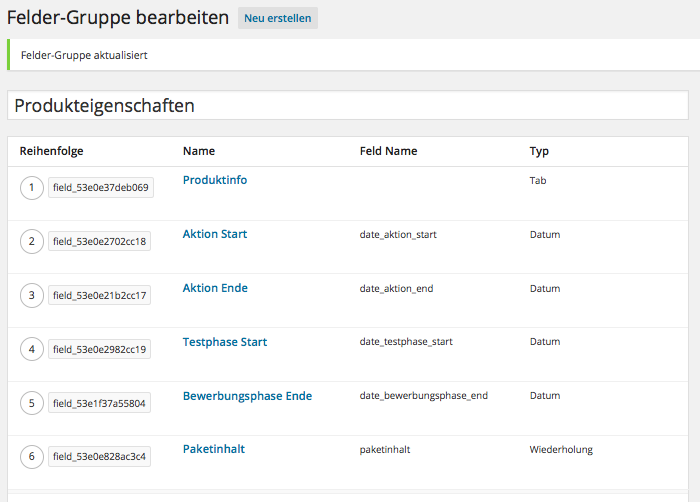
i think i dont have that problem. try to take a look with firebug to see whats going on under the hood?!
 Screenshot-2....png
-
which issue sixty? i am german too
-
thank you drebbits. that helped me
-
yes i can confirm that! plugin completely unusable now. several errors occur
hotfix please!now i took old lang files in latest acf version to fix that
 Screenshot-2....png
-
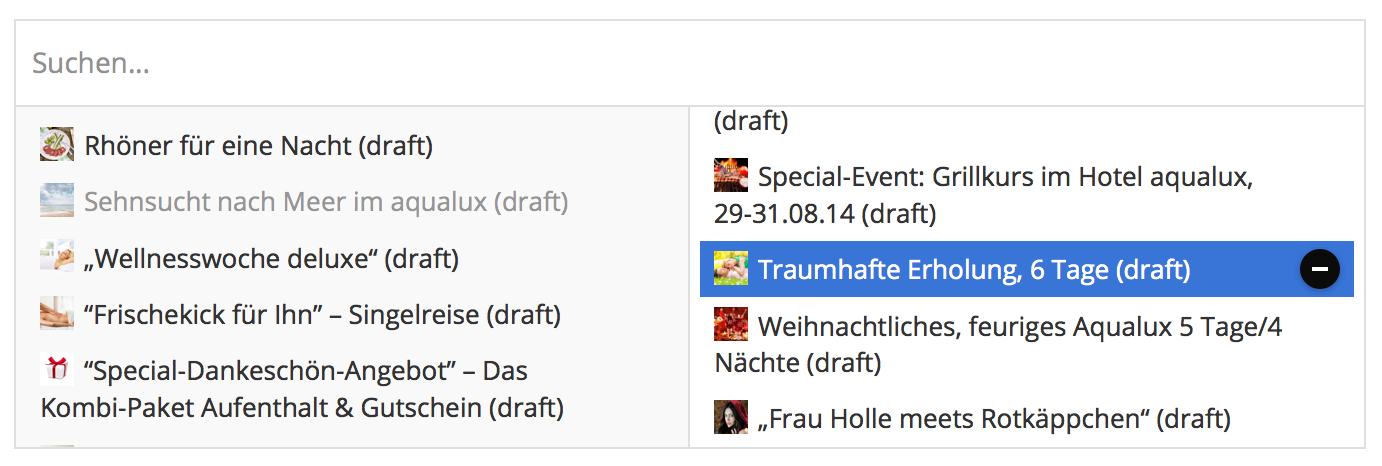
no idea??
 Screenshot-2....png
-
and how can i exclude results? i tried this:
function only_big_images( $html, $post ) {
    $image = wp_get_attachment_image_src( get_post_thumbnail_id( $post->ID ), 'shop_catalog' );

	if($image[1] >= 600){
		return $html;
	}
}
but then in the relationship field list still exist “empty” items with the label “null”. i want to hide them completely from the list!
Screenshot-2....png
-
nice one but this is the correct query:
// only show results with image in relationship field
add_filter('acf/fields/relationship/query', 'my_relationship_query', 10, 3);
function my_relationship_query( $args, $field, $post ){

    $args['meta_query'] = array(
	    array(
	    	// just check if this key exists:
	        'key' => '_thumbnail_id'
	    )
	);

    return $args;
}
thank you for leading me into the right direction!
-
solved! get_field() returns me an array and update_field() generates a serialized array
 .
.
.
.
.
.
-
great! acf for ever <3 !
But this generates a frontend link. i need a link to the edit page of each item in the relationship field.
OR is there a better way to do this than this:
$link = '<a href="post.php?post='.$object->ID.'&action=edit">[edit]</a>';
Screenshot-2....png
-
found the answer here:
http://www.advancedcustomfields.com/resources/how-to-get-values-from-a-user/it has to be
<?php $historie = get_field( 'historie','user_'.$current_user->ID );?> -
alright. i managed it! i use a function to upload the image to the media list first:
http://goldenapplesdesign.com/2010/07/03/front-end-file-uploads-in-wordpress/i read the existing rows first and then use the attachment id from the function above:
<form action="<?php the_permalink(); ?>" method="POST" enctype="multipart/form-data">
	<input type="file" name="imageupload"/>
	<input type="hidden" name="userid" value="<?php echo $current_user->ID;?>" />
	<input type="hidden" name="username" value="<?php echo $current_user->display_name;?>" />
	<input type="submit"/>
</form>
<?php
	foreach ($_FILES as $file => $array) {
		$image = insert_attachment($file,$post->ID); //upload image and returns the id
	}
	if( have_rows('galerie') ){
		$gallery = get_field( 'gallery' );
	} else {
		$gallery = array();
	}

	// add to existing array
	$gallery[] = array(
		'bild'			=> $image,
		'nutzerid'		=> $_POST["userid"],
		'nutzername'	=> $_POST["username"],
		'freigeben'		=> ""
	);
	// save new array
	update_field("field_53e0e20e2cc16", $gallery, $post->ID);
?>
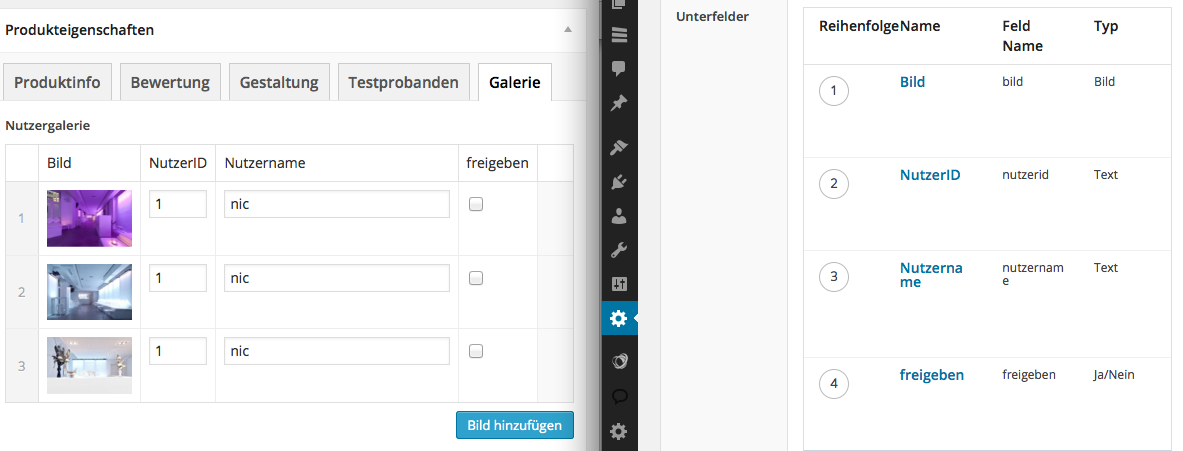
you can see my acf setup in the attachment. maybe someone has ideas to simply things?!
 Screenshot-2....png
-
alright i needed nearly an hour to find the solution but here is it:
new WP_Query( array (
				'post_type' => 'product',
				'posts_per_page' => -1,
				'meta_query' => array(
				    array(
				        'key' => 'nutzer',
				        'value' => '"'.$user_ID.'"',
				        'compare' => 'LIKE'
				    )
			    )
));

Welcome
Welcome to the Advanced Custom Fields community forum.
Browse through ideas, snippets of code, questions and answers between fellow ACF users
Forums
Helping Others
Helping others is a great way to earn karma, gain badges and help ACF development!
