

Forum Replies Created
-
lolofora
- in reply to: Front end show Taxonomies IDs instead of terms/name
- December 15, 2023 at 8:57 am
Un grand salut aussi 🙂
Au cas où d’autres personnes rencontrent le meme problème on continue en Anglais ? 🙂I am definitely not a coder/dev and since the latest release of ACF what I am trying, or anyway, achieved so far, has been done without a single bit of code.
My bad, I forgot to specify that I am also using Elementor.
But here is what I have done:
I have created a new taxonomy:
https://prnt.sc/SblxWOHBmACi
https://prnt.sc/QpWKI3Qa41-S
https://prnt.sc/A8kIAtrZXW6m -
lolofora
- in reply to: Front end show Taxonomies IDs instead of terms/name
- December 15, 2023 at 8:57 am
Salut aussi !
Au cas où d’autres personnes rencontrent le meme problème on continue en Anglais ? 🙂I am definitely not a coder/dev and since the latest release of ACF what I am trying, or anyway, achieved so far, has been done without a single bit of code.
My bad, I forgot to specify that I am also using Elementor.
But here is what I have done:
I have created a new taxonomy: -
lolofora
- in reply to: Front end show Taxonomies IDs instead of terms/name
- December 15, 2023 at 8:56 am
Salut aussi !
Au cas où d’autres personnes rencontrent le meme problème on continue en Anglais ? 🙂I am definitely not a coder/dev and since the latest release of ACF what I am trying, or anyway, achieved so far, has been done without a single bit of code.
My bad, I forgot to specify that I am also using Elementor.
But here is what I have done:
I have created a new taxonomy:
https://prnt.sc/SblxWOHBmACi
https://prnt.sc/QpWKI3Qa41-S
https://prnt.sc/A8kIAtrZXW6m -
lolofora
- in reply to: Front end show Taxonomies IDs instead of terms/name
- December 15, 2023 at 8:56 am
Salut aussi !
Au cas où d’autres personnes rencontrent le meme problème on continue en Anglais ? 🙂I am definitely not a coder/dev and since the latest release of ACF what I am trying, or anyway, achieved so far, has been done without a single bit of code.
My bad, I forgot to specify that I am also using Elementor.
But here is what I have done:
I have created a new taxonomy:
https://prnt.sc/SblxWOHBmACi
https://prnt.sc/QpWKI3Qa41-S
https://prnt.sc/A8kIAtrZXW6mAnd here is what I did in Elementor:
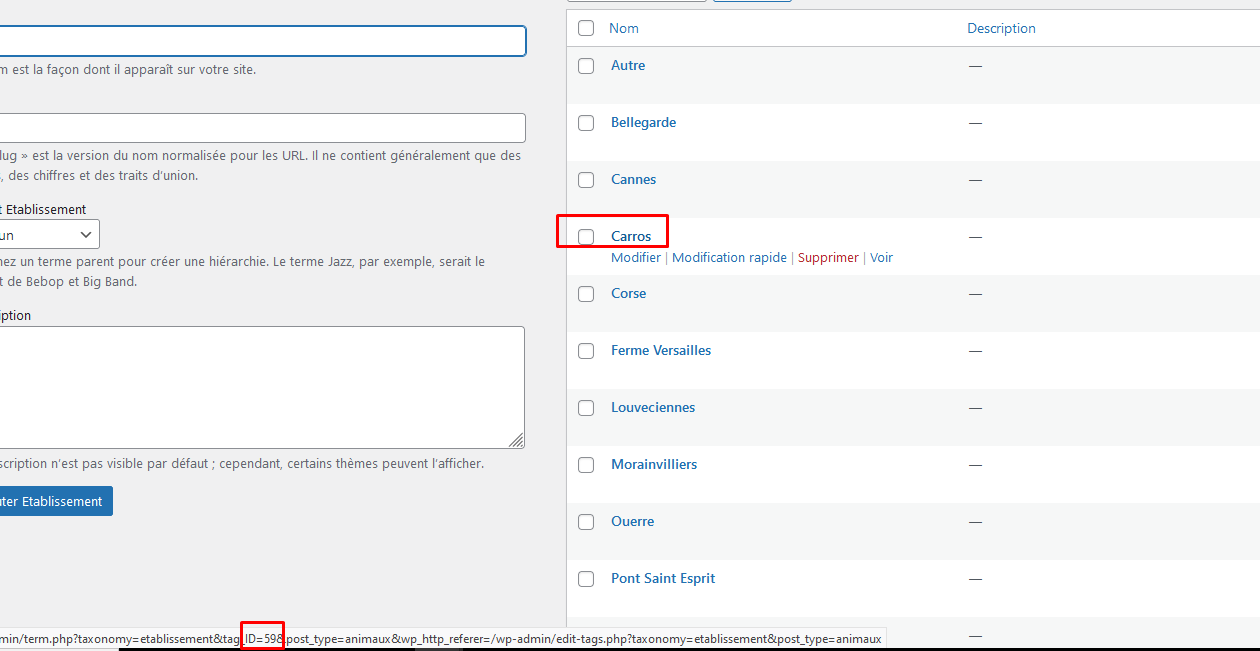
https://prnt.sc/kQmfuTbvomh1So it definitely loads something correct, which is the ID of the taxonomy:
https://prnt.sc/2gf4eFlbn8tv
In this case 59
But even if I switch the value as showed in my original post this is still the ID and not the value/term that is showing up.It works fine with “normal” fields:
https://prnt.sc/X–0v2gyJDCc
https://prnt.sc/GwSsYtf4DpfC
But I know this is not the same thing as Taxonomies.And I am a bit stuck :-/
-
lolofora
- in reply to: Front end show Taxonomies IDs instead of terms/name
- December 15, 2023 at 8:56 am
Salut aussi !
Au cas où d’autres personnes rencontrent le meme problème on continue en Anglais ? 🙂I am definitely not a coder/dev and since the latest release of ACF what I am trying, or anyway, achieved so far, has been done without a single bit of code.
My bad, I forgot to specify that I am also using Elementor.
But here is what I have done:
I have created a new taxonomy:
https://prnt.sc/SblxWOHBmACi
https://prnt.sc/QpWKI3Qa41-S
https://prnt.sc/A8kIAtrZXW6mAnd here is what I did in Elementor:
https://prnt.sc/kQmfuTbvomh1So it definitely loads something correct, which is the ID of the taxonomy:
https://prnt.sc/2gf4eFlbn8tv
In this case 59
But even if I switch the value as showed in my original post this is still the ID and not the value/term that is showing up.It works fine with “normal” fields:
https://prnt.sc/X–0v2gyJDCc
https://prnt.sc/GwSsYtf4DpfC
But I know this is not the same thing as Taxonomies.And I am a bit stuck :-/
I even asked chatgpt to write me a code snippet which looks that it could have done something (I even asked the function to check on a specific url) but it still doesn’t work 🙁
-
lolofora
- in reply to: Front end show Taxonomies IDs instead of terms/name
- December 15, 2023 at 8:56 am
Salut aussi !
Au cas où d’autres personnes rencontrent le meme problème on continue en Anglais ? 🙂I am definitely not a coder/dev and since the latest release of ACF what I am trying, or anyway, achieved so far, has been done without a single bit of code.
My bad, I forgot to specify that I am also using Elementor.
But here is what I have done:
I have created a new taxonomy:
https://prnt.sc/SblxWOHBmACi
https://prnt.sc/QpWKI3Qa41-S
https://prnt.sc/A8kIAtrZXW6mAnd here is what I did in Elementor:
https://prnt.sc/kQmfuTbvomh1So it definitely loads something correct, which is the ID of the taxonomy:
https://prnt.sc/2gf4eFlbn8tv
In this case 59
But even if I switch the value as showed in my original post this is still the ID and not the value/term that is showing up.It works fine with “normal” fields:
https://prnt.sc/X–0v2gyJDCc
https://prnt.sc/GwSsYtf4DpfC
But I know this is not the same thing as Taxonomies.And I am a bit stuck :-/
I even asked chatgpt to write me a code snippet which looks that it could have done something (I even asked the function to check on a specific url) but it still doesn’t work 🙁
function convert_taxonomy_ids_to_terms( $value, $post_id, $field ) {
if ( ! $value ) {
return $value;
}
if ( strpos( $_SERVER[‘REQUEST_URI’], ‘/listing-des-animaux/’ ) !== false ) {
$taxonomies = get_object_taxonomies( ‘animaux’ );
if ( is_array( $value ) ) {
$text_values = array();
foreach ( $value as $id ) {
foreach ( $taxonomies as $taxonomy ) {
$term = get_term_by( ‘id’, $id, $taxonomy );
if ( $term ) {
$text_values[] = $term->name;
}
}
}
return implode( ‘, ‘, $text_values );
} else {
foreach ( $taxonomies as $taxonomy ) {
$term = get_term_by( ‘id’, $value, $taxonomy );
if ( $term ) {
return $term->name;
}
}
return $value;
}
} else {
return $value;
}
}
add_filter( ‘acf/format_value/type=taxonomy’, ‘convert_taxonomy_ids_to_terms’, 10, 3 ); -
When deactivated ACF is working as expected again.
I left a message on their support forum:
https://wordpress.org/support/topic/acf-advanced-custom-fields-compatibility-2/
-
ehw,
In my case the issue comes from the plugin “Product Table for WooCommerce by codeAstrology (WooproductTable)” if i deactivate it, ACF works fine again 🙁
-
Hello,
Your video doesnt work but it seems i have the same problem.
Nothing is happening when i click on the “edit” link
https://prnt.sc/8DrNiMZYbvpjThe menu and options does not open.
I can’t change the type of field or label.I can just delete or duplicate.
And when i duplicate there is nothing more i can do.
I don’t understand i’ve got it working fine on an other website but not here and i don’t have many plugins installed.
-
Ho !
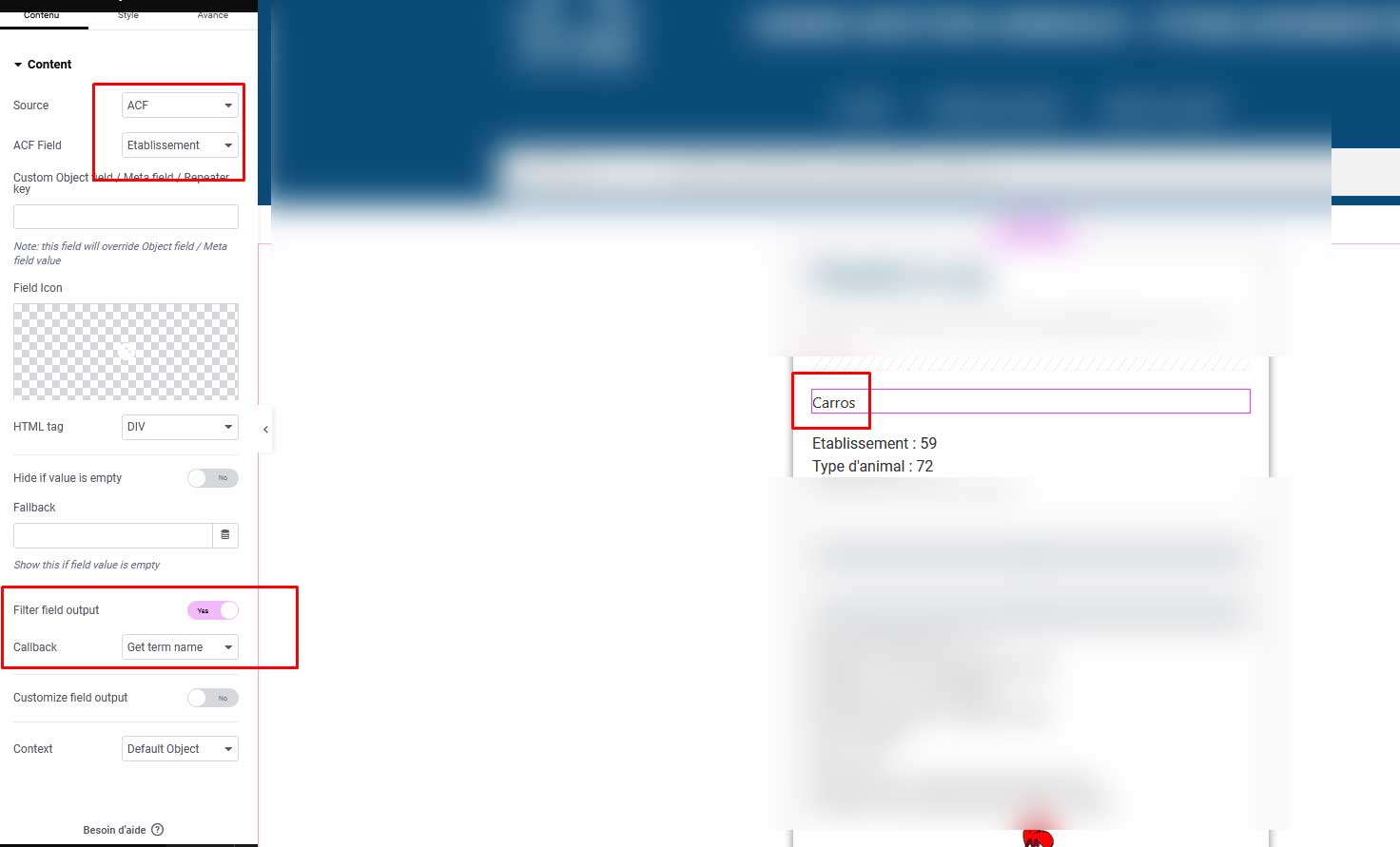
I got it, it was on your screenshot a bit further down !I am finally getting a value ! 🙂
Un grand merci pour ton aide ! 🙂
 jetengine-dy....jpg
-
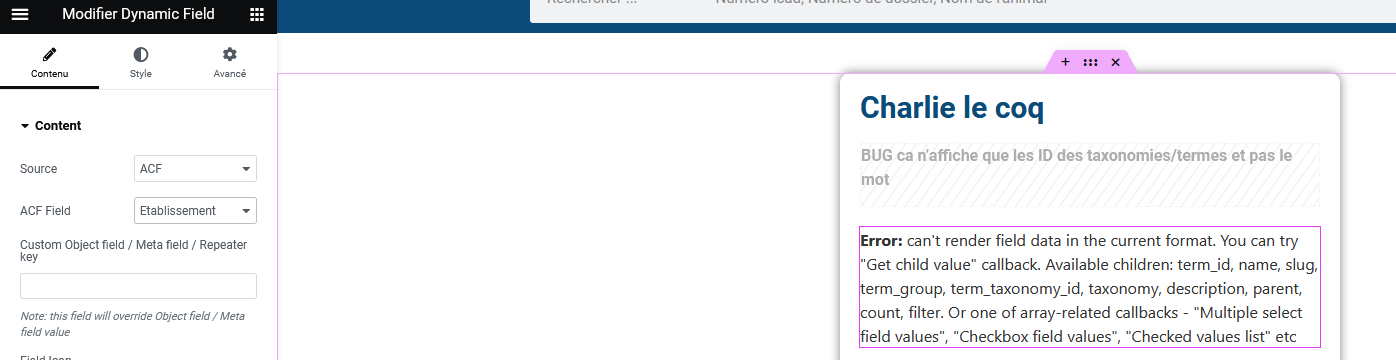
I am getting this error but you were talking about a call back ?
 jetengine-dy....png
-
Merci de ta réponse !
I’d like to try that, this is the plugin that you are using ?
https://crocoblock.com/plugins/jetengine/
-
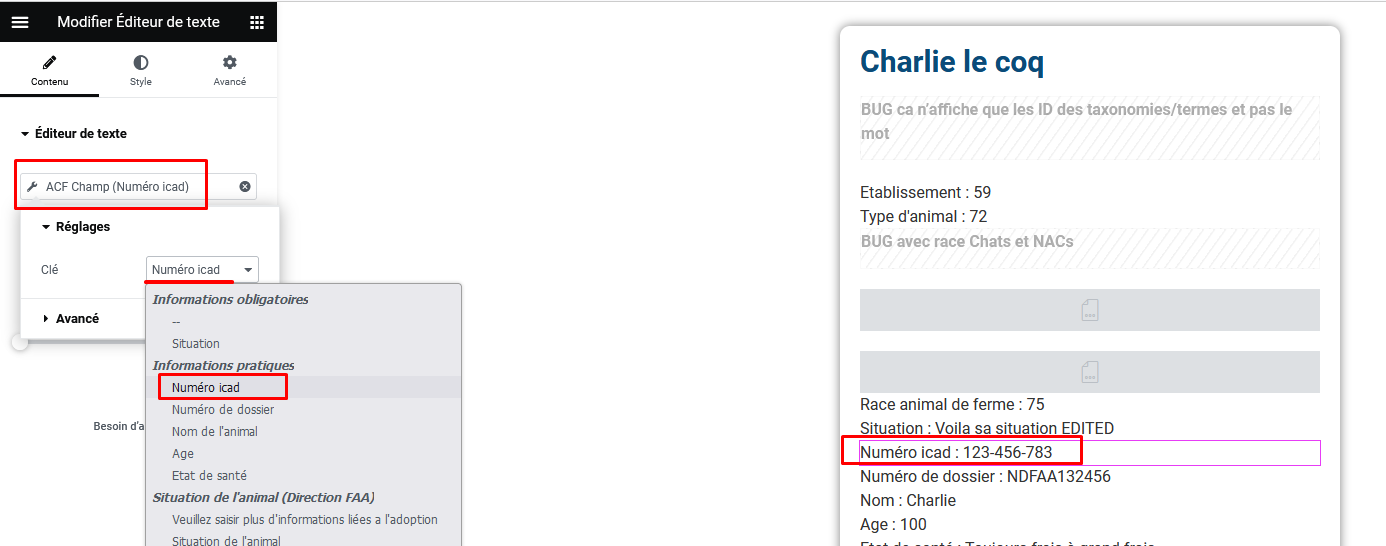
It works fine with “normal” fields:
(attached files)
But I know this is not the same thing as Taxonomies.And I am a bit stuck :-/
 acf-normal-f....png
 acf-normal-f....png
-
And here is what I did in Elementor:
(attached file01)So it definitely loads something correct, which is the ID of the taxonomy:
(attached file02)
In this case 59
But even if I switch the value as showed in my original post this is still the ID and not the value/term that is showing up.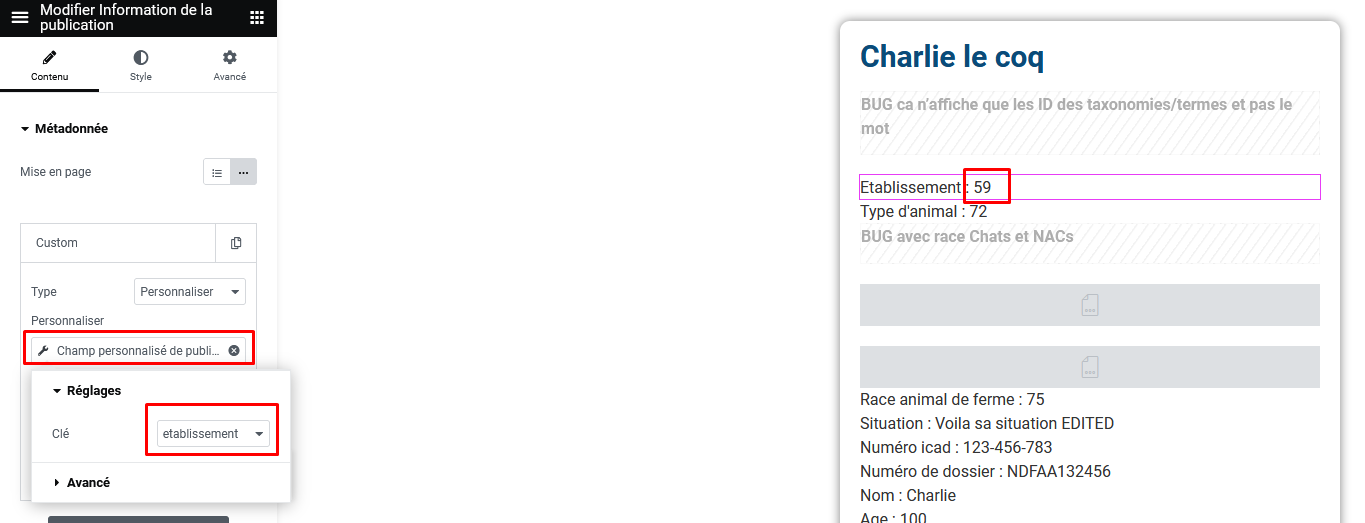 acf-elem-01.....png
 acf-elem-02.....png
-
Un grand salut aussi 🙂
I’ll try to change the content of my post so i can actually post it
Au cas où d’autres personnes rencontrent le meme problème on continue en Anglais ? 🙂I am definitely not a coder/dev and since the latest release of ACF what I am trying, or anyway, achieved so far, has been done without a single bit of code.
My bad, I forgot to specify that I am also using Elementor.
But here is what I have done:
I have created a new taxonomy: acf-1-2-3-2.....png
-
Salut aussi !
Au cas où d’autres personnes rencontrent le meme problème on continue en Anglais ? 🙂I am definitely not a coder/dev and since the latest release of ACF what I am trying, or anyway, achieved so far, has been done without a single bit of code.
My bad, I forgot to specify that I am also using Elementor.
But here is what I have done:
I have created a new taxonomy:
https://prnt.sc/SblxWOHBmACi
https://prnt.sc/QpWKI3Qa41-S
https://prnt.sc/A8kIAtrZXW6m -
Salut aussi !
Au cas où d’autres personnes rencontrent le meme problème on continue en Anglais ? 🙂I am definitely not a coder/dev and since the latest release of ACF what I am trying, or anyway, achieved so far, has been done without a single bit of code.
My bad, I forgot to specify that I am also using Elementor.
But here is what I have done:
I have created a new taxonomy:
https://prnt.sc/SblxWOHBmACi
https://prnt.sc/QpWKI3Qa41-S
https://prnt.sc/A8kIAtrZXW6m

Welcome
Welcome to the Advanced Custom Fields community forum.
Browse through ideas, snippets of code, questions and answers between fellow ACF users
Forums
Helping Others
Helping others is a great way to earn karma, gain badges and help ACF development!
