

Forum Replies Created
-
I have managed to solve the issue.
I switched to Polylang Pro and then set the Repeater’s sub-fields to “Translations: Synchronize” (a field only available in Pro) and this solved it.
I hope this helps anybody else with the same problem.
Have a great day and life!
-
Hi there, any luck with this issue? I’m having exactly the same issue. I’ll share with you exactly what’s happening, in case it is of any help for anybody to clarify what’s the matter.
In my case, I’m using the plugin Advanced Custom Fields PRO, version 6.3.12.
On a client’s WordPress site, I have a custom theme that we have coded ourselves. The site is in two languages (EN/FI) and we use Polylang for the multilingual functionality.
We have a CPT, ‘Resorts’, where there are many different ACF fields, two of which are Post Object fields. One of them fetches CPT posts called ‘Golf Courses’, which are fetched fine and matching the current language, and then we have the other Post Object field, ‘Price Tables’, which, for some unknown reason, only works in Finnish (FI). If I try to find posts of this type in English, it just says ‘The results could not be loaded’, and it fails to find any posts.
I have confirmed that both CPTs ‘Golf Courses’ and ‘Price Tables’ are created exactly in the same way, both have translations in both languages, are correctly linked between each language, and that the Polylang settings are the same for both of them.
Here is an extract from our ‘functions.php’ file, where we register the relevant CPTs:
function custom_post_type(){
//CPT RESORTS
$labels = array(
‘name’ => _x(‘Resorts’, ‘Post Type General Name’, ‘enjoytraveltours’),
‘singular_name’ => _x(‘Resorts’, ‘Post Type Singular Name’, ‘enjoytraveltours’),
‘menu_name’ => __(‘Resorts’, ‘enjoytraveltours’),
‘parent_item_colon’ => __(‘Resort padre’, ‘enjoytraveltours’),
‘all_items’ => __(‘Todos los resorts’, ‘enjoytraveltours’),
‘view_item’ => __(‘Ver resort’, ‘enjoytraveltours’),
‘add_new_item’ => __(‘Añadir resort’, ‘enjoytraveltours’),
‘add_new’ => __(‘Añadir resort’, ‘enjoytraveltours’),
‘edit_item’ => __(‘Editar resort’, ‘enjoytraveltours’),
‘update_item’ => __(‘Actualizar resort’, ‘enjoytraveltours’),
‘search_items’ => __(‘Buscar resort’, ‘enjoytraveltours’),
‘not_found’ => __(‘No encontrado’, ‘enjoytraveltours’),
‘not_found_in_trash’ => __(‘No encontrado en la papelera’, ‘enjoytraveltours’),
);
$args = array(
‘label’ => __(‘Resorts’, ‘enjoytraveltours’),
‘description’ => __(‘resorts destacados’, ‘enjoytraveltours’),
‘labels’ => $labels,
‘supports’ => array(‘title’,’thumbnail’,’custom-fields’,’revisions’,’page-attributes’,’post-formats’),
‘hierarchical’ => true,
‘public’ => true,
‘show_ui’ => true,
‘show_in_menu’ => true,
‘show_in_nav_menus’ => true,
‘show_in_admin_bar’ => true,
‘menu_position’ => 0,
‘can_export’ => true,
‘has_archive’ => true,
‘exclude_from_search’ => false,
‘publicly_queryable’ => true,
‘capability_type’ => ‘page’,
‘menu_icon’ => ‘dashicons-tag’,
);
register_post_type(‘resorts’, $args);//CPT GOLF COURSES
$labels = array(
‘name’ => _x(‘Golf courses’, ‘Post Type General Name’, ‘enjoytraveltours’),
‘singular_name’ => _x(‘Golf courses’, ‘Post Type Singular Name’, ‘enjoytraveltours’),
‘menu_name’ => __(‘Golf courses’, ‘enjoytraveltours’),
‘parent_item_colon’ => __(‘Golf course padre’, ‘enjoytraveltours’),
‘all_items’ => __(‘Todos los Golf courses’, ‘enjoytraveltours’),
‘view_item’ => __(‘Ver golf course’, ‘enjoytraveltours’),
‘add_new_item’ => __(‘Añadir golf course’, ‘enjoytraveltours’),
‘add_new’ => __(‘Añadir golf course’, ‘enjoytraveltours’),
‘edit_item’ => __(‘Editar golf course’, ‘enjoytraveltours’),
‘update_item’ => __(‘Actualizar golf course’, ‘enjoytraveltours’),
‘search_items’ => __(‘Buscar golf course’, ‘enjoytraveltours’),
‘not_found’ => __(‘No encontrado’, ‘enjoytraveltours’),
‘not_found_in_trash’ => __(‘No encontrado en la papelera’, ‘enjoytraveltours’),
);
$args = array(
‘label’ => __(‘Golf courses’, ‘enjoytraveltours’),
‘description’ => __(‘Golf courses destacados’, ‘enjoytraveltours’),
‘labels’ => $labels,
‘supports’ => array(‘title’,’thumbnail’,’custom-fields’,’revisions’,’page-attributes’,’post-formats’),
‘hierarchical’ => false,
‘public’ => false,
‘show_ui’ => true,
‘show_in_menu’ => true,
‘show_in_nav_menus’ => true,
‘show_in_admin_bar’ => true,
‘menu_position’ => 0,
‘can_export’ => true,
‘has_archive’ => true,
‘exclude_from_search’ => false,
‘publicly_queryable’ => true,
‘capability_type’ => ‘page’,
‘menu_icon’ => ‘dashicons-tag’,
);
register_post_type(‘golf-courses’, $args);//CPT PRICE TABLES
$labels = array(
‘name’ => _x(‘Price Tables’, ‘Post Type General Name’, ‘enjoytraveltours’),
‘singular_name’ => _x(‘Price Table’, ‘Post Type Singular Name’, ‘enjoytraveltours’),
‘menu_name’ => __(‘Price Tables’, ‘enjoytraveltours’),
‘parent_item_colon’ => __(‘Price Table padre’, ‘enjoytraveltours’),
‘all_items’ => __(‘Todos los Price Tables’, ‘enjoytraveltours’),
‘view_item’ => __(‘Ver Price Table’, ‘enjoytraveltours’),
‘add_new_item’ => __(‘Añadir Price Table’, ‘enjoytraveltours’),
‘add_new’ => __(‘Añadir Price Table’, ‘enjoytraveltours’),
‘edit_item’ => __(‘Editar Price Table’, ‘enjoytraveltours’),
‘update_item’ => __(‘Actualizar Price Table’, ‘enjoytraveltours’),
‘search_items’ => __(‘Buscar Price Table’, ‘enjoytraveltours’),
‘not_found’ => __(‘No encontrado’, ‘enjoytraveltours’),
‘not_found_in_trash’ => __(‘No encontrado en la papelera’, ‘enjoytraveltours’),
);
$args = array(
‘label’ => __(‘price-tables’, ‘enjoytraveltours’),
‘description’ => __(‘New Price Tables system for the Resort Offers’, ‘enjoytraveltours’),
‘labels’ => $labels,
‘supports’ => array(‘title’,’custom-fields’,’revisions’,’post-formats’),
‘hierarchical’ => false,
‘public’ => false,
‘show_ui’ => true,
‘show_in_menu’ => true,
‘show_in_nav_menus’ => true,
‘show_in_admin_bar’ => true,
‘menu_position’ => 5,
‘can_export’ => true,
‘has_archive’ => true,
‘exclude_from_search’ => false,
‘publicly_queryable’ => true,
‘capability_type’ => ‘post’,
‘menu_icon’ => ‘dashicons-editor-table’,
);
register_post_type(‘price-tables’, $args);
}add_filter( ‘pll_get_post_types’, ‘add_cpt_to_pll’, 10, 2 );
function add_cpt_to_pll( $post_types, $is_settings ) {
$post_types[‘golf-courses’] = ‘golf-courses’;
$post_types[‘price-tables’] = ‘price-tables’;
return $post_types;
}add_action(‘init’, ‘custom_post_type’, 0);
The ‘Price Tables’ CPT is a Post Object field called ‘prices_new’, which is a child field of the Repeater ‘offers’, and this is the field that is only picking up one language. This is the only difference compared to the ‘golf_courses’ Post Object field, which, in contrast, DOES work in both languages.
In case the database could have become corrupted, I tried eliminating the CPT ‘Price Tables’ and creating it again from scratch with a different name in the ‘register_post_type’ function, and created posts again in both languages, but it did exactly the same, it only works in Finnish (FI), and not in English (EN).
Anybody, please let me know if this is a known issue or if I’m doing something wrong, or if you know of a way to fix this issue.
Thanking you in advance.
-
CREMA
- in reply to: Dynamically generate subfield content when adding rows to a nested repeater
- May 11, 2022 at 1:24 pm
Hi John, thank you for your reply and for your suggestions. I had just written you an extensive reply and edited it because the images appeared as broken, and now it seems to have vanished, so I’m writing it again! 🙁
I have changed the priority as advised, many thanks, however if I remove the extra depth in the nested repeaters, then my default Prices no longer appear. Instead, I get 19 Offers, all with empty Prices repeaters inside.
If I start with my current code, including the extra array depth, then I get a sinlge Offer repeater, with it’s nested Prices repeater containing the desired 19 rows, all populated with the desired dates:
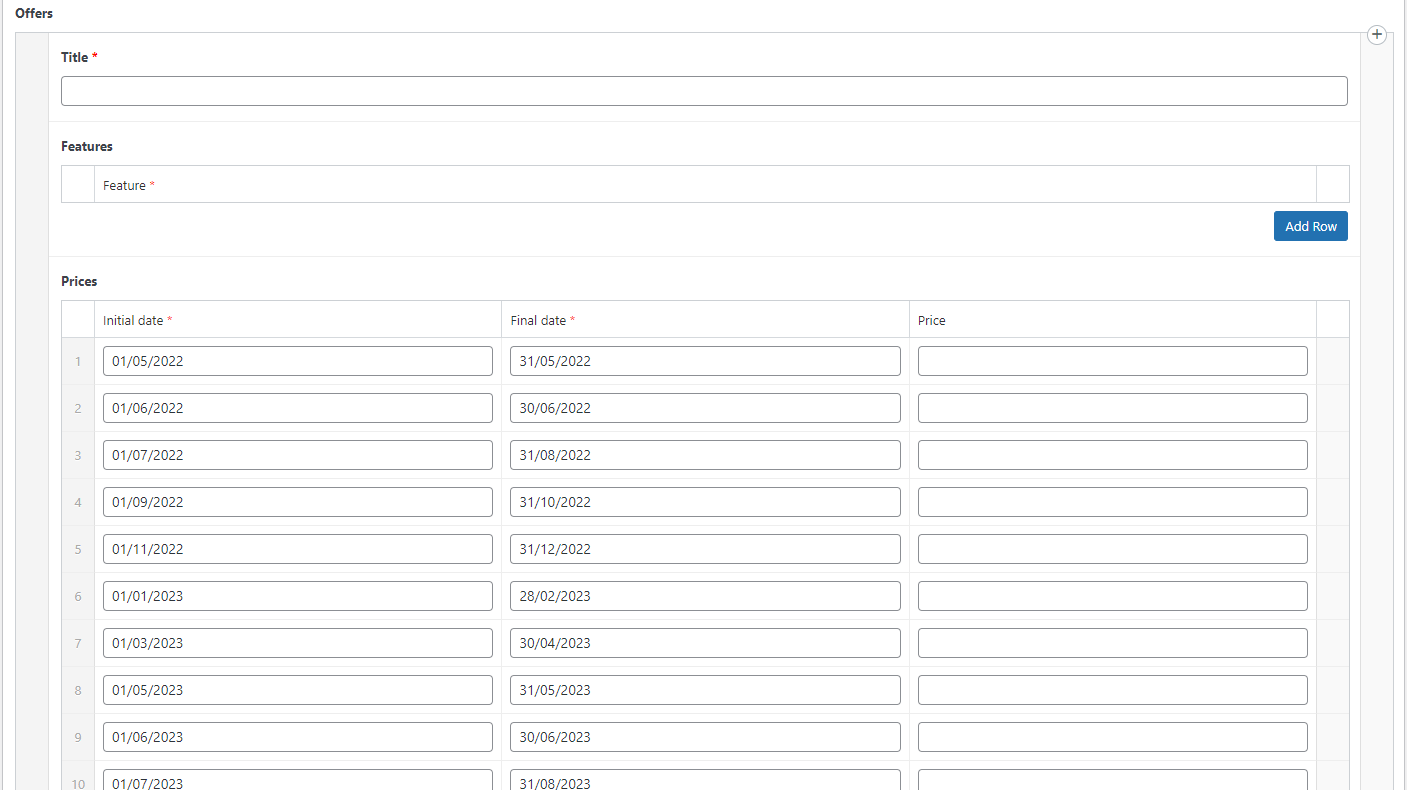
This part works fine, so I understand that this part of the code is OK.
My problem is that I want to be able to press the ADD (+) button on the parent Offers repeater, so that it adds a new row, when we will find that one of the contents of the row is the Prices repeater, which I was to appear populated by default with these same 19 rows and their contents.
I’m guessing the only way to do this is going to be via jQuery, since I can’t alter the function of the ADD (+) button on the Offers repeater.
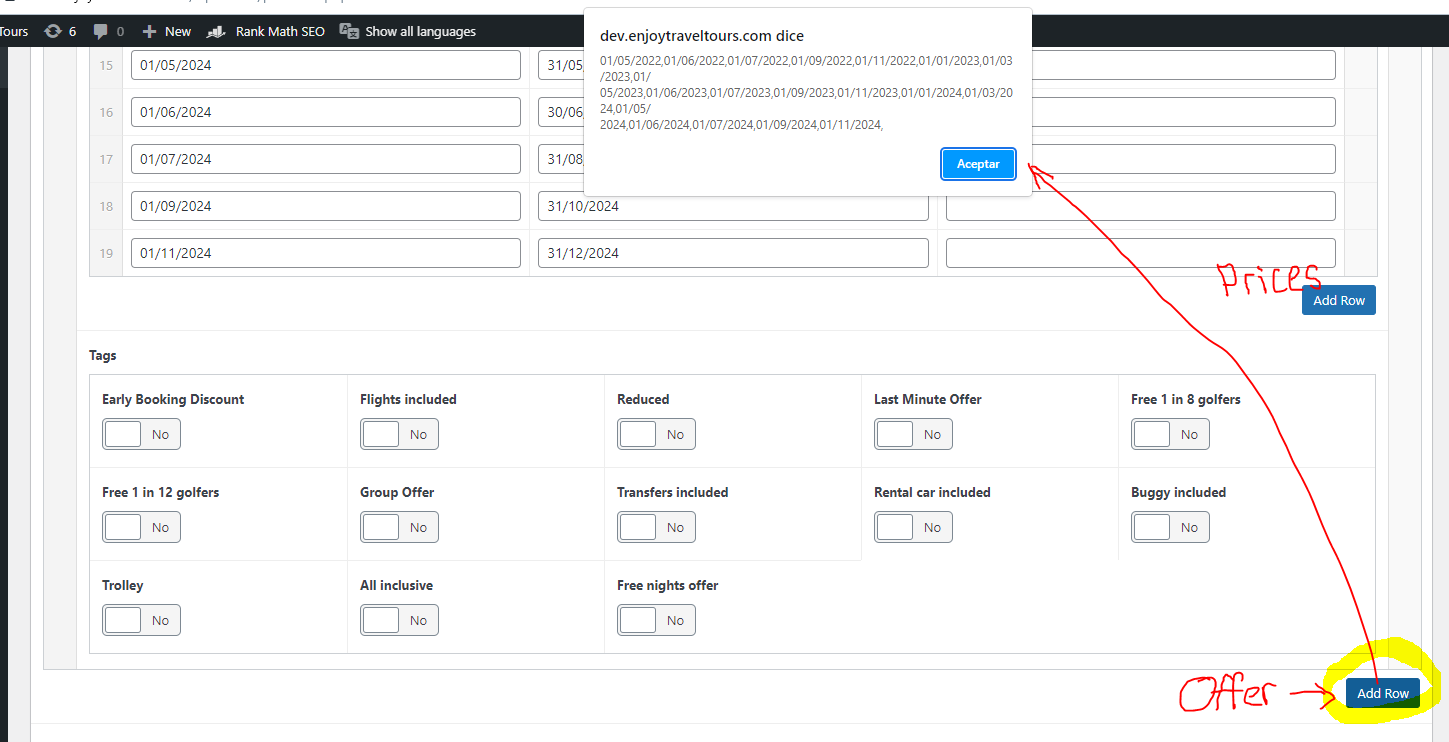
I have managed to add a custom event to this exact button simply by locating it using jQuery and then I can make an Alert with an array of all the default values that I want to stick in the new Prices repeater, after it has added 19 rows to itself. I don’t even know if this is possible. I suspect it is, but very, very complicated. Any help is greatly appreciated!
-
CREMA
- in reply to: Dynamically generate subfield content when adding rows to a nested repeater
- May 3, 2022 at 3:51 am
Hi John, thanks for your reply. Yes, I would like each batch of repeater children to have these exact 19 rows, including all the values as per above. So, basically I’d like that every time we add a new row to the Offers repeater, it automatically appears with the Prices repeater full with these 19 rows that already contain these exact values. How would I go about doing this then?
-
CREMA
- in reply to: Dynamically generate subfield content when adding rows to a nested repeater
- April 29, 2022 at 8:57 am
I’m guessing all I need to do is work out what I’m supposed to change on the conditional “if ($value === false)” which currently only checks if the field is empty when creating the new post, so that it checks if the nested repeater fields are empty upon creation of new child repeaters, and populates them with the default values. Perhaps this needs to be done more like with jQuery than with PHP alone.

Welcome
Welcome to the Advanced Custom Fields community forum.
Browse through ideas, snippets of code, questions and answers between fellow ACF users
Forums
Helping Others
Helping others is a great way to earn karma, gain badges and help ACF development!
