
Search Results for 'taxonomy'
reply
-
In reply to Display the sum of specific field at front-end
- January 16, 2021 at 8:02 am
Hi Jared,
Thank you very much for taking the time to help me out!
I appreciate your code too!
In fact, I have created a taxonomy for ‘Listing-Location’ for my Custom post type, (created with CPT plugin).I know enough to change the slugs of your code but if you could kindly clarify, where would I place this PHP code so it displays in my section?
On the taxonomy code, (provided within the CPT plugin interface)?
That’s my trouble…not sure where to implement it!Thank you again and if it helps, I’m trying to achieve something very similar to the example
at the section titled: ‘Explore Cities’ towards the end – they show for example Chicago: 13 properties.
Well, I’m trying to get this dynamically to show for my locations!Thank you!!!
-
In reply to Display the sum of specific field at front-end
- January 15, 2021 at 4:50 pm
Hi!
I think I understand, you’re probably trying to query by a custom field.
Looking at Example 1. from that resource page, it’s very similar to what you are trying to accomplish. Assuming your custom field is attached to some kind of query-able post type like
postsorpages(my preference is to create a custom post type) this should be very easy.<?php // args $args = array( 'posts_per_page' => -1, //get all posts 'post_type' => 'your_post_type_slug', //posts, pages, whatever the field is attached to 'meta_key' => 'listing-location', //custom field slug 'meta_value' => 'New York' //location to count ); // query $the_query = new WP_Query( $args ); //get WP Query using $args $count = $the_query->post_count; //use property post_count to return the count echo 'Location: New York'; echo 'Total listings I have with that location are '. $count; ?>The property
post_countis available when using a WP_Query. More information here: WP_QueryObviously this may not be the most efficient code because the location is hard coded, but maybe that works in your situation.
My advice would be to set up the listing location as a custom category/taxonomy instead of an ACF field. That way you could loop through all the available categories dynamically.
Hope this helps!
-
In reply to Scraping with ACF Pro?
- January 9, 2021 at 9:21 pm
I have a website which is going to be recommending books.
I want a custom field where I enter the Amazon URL, and I get back the following data automatically:
Book title (to be set as post title) Book author (to be added to ‘Authors’ custom taxonomy) Book image (to be set as featured image) Book genre (to be added to ‘Genres’ custom taxonomy) Book description (to be added to custom field)
Is there a way to achieve this with ACF Pro? I thought maybe oEmbed would be the way to go about it, but I’m not having a lot of luck there.
Does anyone have any suggestions?usps tracking
-
In reply to Select Parent Tax Term Then Child?
- January 5, 2021 at 3:58 pm
‘tax_query’ => array(
array(
‘taxonomy’ => ‘references-cats’,
‘field’ => ‘slug’,
‘terms’ => $slug
)
) -

-
In reply to Trying to display a category (taxonomy) field in the fronted
- January 2, 2021 at 8:56 am
Just trying to show the taxonomy category name that is selected in the custom post entry.
-
In reply to Trying to display a category (taxonomy) field in the fronted
- January 2, 2021 at 1:03 am
As I said a while back, you cannot use
the_field()with a taxonomy field.<li>Plan type : <?php the_field('plan_type'); ?></li>and the documentation explains how to use a taxonomy field based on the return value you have set.
What is your return value and what information about the term are you trying to show?
-
In reply to Trying to display a category (taxonomy) field in the fronted
- December 31, 2020 at 5:23 am
I am in trying to call the category in the template part file:
X:\wp-content\themes\wp-bootstrap-starter\template-parts\content-plan.phpThe template part is then called in a single page file I created for showing only one “plan” in the frontend:
\wp-content\themes\wp-bootstrap-starter\single-plan.phpEvery fields are appearing in a single plan page on the frontend, appart the category taxonomy selected for the plan in question (plan_type field in ACF).
Template part code:
<?php

/**
 * Template part: Plan
 */

if ( !function_exists( 'get_field' ) )
	return;
?>

	<h1><?php the_title(); ?> plan</h1>
        <ul>

              <li>Host : <?php

            $companyname = get_field('companyname');
            echo get_the_title( $companyname->ID );


            ?>
              </li>
            <li>Plan type : <?php the_field('plan_type'); ?></li>
	       <li>Monthly price : $ <?php the_field('monthly_price'); ?></li>

              <li><?php the_field('company_location'); ?></li>

            </ul>
            <p><?php the_content(); ?></p>


	</div><!-- .entry-content -->
</article><!-- #post-## -->
Single page code (I know it’s not the right way to call the plan_type):
<?php get_header(); ?> <section id="primary" class="content-area col-sm-12 col-lg-8"> <div id="main" class="site-main" role="main"> <?php while ( have_posts() ) : the_post(); get_template_part( 'template-parts/content-plan'); the_post_navigation(); // If comments are open or we have at least one comment, load up the comment template. if ( comments_open() || get_comments_number() ) : comments_template(); endif; endwhile; // End of the loop. ?> </div><!-- #main --> </section><!-- #primary --> <?php get_footer(); -
In reply to Trying to display a category (taxonomy) field in the fronted
- December 29, 2020 at 12:32 pm
I thought you were trying to show a field on a term, not show the term in a tax field.
The documentation for a taxonomy field is here https://www.advancedcustomfields.com/resources/taxonomy/ and it gives examples on to use this field.
A taxonomy field is one of those fields that do not work well with
the_field() -
In reply to Trying to display a category (taxonomy) field in the fronted
- December 29, 2020 at 11:53 am
<?php the_field(‘plan_type’, ‘term_’.$term_id); ?> and <?php the_field(‘plan_type’, $term); ?> dont generate a content.
I think I don’t get it. Sorry 😉
Do I have to replace $term or $term_id by something else?
To make it clearer, plan_type is a field in ACF (a taxonomy field – i choosed category). Th field is inthe group field for the CPT. So ca category have to be choosed (different for every post).
I am trying to make the unique post (single post) template, showing the category choosed on the post unique page.
-
In reply to create new taxonomy with acf form not new post
- December 28, 2020 at 11:46 pm
I solve this. Except one problem. Now i’m using next code for form
<?php acf_form(array(
				'post_id' => 'nova_narocilnica',
				'field_groups' => array(
					'group_5f475552ca375'
				 ),
				'post_title'	=> true,
and working well and then with pre_save filter i add manualy this acf filed to database (i cerate new term to custom taxonomy). But problem is when i refresh this page where i have this form included i get in inputs the latest saved values. But i save this values for custom taxonomy not to this page, so why then i get latest saved input values.
When i go researching i find that if i change
'post_id' => 'nova_narocilnica',change to something else the input are blank but still when i submit form it also save to this page. why? -
In reply to Issue on creating a new multiple select field type
- December 28, 2020 at 10:31 pm
Thank you for your reply, tgillet1. I had forgotten this post until I received a notification email. In fact, I already solved this issue myself and realized I misunderstood about the field.
As you said, the field box with a number-field-like appearance was just a multi-select field with size=”1″. I jumped to the wrong conclusion.
By the way, I’d like to write down my findings here for future reference.
[1] Of the above code, $field[‘ajax’] = 1 was not necessary. On the contrary, it causes blank field when used with $field[‘ui’] = 1 (unless ajax actions are properly set).
[2] Even when $field[‘ui’] is set to 1, the appearance of the field still not be ‘Stylized UI’. For example, here is the code and rendered field images.
function render_field( $field ) {
  $field['type'] = 'select';
  $field['ui'] = 1; // or 0
  $field['multiple'] = 1; // or 0
  $field['choices'] = array(
    101 => 'Choice-1',
    102 => 'Choice-2',
    103 => 'Choice-3',
  );
  acf_render_field( $field );
}
Since I couldn’t solve this problem, I took an alternative approach.
[3] Referring to other ACF plugins, I solved the issue by using the prepare_field function instead of the render_field function. Here is the URL of the plugin I created.
https://github.com/game-ryo/ACF-Multiple-Taxonomy-Field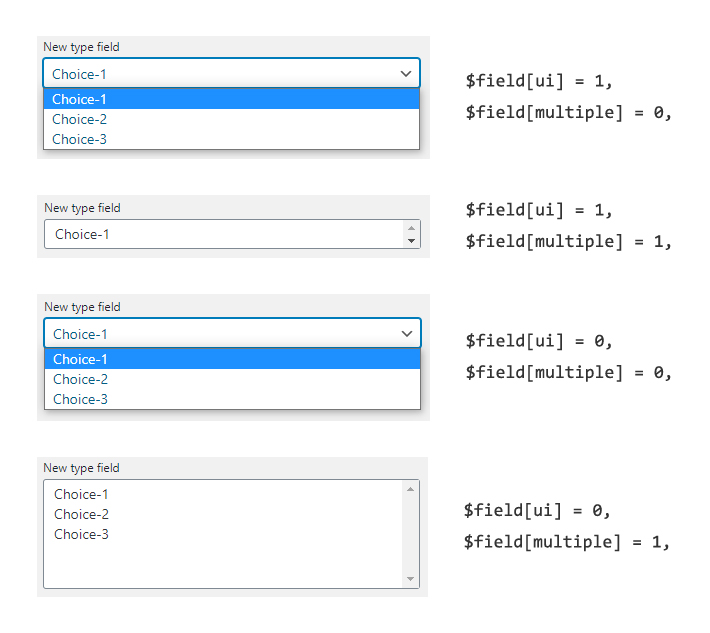 comparison.j....jpg
-
In reply to Specific Fields for specific taxonomies on Archive Page
- December 27, 2020 at 2:02 am
The reason is that ACF does not include conditions for showing fields on the front end and this requires coding, for example
// get terms associated with post
$terms = wp_get_post_terms($post->ID, 'your-taxonomy');
// see if there are terms
if ($terms) {
  // loop over terms
  foreach ($terms as $term) {
    // test to see if this is a term with custom field to show
    if ($term->name == 'special term') {
      // get the value of the field from the term
      $term_field = get_field('field_name', $term);
    }
  }
}
I cannot tell you how to do this is a tool designed to build output in the admin and more than likely no one that visits this forum will be able to help you with this. Most of the people that use ACF code templates using PHP. ACF is an admin tool that helps you create fields and does not include automated code for displaying the values on the front of the site.
-
In reply to Specific Fields for specific taxonomies on Archive Page
- December 26, 2020 at 11:43 pm
Hi John Huebner,
Thank you for your time to reply and your willingness to help!
I’m not certain I understand why I should direct my questions to Dynamic Fields!?
I understand that I’m using Dynamic fields sure, but, I’m using them to display ACF. If you’re not coding them yourself to display them at the front-end, (which is by itself a complex undertaking), then, you’ve got to use some other means/tool to display them right?
My issue is that there aren’t ‘display conditions’ within the field’s menu, (when you create that particular field), to manage when you show that field, or not. I use display conditions on a ‘field group’ level to display them at the admin screen only.I have 2 Field Groups. Both, for the same CPT.
One is for ‘house listings’ the other for ‘land listings’.
How can I make both group fields show for the particular listing on an archive page?
This archive page displays both listing taxonomies. Users can filter out which type they want to see, but on page load, both are visible to the user.
So far, I found that I can only display one or the other, no matter what taxonomy is displayed at front-end.
I was partly able to show particular ‘section’ of taxonomy by using the ‘Dynamic Conditions’ plugin.
But I’d love to figure out how to really solve this problem.Thanks again for your time!
-
In reply to Taxonomy with subcategories
- December 17, 2020 at 3:33 am
You can adjust the get_terms() augments used by ACF by creating a filter https://www.advancedcustomfields.com/resources/acf-fields-taxonomy-query/
$args['parent'] = 0; -
In reply to create new taxonomy with acf form not new post
- December 14, 2020 at 6:41 pm
Hi,
yes this work but now i have next problem.
My structure is like next example:
Custom Post Type: Pregledi
– Custom taxnomy: Lokacija
– Custom taxnomy: NaročilniceNow on acf form naročilnice i also have Taxonomy field coneected to “Lokacija”. So if i explain i assing custom taxonomy Lokacija to taxonomy Naročilnice. And when i do this over backend it work if i asign from frontend i cant that it works.
-
In reply to WP_Query using ACF Taxonomy Category
- December 14, 2020 at 2:18 am
I really do not see anything seriously wrong, the only thing I can think of is that you either have the wrong taxonomy name or that the values your trying to use in the query are not integers
// this field can return either a single category or multiple // ensure that you are only getting the ID values of the terms and not term objects $categories = get_field('project_slider_category', false, false); if ($categories) { if (!is_array($categories)) { $categories = array($categories); } // make sure all values are integers $categories = array_map('intval', $categories); } $args = array( 'post_type' => 'project', 'post_status' => 'publish', 'posts_per_page' => 8, 'orderby' => 'title', 'order' => 'ASC', 'tax_query' => array( array( // make sure the category name is "categories" 'taxonomy' => 'categories', 'terms' => $categories ), ), ); $loop = new WP_Query( $args ); -
In reply to Convert an ACF field to taxonomy
- December 14, 2020 at 1:58 am
There is no easy way to do this. I do not know how the current field is saved but the taxonomy field stores values as a taxonomy ID, and categorizing by this I assume you mean you want to assign the terms to posts in the normal WP way. I can only give you an example. I am unable to give you all the code, a lot of what I am going to give you is just what you need to do.
What I am going to give you is a temporary function that you put in functions PHP an run it by loading every page until you get the “completed” message and then you remove it.
add_action('init', 'convert_field_to_terms'); function convert_field_to_terms() { global $post; $args = array( 'post_type' = 'your-post-type', 'posts_per_page' => -1, // get all // get only posts that have not already been updated 'meta_query' => array( 'relation' =. 'OR', array( 'key' => 'state_update_complete', 'compare' => 'NOT EXISTS' ), array( 'key' => 'state_update_complete', 'value' => 0 ) ) ); $query = new WP_Query($args); if ($query->have_posts()) { while ($query->have_posts()) { $query->the_posts(); // this is where you are going to need to figure out the details // get the ACF field value // ... // get the term that matches the ACF value or // create the term if it does not exists // using get_term_by or insert_term() // ... // use wp_set_object_terms() to add terms to post // ... // set a meta value so we don't do this again if we need to run it multiple times update_post_meta($post->id, 'state_update_complete', '1'); } // end while posts } // end if posts // the above loop will time out your site if there are a lot // of posts that need to be updated // that means that anything after this point will only happen if // all posts are updated die('State Update Has Been Completed'); // once you see the above message you can delete this action } // end function -
In reply to Registering a changeable field
- December 12, 2020 at 7:59 am
Yea, I solved it by registering a post type called acf_fields and created a taxonomy called acf_attributes. the user can then just name the fields and categorize them, and in my PHP acf field just get all titles/slugs from acf_fileds (from the specific taxonomy) and register them as text fields.
-
In reply to create new taxonomy with acf form not new post
- December 12, 2020 at 4:19 am
I do not know of any examples.
acf_form(array(
  'post__id' => 'new_narocilnice',
  'field_groups' => array(
    'group_XXXXXXX'
  )
));
function new_narocilnice_filter($post_id) { if ($post_id != 'new_narocilnice') { return $post_id; } // get values for new term from $_POST['acf'] values // https://developer.wordpress.org/reference/functions/wp_insert_term/ $term = insert_term($term_name, $taxonomy, $other_args); $post_id = 'term_'.$term=>term_id; return $post_id; } -
In reply to Displaying field with get_terms
- December 8, 2020 at 1:34 am
Hey Wozzal, I was having the same issue and my work around for now was this was really close to your code:
<?php // Get the taxonomy's terms
$terms = get_terms(
    array(
        'taxonomy'   => 'news_categories',
        'hide_empty' => false,
    )
);
?>
<?php // Check if any term exists if ( ! empty( $terms ) && is_array( $terms ) ) { // Run a loop and print them all foreach ( $terms as $term ) { ?> <a href="<?php echo esc_url( get_term_link( $term ) ) ?>"> <?php echo $term->name; ?> <?php echo the_field( 'banner_text', $term ); ?> <img src="<?php echo the_field( 'banner_image', $term ); ?>"> </a> <?php } } ?>Getting the Term Name and URL was easy. Getting a simple field, like a “Text Field” from ACF was straight forward too using something like:
<?php echo the_field( 'banner_text', $term ); ?>I really wanted to use an array for the image but that didn’t want to work so I opted for image URL instead as my work around and just echoed this with no var:
<img src="<?php echo the_field( 'banner_image', $term ); ?>">If you did ever figure out how to do this with the Image Array please let me know.
Thanks!
Andy -
In reply to Page link to taxonomy / category page
- December 4, 2020 at 12:19 pm
Hi All,
This can be done as follows:
Field Type: Taxonomy
Taxonomy: Select your category
Appearance: Select
Return Value: Term Object (not Term ID)Here’s how to display it on your Theme:
<?php $cat_link_term = get_field( 'my_category_url' ); ?>
<?php if ( $cat_link_term ): ?>
    <a href="<?php bloginfo('url'); ?>/<?php echo $cat_link_term->slug; ?>"><?php echo $cat_link_term->name; ?></a>
<?php endif; ?>
Here’s how to us it within a repeater:
<?php while(the_repeater_field('my_category_repeater')) { ?>

<?php $cat_link_term = get_sub_field( 'my_category_url' ); ?>
<?php if ( $cat_link_term ): ?>
    <a href="<?php bloginfo('url'); ?>/<?php echo $cat_link_term->slug; ?>"><?php echo $cat_link_term->name; ?></a>
<?php endif; ?>

<?php } ?>
Thanks,
Lee. -
In reply to Get field on index outside loop
- November 28, 2020 at 3:40 am
the_field('av_slider', $tag->term_id)should be
the_field('av_slider', $tag)OR
the_field('av_slider', 'term_'.$tag->term_id)https://www.advancedcustomfields.com/resources/adding-fields-taxonomy-term/
-
In reply to Hide taxonomy term in Form and in post
- November 25, 2020 at 6:00 pm
i have tried this, but it does no work:
// exclude categories from category dropdown add_filter('acf/fields/taxonomy/query/name=materiel_client', 'exclude_categories', 10, 2); function exclude_categories( $args, $field ) { $terms = get_terms([ 'taxonomy' => 'materiel_client', 'hide_empty' => false, ]); $excluding = array(); foreach ($terms as $term) { // $temp.=get_field ( 'visibilite', $term->term_id ); if (get_post_meta( $term->term_id , 'visibilite')=='oui'){ array_push($excluding , get_post_meta( $term->term_id , 'visibilite')); } } $args['exclude'] = $excluding; //the IDs of the excluded terms return $args; } -
In reply to Display custom taxonomy name
- November 19, 2020 at 9:02 am
Thank you for your assistance. This is what I have now. The “Uncategorized” word is now gone, but the field is displaying blank. I’m missing something and just don’t know where.
Modeling Type: <?php $modelingType = get_field('modeling_types'); $term = get_term($modelingType, $taxonomy = 'modeling_types'); echo esc_html($term->name); ?>This was the display before:Modeling Type: Uncategorized
This is the display now: Modeling Type:Thank you!


Welcome
Welcome to the Advanced Custom Fields community forum.
Browse through ideas, snippets of code, questions and answers between fellow ACF users
Forums
Helping Others
Helping others is a great way to earn karma, gain badges and help ACF development!
