
Search Results for 'q'
reply
-
In reply to Options pages across native WordPress admin tabs?
- August 8, 2013 at 1:06 pm
Thanks @elliot
I think the best approach would be to enable ACF custom fields to be hooked. If that were possible, the WP admin page could then be constructed manually, using WP functions, but the developer could add in their own hooks, thereby allowing them to hook ACF fields into their own admin page.
I created a feature request post earlier this morning for you, so if you ever get around to that, I certainly look forward to it.
Cheers
Phil -

In reply to image field doesn't return image url
- August 8, 2013 at 1:05 pm
Just like the rest of the code, you need to send through a reference to the post object to load from. This is done like so:
<img src="<?php the_field('sub_division_image', $pageChild->ID); ?>" alt="<?php echo $pageChild->post_title; ?>" /> -
In reply to Issue displaying on page with multiple items
- August 8, 2013 at 12:37 pm
check out wordpress.stackexchange.com – those guys and gals will help you out. Make sure you do your due diligence first though. Study up on the codex. Use google.
In general, make an effort to solve your issue, but if you get stuck, post a question on stackexchange. If you post this one there, I’ll see if I can answer. The ACF support guys are here to troubleshoot ACF specific issues.
Best of luck.
-

In reply to date picker date display in php 5.2
- August 8, 2013 at 9:40 am
Try this:
 list($day, $month, $year) = sscanf('12/04/2010', '%02d/%02d/%04d'); // field value
$datetime = new DateTime("$year-$month-$day"); // your format
echo $datetime->format('r'); // desired format
source: http://stackoverflow.com/questions/2621433/date-create-from-format-equivalent-for-php-5-2-or-lower
-

In reply to Checkbox while loop if value exists
- August 8, 2013 at 7:15 am
Okay, school boy error, missed the echos 🙁
<a href="<?php echo get_permalink($course->ID); ?>"><?php echo get_the_title($course->ID); ?></a>Many thanks for the help.
-
In reply to Checkbox while loop if value exists
- August 8, 2013 at 7:11 am
Hi again @elliot
Thanks for your continual help.
My code now stands as this:
<?php $courses = get_posts(array(
			'meta_query' => array(
				array(
				'key' => 'short_course',
				'value' => '"yes"',
				'compare' => 'LIKE'
				)
			)
		));
		if ( $courses ) : foreach ($courses as $course) : ?>
			<a href="<?php the_permalink($course->ID); ?>">test</a>
		<?php endforeach; endif; ?>
But the permalink isn’t bringing back the permalink URL… only the current page URL. Am I missing something?
-
In reply to Can we add field groups to non ACF options pages?
- August 8, 2013 at 5:09 am
Hi Phil,
Not at the moment no.. It could be a feature request tho!
-
In reply to Filter Repeater row by Date Field
- August 8, 2013 at 4:59 am
Hi!
If each post had it’s own date field not in a repeater it’d been easier.. but as it is I suppose you’ll have to do something like this:
<?php if(get_field('matches')):
$i = 0;
$today = date('Y-m-d'); //This has to match the format of your date field
?>
	<ul class="matches_list">

		<?php while(has_sub_field('matches')): ?>
			<?php if(strtotime($today) <= strtotime(get_sub_field('date'))){ ?>
				<?php if($i < 5){ ?>
					<?php $i++; ?>
					<li class="match">
						Hove (<?php the_sub_field('teams'); ?>) <strong><?php the_sub_field('hove_score'); ?> <span style="color: #A2224C; font-weight: bold;">-</span> <?php the_sub_field('opponent_score'); ?></strong> <?php the_sub_field('opponent'); ?><br><?php the_sub_field('date'); ?> @ <?php the_sub_field('location'); ?>
					</li>
				<?php } ?>
			<?php } ?>
		<?php endwhile; ?>

	</ul>

<?php endif; ?>
This will not check to make sure the five chosen are the latest ones and it’s possible that due to the repeaterfield arrays setup you will end up with the five oldest ones (which have a date later or equal to today). If so you’ll have to first get the repeaterfield into a variable and do an array_reverse() on it!
-
In reply to Querying relationship fields
- August 7, 2013 at 11:26 pm
Thank you SO much! This is what I ended up with…
<div>

		<?php $associations = get_field('associations');
		if( $associations ): ?>

		<?php foreach( $associations as $association): ?>
			<?php
			$photo = get_field('investment_logo', $association->ID); ?>

			<a href="<?php the_permalink() ?>" title="<?php printf(__('%s','rys'), get_the_title()) ?>" rel="bookmark">
			<img src="<?php echo $photo['url']; ?>" alt="<?php echo $photo['alt']; ?>" />
			</a>

		<?php endforeach; ?>

		<?php endif; ?>

		<a href="<?php the_permalink() ?>" title="<?php printf(__('%s','rys'), get_the_title()) ?>" rel="bookmark" >
		<?php the_title(); ?></a>

		<em><?php the_field('publication_source'); ?></em>

		<span><?php $date = get_field('publication_date'); echo date('F d, Y', datepicker_to_unix($date )); ?></span>

		</div>
Really appreciate your quick response! Thank you!!
-
In reply to Need help with creating new field type with ACF
- August 7, 2013 at 7:07 pm
I tried already what you write, and then the HTML result is:
<textarea id="acf-field-text-year" class="year_n_text" name="f"></textarea> <textarea id="acf-field-vita-year" class="year_n_text" name="f"></textarea> -
In reply to image field doesn't return image url
- August 7, 2013 at 6:56 pm
Hi @elliot.
Sorry my bad.
That was some older code. I did in fact use a img tag but to no success.
								<?php $child_pages = $wpdb->get_results("SELECT * FROM $wpdb->posts WHERE post_parent = ".$post->ID." AND post_type = 'page' ORDER BY menu_order", 'OBJECT');    ?>
                                <?php if ( $child_pages ) : foreach ( $child_pages as $pageChild ) : setup_postdata( $pageChild ); ?>
                                <li>
                                	<a href="<?php echo get_permalink($pageChild->ID); ?>" rel="bookmark" title="<?php echo $pageChild->post_title; ?>">
                                    <div class="subdivision">
                                    	<?php
										if (get_field('sub_division_image')){ ?>
										  	<img src="<?php the_field('sub_division_image'); ?>" alt="<?php echo $pageChild->post_title; ?>" />
										  <?php } else {
											 echo "Hello world";
                                          } ?>
                                    </div>
                                    <p><?php echo $pageChild->post_title; ?></p>
                                    </a>
                                </li>
                                <?php endforeach; endif; ?>
Any thoughts?
Cheers,
GM
-
In reply to jQuery .live() deprecated/removed
- August 7, 2013 at 3:11 pm
Hi @wells5609
Thanks mate. Yes, WP 3.6 still works with .live, but in ACF v4.2.0 I have changed all .live to .on!
Thanks
E -
In reply to What is this "Copy the plugin to your theme / plugin"
- August 7, 2013 at 3:02 pm
Hi @marcelolz
Are you creating a premium theme/plugin for distribution? If so, the above resource will explain how you can do thi.
If you are creating a website for a client, this is not necessary at all.
-
In reply to Need help with creating new field type with ACF
- August 7, 2013 at 2:58 pm
Hi @Koli14
Yes, it is the name which is used to post data.
As mentioned above, if you want to send 2 textarea’s in the same name, you will need to use square brackets to tell the browser it is an array of information.
For example, you want the output to be:
<textarea name="fields[field_123][textarea_1]"></textarea> <textarea name="fields[field_123][textarea_2]"></textarea> -
In reply to Querying relationship fields
- August 7, 2013 at 12:43 pm
Thanks for the screenshots.
The code you want to use will look something like this:
<div>

	<a href="<?php the_permalink() ?>" title="<?php printf(__('%s','rys'), get_the_title()) ?>" rel="bookmark" ><?php the_title(); ?></a>

	<em><?php the_field('publication_source'); ?></em>

	<span><?php $date = get_field('publication_date'); echo date('F d, Y', datepicker_to_unix($date )); ?></span>

	<?php

	// 1. Get all the relationship values
	$associations = get_field('associations');


	// 2. Make sure a value exists
	if( $associations ): ?>

		<?php

		// 3. loop through relatinoship values
		foreach( $associations as $association): ?>

			<?php // 4. Load the image field from the association ?>
			<img src="<?php echo get_field('investment_logo', $association->ID); ?>" />

		<?php endforeach; ?>

	<?php endif; ?>
</div>
Please note this is an example and not the final Markup you will need.
Thanks
E -
In reply to meta_key query with Post Object field
- August 7, 2013 at 12:35 pm
If the value is saved as an array, you can treat the field the same as a relationship field. This means, you can follow this tutorial for your post_object field:
http://www.advancedcustomfields.com/resources/tutorials/querying-relationship-fields/
-
In reply to Javascript populated field not saving data
- August 7, 2013 at 9:29 am
Quite simply, a disabled input is never posted to the save function.
Maybe you should use the readonly attribute instead!
Easy
Cheers
E -
In reply to Checkbox while loop if value exists
- August 7, 2013 at 9:27 am
Hi @rdck
Sorry, I completely missed the issue!
The issue is that you are using a while loop which will never end!
You should be using a foreach!
-
In reply to Default to current user with user field
- August 7, 2013 at 8:33 am
Hi!
I honestly think you’ll be better of creating this yourself..
simply do an update_post_meta on the wp_save_post hook.. something like this (not tested):
function save_book_meta($post_id) {

    $slug = 'book'; //CHANGE THIS TO THE SLUG OF YOUR POST TYPE

    /* check whether anything should be done */
    $_POST += array("{$slug}_edit_nonce" => '');
    if ( $slug != $_POST['post_type'] ) {
        return;
    }
    if ( !current_user_can( 'edit_post', $post_id ) ) {
        return;
    }

$current_user = wp_get_current_user();
   update_post_meta($post_id, 'latest_author', $current_user-> display_name);

}

add_action( 'save_post', 'save_book_meta');
This will save the current users display name as a custom field called “latest_author”.
-
In reply to Location Rules: Post Status?
- August 7, 2013 at 4:19 am
Thanks! Using that tutorial, I came up with this quick and dirty custom rule:
add_filter('acf/location/rule_types', 'acf_location_rules_types');
function acf_location_rules_types( $choices )
{
    $choices['Post']['post_status'] = 'Post Status';
    return $choices;
}

add_filter('acf/location/rule_values/post_status', 'acf_location_rules_values_post_status');
function acf_location_rules_values_post_status( $choices )
{
    $post_status = array('publish', 'pending', 'draft', 'auto-draft', 'future', 'private', 'inherit', 'trash');
    $num_status = count($post_status);

    for ($index = 0; $index < $num_status; $index++)
    {
        $choices[$post_status[$index]] = $post_status[$index];
    }

    return $choices;
}

add_filter('acf/location/rule_match/post_status', 'acf_location_rules_match_post_status', 10, 3);
function acf_location_rules_match_post_status( $match, $rule, $options )
{
    $this_post_status = get_post_status($options[post_id]));
    $selected_post_status = $rule['value'];

    if($rule['operator'] == "==")
    {
      $match = ( $this_post_status == $selected_post_status );
    }
    elseif($rule['operator'] == "!=")
    {
      $match = ( $this_post_status != $selected_post_status );
    }

    return $match;
}
Ideally, you’d wouldn’t have to hard-code the array of statuses (in case they change or custom ones have been created), but quick googling didn’t turn up a WordPress construct that returns an array of defined post statuses.
-
In reply to Need help with creating new field type with ACF
- August 7, 2013 at 1:35 am
Yes, i checked the generated HTML source, and played with a few versions (with brackets, in quotes…), i’m not expert in PHP…
It still not working, maybe i asked the question wrong.
So the name of the textarea is how ACF knows which field to save (not the ID or class)? So if i want two textarea, they need to have different names.
Now the working field has a name: $field[‘name’] which generates: fields[field_51fbdeb7f1609].
What should i add as a name to the second textarea, and how can i get the value of it?
I can get the value of the field with the $field[‘value’], but it’s just the value of the textare with the name: $field[‘name’].
Uhhh, maybe it’s a bit too complicated for me… -
In reply to Querying relationship fields
- August 7, 2013 at 1:15 am
Yes, I am aware that I need to put the relationship code within my loop but I don’t know what the code should be. Every time I tried adding it, I got a php error. I’m confused because I’m already querying multiple different posts on the page (unlike the documentation which shows an example of querying for a single template file).
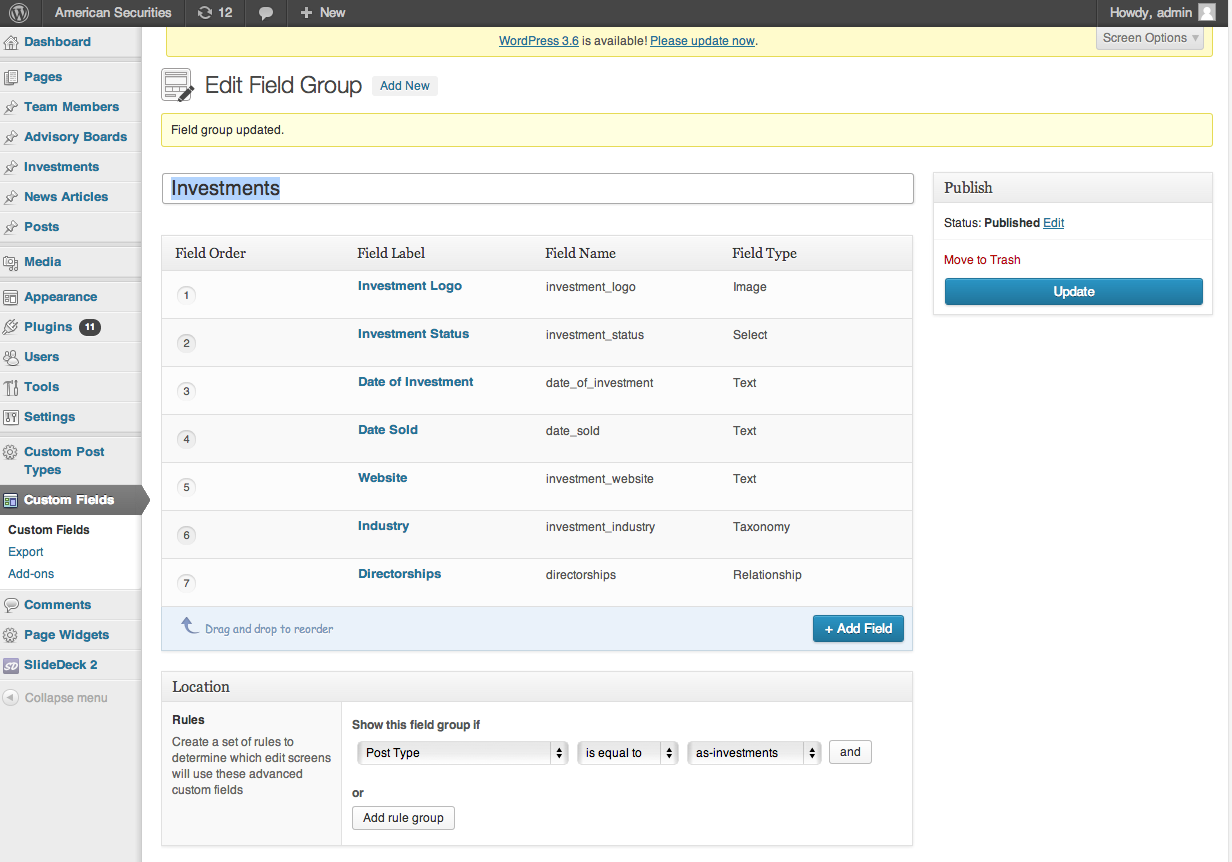
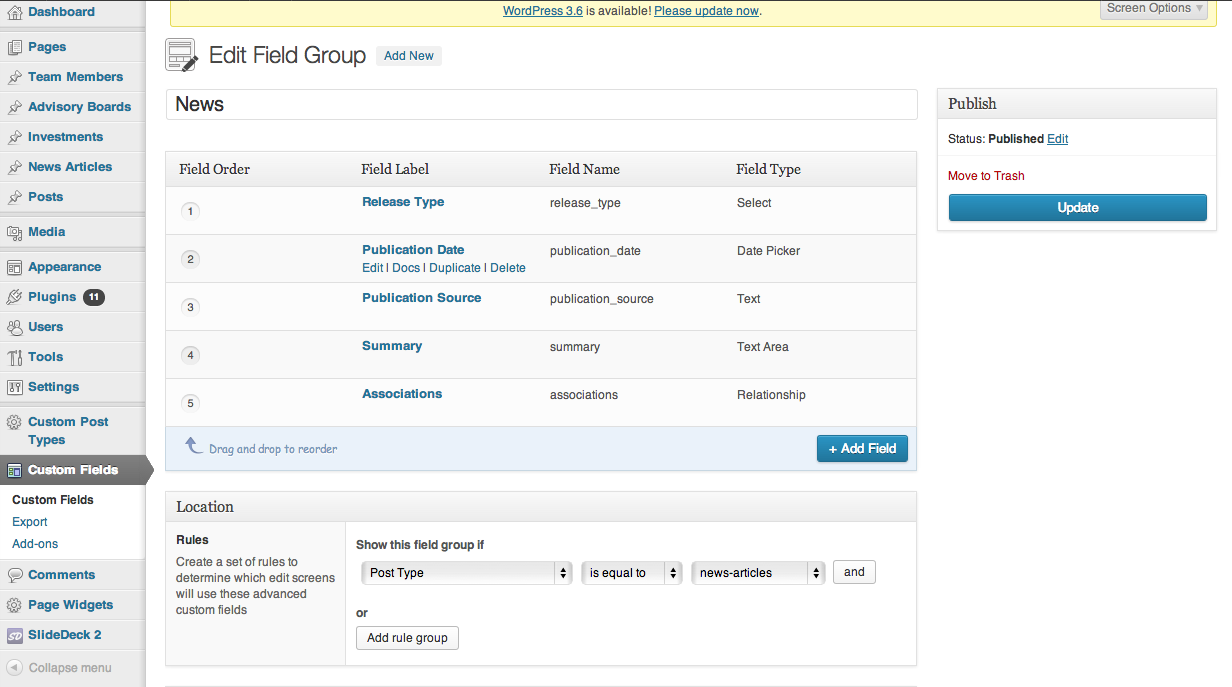
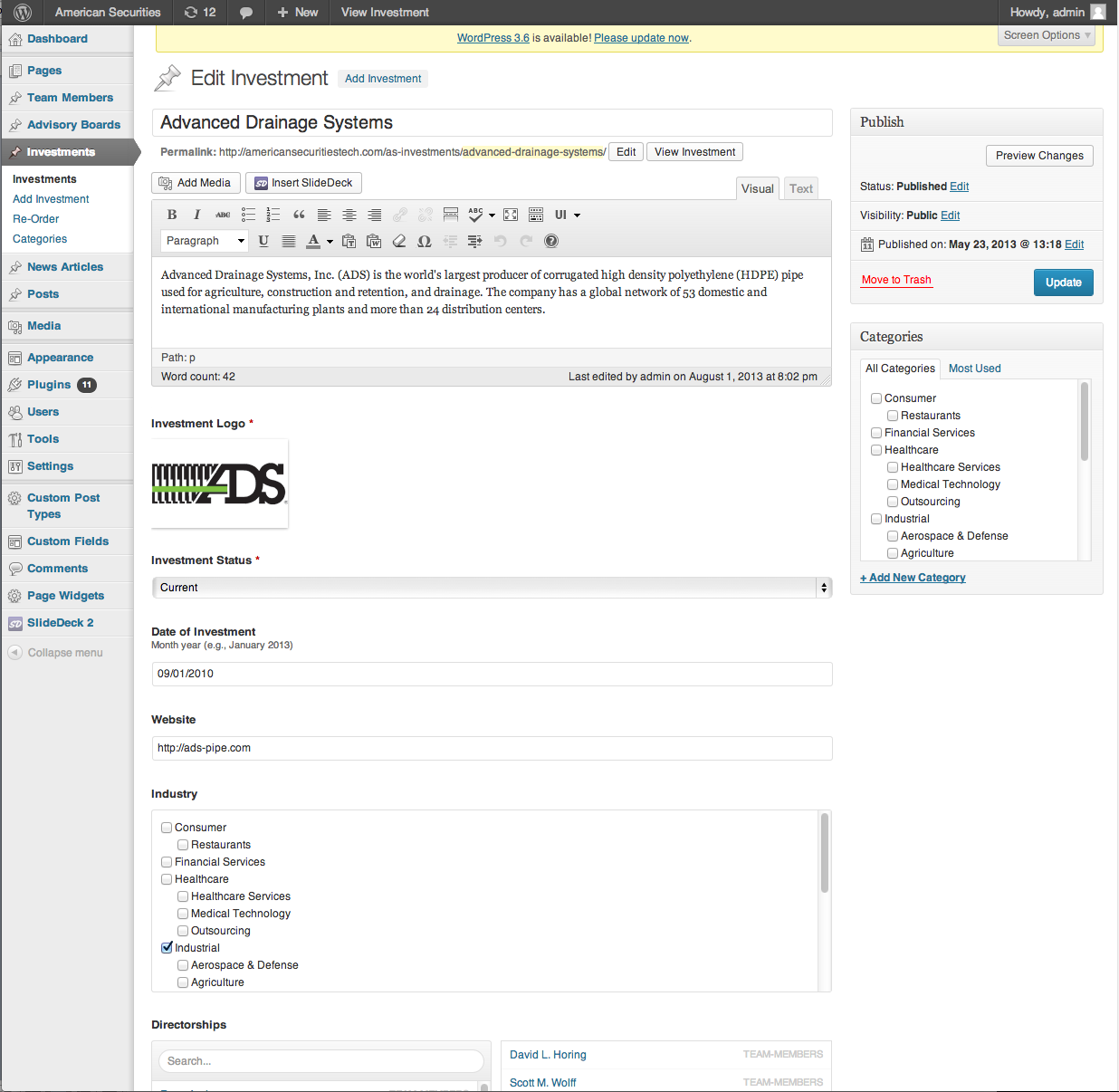
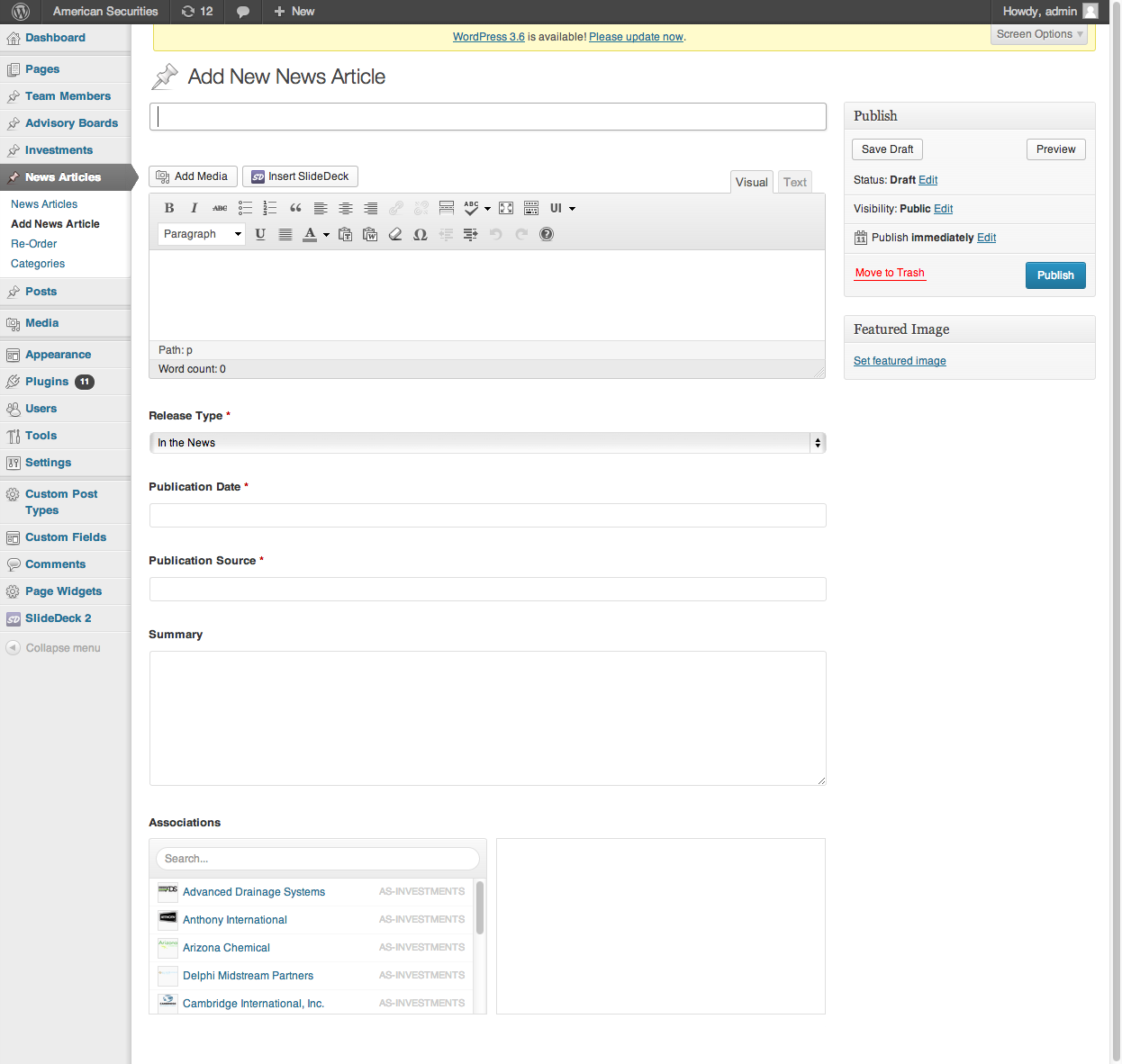
Please see the screenshots for what I’m working with. I know this is slightly complicated but I’m sure folks would want to know how to do this as well.
I want to query the image somewhere between this div.
<div>

<a href="<?php the_permalink() ?>" title="<?php printf(__('%s','rys'), get_the_title()) ?>" rel="bookmark" ><?php the_title(); ?></a>

		<em><?php the_field('publication_source'); ?></em>

<span><?php $date = get_field('publication_date');
			echo date('F d, Y', datepicker_to_unix($date )); ?></span>
		</div>
Really appreciate your help! Thank you!!
 Screen-Shot-....png
 Screen-Shot-....png
 Screen-Shot-....png
 Screen-Shot-....png
 Screen-Shot-....jpg
-
In reply to Not compatible with this code?
- August 7, 2013 at 12:14 am
Since I’m using it for the post type “course”, I changed the post_type=post into post_type=course.
However, the count still doesn’t work (it still counts everything).
Also, the 1st part of your code (that you last posted) doesn’t work (to show only the authors content) – while an earlier example of you did work – so I used the code below for the first part and added the “Fix post counts” count only.
What I’m currently using (working code).
// So authors can only see their own content (e.g. courses etc)
function posts_for_current_author($query) {

	if( !$query->is_admin )
		return $query;

	$screen = get_current_screen();

	if ($screen->base === 'post')
    		return $query;

	if( !current_user_can( 'activate_plugins' ) ) {
		global $user_ID;
		$query->set('author', $user_ID );

	}
	return $query;


}

add_filter('pre_get_posts', 'posts_for_current_author');
I haven’t been able to get the count correct, see http://d.pr/i/Ijhs.
-
In reply to image field doesn't return image url
- August 7, 2013 at 12:14 am
Hi all,
I’m new using this plugin and I have the same issue here.
I have this code:
<?php $child_pages = $wpdb->get_results("SELECT * FROM $wpdb->posts WHERE post_parent = ".$post->ID." AND post_type = 'page' ORDER BY menu_order", 'OBJECT');    ?>
<?php if ( $child_pages ) : foreach ( $child_pages as $pageChild ) : setup_postdata( $pageChild ); ?>
<li>
<a href="<?php echo get_permalink($pageChild->ID); ?>" rel="bookmark" title="<?php echo $pageChild->post_title; ?>">
<div class="subdivision">
<?php
if (get_field('sub_division_image')){ ?>
<?php the_field('sub_division_image'); ?>
<?php } else {
echo "Hello world";
} ?>
</div>
<p><?php echo $pageChild->post_title; ?></p>
</a>
</li>
<?php endforeach; endif; ?>
But there is no way to get the image to show up on my page. If I use the plugin as a custom text field it will work just fine. Any help would be very appreciated!
Thanks.
GM
-
In reply to Checkbox while loop if value exists
- August 6, 2013 at 9:39 pm
Thanks for the reply @elliot, however, adding the endif; doesn’t solve it. It still is spitting out the word ‘test’ infinitely and crashing the site, rather than what is to be expected.
<?php $courses = get_posts(array(
			'meta_query' => array(
				array(
				'key' => 'short_course', // name of custom field
				'value' => '"yes"', // matches exaclty "yes", not just yes. This prevents a match for "acquired"
				'compare' => 'LIKE'
				)
			)
		));
		if ( $courses ) : while ( $courses ) : ?>
			test
		<?php endwhile; endif; ?>


Welcome
Welcome to the Advanced Custom Fields community forum.
Browse through ideas, snippets of code, questions and answers between fellow ACF users
Forums
Helping Others
Helping others is a great way to earn karma, gain badges and help ACF development!
