
Search Results for 'Wysiwyg'
reply
-

In reply to WYSIWYG broken with repeater
- September 10, 2013 at 12:42 pm
Hi @gregnemes
The WP WYSIWYG field (different to the default WYSIWYG field) does not work within the repeater field. This is stated on the add-on page:
http://www.advancedcustomfields.com/add-ons/wordpress-wysiwyg/It is not possible to get it to work as a sub field due to the way in which it is created via PHP – rather than JS.
Thanks
E -
In reply to WYSIWYG looses formatting when it's row gets reordered
- September 10, 2013 at 12:34 pm
Hi @Malin
Could you please attach some screenshots demonstrating the issue?
Thanks
E -
In reply to remove wysiwyg wptexturize filter
- September 3, 2013 at 12:46 pm
Hi @rockethouse
Yes, sorry, currently there is no way to stop sub fields from becoming formatted…
Hmmm, I’ll look into this too
Cheers
E -
In reply to WYSIWYG Styling
- September 3, 2013 at 8:42 am
Just a vote in support for adding this feature. It would really help out. Thanks for your responsiveness, Eliot! Every new update I install always has new features or fixes that were on my wishlist!
-
In reply to remove wysiwyg wptexturize filter
- September 2, 2013 at 12:45 pm
Cheers for the quick reply!
I tried that but unfortunately it didn’t work… for now i’ve ended up just commenting out the filter from wysiwyg.php.
the field i’m using is a sub / repeater field so maybe thats why?
This is what I tried:
echo get_sub_field('content', $post_id = false, $format = false); -
In reply to Creating a submission form with specifics?
- September 2, 2013 at 12:34 pm
Hi @venn177
You can achieve this by using the acf_form function.
You can learn more about this here:
* http://www.advancedcustomfields.com/resources/tutorials/creating-a-front-end-form/
* http://www.advancedcustomfields.com/resources/tutorials/using-acf_form-to-create-a-new-post/Please note, there is currently no the_title / the_content field types in ACF, so you will need to use a text / WYSIWYG field and then find the $_POST values within the pre_save_post filter.
-
In reply to remove wysiwyg wptexturize filter
- September 2, 2013 at 12:31 pm
Hi @rockethouse
I have a feeling that currently, there is no way to remove the ACF filter. I’ll add this to the to-do and have it fixed in the next version.
For now, you can load the value without any formatting like so:
get_field('field_name', $post_id = false, $format = false);Hope that helps
-
In reply to WYSIWYG Editor Fails To Load
- August 30, 2013 at 4:04 pm
There is something weird going on. If I use https://github.com/elliotcondon/acf-wordpress-wysiwyg-field and apply it to just one field. It seems to fix the problem for the rest of them. Only one field needs to be using the WYSIWYG loaded through this plugin and the rest of them will work using the normal WYSIWYG field in ACF.
-
In reply to WYSIWYG Editor Fails To Load
- August 30, 2013 at 3:22 pm
Hi guys.
Can you please try using ACF on a fresh install. Does WYSIWYG work?
If so, the issue is sure to be a conflict with a plugin or theme you are using.
Ad in the plugins 1 at a time until you get the issue. This will pin point the issue and you can then find a resolution
Good luck!
-
In reply to WYSIWYG Editor Fails To Load
- August 30, 2013 at 4:49 am
Hi Elliot,
Same problem here, I believe this should be marked as not resolved, as Matthew reports in his edit above, it’s not solved for him either.
TinyMCE does not load on posts where ACF WYSIWYG field is enabled.
I too initially had a problem because I was trying it with TinyMCE advanced, but I just tried ACF on an installation without that plugin, and the tinyMCE is still disabled -
In reply to No visible Editor Wysiwyg -> taxonomy in wp 3.6
- August 27, 2013 at 4:21 pm
Do not use a custom tinymce.
I have the WP in Spanish.
-
In reply to Regression: Backslashes stripped in WYSIWYG
- August 27, 2013 at 3:29 pm
Thanks for being so responsive, Elliot!
I’ll let you know if I come up with a solution that (a) doesn’t unnecessarily strip backslashes from wysiwyg field content, and (b) works properly with older PHP setups that have magic quotes enabled.
If you don’t mind, I’ll leave this issue open until I can report back.
Cheers,
-paul -
In reply to Regression: Backslashes stripped in WYSIWYG
- August 27, 2013 at 2:29 pm
Hi @figureone
The issue is that some servers have the magic quotes option turned on which conflicts with the strip slashes function.
I can remember 100% what the issue was, but I remember all my attempts to apply different logic deepening on the magic quote option failed each time.
Sorry, but making any changes to this will massively effect thousands of clients.
Perhaps you can hook into the update_value filter and write some code to counteract the issue?
Thanks mate
E -
In reply to No visible Editor Wysiwyg -> taxonomy in wp 3.6
- August 27, 2013 at 6:48 am
I’m having this same problem on my site.
-
In reply to WYSIWYG Editor Fails To Load
- August 23, 2013 at 4:20 pm
Hello Elliot,
I just wanted to let you know that installing this https://github.com/elliotcondon/acf-wordpress-wysiwyg-field
fixed my issue.EDIT: I was wrong this did not fix the issue. And I cannot uncheck solved on this bug tracker.
-
In reply to WYSIWYG Editor Fails To Load
- August 23, 2013 at 2:48 pm
Hi there Elliot. Thanks for your great work. I just wanted to point out that it’s not working with TinyMCE Advanced disabled either and that the input.js file that is throwing the error is part of your plugin located at plugins/advanced-custom-fields/js/input.min.js
On my screen cap of the error I am pretty printing the minified Javascript for readability.
I uninstalled TinyMCE Advanced and it did not fix the problem.
I also tried uninstalling and reinstalling the ACF plugin on a cloned copy of my wordpress site. It did not change the end result, also surprisingly I did not lose any fields or data when I did the uninstall/reinstall.
Do you have any tips for me to troubleshoot this problem? Is there any information that you could use to pinpoint the issue that I am experiencing?
Thanks so much for your help.
-
In reply to WYSIWYG Editor Fails To Load
- August 23, 2013 at 2:34 pm
Hi @MatthewAry
Thanks for the bug report.
I’ll take a look at the compatibility with tinymce advanced plugin int the future.
Thanks
E -
In reply to No visible Editor Wysiwyg -> taxonomy in wp 3.6
- August 23, 2013 at 2:11 pm
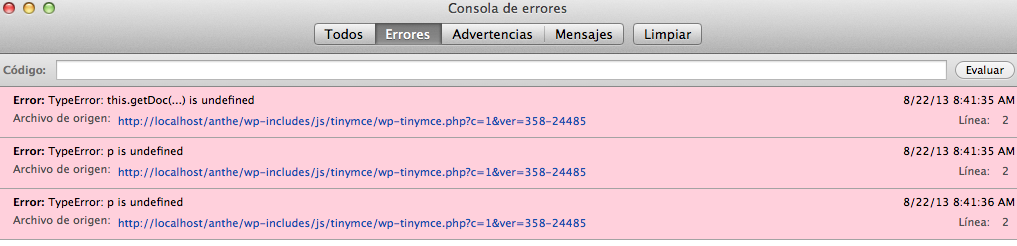
Thanks for the screenshot. Yes, the issue is JS based and coming from the tinymce script. Unfortunately, the issue could be anything…
Does your WP site use a custom tinymce? Perhaps because of the language translation?
-
In reply to No visible Editor Wysiwyg -> taxonomy in wp 3.6
- August 22, 2013 at 4:46 pm
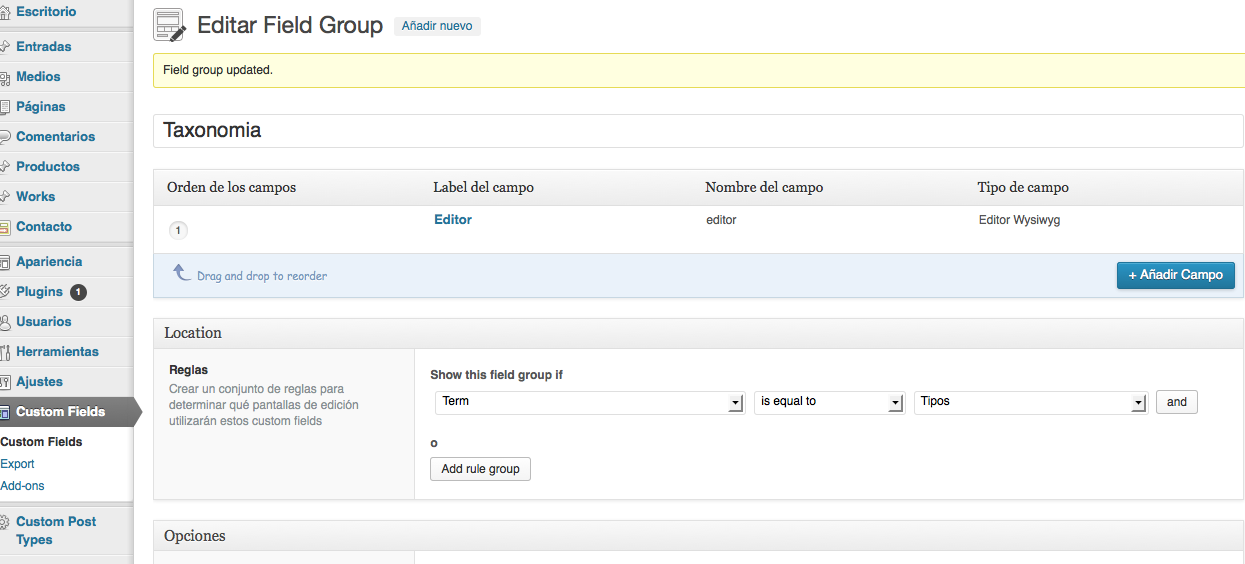
Hello,
Hope that helps.
In a custom post works well, but in a taxonomy editor is not displayed.
Thanks again Captura-de-p....png
 Captura-de-p....png
 Captura-de-p....png
 Captura-de-p....png
-
In reply to No visible Editor Wysiwyg -> taxonomy in wp 3.6
- August 22, 2013 at 2:35 pm
2 things:
1. Can you attach a screenshot of the issue?
2. Have you checked your console log for JS errors? -
In reply to ACF and the WordPress Wysiwyg.
- August 21, 2013 at 2:38 pm
Hi @nolimit966
You will find a WordPress WYSIWYG field in the add-ons page of this website!
Cheers
E -
In reply to Links do not appear as links
- August 20, 2013 at 2:40 pm
Hi @mmjaeger
ACF does not have an auto link generator built in.
Perhaps you are expecting functionality that does not exist.
You can use the link button in your WYSIWYG field to create links on text
-
In reply to HTML Default Values
- August 20, 2013 at 2:31 pm
Hi @Nuro
Yes, you can use a WYSIWYG field and set the default value to any HTML you wish.
If you want tables in your tinymce editor, there is a WP plugin for this which will work with ACF WYSIWYG fields.
Cheers
E -
In reply to Repeater WYSIWYG can't get value
- August 16, 2013 at 2:40 pm
Hi @elliot,
Yes, that was it. I never realized there was a max character for CF keys!
Fortunately, that’s the only one that extends that long, so I’ll start to use abbreviations when possible. do_cf_res_item_con works I suppose.
Thanks again. Excellent plugin. I’ve purchased 3 of your add ons and use ACF on several projects.
-
In reply to Repeater WYSIWYG can't get value
- August 16, 2013 at 1:06 pm
Hi @synergywp
There is a chance that the field_name is too long for ACF to save the value!
Can you try and rename the field name to something shorter?


Welcome
Welcome to the Advanced Custom Fields community forum.
Browse through ideas, snippets of code, questions and answers between fellow ACF users
Forums
Helping Others
Helping others is a great way to earn karma, gain badges and help ACF development!
