Support

Account

Forum Replies Created

  • Hi @acf-support

    Thanks for your reply.

    Moments after posting the ticket i found out that it´s possible to use conditional logic for a cloned field. Just set display to group instead of seamless and the conditional logic option pops up.

  • Hi @hube2

    It seems you linked to this topic.

    Could you please check that?

    Thanks.

  • Hi @acf-support ,

    I´ve been testing some more and tried recreating all field groups, manually from scratch on a fresh install.

    • WP 4.6.1
    • ACF PRO 5.4.4
    • No other plugins

    The same error appears here too.

    The contents of the field global_quotes is set through the options page Theme settings.

    The error only seems to appear if there are values in the global_quotes field

    The filter for acf/load_field which populates the global_quotes_select:

    add_filter( 'acf/load_field/name=global_quotes_select', function( $field ) {
    
    	$global_quotes = get_field( 'global_quotes', 'option' );
    
    	if ( ! $global_quotes ) {
    		return $field;
    	}
    
    	foreach ( $global_quotes as $i => $quote ) {
    		$field['choices'][ $i ] = $quote['quote'];
    	}
    
    	return $field;
    
    });

    The Options page for Theme Settings:

    if ( function_exists( 'acf_add_options_page' ) ) {
    	acf_add_options_page([
    		'page_title' => __( 'Theme Settings', 'wptest' ),
    		'menu_title' => __( 'Theme Settings', 'wptest' ),
    		'menu_slug' => 'wptest_options',
    		'capability' => 'manage_options',
    		'redirect' => false,
    		'icon_url' => 'dashicons-welcome-widgets-menus',
    		'position' => 25,
    	]);
    }

    I´ve attached all three json-files needed to replicate the error. Could You please try and create everything manually the way I did?

    Thanks in advance.

  • Hi @acf-support ,

    Yes I put the json files in the acf-json folder in my theme folder and then choose to sync the field groups.

    I then deleted the json files and tried to import them through ACF Tools / Import Field Groups. This time everything works as it´s supposed to. The field group is of type clone and the values are fetched the way they should.

    I´ll test this a bit further tomorrow when I´m at work.

    Thanks for your help so far.

  • Hi @acf-support

    I tried to disable all other plugins but the problem still remained.

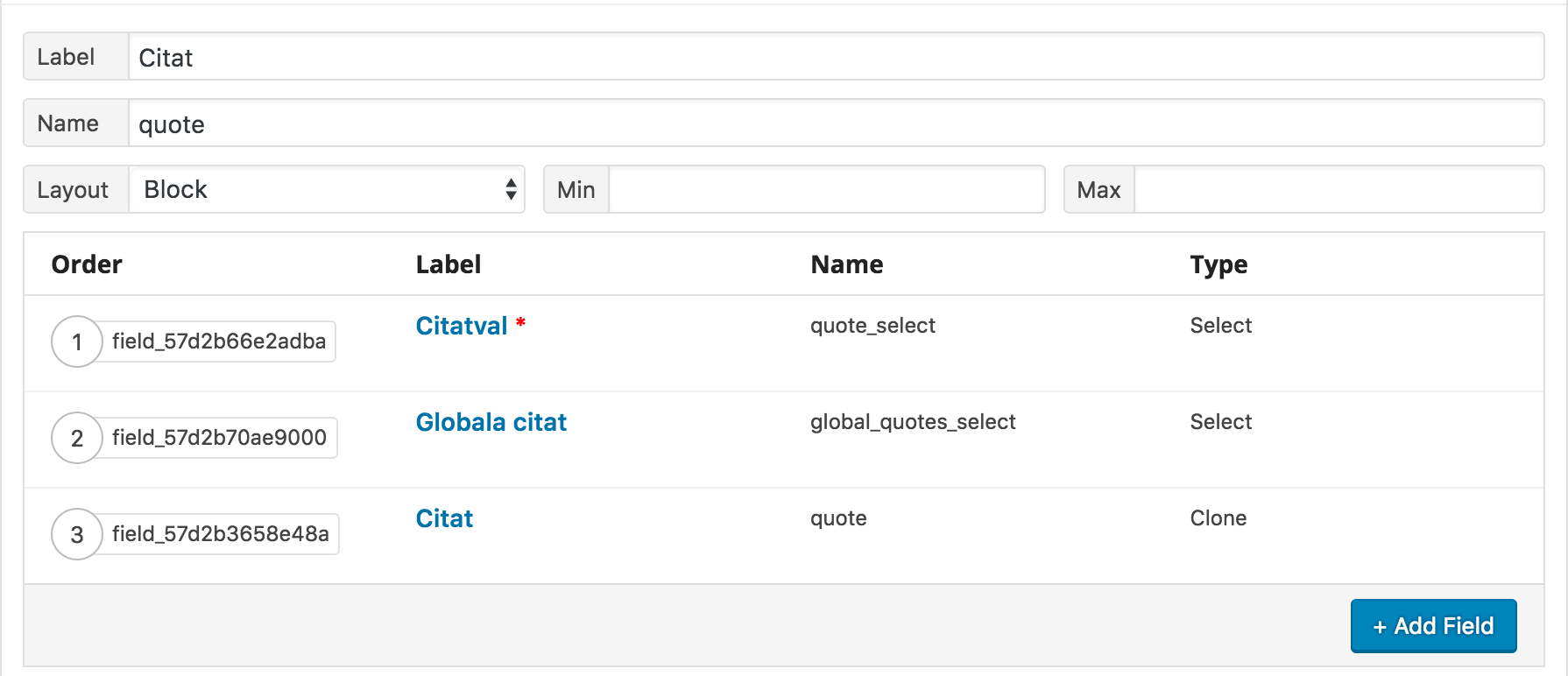
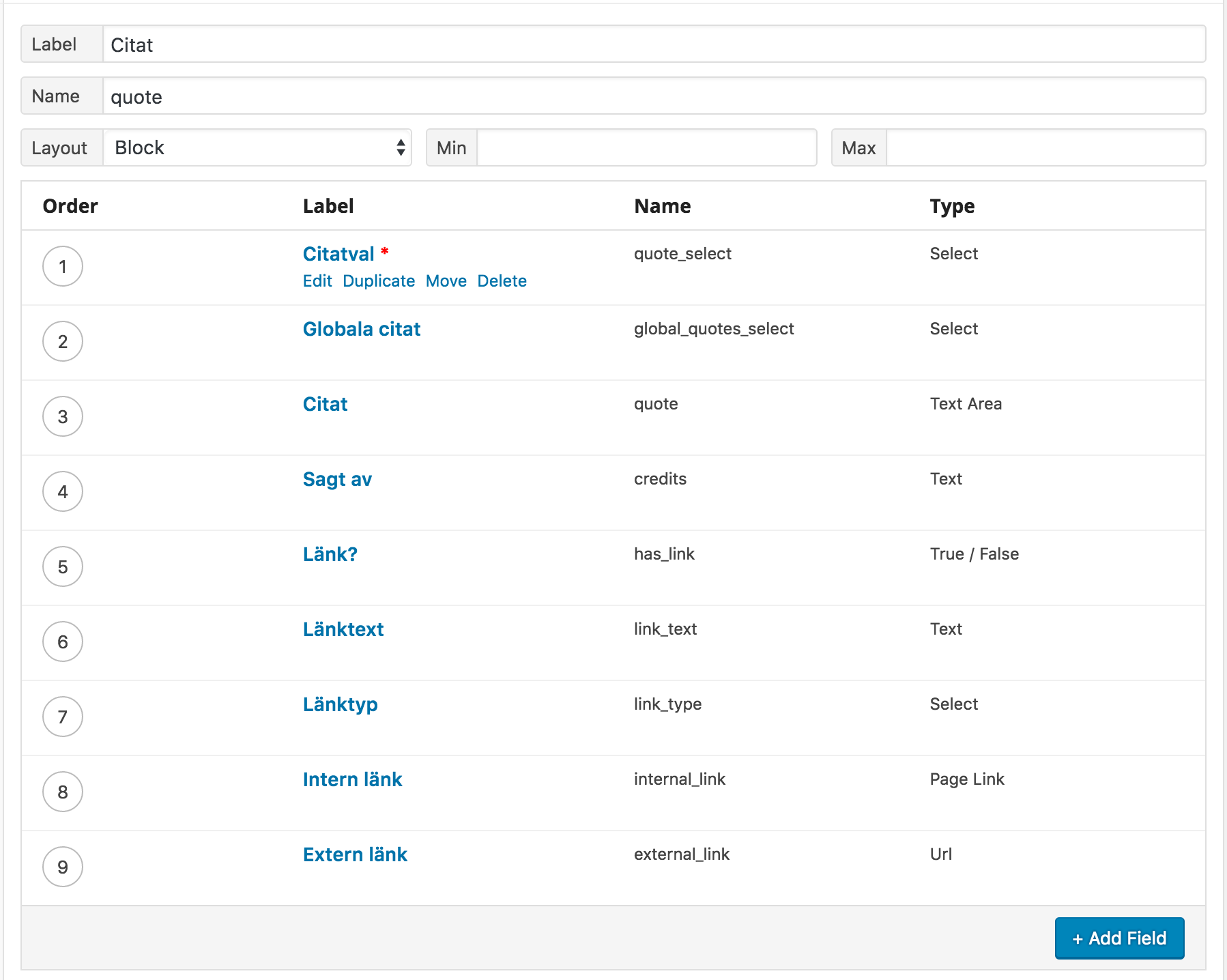
    After that I did a fresh install of both WP and ACF PRO, without any other plugins and then using the JSON files from the first install. I then noticed that the fields appear to be treated differently when being synced and it no longer shows up as clone. The warnings and notices were no longer appearing either.

    Please see the attached screen shots that visualize the differences.

    Thanks in advance.

  • Hi @acf-support

    Thanks for your reply. I´ve attached the json-files for the field groups in question.

    Upon updating the above mentioned field group the headers already sent warning appears as well. With WP_DEBUG set to false this is of course not happening.

    Warning: Cannot modify header information - headers already sent by (output started at wp-content/plugins/advanced-custom-fields-pro/pro/fields/clone.php:405) in wp-includes/pluggable.php on line 1174

Viewing 6 posts - 1 through 6 (of 6 total)