

Forum Replies Created
-
hiroshi
- in reply to: Location setting based on page template does not work with Gutenberg
- November 29, 2018 at 2:17 pm
HI to @alexeympw
Thank you for your information!
I’ll try 5.7.6.Anyway, if it’s a kind of degradation, hope it’ll be fixed soon.
-
hiroshi
- in reply to: Will "acf/validate_value" be a part of ACF FREE version5.0?
- September 23, 2018 at 7:53 pm
I’ve checked Version: 5.7.6 of free version and found the hook exists.
-
hiroshi
- in reply to: a value retrieved via 'acf/validate_value' is double-backslashed.
- September 13, 2018 at 7:43 am
Thanks for your reply @hube2
You cleared my mind!
(I should have read core of ACF first…)
Regards
-
hiroshi
- in reply to: a value retrieved via 'acf/validate_value' is double-backslashed.
- September 7, 2018 at 10:45 pm
Does it happen to me only…?
-
hiroshi
- in reply to: Does "post_object" field go through "acf/render_field" twice?
- January 30, 2018 at 5:44 am
Thanks again @hube2
So I close this topic.
-
hiroshi
- in reply to: Does "post_object" field go through "acf/render_field" twice?
- January 29, 2018 at 2:24 pm
Thank you for more information! @hube2
After coming 2 know the situation behind, should I report a bug? or stay silent?
PS
My code to avoid the double echo is something like this below.class MyAddExtraInfoToACFField { const EXTRA_INFO_KEY = 'my_extrainfo'; public $show_extrainfo_count; public function __construct() { $this->show_extrainfo_count = []; add_action( 'acf/render_field_settings', [ $this, 'add_extrainfo_to_acf' ], 99999 ); add_action( 'acf/render_field', [ $this, 'show_extrainfo_to_acf' ], 9, 1 ); } public function load_css_js( $hook ) { if ( 'post.php' === $hook || 'post-new.php' === $hook ) { wp_enqueue_style( __CLASS__, plugins_url( 'style.css', __FILE__ ) ); wp_enqueue_script( __CLASS__, plugins_url( 'script.js', __FILE__ ) ); } } public function add_extrainfo_to_acf( $field ) { $value = ( isset( $field[ self::EXTRA_INFO_KEY ] ) ) ? $field[ self::EXTRA_INFO_KEY ] : ''; acf_render_field_wrap( [ 'label' => 'my_extrainfo', 'instructions' => 'Write an extra info to this item.', 'required' => 0, 'type' => 'textarea', 'name' => self::EXTRA_INFO_KEY, 'prefix' => $field['prefix'], 'value' => $value, 'class' => 'field-' . self::EXTRA_INFO_KEY, ], 'tr' ); } public function show_extrainfo_to_acf( $field ) { global $typenow, $pagenow; if ( 'acf-field-group' === $typenow ) { return; }// avoid an error if ( 'post.php' !== $pagenow && 'post-new.php' !== $pagenow ) { return; } // check if it's second run if ( isset( $this->show_extrainfo_count[ $field['key'] ] ) ) { return; } echo $field[ self::EXTRA_INFO_KEY ]; $this->show_extrainfo_count[ $field['key'] ] = true; } } $my_add_extrainfo_to_acf_field = new MyAddExtraInfoToACFField(); -
hiroshi
- in reply to: Does "post_object" field go through "acf/render_field" twice?
- January 28, 2018 at 1:54 pm
Thank you for your answer! @hube2
So, To prevent echo “Some extra HTML” twice with the “Global” code in “acf/render_field” page,
I should check $field[‘key’] and see if it’s second time or not.Would you please tell me the idea above is appropriate?
-
hiroshi
- in reply to: Is it possible hiding a form after a submission using acf_form()?
- May 15, 2017 at 10:27 am
Hi James.
Thank you for your replay!
The approach is working fine so far.
So I close this topics. -
Hi @hube2
Thanks aganin!
In the end, I made this sa a solution.
(very rough code though…)function my_get_field_object_for_new_post($selector, $parent_selector = ''){ global $wpdb; $where = ''; $parent_id = false; $result_key = false; if($parent_selector != ''){ $sql = "SELECT ID FROM $wpdb->posts WHERE post_excerpt = %s AND post_type = 'acf-field'"; $sql = $wpdb->prepare($sql, $parent_selector); $result = $wpdb->get_row( $sql ); if((int)$result->ID > 0){ $parent_id = $result->ID; } else { $sql = "SELECT ID FROM $wpdb->posts WHERE post_title = %s AND post_type = 'acf-field-group'";// can be group name $sql = $wpdb->prepare($sql, $parent_selector); $result = $wpdb->get_row( $sql ); if((int)$result->ID > 0){ $parent_id = $result->ID; } } if($parent_id){ $where = " AND <code>post_parent</code> = " . $parent_id; } } if($selector!=''){ $sql = "SELECT post_name FROM $wpdb->posts WHERE post_excerpt = %s AND post_type = 'acf-field'".$where; $sql = $wpdb->prepare($sql, $selector); $result = $wpdb->get_row( $sql ); if( $result->post_name ){ $result_key = $result->post_name; } } return $result_key; } -
Hi @hube2
Thanks for ur advise always!
I should have read the doc well…Then I tried this code below
$my_post = […];
$post_id = wp_insert_post( $my_post );
$field = get_field_object(‘selector’, $post_id );
Update_field($field[‘key’], ‘value’, $post_id);but $field is empty, so Update_field() does not work.
Do I have to use SQL instead of get_field_object()
to get field_key from field_name in case of a new post? -
hiroshi
- in reply to: Can I get a field list for a form which is "location rule" applied ?
- October 16, 2016 at 1:19 am
Hi @john Huebner,
> WP automatically saves an autodraft of the new post and assigns a post id to it.
I was not sure about it.
Thank you for your great support! -
hiroshi
- in reply to: Can I get a field list for a form which is "location rule" applied ?
- October 16, 2016 at 1:01 am
Hi @John Huebner,
Thank you for your attentive reply!
> ACF does not know where fields are located unless it has a “$post_id” value to work with.
Then I still wonder why ACF can generate a form in ‘post-new’ screen depending on conditions of post_type, user, etc.
Maybe I should dive into ACF core and fetch the code which does the work. -
hiroshi
- in reply to: How to disable drag&drop ordering function on a specific Repeaters field?
- August 30, 2016 at 11:47 am
Hi @golewis
> how you added the JS file?
Here is an instruction from ACF guys.
https://www.advancedcustomfields.com/resources/adding-custom-javascript-fields/Also U better wrap javascript above with this code below avoiding JS error.
if (typeof acf !== 'undefined') {}PS
These codes below colorize the handle + replace title attribute.setTimeout(function(){ var target = $('.disable-sorting > .acf-input > .acf-repeater > .acf-table > tbody > .acf-row > .acf-row-handle.order'); target.css( {'cursor':'default', 'background-color':'#feffe5'} ).attr('title', 'Ordering disabled'); }, 200); -
hiroshi
- in reply to: How to disable drag&drop ordering function on a specific Repeaters field?
- August 23, 2016 at 4:50 pm
My co-worker gave me solution!
I put these lines in my JS file, and worked without modifying ACF itself.$.extend( acf.fields.repeater, { _mouseenter: function( e ){ // original codes + mine } } -
hiroshi
- in reply to: How to disable drag&drop ordering function on a specific Repeaters field?
- August 23, 2016 at 3:46 pm
Just for reference,
this solution is working, but I don’t wanna modify ACF PRO.1. apply class ‘disable-sorting’ to a Repeaters field by a normal ACF PRO field group UI.
2. add codes below inside of ‘_mouseenter :function( e ){}’ in ‘acf-pro-input.min.js’.if( $( this.$tbody.closest('.acf-field-repeater') ).hasClass('disable-sorting') ){ return; } -
hiroshi
- in reply to: Reload the result of Relationship using other fields' value before submit
- July 27, 2016 at 6:42 am
Hi @hube2
Thank you for your advice again!
Somehow, I’ve done a hack for relationship field which I wanted to do finally.it was such a formidable one for me…
Especially with relationship field, I had to care with both panes… -
hiroshi
- in reply to: acf/fields/taxonomy/query doesn't return the same result which get_terms() does
- July 27, 2016 at 6:33 am
Hi @james
Using starter kit which you introduced, I could make my own one!
Thank you for your continuous support!
I really appreciate it! -
hiroshi
- in reply to: Reload the result of Relationship using other fields' value before submit
- July 24, 2016 at 5:24 pm
Hi @hube2
Big thanks for your clue!
Codes works fine as they are.
So I’m gonna start analysing them from now!One thing, I noticed that ajax_load_city_field_choices() affects oddly to field_type selection in field group edit screen. (red circled area in my attachment. Sorry for my screenshot in Japanese)
Is it by design?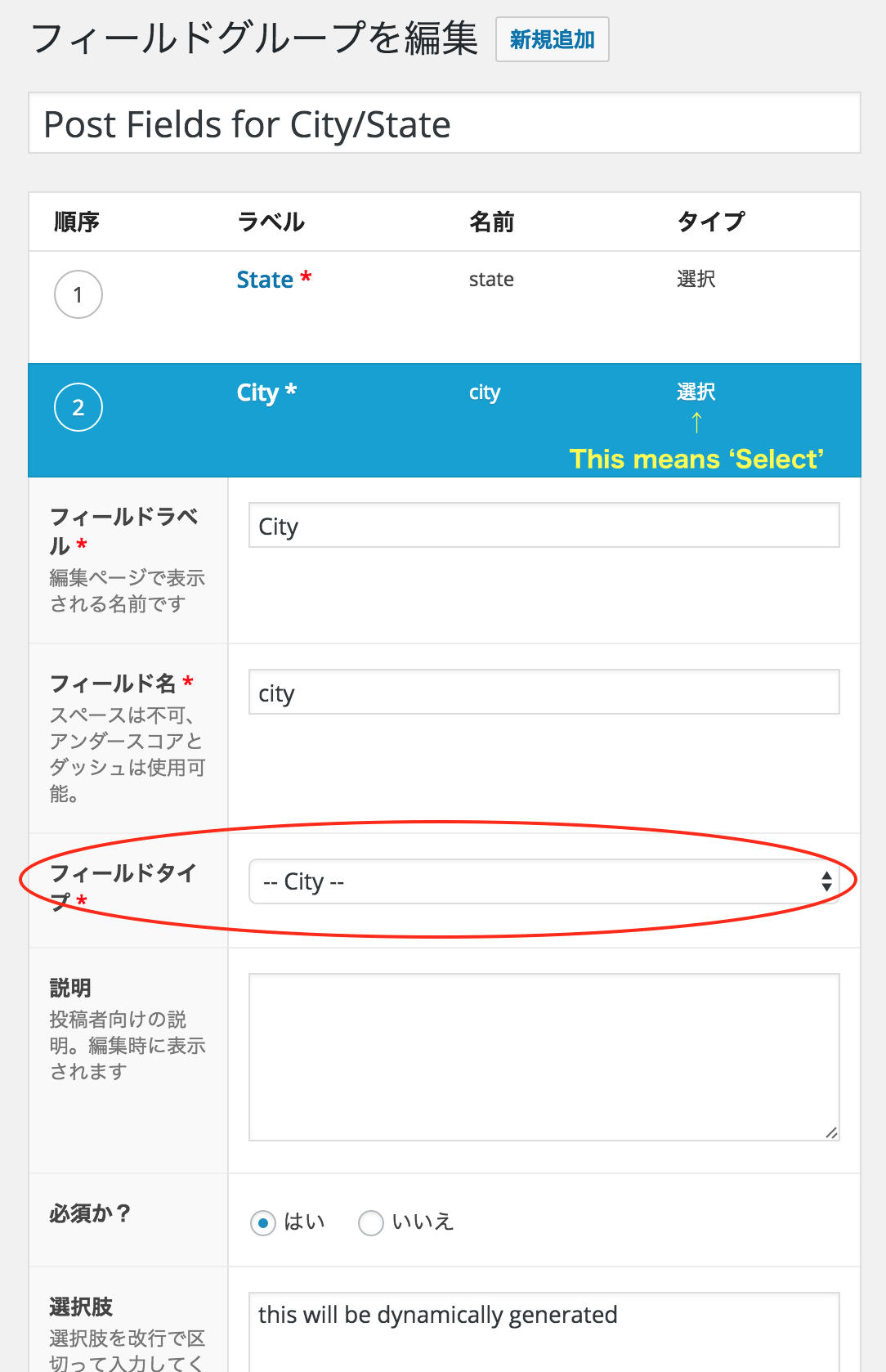 -2016-07-24-....png
-
-
hiroshi
- in reply to: acf/fields/taxonomy/query doesn't return the same result which get_terms() does
- July 23, 2016 at 6:26 pm
Hi @james
I am gonna learn how to make add-on!
(is there any tutorial for it?) -
Hi @james
As a temporaly solution,
I modified 2 files of ACF core like below.Do you think this modification will cause system malfunction?
/advanced-custom-fields-pro/assets/js/acf-input.min.js
- 'click #save-post':'click_ignore',
+ 'click #save-post':'click_publish',
/advanced-custom-fields-pro/forms/post.php
- if( get_post_status($post_id) == 'publish' ) {
+ if( in_array(get_post_status($post_id), array('publish', 'future', 'draft', 'pending', 'private')) ) {
PS
Validation for posts beside publish is indispensable for 70% of my cliant cases.
I wish coming ACF PRO will be able to select statuses to be validated. -
Hi @james
Thanks for your information again!
I tried the plugin right away, but did not work…
So I just wrote a report to the plugin’s author.I wish the function will be a part of ACF’s coming feature!
-
Hi @james
I am very sorry for my long and impolite silence.
Here’s my test validation code going with a ACF setting of 1 text field named as ‘test’.
add_filter( 'acf/validate_value/name=test','my_acf_validatrion', 10, 4);
function my_acf_validatrion( $valid, $value, $field, $input ){
	if( !$valid || $value == ''  ) {
		return true;
	}
	if ( $value != 'a' ) {
		return 'bad input';
	}
	return $valid;
}
validation works
– publish > publish
– draft > publishvalidation doesn’t work
– publish > draft
– draft > draft
– new > draft (newly posted one)I wanna know the behavior above is by design or not…
-
hiroshi
- in reply to: acf/fields/taxonomy/query doesn't return the same result which get_terms() does
- July 18, 2016 at 4:31 pm
Hi James!
Big thank you for your support as usual!
I’m afraid this is not possible because ACF will try to get the parents if the taxonomy is hierarchical so that it can show the terms in a tree layout. To fix it, you need to modify the core file.
I understand.
Instead of modifying the core file,
Do you think making new add-on based on the file is bad idea?PS
As a temporary solution, giving up query solution & using acf/fields/taxonomy/result/ hook, I added some text such as ‘[not selectable]’ to each selection’s title , and I prevent a click on it by Jquery & css. (pink background row is not clickable in the attachment)PS2
I don’t know how I should describe my issue as a ticket though…
should it be a bug report? or request?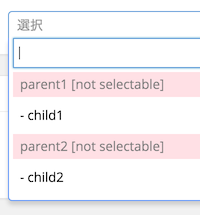 screenshot-2....png
-
Hi James!
Thank you for your sonic reply!
I’ve been using and loving ACF PRO, and has tried various kind of validations.
But this time, I need a validation to a post saving newly as draft.All the validation works perfect when I save a post as publish,
but none of them works when I do it as draft post.So I would appreciate any sorts of hint or tips to solve my problem above.
Best regards,
hiroshi

Welcome
Welcome to the Advanced Custom Fields community forum.
Browse through ideas, snippets of code, questions and answers between fellow ACF users
Forums
Helping Others
Helping others is a great way to earn karma, gain badges and help ACF development!
