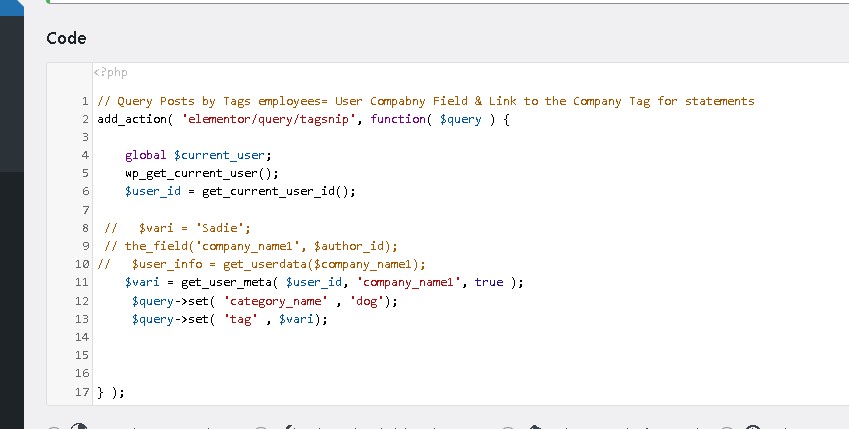
THank you for the effort. If I can get the Comapny_name ACF field value of the current signed in user. I would then set the Post query tag to be equal to the value of that field. Posts have tags with company names and the users also have a company_name ACF field with te company they work for. I will try the meta code you showed above.
Did it say the code snippet name goes in the Custom Query Box?
Just an FYI, You are in the correct widget. Post Widget. The Query section, is asking for the name of a Code snippet that defines what posts will be included when the page is displayed. This php code is defined using the Code Snippet plugin. The query could be as easy as saying category_name, Dogs , This would be inside PHP. I can get the User ID or name or Bio but I can not Get the ACF fields linked to the user. It comes back blank.
I got a work around but I would still like to figure out how to access thses User profile fields through the PHP querry code. They work with Dynamic fields in Elementor. If you look at the attached image, this code does not work, If I use the decription field in the $vari= line, that works. I must be missing something simple.
Addition, your code mentions the Post ID. The ACF fields are not in a Post, they are linked to User Profiles. Hope that helps.
To Clarify: The Elementor Post widget has a Post Query field that is the name of a PHP code snippet. This is where the code you talked about goes. I am able to pull the value of the Bio/Description field in the User profile that is signed in. I then set the Post Tag as being the value that is in the Bio field. Bio field has the company name. The Company name is also in the Tag of specific posts. This works perfectly. My challenge is that I can not access any of the ACF fields tied to the User Profile. I there a way to get to those fields?