
Search Results for 'q'
reply
-
In reply to Repeater field shortcode?
- November 10, 2015 at 2:41 pm
I got as far as to make the custom post type and re-create/assign the page template, which uses the page builder, for the post type. I want some of each sport page to be editable, but some parts of it to output strictly the acf fields that are shown. So I’ve added a code section in the page builder, and so far have managed to get this, with your help, in that part…
<h3>Coaching Staff</h3>
<div class="coach_name">[acf field="coaching_staff_0_coachs_name"], [acf field="coaching_staff_0_coachs_title"]</div>

<div class="coach_contact">Phone: [acf field="coaching_staff_0_coachs_phone"] | <a href='mailto:[acf field="coaching_staff_0_coachs_email"]'>E-Mail</a></div>

<div class="coach_bio">[acf field="coaching_staff_0_coachs_biography"]</div>
I don’t know enough about building page templates or php to create the full page that way, wish I did! I’ve hired people to make them for some other sites, but had a little extra time and wanted to try to learn a little more 😉
-
In reply to Repeater field shortcode?
- November 10, 2015 at 2:10 pm
@hube2 Wow, thank you for the quick response. I’m sure it’s evident I’m pretty new to using ACF in templates. When you say there isn’t a way to create a loop, what do you mean?
I am making a site where someone else will put in info about sports teams (a custom post type), and for the repeater field, they can add as many coaches per sport as they need, but not every sport will have the same number, which is why I chose the repeater. And I’m trying to make page templates in the theme’s page builder so the person who manages the site just has to type things into the meta fields instead of opening the page template and editing that.
-

In reply to Repeater field shortcode?
- November 10, 2015 at 2:02 pm
Actually, yes there is.
[acf field="{$repeater_name}_{$row}_{$sub_field_name}"]Rows start at zero, not one.
But there isn’t any way to create a loop to show them I don’t think.
-
In reply to Drag and drop in gallery field extremely hard to use
- November 10, 2015 at 1:32 pm
I’m not sure exactly what’s going on. I’ve marked this for the developer’s attention but I can’t say when he’ll see it. If you want quicker attention then you should submit support ticket here http://support.advancedcustomfields.com/new-ticket/.
-
In reply to how to query by asc or des
- November 10, 2015 at 4:35 am
Hi,
at first.
post_type is the Type of the Post. That means post_type = “post”, if you create post with normal wordpress features.
Here the CodexFor example the Navigation Elements are an other post_type. Beside that there are custom Post Types.
meta_key is the key in the database. In ACF the key of Single Fields is always the name of their field.But you don’t need the key. Because the Star Field is linked with the post.
I think you create a post and have the star_rating field for each post. So you have to query all posts with the post_type =”post”.
$posts = get_posts(array(
	'post_type'			=> 'post',
	'posts_per_page'	=> -1,
	'orderby'			=> 'star_rating',
	'order'				=> 'DESC'
));
Hope It helps.
-
In reply to Creation and edition of a post
- November 10, 2015 at 12:08 am
And now ? it is working perfectly !
<?php /** * Template Name: Page Creation Vigneron3.0 2 */ ?> <?php // fonction ACF -------------------------------------------- // with this i dont have to think to put acf_form_head whereever I need it, it is always there add_action('wp_head','acf_form_head'); function my_pre_save_post( $post_id ) { // check if this is to be a new post if( $post_id != 'new' ) { return $post_id; } // Create a new post $post = array( 'post_status' => 'publish' , 'post_title' => $_POST['fields']['field_5640802e05f78'], 'post_content' => $_POST['fields']['field_5640802e05f79'], 'post_type' => 'page' , 'page_template' => 'page_vigneron30.php', ); // insert the post $post_id = wp_insert_post( $post ); $_POST['return'] = add_query_arg( array('post_id' => $post_id),$_POST['return']); // return the new ID return $post_id; } add_filter('acf/pre_save_post' , 'my_pre_save_post' ); function my_acf_save_post( $post_id ) { // Don't do this on the ACF post type if ( get_post_type( $post_id ) == 'acf' ) return; // Get the Fields $fields = get_field_objects( $post_id ); // Grab Post Data from the Form $post = array( 'ID' => $post_id, 'post_title' => $fields['titre']['value'], 'post_content' => $fields['contenu']['value'], ); // Update the Post wp_update_post( $post,true ); } add_action( 'acf/save_post', 'my_acf_save_post', 10, 1 ); ?> <?php get_header(); ?> <div id="primary" class="content-area"> <?php $args = array( 'post_id' => 'new', 'post_title' => false, 'post_content' => false, 'field_groups' => array( 5015 ), 'submit_value' => "Valider cette nouvelle action" ); acf_form( $args ); ?> </div><!-- #primary --> <?php get_footer(); ?> -
In reply to display posts based on a value within a checkbox array
- November 9, 2015 at 7:15 pm
I’ve fixed this via the ACF documentation – http://www.advancedcustomfields.com/resources/query-posts-custom-fields/.
Using the ‘LIKE’ compare value in the meta_query array:
$args = array( 'numberposts' => -1, 'post_type' => 'activities', 'post_status' => 'publish', 'meta_query' => array ( array ( 'key' => 'day_of_the_week', 'value' => $title, 'compare' => 'LIKE' ) ) ); -
In reply to Creation and edition of a post
- November 8, 2015 at 11:37 pm
Ok, now, it is better, but not ok yet. In that case, I create a new record, and then I can edit it, at least the variables included in the acf group. But if I type something in the title field or the content field, I do net see that something in the record !
<?php /** * Template Name: Page Creation Vigneron3.0 2 */ ?> <?php // fonction ACF -------------------------------------------- // add_action('wp_head','acf_form_head'); function my_pre_save_post( $post_id ) { // check if this is to be a new post if( $post_id != 'new' ) { return $post_id; } // Create a new post $post = array( 'post_status' => 'publish' , 'post_title' => 'Ici, le nom du Domaine, Vignoble ...' , 'post_type' => 'page' , 'page_template' => 'page_vigneron30.php', ); // insert the post $post_id = wp_insert_post( $post ); $_POST['return'] = add_query_arg( array( 'post_id' => $post_id ), $_POST['return'] ); // return the new ID return $post_id; } add_filter('acf/pre_save_post' , 'my_pre_save_post' ); // --------------------------------------------------------------------------------- ?> <?php acf_form_head(); ?> <?php get_header(); ?> <div id="primary" class="content-area"> <div id="content" class="site-content" role="main"> <?php $args = array( 'post_id' => 'new', 'post_title' => true, 'post_content' => true, 'field_groups' => array( 5015 ), 'submit_value' => "Valider cette nouvelle action" ); acf_form( $args ); ?> </div><!-- #content --> </div><!-- #primary --> <?php get_footer(); ?> -
In reply to Sort posts by date picker in repeater field
- November 8, 2015 at 10:39 pm
Hi,
Thanks for your answer. Something i don’t understand or it was not good. BUT, with this code it works fine for me:
<?php /*build and fill: cp-loop and repeater loop*/ if(have_posts()) : while(have_posts()) : the_post(); $my_workshop_name = get_the_title(); if( have_rows('datums') ): while ( have_rows('datums') ) : the_row(); $my_workshop_date = get_sub_field('datum'); $the_ID = get_the_ID(); /*of course you can extend this with additional fields or infos for that workshop that you can use later*/ $workshops[$my_workshop_date][$the_ID]['date'] = $my_workshop_date; $workshops[$my_workshop_date][$the_ID]['name'] = $my_workshop_name; endwhile; endif; endwhile; endif; /*output*/ // [20151201]=> array(1) { [29]=> array(2) { ["date"]=> string(8) "20151201" ["name"]=> string(18) "TEST123 4-12-2015" } } //$datum = date("Ymd"); ksort($workshops); foreach ($workshops as $key_day => $row_day){ if ($key_day > date("Ymd")) { foreach ($row_day as $key_workshop => $row_workshop){ $workshop_name = $row_workshop['name']; $workshop_date = $row_workshop['date']; echo $workshop_date .' : '. $workshop_name .'<br />'; } } } ?> -

In reply to if then statements with known field value
- November 8, 2015 at 4:52 pm
i believe i figured it out.
it works if i change the first line from:
<?php if (get_sub_field('session-title')="TBA") {to
<?php if (get_sub_field('session-title')=="TBA") { -
In reply to Filter Sort Repeater Field in Backend
- November 7, 2015 at 9:47 am
I’m running into the exact same issue, I’ve noticed that $value is just a string equal to the number of rows I have saved in the repeater field.
-
In reply to Get True / False field value Javascript
- November 6, 2015 at 10:18 pm
Never mind, I already found the solution! just check the attribute “checked”. If the box is checked it will return the value “checked”. Otherwise the attribute will be undefined.
So by using this code I check all the boxes within a certain div:if (jQuery(this).attr("checked")) { // in here it means that the checkbox is checked } -
In reply to ACF returning ID as string instead of an array
- November 6, 2015 at 7:42 pm
Hi Elliot,
That indeed fixes the issues! Thanks for the quick fix Elliot, it’s much appreciated! 🙂
Thanks,
Robin -
In reply to conditional logic disappeared on repeater fields
- November 6, 2015 at 12:28 pm
What else has changes on the site other than updating WP. Conditional logic in repeaters on sites where I have ACF4 running is working.
Try deactivating plugins and changing to a default theme to see where the problem is. More than likely there is some javascript error that’s causing it. There could also be a PHP warning or error that might be causing the problem because with the ajax request.
-
In reply to User field
- November 6, 2015 at 12:22 pm
There is a tutorial here about how to do reverse relationship queries that can be used here http://www.advancedcustomfields.com/resources/querying-relationship-fields/. You’ll need to alter it a bit to look for user id values but other than that it should be the same.
-
In reply to have_rows causing infinite loop when getting repeater values from another page
- November 6, 2015 at 11:40 am
I’m not the developer, I just do my best to answer questions here. I can mark this thread for the developer to look at when he get time.
My suspicion is that it has something to do with a combination of not providing a post id for the repeater and the fact that you’re using get_template_part() which creates a disconnect.
get_template_part() includes a lot of global variable values so that the template part has access to them, like the current $post and $wp_query. This might have something to do with the post id being reset, this is likely the reason your post id value is being reset.
You could try using php include instead of get_template_part which would rule this out since the variables will transfer to the included file and won’t be overridden by the global calls in get_template_part.
But this causes another problem where $target_page and $target_section will be overwritten every time that _block_reference.php is included so you’ll end up with a different problem.
Like I said above, you’ll either need to do the work around that you outline or create a recursive function that would eliminate both problems.
-
In reply to Line breaks showing in text and text areas
- November 6, 2015 at 10:07 am
Sorry for what might seem to be basic questions.
I looked over these files quickly and I don’t see anything that stands out, but that doesn’t mean that there isn’t something going on in there. Also, I am not familiar with genesis so I don’t know if there’s anything in that framework or in genesis them you’re using that might cause it. There may also be other plugins that are causing a problem. I know that on my test installation of ACF4 that the problem you’re experiencing.
My next suggestion is also going to be basic debugging. That is to deactivate other plugins and try one of the default 20XX themes to narrow down what is causing the problem.
-
In reply to Url and Email field
- November 6, 2015 at 8:44 am
acf has a simple shortcode that can be used in the content area in WP that is documented here http://www.advancedcustomfields.com/resources/shortcode/
Basically it would be something like this when editing in text mode, but to be honest I don’t know if this will work with the changes that WP has recently made to the way shortcodes work. You’d have to try it.
<a href='mailto:[acf field="field_name"]'>E-Mail</a>I’m not familiar with the Divi and don’t know if it will work there.
-
In reply to Featured Post using Checkbox
- November 5, 2015 at 1:51 pm
something like
<?php $loop = new WP_Query( array( 'post_type' => 'news', 'posts_per_page' => 3, 'meta_key' => 'feature_on_home', 'meta_value' => '1' ) ); ?> -
In reply to Url and Email field
- November 5, 2015 at 1:47 pm
To the first point, yes they are just standard fields but require that a valid URL or an email address be entered.
second question
<?php <a href="mailto:<?php the_field('email_field_name'); ?>">E-Mail</a> ?> -
In reply to ACF With PHP Based Style Sheet
- November 5, 2015 at 1:10 pm
That won’t work. You need to set the id in the post that is requesting the style sheet, not in the file that is generating the style sheet.
Here is a simple example
In the post:
<?php
    $queried_object = get_queried_object();
    $post_id = $queried_object->ID;
?>
<link rel="stylesheet" href="url/of/file.php?post_id=<?php echo $post_id; ?>" />
In the file generating the stylesheet:
$post_id = $_GET['post_id']; include("../../../../wp-load.php"); header('Content-Type:text/css'); -
In reply to ACF With PHP Based Style Sheet
- November 5, 2015 at 3:05 am
This seemed like a good solution but for whatever reason I cannot get it going…
I have tried various permutations and still the variable is not being passed…Not sure how to answer your question how am I calling it…did I not give enough information above?
Right now I am trying something like this and still no luck
<?php // For GSL
	include("../../../../wp-load.php");
	header('Content-Type:text/css');
?>

<?php
global $post;
$variable = get_field('lp_background', $post->ID); ?>
?>
.custom #landing_banner .wrapper { background: url('<?php $variable ?>') transparent no-repeat center top; background-size: cover; }
Are you able to provide a better code block using the actual fields name I am showing in my example?
Any help is appreciated!
-
In reply to have_rows causing infinite loop when getting repeater values from another page
- November 5, 2015 at 2:40 am
Hi John,
I’ve drawn up a little diagram to further explain what I’m doing here.Here’s a point-by-point explanation:
- Both pages use flexible content layouts, so they both include have_rows()
- Page 2 includes a flexible content layout that has a repeater inside
- That block has a text field “block_id”, where a user can give it a unique name (we’re using “targetblock”)
- We want to include “targetblock” on another page
- Page 1 includes a flexible content layout, “block_reference” that includes two fields:
- “target_block” – text field where users can enter the unique name of the target layout to include
- “target_page” – post object field where users can select the page that has the target layout on it
- “block_reference” does a few things:
- Loops through the flexible layouts on the target_page
- Checks if there’s a “block_id” field that matches “target_block”
- If found, it includes whatever that flexible content layout would normally include (in this case, a repeater field)
All of this is working as long as the block that we’re trying to pull from Page 2 doesn’t include another have_rows() call. I’ve explored the plugin code a bit, and it looks like there’s a case where it breaks in api/api-template.php around line 489.
I’m going to do some more testing, but the main problem is that it’s resetting the have_rows() loop for Page 1, causing the entire page to be re-generated, which includes the item from Page 2 again, causing the infinite loop.
I’m aware of the potential for including another “block_reference” from another page, and have added some code to avoid this.
Thanks again for your help,
Scott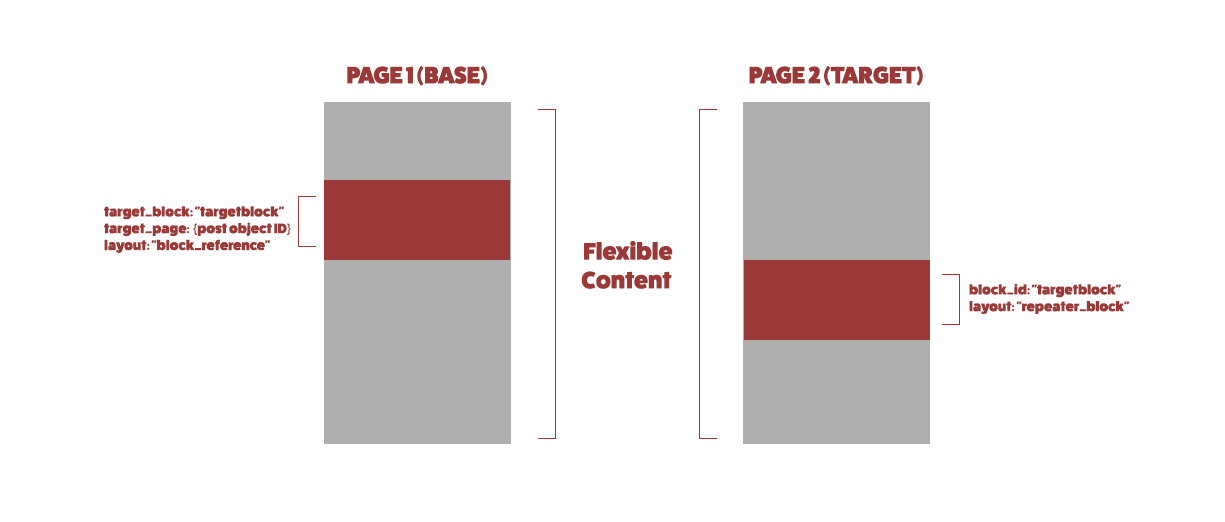 Base-Target-....png


Welcome
Welcome to the Advanced Custom Fields community forum.
Browse through ideas, snippets of code, questions and answers between fellow ACF users
Forums
Helping Others
Helping others is a great way to earn karma, gain badges and help ACF development!
