
Search Results for 'date picker'
reply
-

In reply to Date Picker (and if date specified has passed)
- August 13, 2013 at 2:37 pm
Hi @rdck
Have you tested that
get_field('event_end_date')returns a value? -
In reply to Date format Datepicker for CSV Import?
- August 13, 2013 at 2:15 pm
Hi @aaronrobb
The date picker will use the save_format option to load and save data to.
What is the save_format option set to?
-

In reply to Date Picker (and if date specified has passed)
- August 13, 2013 at 8:19 am
Looks like it’s to do with the fact it’s in a while loop?
while ( have_posts() ) : the_post(); -
In reply to Date Picker (and if date specified has passed)
- August 13, 2013 at 8:14 am
And actually, I realised I hadn’t formatted the date, so have this now —
$end_date_passed_check = DateTime::createFromFormat('Ymd', get_field('event_end_date'));

if ($end_date_passed_check->format('Ymd') < date('Ymd'))
{
   $date_passed = 'date-passed';
}
But alas it’s adding the class randomly… not as it should be.
-
In reply to Date Picker (and if date specified has passed)
- August 13, 2013 at 8:04 am
I thought this might’ve worked; but throwing out an undefined variable…
$end_date_passed_check = DateTime::createFromFormat('Ymd', get_field('event_end_date'));

if ($end_date_passed_check < date('Ymd'))
{
    $date_passed = 'date-passed';
}
<div class="each-programme-content <?php echo $date_passed; ?>"></div> -
In reply to Custom fields get emptied when publishing
- August 13, 2013 at 1:40 am
Hello, is this problem fixed now? I have still same problem.
ACF plugin 4.2.1, ACF Datepicker plugin 2.0.9Must I change something in plugin source code?
-
In reply to Date
- August 12, 2013 at 12:26 pm
Hi @elliot,
Here is the data from ‘postmeta’ table.
a:11:{s:3:"key";s:19:"field_51f95d72c7c5a";s:5:"label";s:4:"Date";s:4:"name";s:4:"date";s:4:"type";s:11:"date_picker";s:12:"instructions";s:36:"Please select the date of your event";s:8:"required";s:1:"0";s:11:"date_format";s:3:"Ymd";s:14:"display_format";s:8:"dd/mm/yy";s:9:"first_day";s:1:"1";s:17:"conditional_logic";a:3:{s:6:"status";s:1:"1";s:5:"rules";a:1:{i:0;a:3:{s:5:"field";s:19:"field_51f846266fda1";s:8:"operator";s:2:"==";s:5:"value";s:6:"Events";}}s:8:"allorany";s:3:"all";}s:8:"order_no";i:4;} -
In reply to Date Picker – date appears as 1st Jan 1970???
- August 8, 2013 at 2:55 pm
Have you debugged the variables in each step?
Can you post the results? -

In reply to date picker date display in php 5.2
- August 8, 2013 at 9:40 am
Try this:
 list($day, $month, $year) = sscanf('12/04/2010', '%02d/%02d/%04d'); // field value
$datetime = new DateTime("$year-$month-$day"); // your format
echo $datetime->format('r'); // desired format
source: http://stackoverflow.com/questions/2621433/date-create-from-format-equivalent-for-php-5-2-or-lower
-
In reply to Date Picker – date appears as 1st Jan 1970???
- August 8, 2013 at 6:00 am
I am having the same problem as well.
I’m using the following code in my theme functions file
function datepicker_to_unix( $date ){
	$dateparts = explode('/', $date);
	$unixtimestamp = strtotime(date('d.m.Y', strtotime($dateparts[1].'/'.$dateparts[2].'/'.$dateparts[0])));
	return $unixtimestamp;
}
And then the following in my template file
<?php $date = get_field('field_name'); echo date('F d, Y', datepicker_to_unix($date )); ?>The result outputs: January 01, 1970
-
In reply to Querying relationship fields
- August 7, 2013 at 11:26 pm
Thank you SO much! This is what I ended up with…
<div>

		<?php $associations = get_field('associations');
		if( $associations ): ?>

		<?php foreach( $associations as $association): ?>
			<?php
			$photo = get_field('investment_logo', $association->ID); ?>

			<a href="<?php the_permalink() ?>" title="<?php printf(__('%s','rys'), get_the_title()) ?>" rel="bookmark">
			<img src="<?php echo $photo['url']; ?>" alt="<?php echo $photo['alt']; ?>" />
			</a>

		<?php endforeach; ?>

		<?php endif; ?>

		<a href="<?php the_permalink() ?>" title="<?php printf(__('%s','rys'), get_the_title()) ?>" rel="bookmark" >
		<?php the_title(); ?></a>

		<em><?php the_field('publication_source'); ?></em>

		<span><?php $date = get_field('publication_date'); echo date('F d, Y', datepicker_to_unix($date )); ?></span>

		</div>
Really appreciate your quick response! Thank you!!
-
In reply to Date Picker – date appears as 1st Jan 1970???
- August 7, 2013 at 3:14 pm
Hi @sallywp
What code are you using to display the date field data?
-
In reply to Querying relationship fields
- August 7, 2013 at 12:43 pm
Thanks for the screenshots.
The code you want to use will look something like this:
<div>

	<a href="<?php the_permalink() ?>" title="<?php printf(__('%s','rys'), get_the_title()) ?>" rel="bookmark" ><?php the_title(); ?></a>

	<em><?php the_field('publication_source'); ?></em>

	<span><?php $date = get_field('publication_date'); echo date('F d, Y', datepicker_to_unix($date )); ?></span>

	<?php

	// 1. Get all the relationship values
	$associations = get_field('associations');


	// 2. Make sure a value exists
	if( $associations ): ?>

		<?php

		// 3. loop through relatinoship values
		foreach( $associations as $association): ?>

			<?php // 4. Load the image field from the association ?>
			<img src="<?php echo get_field('investment_logo', $association->ID); ?>" />

		<?php endforeach; ?>

	<?php endif; ?>
</div>
Please note this is an example and not the final Markup you will need.
Thanks
E -
In reply to Querying relationship fields
- August 7, 2013 at 1:15 am
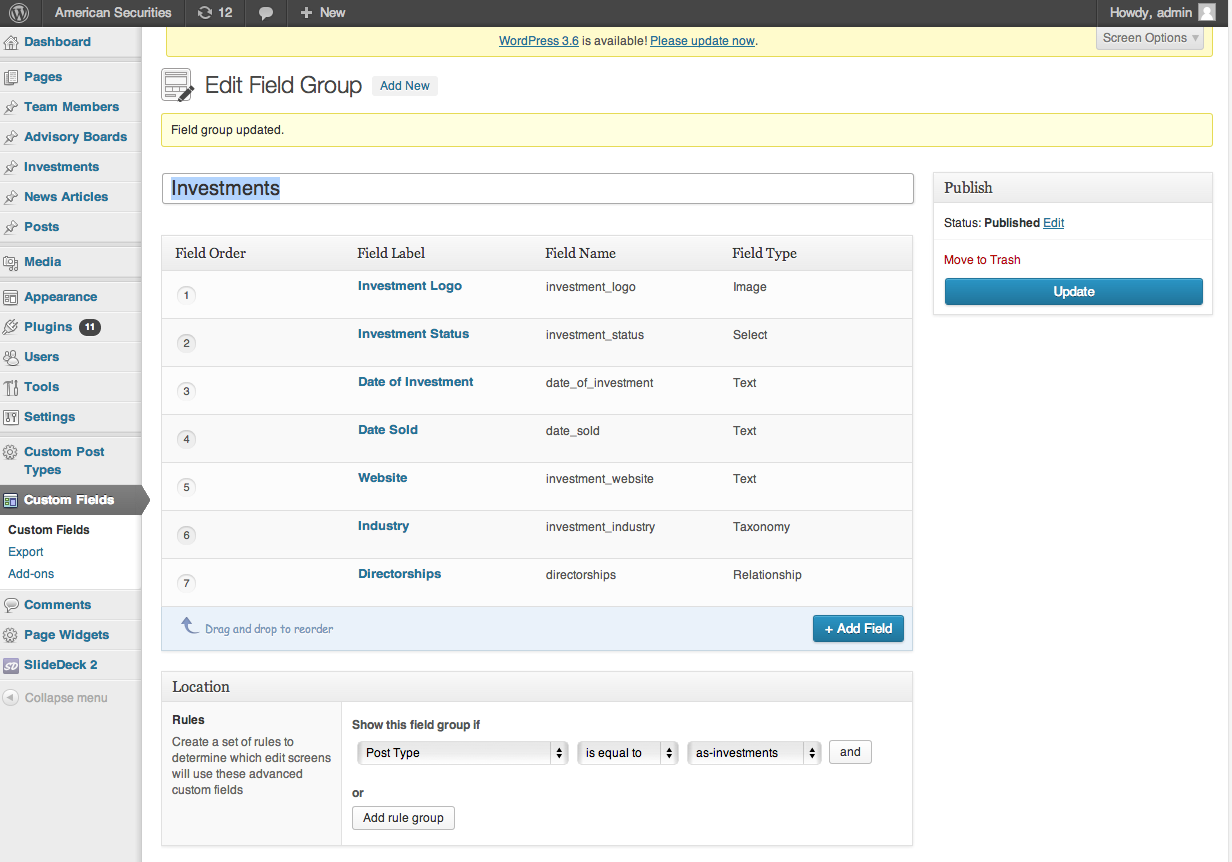
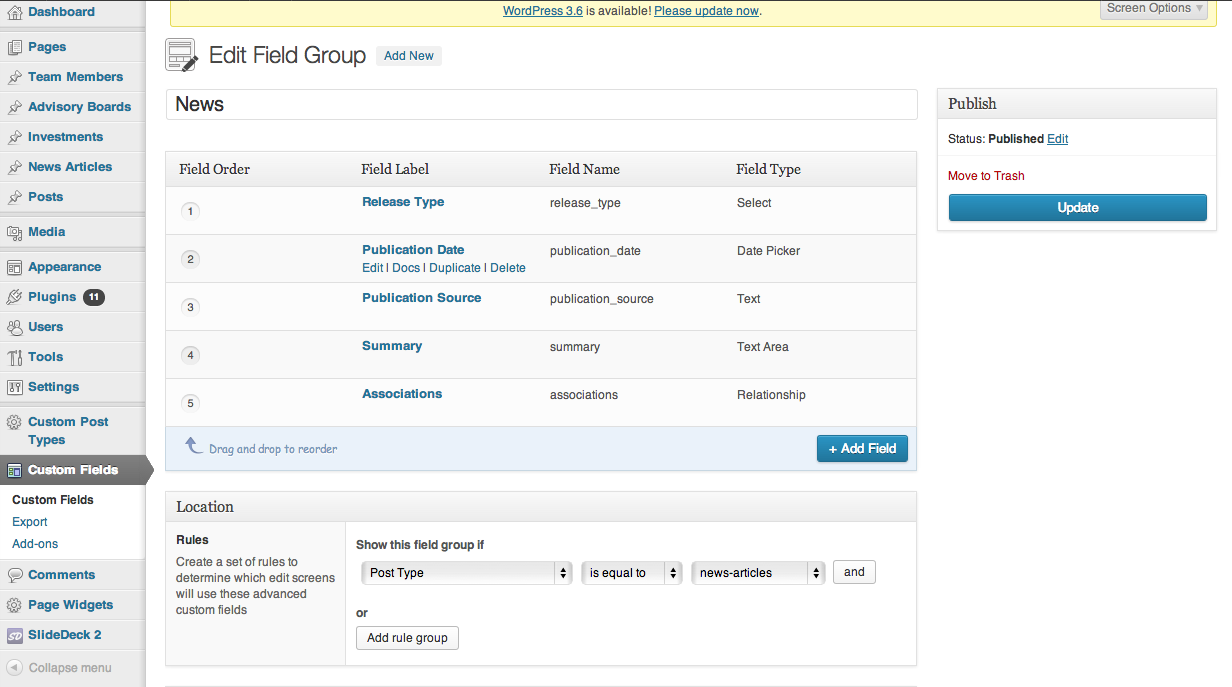
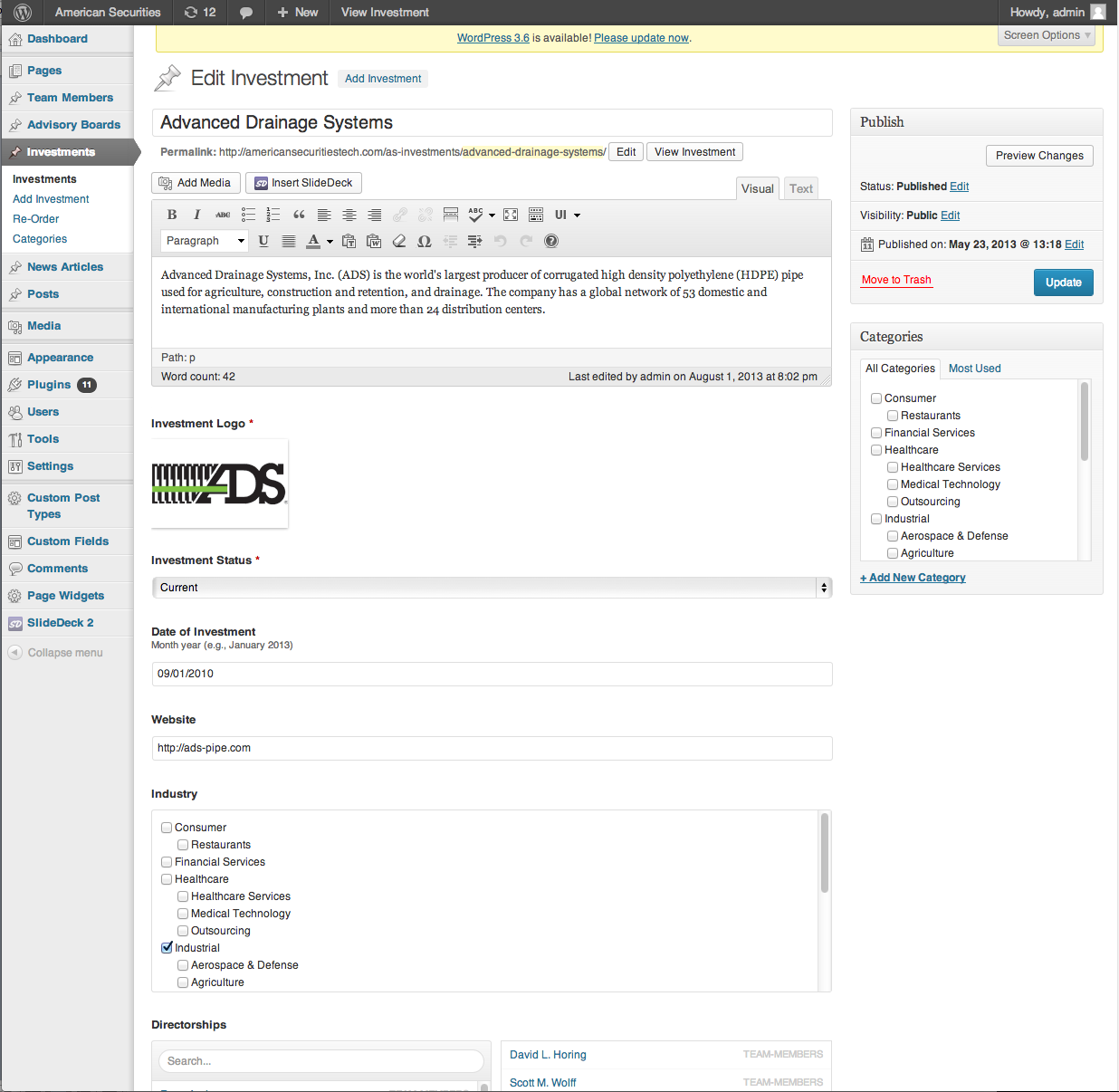
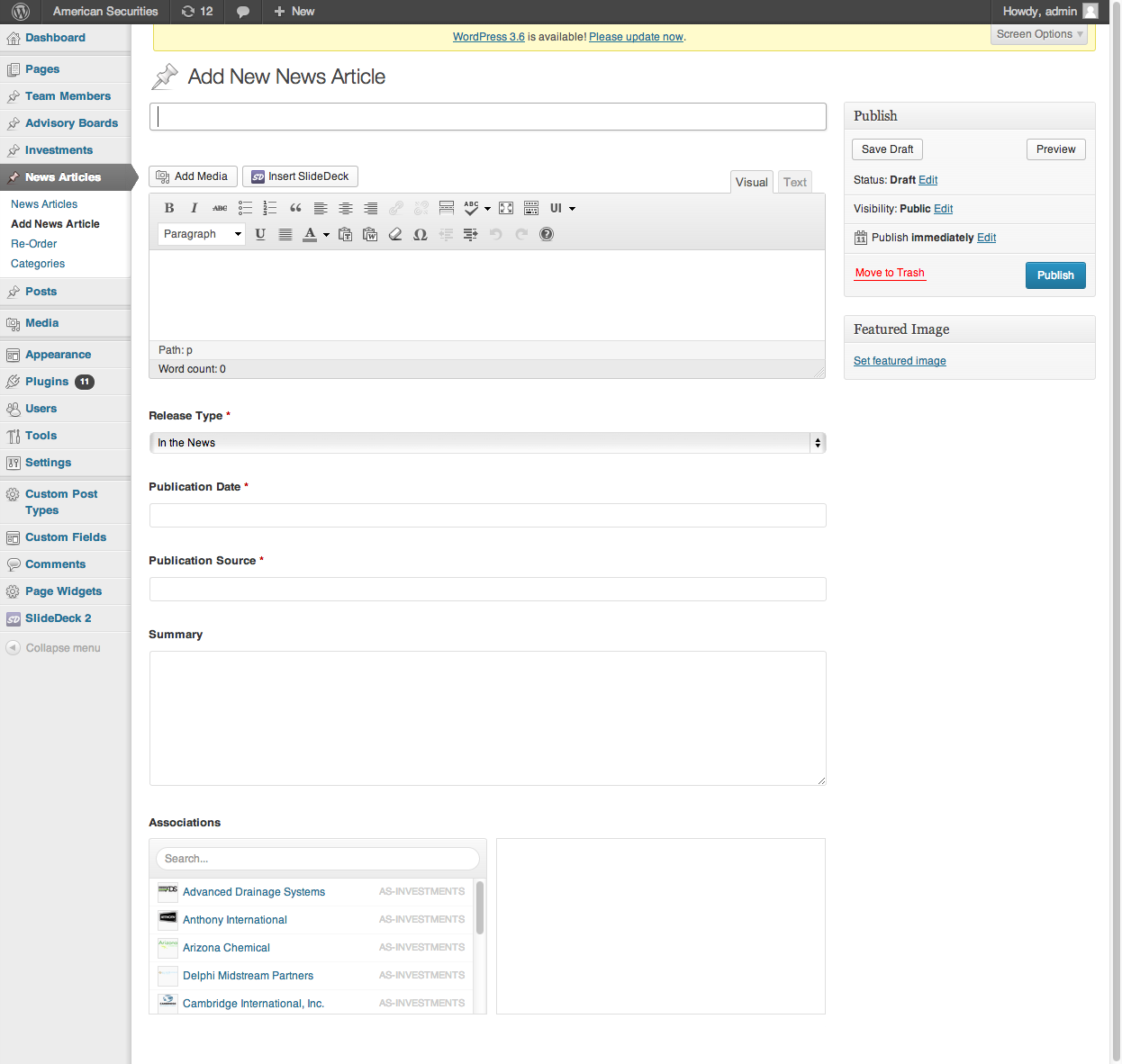
Yes, I am aware that I need to put the relationship code within my loop but I don’t know what the code should be. Every time I tried adding it, I got a php error. I’m confused because I’m already querying multiple different posts on the page (unlike the documentation which shows an example of querying for a single template file).
Please see the screenshots for what I’m working with. I know this is slightly complicated but I’m sure folks would want to know how to do this as well.
I want to query the image somewhere between this div.
<div>

<a href="<?php the_permalink() ?>" title="<?php printf(__('%s','rys'), get_the_title()) ?>" rel="bookmark" ><?php the_title(); ?></a>

		<em><?php the_field('publication_source'); ?></em>

<span><?php $date = get_field('publication_date');
			echo date('F d, Y', datepicker_to_unix($date )); ?></span>
		</div>
Really appreciate your help! Thank you!!
 Screen-Shot-....png
 Screen-Shot-....png
 Screen-Shot-....png
 Screen-Shot-....png
 Screen-Shot-....jpg
-
In reply to Show date and summary of the field
- August 6, 2013 at 2:20 pm
Hi @rcriche
1. Please look over the documentation for examples of formatting a date field:
http://www.advancedcustomfields.com/resources/field-types/date-picker/2. You can use a PHP function such as substr
-
In reply to Datepicker: wrong format is displaying
- August 6, 2013 at 6:58 am
@matthewbivins sorry for the late reply, just got back in town. Here’s the code that worked for me. It can be improved upon but did the job. Best of luck.
<?php if(get_field('deadline')) { $date = DateTime::createFromFormat('Ymd', get_field('deadline')); echo '<li><strong>Deadline: </strong>'; echo $date->format('F j, Y'); echo '</li>'; } ?> -
In reply to Custom fields get emptied when publishing
- August 2, 2013 at 8:02 am
-
In reply to Datepicker: wrong format is displaying
- August 2, 2013 at 3:22 am
Hello, guys,
I thought that my issue involved the PHP version my server had installed. I asked the host to upgrade me to 5.3 at least.
This upgrade worked…spottily. I could then get the format to change, mostly, but then I started having issues with the custom fields themselves; I would use the datepicker to choose a date, update the post, and the date would disappear. I would also get a fatal error: “Call to a member function format() on a non-object” on the posts that did have dates attached to the field. When I was lucky, the formats were changed perfectly (using the PHP code suggested on the DatePicker reference page on this site), but in the end I had to set the field to “text” instead of “datepicker” because I couldn’t guarantee success.
@cerulean or others like him/her – I’d definitely check to see what version of PHP your server is running. If it’s below 5.3 the “DateTime::createFromFormat” code won’t work. Upgrade and it might fix your issue!
@elliot, or others – can you point me to a piece of jQuery that you know works to change the datepicker format? And perhaps let me know what I need installed on my site as well (jQuery, jQuery UI, perhaps)?Many thanks, Matt
-
In reply to Datepicker: wrong format is displaying
- July 31, 2013 at 2:12 pm
Hey guys,
Have you debugged your code to see what is and isn’t working?
eg:
if(get_field('deadline')) { $date = DateTime::createFromFormat('Ymd', get_field('deadline')); echo '<pre>'; print_r($date); echo '</pre>'; die; } -
In reply to Datepicker: wrong format is displaying
- July 30, 2013 at 3:02 pm
@cerulean –
I’m having the same problem…using the code provided in the Date Picker docs but still coming up with “20131111” as a display format, for example.Your code above looks fine to me; it’s very similar to what I’ve been trying. Did you have any luck finding a solution?
M
-
In reply to display events will become …
- July 23, 2013 at 9:59 pm
ok i found alone,
i don’t put the good key name 😉it’s ok like this:
$currentdate = date(“Y-m-d”,mktime(0,0,0,date(“m”),date(“d”)-1,date(“Y”)));
query_posts( array(
‘meta_query’=> array(
array(
‘key’ => ‘date-picker’,
‘compare’ => ‘>’,
‘value’ => $currentdate,
‘type’ => ‘DATE’,
)),
‘post_type’ => ‘concerts’,
‘meta_key’ => ‘date-picker’,
‘orderby’ => ‘meta_value_num’,
‘posts_per_page’ => 4,
‘order’ => ‘ASC’,
) );
?>
<?php if (have_posts()) : ?>
<?php while (have_posts()) : the_post(); ?>
<div class=”post-photo”>
<div class=”thumbnail opacity”>”><?php the_post_thumbnail(‘thumbnail’); ?></div>
<p><?php the_title();?></p><br/>
<div class=”bouton-6″>voir l’album</div>
</div>
<?php endwhile; ?>
<?php endif; ?>
<?php wp_reset_query(); ?> -
In reply to Datepicker: wrong format is displaying
- July 20, 2013 at 11:14 am
Hi @cerulean
Perhaps you could elaborate more on ‘Sorry but I’m not having luck’.
Have you done any debugging?
-
In reply to Datepicker: wrong format is displaying
- July 20, 2013 at 6:44 am
Thanks for any assistance on displaying the Datepicker date as July 19, 2013 and not 20130719.
Let me know if there’s other documentation I should be looking at besides http://www.advancedcustomfields.com/resources/field-types/date-picker/
Thanks!
-
In reply to Datepicker: wrong format is displaying
- July 19, 2013 at 3:54 am
To be clear, I’m referring to the WYSIWYG editor on this forum site. Anyway, thanks for helping with my date formatting problem : )
-
In reply to Datepicker: wrong format is displaying
- July 19, 2013 at 3:53 am
Unrelated but odd … when I try to use the “link” tool in the WYSIWYG editor it shuts the entire site window after clicking the link window button (tried it a few times). Not sure if anyone else has this problem but thought I’d mention it.


Welcome
Welcome to the Advanced Custom Fields community forum.
Browse through ideas, snippets of code, questions and answers between fellow ACF users
Forums
Helping Others
Helping others is a great way to earn karma, gain badges and help ACF development!
